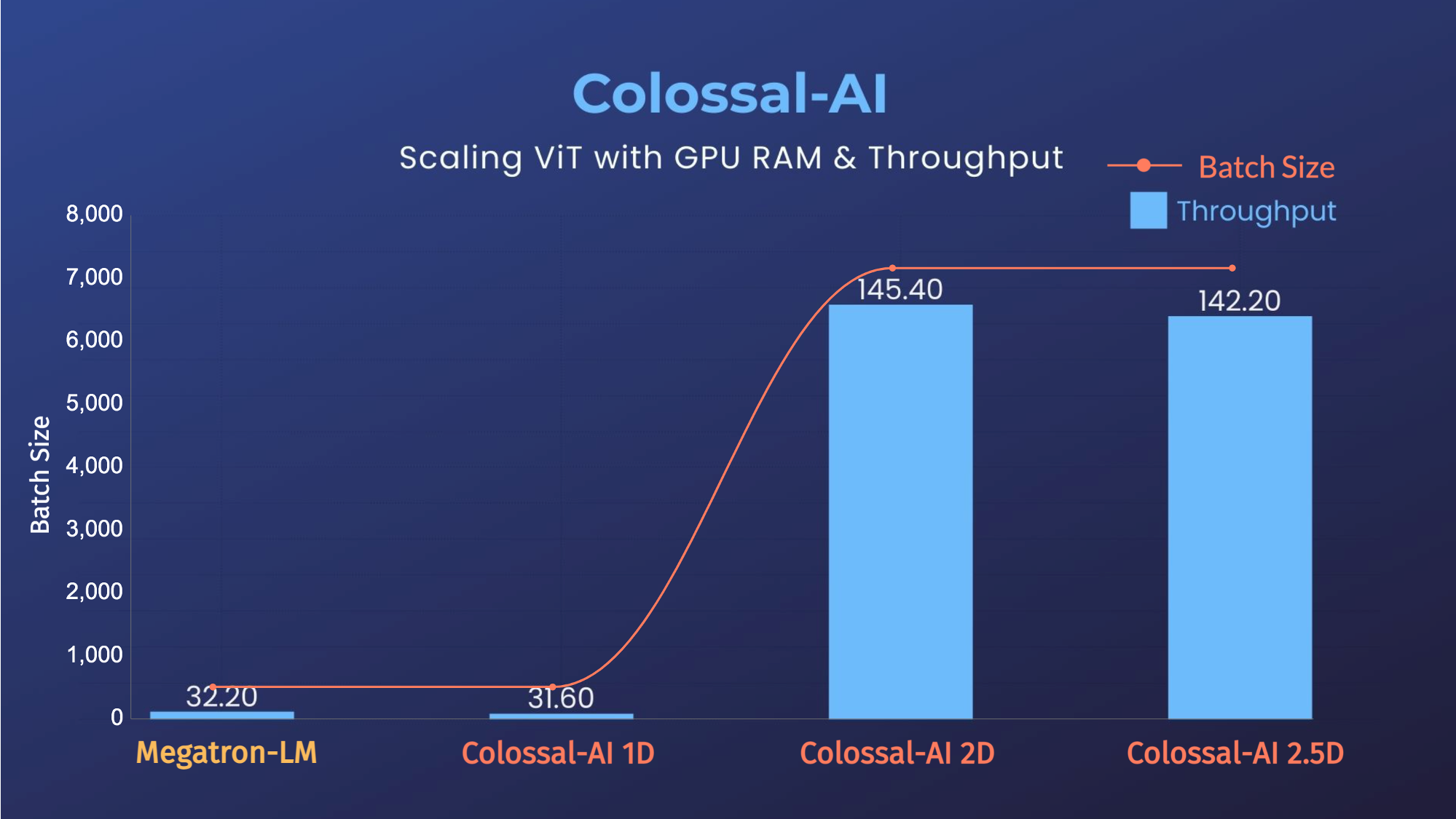
 - 14x larger batch size, and 5x faster training for Tensor Parallel = 64
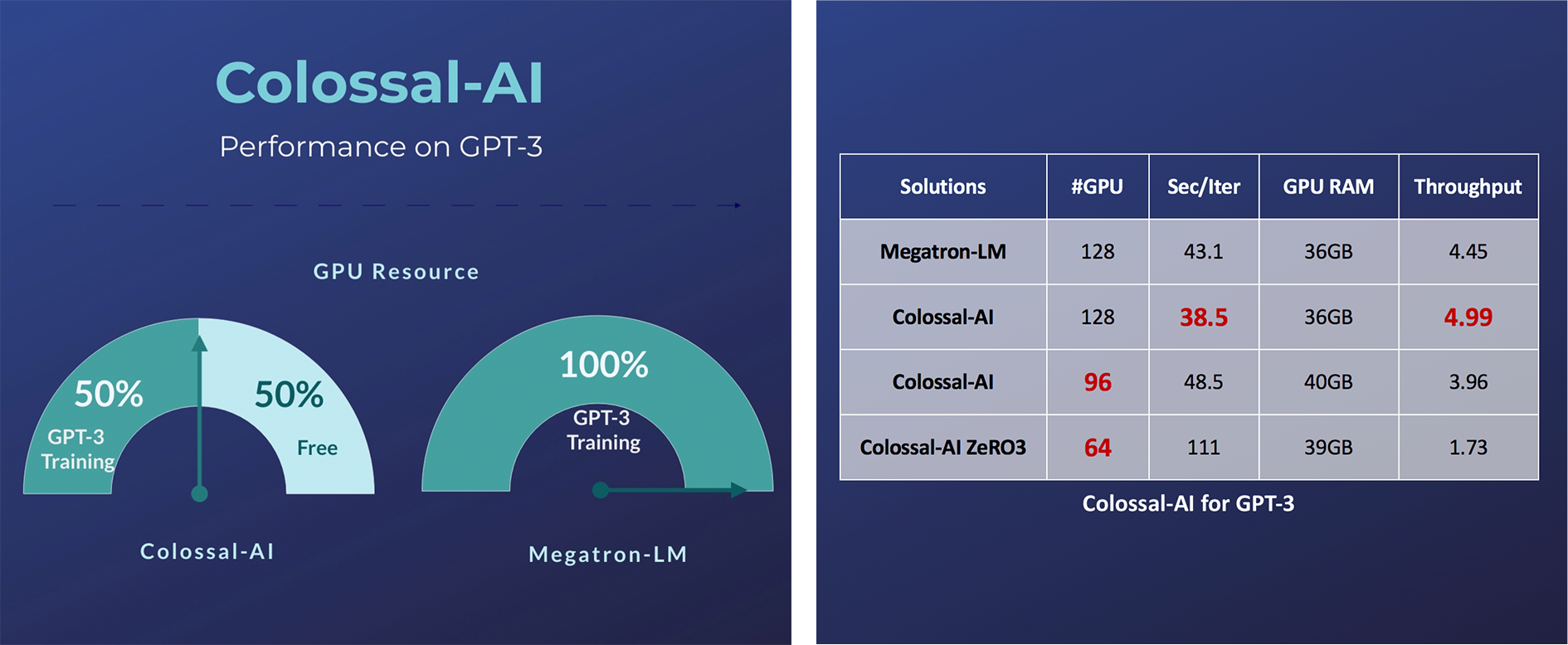
### GPT-3
- 14x larger batch size, and 5x faster training for Tensor Parallel = 64
### GPT-3
 - Free 50% GPU resources, or 10.7% acceleration
### GPT-2
- Free 50% GPU resources, or 10.7% acceleration
### GPT-2
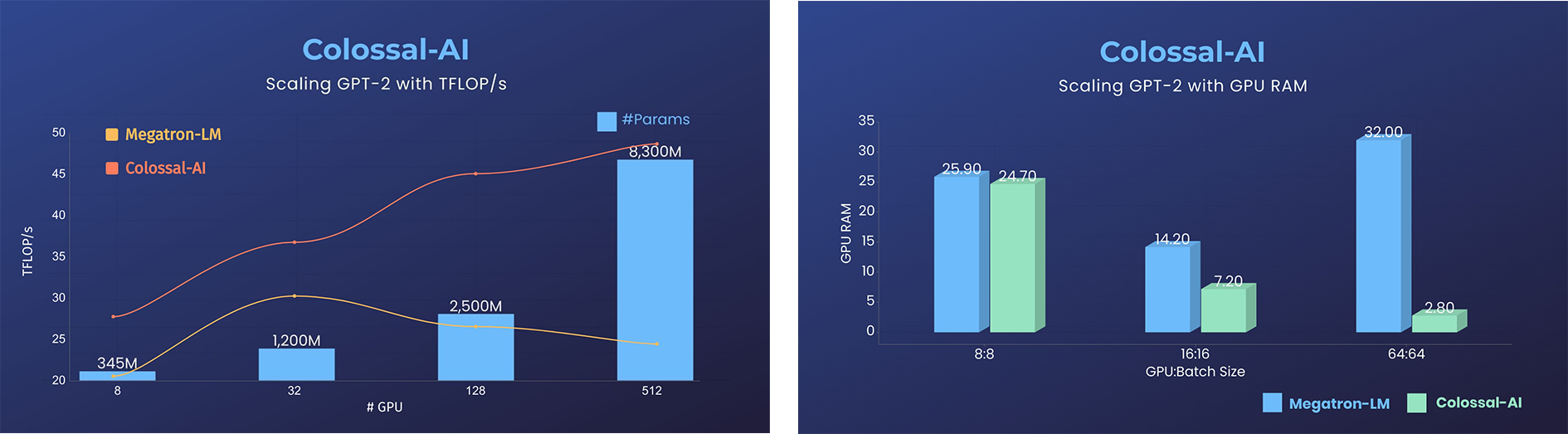 - 11x lower GPU RAM, or superlinear scaling
### BERT
- 11x lower GPU RAM, or superlinear scaling
### BERT
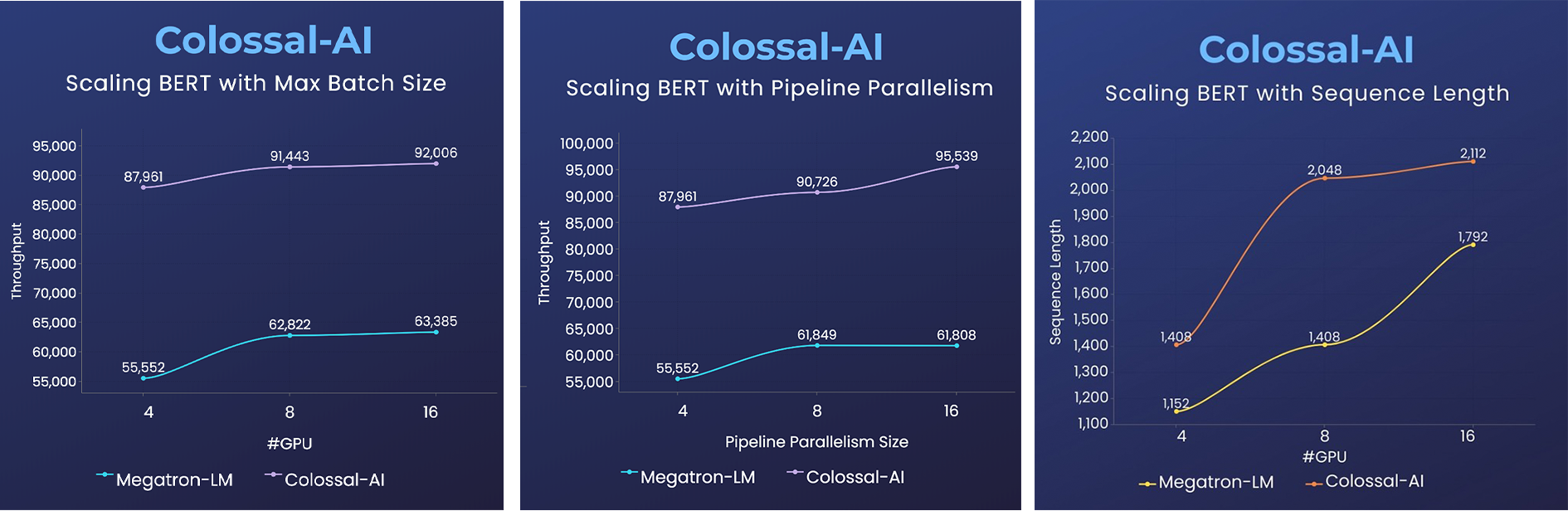 - 2x faster training, or 50% longer sequence length
Please visit our [documentation and tutorials](https://www.colossalai.org/) for more details.
## Installation
### PyPI
```bash
pip install colossalai
```
This command will install CUDA extension if your have installed CUDA, NVCC and torch.
If you don't want to install CUDA extension, you should add `--global-option="--no_cuda_ext"`, like:
```bash
pip install colossalai --global-option="--no_cuda_ext"
```
If you want to use `ZeRO`, you can run:
```bash
pip install colossalai[zero]
```
### Install From Source
> The version of Colossal-AI will be in line with the main branch of the repository. Feel free to raise an issue if you encounter any problem. :)
```shell
git clone https://github.com/hpcaitech/ColossalAI.git
cd ColossalAI
# install dependency
pip install -r requirements/requirements.txt
# install colossalai
pip install .
```
If you don't want to install and enable CUDA kernel fusion (compulsory installation when using fused optimizer):
```shell
pip install --global-option="--no_cuda_ext" .
```
## Use Docker
Run the following command to build a docker image from Dockerfile provided.
```bash
cd ColossalAI
docker build -t colossalai ./docker
```
Run the following command to start the docker container in interactive mode.
```bash
docker run -ti --gpus all --rm --ipc=host colossalai bash
```
## Community
Join the Colossal-AI community on [Forum](https://github.com/hpcaitech/ColossalAI/discussions),
[Slack](https://join.slack.com/t/colossalaiworkspace/shared_invite/zt-z7b26eeb-CBp7jouvu~r0~lcFzX832w),
and [WeChat](https://raw.githubusercontent.com/hpcaitech/public_assets/main/colossalai/img/WeChat.png "qrcode") to share your suggestions, advice, and questions with our engineering team.
## Contributing
If you wish to contribute to this project, please follow the guideline in [Contributing](./CONTRIBUTING.md).
Thanks so much to all of our amazing contributors!
*The order of contributor avatars is randomly shuffled.*
## Quick View
### Start Distributed Training in Lines
```python
import colossalai
from colossalai.utils import get_dataloader
# my_config can be path to config file or a dictionary obj
# 'localhost' is only for single node, you need to specify
# the node name if using multiple nodes
colossalai.launch(
config=my_config,
rank=rank,
world_size=world_size,
backend='nccl',
port=29500,
host='localhost'
)
# build your model
model = ...
# build you dataset, the dataloader will have distributed data
# sampler by default
train_dataset = ...
train_dataloader = get_dataloader(dataset=dataset,
shuffle=True
)
# build your optimizer
optimizer = ...
# build your loss function
criterion = ...
# initialize colossalai
engine, train_dataloader, _, _ = colossalai.initialize(
model=model,
optimizer=optimizer,
criterion=criterion,
train_dataloader=train_dataloader
)
# start training
engine.train()
for epoch in range(NUM_EPOCHS):
for data, label in train_dataloader:
engine.zero_grad()
output = engine(data)
loss = engine.criterion(output, label)
engine.backward(loss)
engine.step()
```
### Write a Simple 2D Parallel Model
Let's say we have a huge MLP model and its very large hidden size makes it difficult to fit into a single GPU. We can
then distribute the model weights across GPUs in a 2D mesh while you still write your model in a familiar way.
```python
from colossalai.nn import Linear2D
import torch.nn as nn
class MLP_2D(nn.Module):
def __init__(self):
super().__init__()
self.linear_1 = Linear2D(in_features=1024, out_features=16384)
self.linear_2 = Linear2D(in_features=16384, out_features=1024)
def forward(self, x):
x = self.linear_1(x)
x = self.linear_2(x)
return x
```
## Cite Us
```
@article{bian2021colossal,
title={Colossal-AI: A Unified Deep Learning System For Large-Scale Parallel Training},
author={Bian, Zhengda and Liu, Hongxin and Wang, Boxiang and Huang, Haichen and Li, Yongbin and Wang, Chuanrui and Cui, Fan and You, Yang},
journal={arXiv preprint arXiv:2110.14883},
year={2021}
}
```
- 2x faster training, or 50% longer sequence length
Please visit our [documentation and tutorials](https://www.colossalai.org/) for more details.
## Installation
### PyPI
```bash
pip install colossalai
```
This command will install CUDA extension if your have installed CUDA, NVCC and torch.
If you don't want to install CUDA extension, you should add `--global-option="--no_cuda_ext"`, like:
```bash
pip install colossalai --global-option="--no_cuda_ext"
```
If you want to use `ZeRO`, you can run:
```bash
pip install colossalai[zero]
```
### Install From Source
> The version of Colossal-AI will be in line with the main branch of the repository. Feel free to raise an issue if you encounter any problem. :)
```shell
git clone https://github.com/hpcaitech/ColossalAI.git
cd ColossalAI
# install dependency
pip install -r requirements/requirements.txt
# install colossalai
pip install .
```
If you don't want to install and enable CUDA kernel fusion (compulsory installation when using fused optimizer):
```shell
pip install --global-option="--no_cuda_ext" .
```
## Use Docker
Run the following command to build a docker image from Dockerfile provided.
```bash
cd ColossalAI
docker build -t colossalai ./docker
```
Run the following command to start the docker container in interactive mode.
```bash
docker run -ti --gpus all --rm --ipc=host colossalai bash
```
## Community
Join the Colossal-AI community on [Forum](https://github.com/hpcaitech/ColossalAI/discussions),
[Slack](https://join.slack.com/t/colossalaiworkspace/shared_invite/zt-z7b26eeb-CBp7jouvu~r0~lcFzX832w),
and [WeChat](https://raw.githubusercontent.com/hpcaitech/public_assets/main/colossalai/img/WeChat.png "qrcode") to share your suggestions, advice, and questions with our engineering team.
## Contributing
If you wish to contribute to this project, please follow the guideline in [Contributing](./CONTRIBUTING.md).
Thanks so much to all of our amazing contributors!
*The order of contributor avatars is randomly shuffled.*
## Quick View
### Start Distributed Training in Lines
```python
import colossalai
from colossalai.utils import get_dataloader
# my_config can be path to config file or a dictionary obj
# 'localhost' is only for single node, you need to specify
# the node name if using multiple nodes
colossalai.launch(
config=my_config,
rank=rank,
world_size=world_size,
backend='nccl',
port=29500,
host='localhost'
)
# build your model
model = ...
# build you dataset, the dataloader will have distributed data
# sampler by default
train_dataset = ...
train_dataloader = get_dataloader(dataset=dataset,
shuffle=True
)
# build your optimizer
optimizer = ...
# build your loss function
criterion = ...
# initialize colossalai
engine, train_dataloader, _, _ = colossalai.initialize(
model=model,
optimizer=optimizer,
criterion=criterion,
train_dataloader=train_dataloader
)
# start training
engine.train()
for epoch in range(NUM_EPOCHS):
for data, label in train_dataloader:
engine.zero_grad()
output = engine(data)
loss = engine.criterion(output, label)
engine.backward(loss)
engine.step()
```
### Write a Simple 2D Parallel Model
Let's say we have a huge MLP model and its very large hidden size makes it difficult to fit into a single GPU. We can
then distribute the model weights across GPUs in a 2D mesh while you still write your model in a familiar way.
```python
from colossalai.nn import Linear2D
import torch.nn as nn
class MLP_2D(nn.Module):
def __init__(self):
super().__init__()
self.linear_1 = Linear2D(in_features=1024, out_features=16384)
self.linear_2 = Linear2D(in_features=16384, out_features=1024)
def forward(self, x):
x = self.linear_1(x)
x = self.linear_2(x)
return x
```
## Cite Us
```
@article{bian2021colossal,
title={Colossal-AI: A Unified Deep Learning System For Large-Scale Parallel Training},
author={Bian, Zhengda and Liu, Hongxin and Wang, Boxiang and Huang, Haichen and Li, Yongbin and Wang, Chuanrui and Cui, Fan and You, Yang},
journal={arXiv preprint arXiv:2110.14883},
year={2021}
}
```