 Prof. James Demmel (UC Berkeley): Colossal-AI makes training AI models efficient, easy, and scalable.
Prof. James Demmel (UC Berkeley): Colossal-AI makes training AI models efficient, easy, and scalable.
Prof. James Demmel (UC Berkeley): Colossal-AI makes training AI models efficient, easy, and scalable.
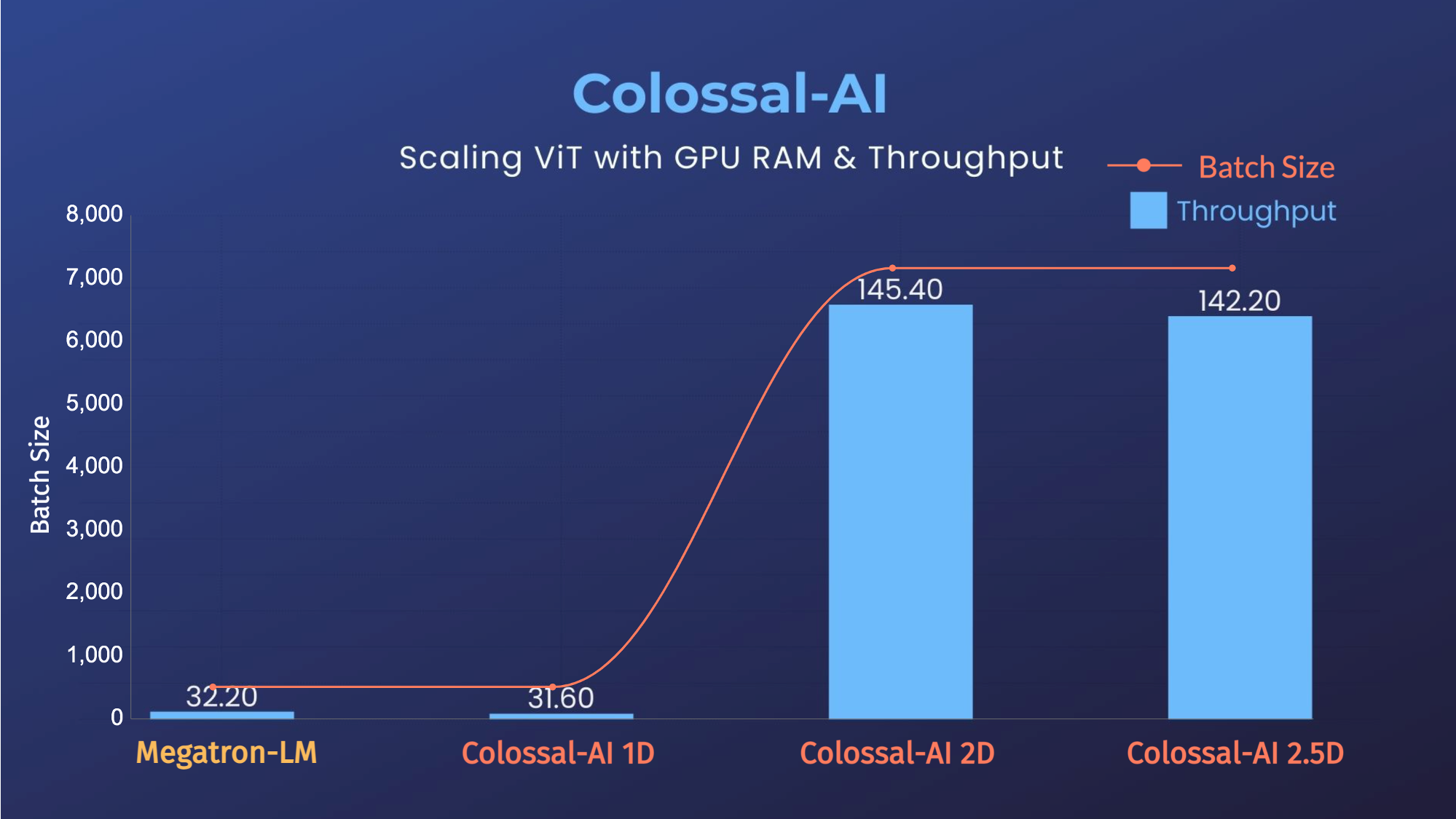
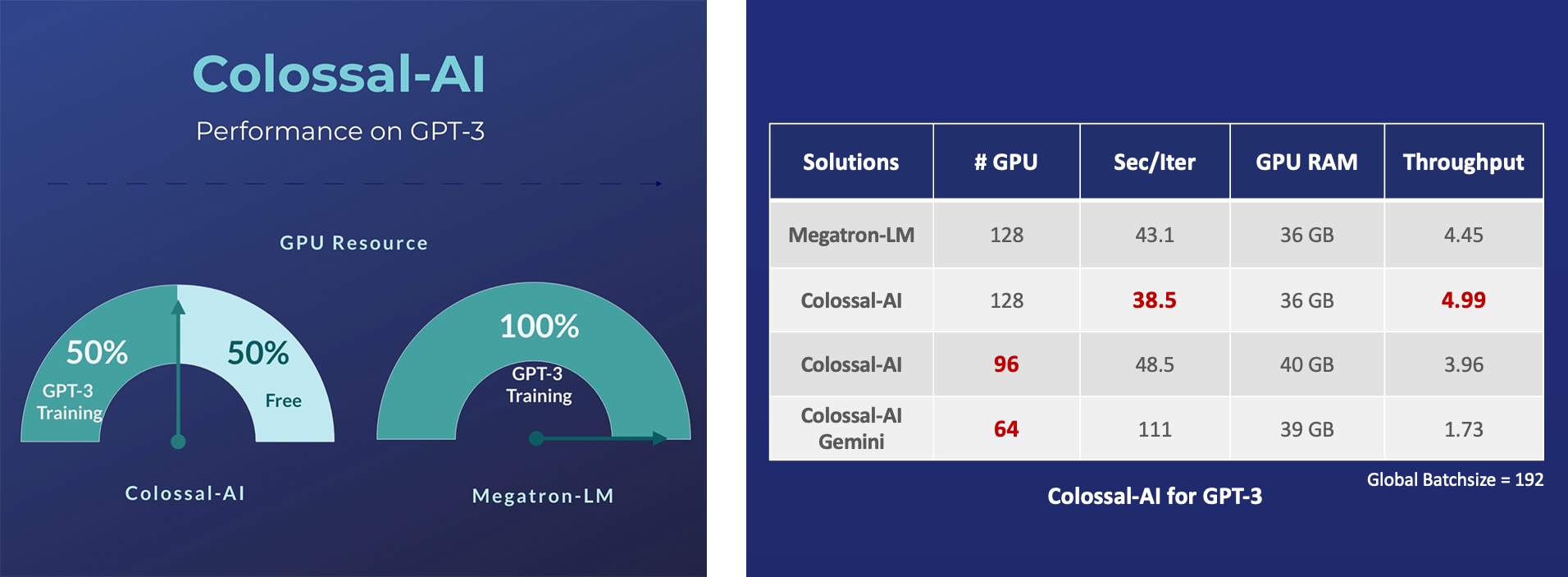
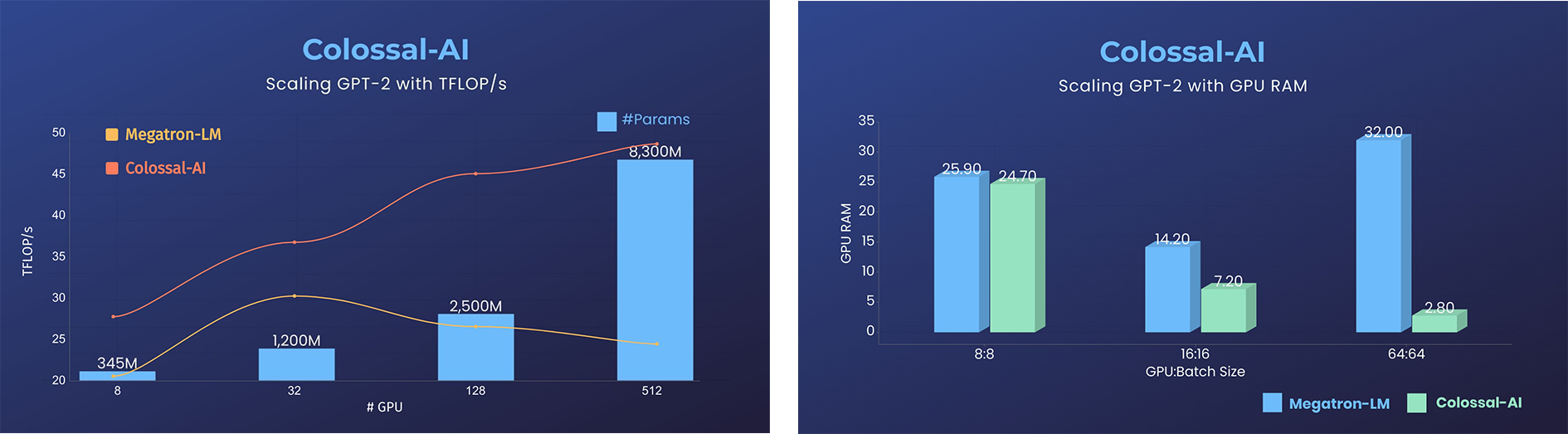 - 11x lower GPU memory consumption, and superlinear scaling efficiency with Tensor Parallelism
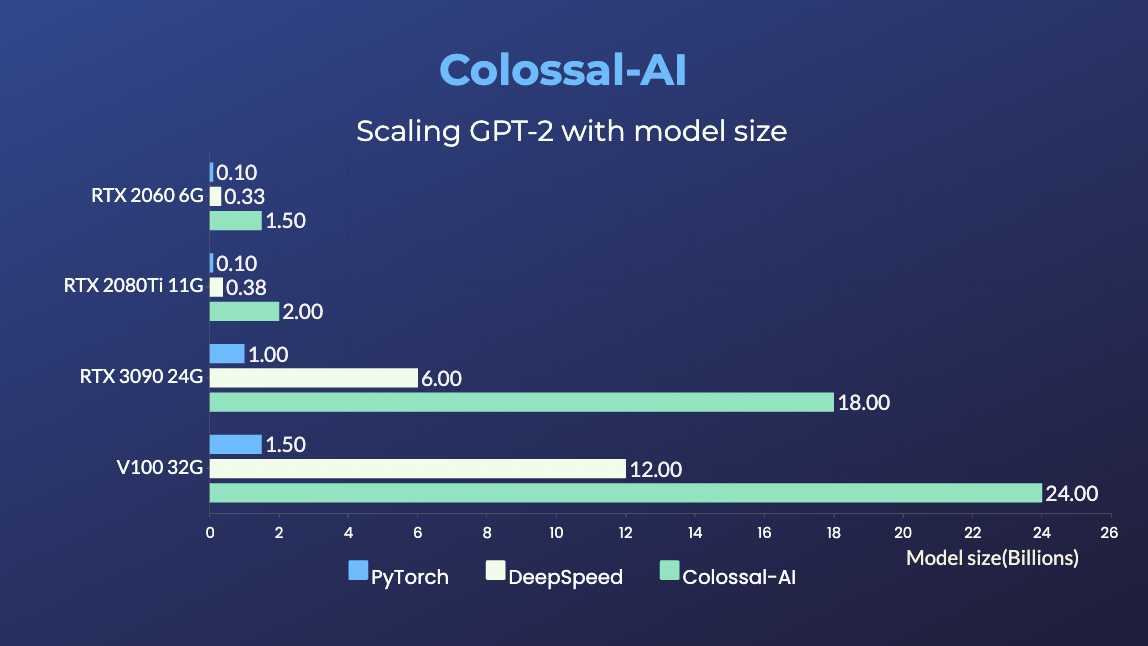
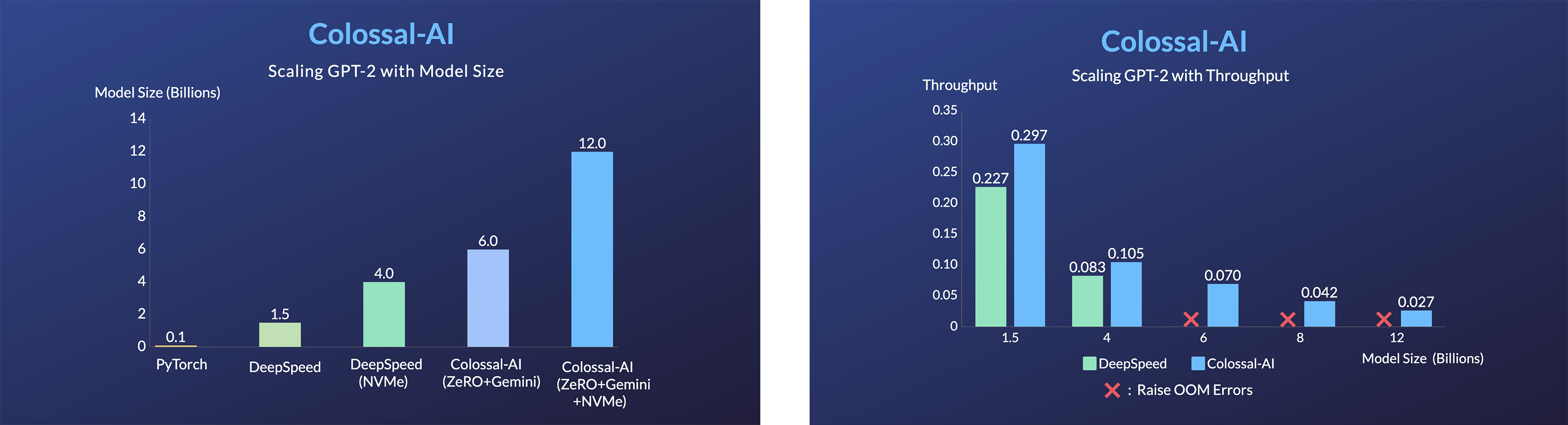
GPT-2.png) - 24x larger model size on the same hardware
- over 3x acceleration
### BERT
- 24x larger model size on the same hardware
- over 3x acceleration
### BERT
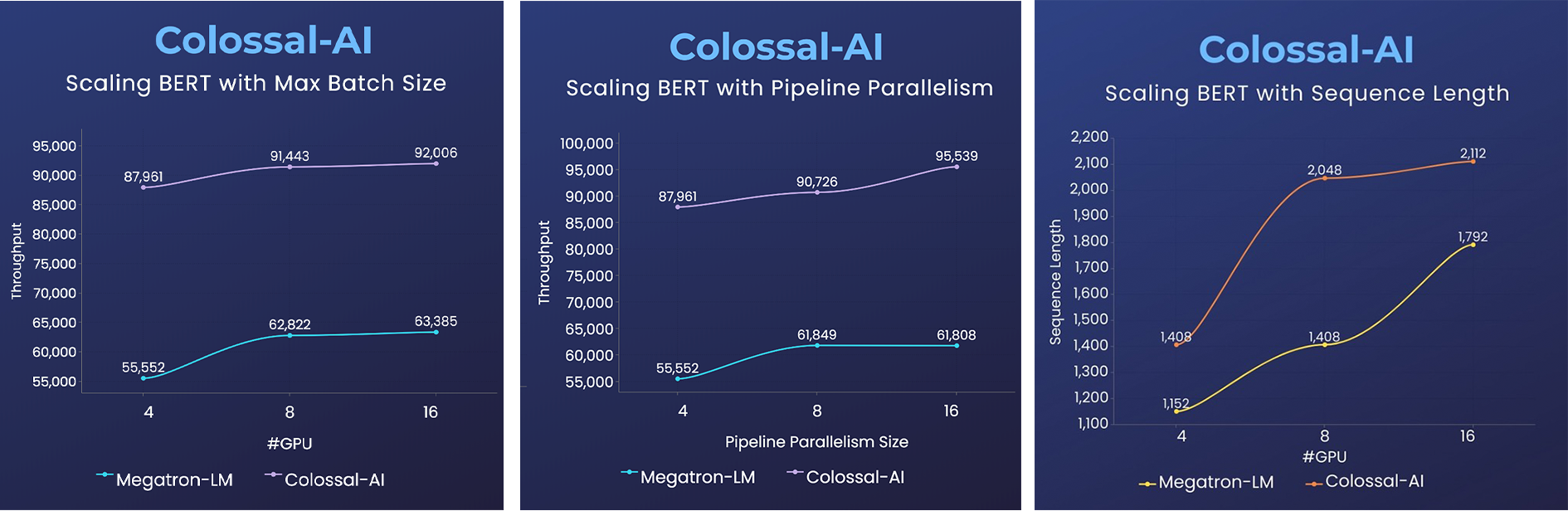 - 2x faster training, or 50% longer sequence length
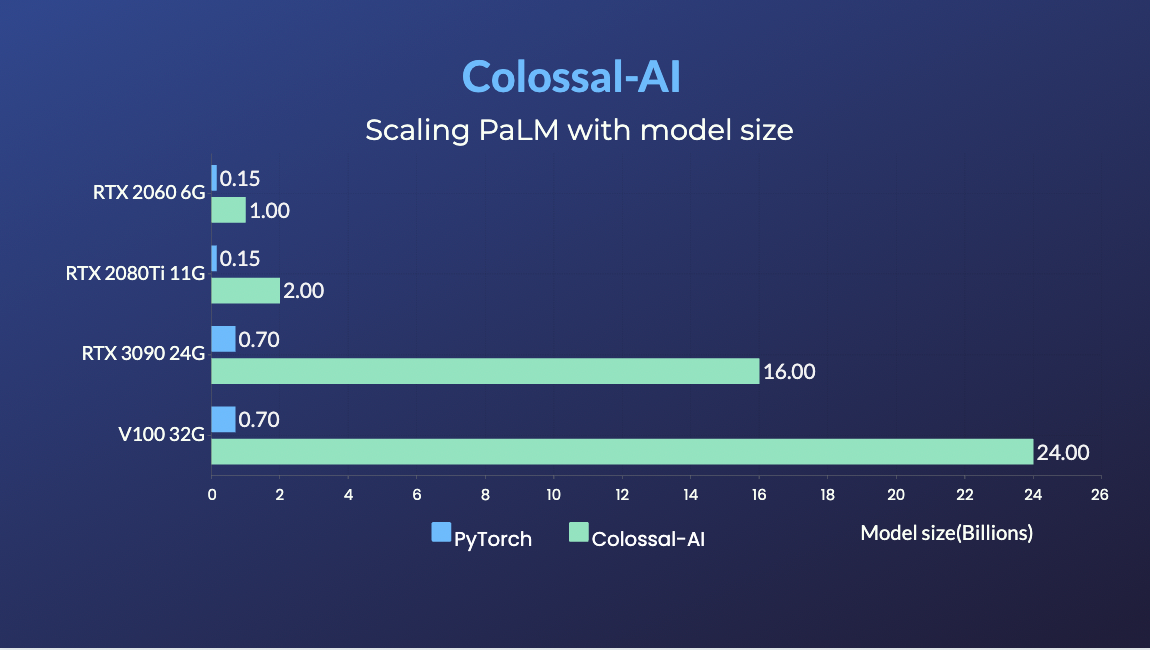
### PaLM
- [PaLM-colossalai](https://github.com/hpcaitech/PaLM-colossalai): Scalable implementation of Google's Pathways Language Model ([PaLM](https://ai.googleblog.com/2022/04/pathways-language-model-palm-scaling-to.html)).
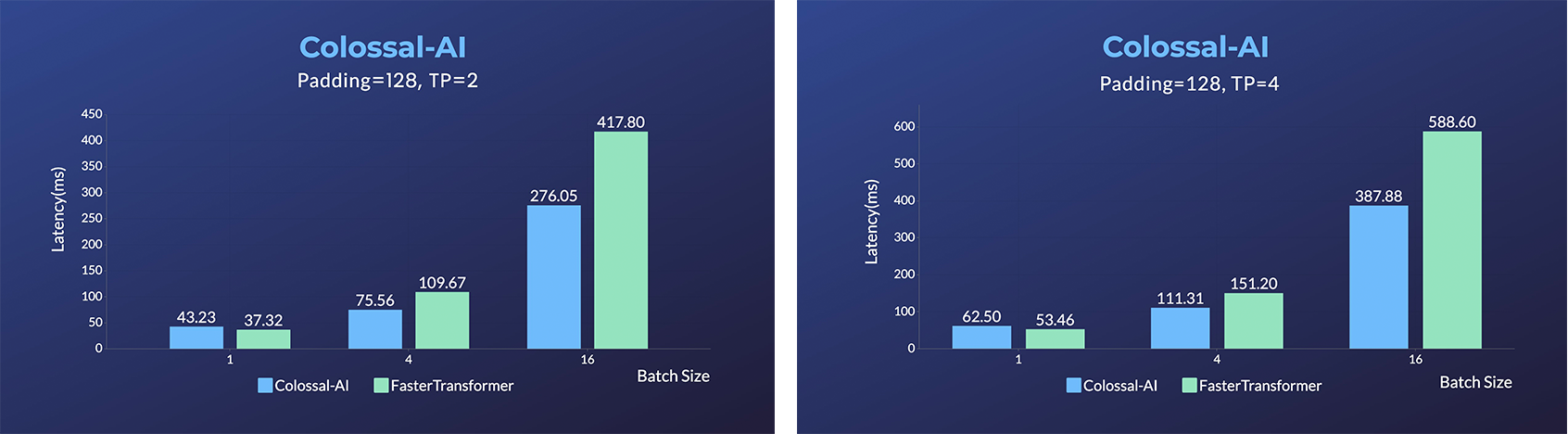
### OPT
- 2x faster training, or 50% longer sequence length
### PaLM
- [PaLM-colossalai](https://github.com/hpcaitech/PaLM-colossalai): Scalable implementation of Google's Pathways Language Model ([PaLM](https://ai.googleblog.com/2022/04/pathways-language-model-palm-scaling-to.html)).
### OPT
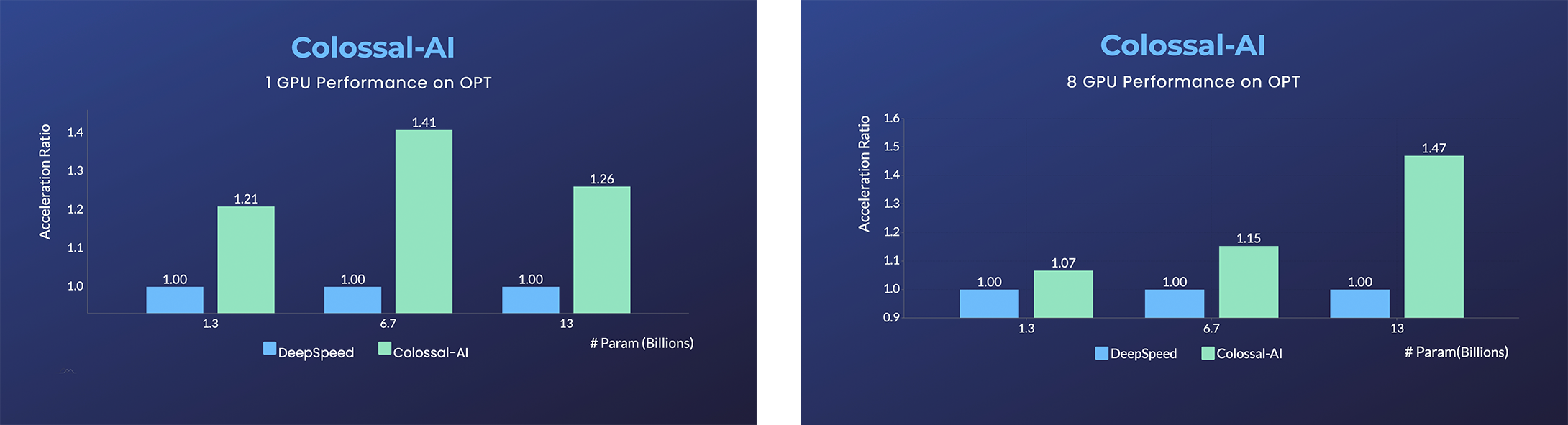 - [Open Pretrained Transformer (OPT)](https://github.com/facebookresearch/metaseq), a 175-Billion parameter AI language model released by Meta, which stimulates AI programmers to perform various downstream tasks and application deployments because public pretrained model weights.
- 45% speedup fine-tuning OPT at low cost in lines. [[Example]](https://github.com/hpcaitech/ColossalAI-Examples/tree/main/language/opt) [[Online Serving]](https://service.colossalai.org/opt)
Please visit our [documentation](https://www.colossalai.org/) and [examples](https://github.com/hpcaitech/ColossalAI-Examples) for more details.
### Recommendation System Models
- [Cached Embedding](https://github.com/hpcaitech/CachedEmbedding), utilize software cache to train larger embedding tables with a smaller GPU memory budget.
## Single GPU Training Demo
### GPT-2
- [Open Pretrained Transformer (OPT)](https://github.com/facebookresearch/metaseq), a 175-Billion parameter AI language model released by Meta, which stimulates AI programmers to perform various downstream tasks and application deployments because public pretrained model weights.
- 45% speedup fine-tuning OPT at low cost in lines. [[Example]](https://github.com/hpcaitech/ColossalAI-Examples/tree/main/language/opt) [[Online Serving]](https://service.colossalai.org/opt)
Please visit our [documentation](https://www.colossalai.org/) and [examples](https://github.com/hpcaitech/ColossalAI-Examples) for more details.
### Recommendation System Models
- [Cached Embedding](https://github.com/hpcaitech/CachedEmbedding), utilize software cache to train larger embedding tables with a smaller GPU memory budget.
## Single GPU Training Demo
### GPT-2

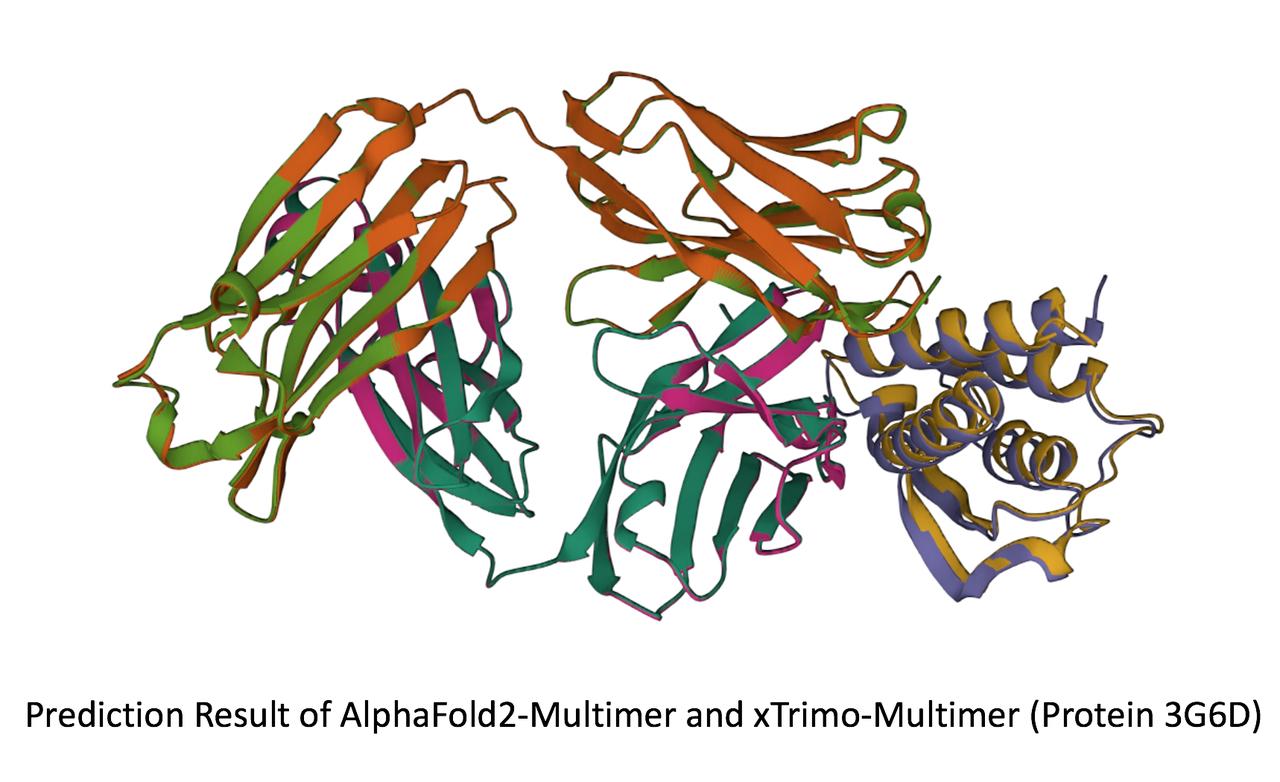
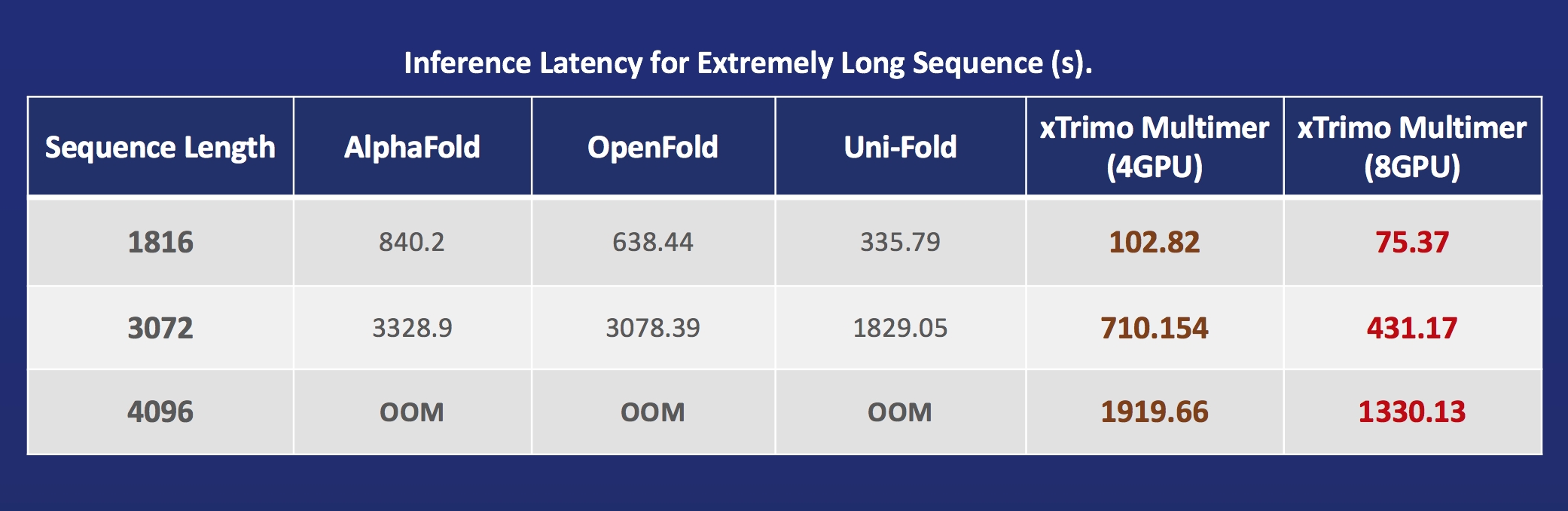 - [xTrimoMultimer](https://github.com/biomap-research/xTrimoMultimer): accelerating structure prediction of protein monomers and multimer by 11x
## Installation
### Download From Official Releases
You can visit the [Download](https://www.colossalai.org/download) page to download Colossal-AI with pre-built CUDA extensions.
### Download From Source
> The version of Colossal-AI will be in line with the main branch of the repository. Feel free to raise an issue if you encounter any problem. :)
```shell
git clone https://github.com/hpcaitech/ColossalAI.git
cd ColossalAI
# install dependency
pip install -r requirements/requirements.txt
# install colossalai
pip install .
```
If you don't want to install and enable CUDA kernel fusion (compulsory installation when using fused optimizer):
```shell
NO_CUDA_EXT=1 pip install .
```
## Use Docker
### Pull from DockerHub
You can directly pull the docker image from our [DockerHub page](https://hub.docker.com/r/hpcaitech/colossalai). The image is automatically uploaded upon release.
### Build On Your Own
Run the following command to build a docker image from Dockerfile provided.
> Building Colossal-AI from scratch requires GPU support, you need to use Nvidia Docker Runtime as the default when doing `docker build`. More details can be found [here](https://stackoverflow.com/questions/59691207/docker-build-with-nvidia-runtime).
> We recommend you install Colossal-AI from our [project page](https://www.colossalai.org) directly.
```bash
cd ColossalAI
docker build -t colossalai ./docker
```
Run the following command to start the docker container in interactive mode.
```bash
docker run -ti --gpus all --rm --ipc=host colossalai bash
```
## Community
Join the Colossal-AI community on [Forum](https://github.com/hpcaitech/ColossalAI/discussions),
[Slack](https://join.slack.com/t/colossalaiworkspace/shared_invite/zt-z7b26eeb-CBp7jouvu~r0~lcFzX832w),
and [WeChat](https://raw.githubusercontent.com/hpcaitech/public_assets/main/colossalai/img/WeChat.png "qrcode") to share your suggestions, feedback, and questions with our engineering team.
## Contributing
If you wish to contribute to this project, please follow the guideline in [Contributing](./CONTRIBUTING.md).
Thanks so much to all of our amazing contributors!
- [xTrimoMultimer](https://github.com/biomap-research/xTrimoMultimer): accelerating structure prediction of protein monomers and multimer by 11x
## Installation
### Download From Official Releases
You can visit the [Download](https://www.colossalai.org/download) page to download Colossal-AI with pre-built CUDA extensions.
### Download From Source
> The version of Colossal-AI will be in line with the main branch of the repository. Feel free to raise an issue if you encounter any problem. :)
```shell
git clone https://github.com/hpcaitech/ColossalAI.git
cd ColossalAI
# install dependency
pip install -r requirements/requirements.txt
# install colossalai
pip install .
```
If you don't want to install and enable CUDA kernel fusion (compulsory installation when using fused optimizer):
```shell
NO_CUDA_EXT=1 pip install .
```
## Use Docker
### Pull from DockerHub
You can directly pull the docker image from our [DockerHub page](https://hub.docker.com/r/hpcaitech/colossalai). The image is automatically uploaded upon release.
### Build On Your Own
Run the following command to build a docker image from Dockerfile provided.
> Building Colossal-AI from scratch requires GPU support, you need to use Nvidia Docker Runtime as the default when doing `docker build`. More details can be found [here](https://stackoverflow.com/questions/59691207/docker-build-with-nvidia-runtime).
> We recommend you install Colossal-AI from our [project page](https://www.colossalai.org) directly.
```bash
cd ColossalAI
docker build -t colossalai ./docker
```
Run the following command to start the docker container in interactive mode.
```bash
docker run -ti --gpus all --rm --ipc=host colossalai bash
```
## Community
Join the Colossal-AI community on [Forum](https://github.com/hpcaitech/ColossalAI/discussions),
[Slack](https://join.slack.com/t/colossalaiworkspace/shared_invite/zt-z7b26eeb-CBp7jouvu~r0~lcFzX832w),
and [WeChat](https://raw.githubusercontent.com/hpcaitech/public_assets/main/colossalai/img/WeChat.png "qrcode") to share your suggestions, feedback, and questions with our engineering team.
## Contributing
If you wish to contribute to this project, please follow the guideline in [Contributing](./CONTRIBUTING.md).
Thanks so much to all of our amazing contributors!
 *The order of contributor avatars is randomly shuffled.*
## Quick View
### Start Distributed Training in Lines
```python
parallel = dict(
pipeline=2,
tensor=dict(mode='2.5d', depth = 1, size=4)
)
```
### Start Heterogeneous Training in Lines
```python
zero = dict(
model_config=dict(
tensor_placement_policy='auto',
shard_strategy=TensorShardStrategy(),
reuse_fp16_shard=True
),
optimizer_config=dict(initial_scale=2**5, gpu_margin_mem_ratio=0.2)
)
```
## Cite Us
```
@article{bian2021colossal,
title={Colossal-AI: A Unified Deep Learning System For Large-Scale Parallel Training},
author={Bian, Zhengda and Liu, Hongxin and Wang, Boxiang and Huang, Haichen and Li, Yongbin and Wang, Chuanrui and Cui, Fan and You, Yang},
journal={arXiv preprint arXiv:2110.14883},
year={2021}
}
```
*The order of contributor avatars is randomly shuffled.*
## Quick View
### Start Distributed Training in Lines
```python
parallel = dict(
pipeline=2,
tensor=dict(mode='2.5d', depth = 1, size=4)
)
```
### Start Heterogeneous Training in Lines
```python
zero = dict(
model_config=dict(
tensor_placement_policy='auto',
shard_strategy=TensorShardStrategy(),
reuse_fp16_shard=True
),
optimizer_config=dict(initial_scale=2**5, gpu_margin_mem_ratio=0.2)
)
```
## Cite Us
```
@article{bian2021colossal,
title={Colossal-AI: A Unified Deep Learning System For Large-Scale Parallel Training},
author={Bian, Zhengda and Liu, Hongxin and Wang, Boxiang and Huang, Haichen and Li, Yongbin and Wang, Chuanrui and Cui, Fan and You, Yang},
journal={arXiv preprint arXiv:2110.14883},
year={2021}
}
```