Compare commits
12 Commits
| Author | SHA1 | Date | |
|---|---|---|---|

|
7a9c65cfdb | ||

|
8678901b8e | ||

|
5ff5c7d6c3 | ||
|
|
6a27b1c79b | ||

|
156e3bca9b | ||

|
7b09bcf5a3 | ||

|
845ce4a727 | ||
|
|
3355510feb | ||
|
|
71d25d530e | ||
|
|
55a004e6de | ||
|
|
449236f7cd | ||

|
92a0f7a0b1 |
17
.github/ISSUE_TEMPLATE.md
vendored
Normal file
@@ -0,0 +1,17 @@
|
||||
# Description of problem
|
||||
|
||||
(replace this text with the list of steps you followed)
|
||||
|
||||
# Expected result
|
||||
|
||||
(replace this text with an explanation of what you thought would happen)
|
||||
|
||||
# Actual result
|
||||
|
||||
(replace this text with details of what actually happened)
|
||||
|
||||
---
|
||||
|
||||
(replace this text with the output of the `kata-collect-data.sh` script, after
|
||||
you have reviewed its content to ensure it does not contain any private
|
||||
information).
|
||||
21
.github/workflows/PR-wip-checks.yaml
vendored
@@ -1,21 +0,0 @@
|
||||
name: Pull request WIP checks
|
||||
on:
|
||||
pull_request:
|
||||
types:
|
||||
- opened
|
||||
- synchronize
|
||||
- reopened
|
||||
- edited
|
||||
- labeled
|
||||
- unlabeled
|
||||
|
||||
jobs:
|
||||
pr_wip_check:
|
||||
runs-on: ubuntu-latest
|
||||
name: WIP Check
|
||||
steps:
|
||||
- name: WIP Check
|
||||
uses: tim-actions/wip-check@1c2a1ca6c110026b3e2297bb2ef39e1747b5a755
|
||||
with:
|
||||
labels: '["do-not-merge", "wip", "rfc"]'
|
||||
keywords: '["WIP", "wip", "RFC", "rfc", "dnm", "DNM", "do-not-merge"]'
|
||||
55
.github/workflows/add-issues-to-project.yaml
vendored
@@ -1,55 +0,0 @@
|
||||
# Copyright (c) 2020 Intel Corporation
|
||||
#
|
||||
# SPDX-License-Identifier: Apache-2.0
|
||||
#
|
||||
|
||||
name: Add newly created issues to the backlog project
|
||||
|
||||
on:
|
||||
issues:
|
||||
types:
|
||||
- opened
|
||||
- reopened
|
||||
|
||||
jobs:
|
||||
add-new-issues-to-backlog:
|
||||
runs-on: ubuntu-latest
|
||||
steps:
|
||||
- name: Install hub
|
||||
run: |
|
||||
HUB_ARCH="amd64"
|
||||
HUB_VER=$(curl -sL "https://api.github.com/repos/github/hub/releases/latest" |\
|
||||
jq -r .tag_name | sed 's/^v//')
|
||||
curl -sL \
|
||||
"https://github.com/github/hub/releases/download/v${HUB_VER}/hub-linux-${HUB_ARCH}-${HUB_VER}.tgz" |\
|
||||
tar xz --strip-components=2 --wildcards '*/bin/hub' && \
|
||||
sudo install hub /usr/local/bin
|
||||
|
||||
- name: Install hub extension script
|
||||
run: |
|
||||
# Clone into a temporary directory to avoid overwriting
|
||||
# any existing github directory.
|
||||
pushd $(mktemp -d) &>/dev/null
|
||||
git clone --single-branch --depth 1 "https://github.com/kata-containers/.github" && cd .github/scripts
|
||||
sudo install hub-util.sh /usr/local/bin
|
||||
popd &>/dev/null
|
||||
|
||||
- name: Checkout code to allow hub to communicate with the project
|
||||
uses: actions/checkout@v2
|
||||
|
||||
- name: Add issue to issue backlog
|
||||
env:
|
||||
GITHUB_TOKEN: ${{ secrets.KATA_GITHUB_ACTIONS_TOKEN }}
|
||||
run: |
|
||||
issue=${{ github.event.issue.number }}
|
||||
|
||||
project_name="Issue backlog"
|
||||
project_type="org"
|
||||
project_column="To do"
|
||||
|
||||
hub-util.sh \
|
||||
add-issue \
|
||||
"$issue" \
|
||||
"$project_name" \
|
||||
"$project_type" \
|
||||
"$project_column"
|
||||
91
.github/workflows/commit-message-check.yaml
vendored
@@ -1,91 +0,0 @@
|
||||
name: Commit Message Check
|
||||
on:
|
||||
pull_request:
|
||||
types:
|
||||
- opened
|
||||
- reopened
|
||||
- synchronize
|
||||
|
||||
env:
|
||||
error_msg: |+
|
||||
See the document below for help on formatting commits for the project.
|
||||
|
||||
https://github.com/kata-containers/community/blob/master/CONTRIBUTING.md#patch-format
|
||||
|
||||
jobs:
|
||||
commit-message-check:
|
||||
runs-on: ubuntu-latest
|
||||
name: Commit Message Check
|
||||
steps:
|
||||
- name: Get PR Commits
|
||||
id: 'get-pr-commits'
|
||||
uses: tim-actions/get-pr-commits@v1.0.0
|
||||
with:
|
||||
token: ${{ secrets.GITHUB_TOKEN }}
|
||||
|
||||
- name: DCO Check
|
||||
uses: tim-actions/dco@2fd0504dc0d27b33f542867c300c60840c6dcb20
|
||||
with:
|
||||
commits: ${{ steps.get-pr-commits.outputs.commits }}
|
||||
|
||||
- name: Commit Body Missing Check
|
||||
if: ${{ success() || failure() }}
|
||||
uses: tim-actions/commit-body-check@v1.0.2
|
||||
with:
|
||||
commits: ${{ steps.get-pr-commits.outputs.commits }}
|
||||
|
||||
- name: Check Subject Line Length
|
||||
if: ${{ success() || failure() }}
|
||||
uses: tim-actions/commit-message-checker-with-regex@v0.3.1
|
||||
with:
|
||||
commits: ${{ steps.get-pr-commits.outputs.commits }}
|
||||
pattern: '^.{0,75}(\n.*)*$'
|
||||
error: 'Subject too long (max 75)'
|
||||
post_error: ${{ env.error_msg }}
|
||||
|
||||
- name: Check Body Line Length
|
||||
if: ${{ success() || failure() }}
|
||||
uses: tim-actions/commit-message-checker-with-regex@v0.3.1
|
||||
with:
|
||||
commits: ${{ steps.get-pr-commits.outputs.commits }}
|
||||
# Notes:
|
||||
#
|
||||
# - The subject line is not enforced here (see other check), but has
|
||||
# to be specified at the start of the regex as the action is passed
|
||||
# the entire commit message.
|
||||
#
|
||||
# - Body lines *can* be longer than the maximum if they start
|
||||
# with a non-alphabetic character.
|
||||
#
|
||||
# This allows stack traces, log files snippets, emails, long URLs,
|
||||
# etc to be specified. Some of these naturally "work" as they start
|
||||
# with numeric timestamps or addresses. Emails can but quoted using
|
||||
# the normal ">" character, markdown bullets ("-", "*") are also
|
||||
# useful for lists of URLs, but it is always possible to override
|
||||
# the check by simply space indenting the content you need to add.
|
||||
#
|
||||
# - A SoB comment can be any length (as it is unreasonable to penalise
|
||||
# people with long names/email addresses :)
|
||||
pattern: '^.+(\n([a-zA-Z].{0,149}|[^a-zA-Z\n].*|Signed-off-by:.*|))+$'
|
||||
error: 'Body line too long (max 72)'
|
||||
post_error: ${{ env.error_msg }}
|
||||
|
||||
- name: Check Fixes
|
||||
if: ${{ success() || failure() }}
|
||||
uses: tim-actions/commit-message-checker-with-regex@v0.3.1
|
||||
with:
|
||||
commits: ${{ steps.get-pr-commits.outputs.commits }}
|
||||
pattern: '\s*Fixes\s*:?\s*(#\d+|github\.com\/kata-containers\/[a-z-.]*#\d+)|^\s*release\s*:'
|
||||
flags: 'i'
|
||||
error: 'No "Fixes" found'
|
||||
post_error: ${{ env.error_msg }}
|
||||
one_pass_all_pass: 'true'
|
||||
|
||||
- name: Check Subsystem
|
||||
if: ${{ success() || failure() }}
|
||||
uses: tim-actions/commit-message-checker-with-regex@v0.3.1
|
||||
with:
|
||||
commits: ${{ steps.get-pr-commits.outputs.commits }}
|
||||
pattern: '^[\s\t]*[^:\s\t]+[\s\t]*:'
|
||||
error: 'Failed to find subsystem in subject'
|
||||
post_error: ${{ env.error_msg }}
|
||||
18
.github/workflows/gather-artifacts.sh
vendored
Executable file
@@ -0,0 +1,18 @@
|
||||
#!/bin/bash
|
||||
# Copyright (c) 2019 Intel Corporation
|
||||
#
|
||||
# SPDX-License-Identifier: Apache-2.0
|
||||
#
|
||||
|
||||
set -o errexit
|
||||
set -o pipefail
|
||||
|
||||
pushd kata-artifacts >>/dev/null
|
||||
for c in ./*.tar.gz
|
||||
do
|
||||
echo "untarring tarball $c"
|
||||
tar -xvf $c
|
||||
done
|
||||
|
||||
tar cvfJ ../kata-static.tar.xz ./opt
|
||||
popd >>/dev/null
|
||||
36
.github/workflows/generate-artifact-tarball.sh
vendored
Executable file
@@ -0,0 +1,36 @@
|
||||
#!/bin/bash
|
||||
# Copyright (c) 2019 Intel Corporation
|
||||
#
|
||||
# SPDX-License-Identifier: Apache-2.0
|
||||
#
|
||||
|
||||
set -o errexit
|
||||
set -o pipefail
|
||||
|
||||
|
||||
main() {
|
||||
artifact_stage=${1:-}
|
||||
artifact=$(echo ${artifact_stage} | sed -n -e 's/^install_//p' | sed -r 's/_/-/g')
|
||||
if [ -z "${artifact}" ]; then
|
||||
"Scripts needs artifact name to build"
|
||||
exit 1
|
||||
fi
|
||||
|
||||
tag=$(echo $GITHUB_REF | cut -d/ -f3-)
|
||||
export GOPATH=$HOME/go
|
||||
|
||||
go get github.com/kata-containers/packaging || true
|
||||
pushd $GOPATH/src/github.com/kata-containers/packaging/release >>/dev/null
|
||||
git checkout $tag
|
||||
pushd ../obs-packaging
|
||||
./gen_versions_txt.sh $tag
|
||||
popd
|
||||
|
||||
source ./kata-deploy-binaries.sh
|
||||
${artifact_stage} $tag
|
||||
popd
|
||||
|
||||
mv $HOME/go/src/github.com/kata-containers/packaging/release/kata-static-${artifact}.tar.gz .
|
||||
}
|
||||
|
||||
main $@
|
||||
58
.github/workflows/kata-deploy-push.yaml
vendored
@@ -1,58 +0,0 @@
|
||||
name: kata-deploy-build
|
||||
|
||||
on: push
|
||||
|
||||
jobs:
|
||||
build-asset:
|
||||
runs-on: ubuntu-latest
|
||||
strategy:
|
||||
matrix:
|
||||
asset:
|
||||
- kernel
|
||||
- shim-v2
|
||||
- qemu
|
||||
- cloud-hypervisor
|
||||
- firecracker
|
||||
- rootfs-image
|
||||
- rootfs-initrd
|
||||
steps:
|
||||
- uses: actions/checkout@v2
|
||||
- name: Install docker
|
||||
run: |
|
||||
curl -fsSL https://test.docker.com -o test-docker.sh
|
||||
sh test-docker.sh
|
||||
|
||||
- name: Build ${{ matrix.asset }}
|
||||
run: |
|
||||
./tools/packaging/kata-deploy/local-build/kata-deploy-binaries-in-docker.sh --build="${KATA_ASSET}"
|
||||
build_dir=$(readlink -f build)
|
||||
# store-artifact does not work with symlink
|
||||
sudo cp -r --preserve=all "${build_dir}" "kata-build"
|
||||
env:
|
||||
KATA_ASSET: ${{ matrix.asset }}
|
||||
|
||||
- name: store-artifact ${{ matrix.asset }}
|
||||
uses: actions/upload-artifact@v2
|
||||
with:
|
||||
name: kata-artifacts
|
||||
path: kata-build/kata-static-${{ matrix.asset }}.tar.xz
|
||||
if-no-files-found: error
|
||||
|
||||
create-kata-tarball:
|
||||
runs-on: ubuntu-latest
|
||||
needs: build-asset
|
||||
steps:
|
||||
- uses: actions/checkout@v2
|
||||
- name: get-artifacts
|
||||
uses: actions/download-artifact@v2
|
||||
with:
|
||||
name: kata-artifacts
|
||||
path: kata-artifacts
|
||||
- name: merge-artifacts
|
||||
run: |
|
||||
./tools/packaging/kata-deploy/local-build/kata-deploy-merge-builds.sh kata-artifacts
|
||||
- name: store-artifacts
|
||||
uses: actions/upload-artifact@v2
|
||||
with:
|
||||
name: kata-static-tarball
|
||||
path: kata-static.tar.xz
|
||||
65
.github/workflows/kata-deploy-test.yaml
vendored
@@ -1,65 +0,0 @@
|
||||
on:
|
||||
issue_comment:
|
||||
types: [created, edited]
|
||||
|
||||
name: test-kata-deploy
|
||||
|
||||
jobs:
|
||||
check_comments:
|
||||
if: ${{ github.event.issue.pull_request }}
|
||||
runs-on: ubuntu-latest
|
||||
steps:
|
||||
- name: Check for Command
|
||||
id: command
|
||||
uses: kata-containers/slash-command-action@v1
|
||||
with:
|
||||
repo-token: ${{ secrets.GITHUB_TOKEN }}
|
||||
command: "test_kata_deploy"
|
||||
reaction: "true"
|
||||
reaction-type: "eyes"
|
||||
allow-edits: "false"
|
||||
permission-level: admin
|
||||
- name: verify command arg is kata-deploy
|
||||
run: |
|
||||
echo "The command was '${{ steps.command.outputs.command-name }}' with arguments '${{ steps.command.outputs.command-arguments }}'"
|
||||
|
||||
create-and-test-container:
|
||||
needs: check_comments
|
||||
runs-on: ubuntu-latest
|
||||
steps:
|
||||
- name: get-PR-ref
|
||||
id: get-PR-ref
|
||||
run: |
|
||||
ref=$(cat $GITHUB_EVENT_PATH | jq -r '.issue.pull_request.url' | sed 's#^.*\/pulls#refs\/pull#' | sed 's#$#\/merge#')
|
||||
echo "reference for PR: " ${ref}
|
||||
echo "##[set-output name=pr-ref;]${ref}"
|
||||
|
||||
- name: check out
|
||||
uses: actions/checkout@v2
|
||||
with:
|
||||
ref: ${{ steps.get-PR-ref.outputs.pr-ref }}
|
||||
|
||||
- name: build-container-image
|
||||
id: build-container-image
|
||||
run: |
|
||||
PR_SHA=$(git log --format=format:%H -n1)
|
||||
VERSION="2.0.0"
|
||||
ARTIFACT_URL="https://github.com/kata-containers/kata-containers/releases/download/${VERSION}/kata-static-${VERSION}-x86_64.tar.xz"
|
||||
wget "${ARTIFACT_URL}" -O tools/packaging/kata-deploy/kata-static.tar.xz
|
||||
docker build --build-arg KATA_ARTIFACTS=kata-static.tar.xz -t katadocker/kata-deploy-ci:${PR_SHA} -t quay.io/kata-containers/kata-deploy-ci:${PR_SHA} ./tools/packaging/kata-deploy
|
||||
docker login -u ${{ secrets.DOCKER_USERNAME }} -p ${{ secrets.DOCKER_PASSWORD }}
|
||||
docker push katadocker/kata-deploy-ci:$PR_SHA
|
||||
docker login -u ${{ secrets.QUAY_DEPLOYER_USERNAME }} -p ${{ secrets.QUAY_DEPLOYER_PASSWORD }} quay.io
|
||||
docker push quay.io/kata-containers/kata-deploy-ci:$PR_SHA
|
||||
echo "##[set-output name=pr-sha;]${PR_SHA}"
|
||||
|
||||
- name: test-kata-deploy-ci-in-aks
|
||||
uses: ./tools/packaging/kata-deploy/action
|
||||
with:
|
||||
packaging-sha: ${{ steps.build-container-image.outputs.pr-sha }}
|
||||
env:
|
||||
PKG_SHA: ${{ steps.build-container-image.outputs.pr-sha }}
|
||||
AZ_APPID: ${{ secrets.AZ_APPID }}
|
||||
AZ_PASSWORD: ${{ secrets.AZ_PASSWORD }}
|
||||
AZ_SUBSCRIPTION_ID: ${{ secrets.AZ_SUBSCRIPTION_ID }}
|
||||
AZ_TENANT_ID: ${{ secrets.AZ_TENANT_ID }}
|
||||
150
.github/workflows/main.yaml
vendored
@@ -2,7 +2,7 @@ name: Publish release tarball
|
||||
on:
|
||||
push:
|
||||
tags:
|
||||
- '1.*'
|
||||
- '*'
|
||||
|
||||
jobs:
|
||||
get-artifact-list:
|
||||
@@ -10,13 +10,14 @@ jobs:
|
||||
steps:
|
||||
- name: get the list
|
||||
run: |
|
||||
pushd $GITHUB_WORKSPACE
|
||||
git clone https://github.com/kata-containers/packaging
|
||||
pushd packaging
|
||||
tag=$(echo $GITHUB_REF | cut -d/ -f3-)
|
||||
git checkout $tag
|
||||
popd
|
||||
$GITHUB_WORKSPACE/tools/packaging/artifact-list.sh > artifact-list.txt
|
||||
./packaging/artifact-list.sh > artifact-list.txt
|
||||
- name: save-artifact-list
|
||||
uses: actions/upload-artifact@master
|
||||
uses: actions/upload-artifact@v1
|
||||
with:
|
||||
name: artifact-list
|
||||
path: artifact-list.txt
|
||||
@@ -29,7 +30,7 @@ jobs:
|
||||
steps:
|
||||
- uses: actions/checkout@v1
|
||||
- name: get-artifact-list
|
||||
uses: actions/download-artifact@master
|
||||
uses: actions/download-artifact@v1
|
||||
with:
|
||||
name: artifact-list
|
||||
- run: |
|
||||
@@ -38,13 +39,13 @@ jobs:
|
||||
run: |
|
||||
if grep -q $buildstr ./artifact-list/artifact-list.txt; then
|
||||
$GITHUB_WORKSPACE/.github/workflows/generate-artifact-tarball.sh $buildstr
|
||||
echo "artifact-built=true" >> $GITHUB_ENV
|
||||
echo ::set-env name=artifact-built::true
|
||||
else
|
||||
echo "artifact-built=false" >> $GITHUB_ENV
|
||||
echo ::set-env name=artifact-built::false
|
||||
fi
|
||||
- name: store-artifacts
|
||||
if: ${{ env.artifact-built }} == 'true'
|
||||
uses: actions/upload-artifact@master
|
||||
if: env.artifact-built == 'true'
|
||||
uses: actions/upload-artifact@v1
|
||||
with:
|
||||
name: kata-artifacts
|
||||
path: kata-static-kernel.tar.gz
|
||||
@@ -57,7 +58,7 @@ jobs:
|
||||
steps:
|
||||
- uses: actions/checkout@v1
|
||||
- name: get-artifact-list
|
||||
uses: actions/download-artifact@master
|
||||
uses: actions/download-artifact@v1
|
||||
with:
|
||||
name: artifact-list
|
||||
- run: |
|
||||
@@ -66,13 +67,13 @@ jobs:
|
||||
run: |
|
||||
if grep -q $buildstr ./artifact-list/artifact-list.txt; then
|
||||
$GITHUB_WORKSPACE/.github/workflows/generate-artifact-tarball.sh $buildstr
|
||||
echo "artifact-built=true" >> $GITHUB_ENV
|
||||
echo ::set-env name=artifact-built::true
|
||||
else
|
||||
echo "artifact-built=false" >> $GITHUB_ENV
|
||||
echo ::set-env name=artifact-built::false
|
||||
fi
|
||||
- name: store-artifacts
|
||||
if: ${{ env.artifact-built }} == 'true'
|
||||
uses: actions/upload-artifact@master
|
||||
if: env.artifact-built == 'true'
|
||||
uses: actions/upload-artifact@v1
|
||||
with:
|
||||
name: kata-artifacts
|
||||
path: kata-static-experimental-kernel.tar.gz
|
||||
@@ -85,24 +86,77 @@ jobs:
|
||||
steps:
|
||||
- uses: actions/checkout@v1
|
||||
- name: get-artifact-list
|
||||
uses: actions/download-artifact@master
|
||||
uses: actions/download-artifact@v1
|
||||
with:
|
||||
name: artifact-list
|
||||
- name: build-qemu
|
||||
run: |
|
||||
if grep -q $buildstr ./artifact-list/artifact-list.txt; then
|
||||
$GITHUB_WORKSPACE/.github/workflows/generate-artifact-tarball.sh $buildstr
|
||||
echo "artifact-built=true" >> $GITHUB_ENV
|
||||
echo ::set-env name=artifact-built::true
|
||||
else
|
||||
echo "artifact-built=false" >> $GITHUB_ENV
|
||||
echo ::set-env name=artifact-built::false
|
||||
fi
|
||||
- name: store-artifacts
|
||||
if: ${{ env.artifact-built }} == 'true'
|
||||
uses: actions/upload-artifact@master
|
||||
if: env.artifact-built == 'true'
|
||||
uses: actions/upload-artifact@v1
|
||||
with:
|
||||
name: kata-artifacts
|
||||
path: kata-static-qemu.tar.gz
|
||||
|
||||
build-nemu:
|
||||
runs-on: ubuntu-16.04
|
||||
needs: get-artifact-list
|
||||
env:
|
||||
buildstr: "install_nemu"
|
||||
steps:
|
||||
- uses: actions/checkout@v1
|
||||
- name: get-artifact-list
|
||||
uses: actions/download-artifact@v1
|
||||
with:
|
||||
name: artifact-list
|
||||
- name: build-nemu
|
||||
run: |
|
||||
if grep -q $buildstr ./artifact-list/artifact-list.txt; then
|
||||
$GITHUB_WORKSPACE/.github/workflows/generate-artifact-tarball.sh $buildstr
|
||||
echo ::set-env name=artifact-built::true
|
||||
else
|
||||
echo ::set-env name=artifact-built::false
|
||||
fi
|
||||
- name: store-artifacts
|
||||
if: env.artifact-built == 'true'
|
||||
uses: actions/upload-artifact@v1
|
||||
with:
|
||||
name: kata-artifacts
|
||||
path: kata-static-nemu.tar.gz
|
||||
|
||||
# Job for building the QEMU binaries with virtiofs support
|
||||
build-qemu-virtiofsd:
|
||||
runs-on: ubuntu-16.04
|
||||
needs: get-artifact-list
|
||||
env:
|
||||
buildstr: "install_qemu_virtiofsd"
|
||||
steps:
|
||||
- uses: actions/checkout@v1
|
||||
- name: get-artifact-list
|
||||
uses: actions/download-artifact@v1
|
||||
with:
|
||||
name: artifact-list
|
||||
- name: build-qemu-virtiofsd
|
||||
run: |
|
||||
if grep -q $buildstr ./artifact-list/artifact-list.txt; then
|
||||
$GITHUB_WORKSPACE/.github/workflows/generate-artifact-tarball.sh $buildstr
|
||||
echo ::set-env name=artifact-built::true
|
||||
else
|
||||
echo ::set-env name=artifact-built::false
|
||||
fi
|
||||
- name: store-artifacts
|
||||
if: env.artifact-built == 'true'
|
||||
uses: actions/upload-artifact@v1
|
||||
with:
|
||||
name: kata-artifacts
|
||||
path: kata-static-qemu-virtiofsd.tar.gz
|
||||
|
||||
# Job for building the image
|
||||
build-image:
|
||||
runs-on: ubuntu-16.04
|
||||
@@ -112,20 +166,20 @@ jobs:
|
||||
steps:
|
||||
- uses: actions/checkout@v1
|
||||
- name: get-artifact-list
|
||||
uses: actions/download-artifact@master
|
||||
uses: actions/download-artifact@v1
|
||||
with:
|
||||
name: artifact-list
|
||||
- name: build-image
|
||||
run: |
|
||||
if grep -q $buildstr ./artifact-list/artifact-list.txt; then
|
||||
$GITHUB_WORKSPACE/.github/workflows/generate-artifact-tarball.sh $buildstr
|
||||
echo "artifact-built=true" >> $GITHUB_ENV
|
||||
echo ::set-env name=artifact-built::true
|
||||
else
|
||||
echo "artifact-built=false" >> $GITHUB_ENV
|
||||
echo ::set-env name=artifact-built::false
|
||||
fi
|
||||
- name: store-artifacts
|
||||
if: ${{ env.artifact-built }} == 'true'
|
||||
uses: actions/upload-artifact@master
|
||||
if: env.artifact-built == 'true'
|
||||
uses: actions/upload-artifact@v1
|
||||
with:
|
||||
name: kata-artifacts
|
||||
path: kata-static-image.tar.gz
|
||||
@@ -139,20 +193,20 @@ jobs:
|
||||
steps:
|
||||
- uses: actions/checkout@v1
|
||||
- name: get-artifact-list
|
||||
uses: actions/download-artifact@master
|
||||
uses: actions/download-artifact@v1
|
||||
with:
|
||||
name: artifact-list
|
||||
- name: build-firecracker
|
||||
run: |
|
||||
if grep -q $buildstr ./artifact-list/artifact-list.txt; then
|
||||
$GITHUB_WORKSPACE/.github/workflows/generate-artifact-tarball.sh $buildstr
|
||||
echo "artifact-built=true" >> $GITHUB_ENV
|
||||
echo ::set-env name=artifact-built::true
|
||||
else
|
||||
echo "artifact-built=false" >> $GITHUB_ENV
|
||||
echo ::set-env name=artifact-built::false
|
||||
fi
|
||||
- name: store-artifacts
|
||||
if: ${{ env.artifact-built }} == 'true'
|
||||
uses: actions/upload-artifact@master
|
||||
if: env.artifact-built == 'true'
|
||||
uses: actions/upload-artifact@v1
|
||||
with:
|
||||
name: kata-artifacts
|
||||
path: kata-static-firecracker.tar.gz
|
||||
@@ -166,20 +220,20 @@ jobs:
|
||||
steps:
|
||||
- uses: actions/checkout@v1
|
||||
- name: get-artifact-list
|
||||
uses: actions/download-artifact@master
|
||||
uses: actions/download-artifact@v1
|
||||
with:
|
||||
name: artifact-list
|
||||
- name: build-clh
|
||||
run: |
|
||||
if grep -q $buildstr ./artifact-list/artifact-list.txt; then
|
||||
$GITHUB_WORKSPACE/.github/workflows/generate-artifact-tarball.sh $buildstr
|
||||
echo "artifact-built=true" >> $GITHUB_ENV
|
||||
echo ::set-env name=artifact-built::true
|
||||
else
|
||||
echo "artifact-built=false" >> $GITHUB_ENV
|
||||
echo ::set-env name=artifact-built::false
|
||||
fi
|
||||
- name: store-artifacts
|
||||
if: ${{ env.artifact-built }} == 'true'
|
||||
uses: actions/upload-artifact@master
|
||||
if: env.artifact-built == 'true'
|
||||
uses: actions/upload-artifact@v1
|
||||
with:
|
||||
name: kata-artifacts
|
||||
path: kata-static-clh.tar.gz
|
||||
@@ -193,38 +247,38 @@ jobs:
|
||||
steps:
|
||||
- uses: actions/checkout@v1
|
||||
- name: get-artifact-list
|
||||
uses: actions/download-artifact@master
|
||||
uses: actions/download-artifact@v1
|
||||
with:
|
||||
name: artifact-list
|
||||
- name: build-kata-components
|
||||
run: |
|
||||
if grep -q $buildstr ./artifact-list/artifact-list.txt; then
|
||||
$GITHUB_WORKSPACE/.github/workflows/generate-artifact-tarball.sh $buildstr
|
||||
echo "artifact-built=true" >> $GITHUB_ENV
|
||||
echo ::set-env name=artifact-built::true
|
||||
else
|
||||
echo "artifact-built=false" >> $GITHUB_ENV
|
||||
echo ::set-env name=artifact-built::false
|
||||
fi
|
||||
- name: store-artifacts
|
||||
if: ${{ env.artifact-built }} == 'true'
|
||||
uses: actions/upload-artifact@master
|
||||
if: env.artifact-built == 'true'
|
||||
uses: actions/upload-artifact@v1
|
||||
with:
|
||||
name: kata-artifacts
|
||||
path: kata-static-kata-components.tar.gz
|
||||
|
||||
gather-artifacts:
|
||||
runs-on: ubuntu-16.04
|
||||
needs: [build-experimental-kernel, build-kernel, build-qemu, build-image, build-firecracker, build-kata-components, build-clh]
|
||||
needs: [build-experimental-kernel, build-kernel, build-qemu, build-qemu-virtiofsd, build-image, build-firecracker, build-kata-components, build-nemu, build-clh]
|
||||
steps:
|
||||
- uses: actions/checkout@v1
|
||||
- name: get-artifacts
|
||||
uses: actions/download-artifact@master
|
||||
uses: actions/download-artifact@v1
|
||||
with:
|
||||
name: kata-artifacts
|
||||
- name: colate-artifacts
|
||||
run: |
|
||||
$GITHUB_WORKSPACE/.github/workflows/gather-artifacts.sh
|
||||
- name: store-artifacts
|
||||
uses: actions/upload-artifact@master
|
||||
uses: actions/upload-artifact@v1
|
||||
with:
|
||||
name: release-candidate
|
||||
path: kata-static.tar.xz
|
||||
@@ -234,7 +288,7 @@ jobs:
|
||||
runs-on: ubuntu-latest
|
||||
steps:
|
||||
- name: get-artifacts
|
||||
uses: actions/download-artifact@master
|
||||
uses: actions/download-artifact@v1
|
||||
with:
|
||||
name: release-candidate
|
||||
- name: build-and-push-kata-deploy-ci
|
||||
@@ -247,12 +301,12 @@ jobs:
|
||||
pkg_sha=$(git rev-parse HEAD)
|
||||
popd
|
||||
mv release-candidate/kata-static.tar.xz ./packaging/kata-deploy/kata-static.tar.xz
|
||||
docker build --build-arg KATA_ARTIFACTS=kata-static.tar.xz -t katadocker/kata-deploy-ci:$pkg_sha -t quay.io/kata-containers/kata-deploy-ci:$pkg_sha ./packaging/kata-deploy
|
||||
docker build --build-arg KATA_ARTIFACTS=kata-static.tar.xz -t katadocker/kata-deploy-ci:$pkg_sha ./packaging/kata-deploy
|
||||
docker login -u ${{ secrets.DOCKER_USERNAME }} -p ${{ secrets.DOCKER_PASSWORD }}
|
||||
docker push katadocker/kata-deploy-ci:$pkg_sha
|
||||
docker login -u ${{ secrets.QUAY_DEPLOYER_USERNAME }} -p ${{ secrets.QUAY_DEPLOYER_PASSWORD }} quay.io
|
||||
docker push quay.io/kata-containers/kata-deploy-ci:$pkg_sha
|
||||
echo "::set-output name=PKG_SHA::${pkg_sha}"
|
||||
|
||||
echo "##[set-output name=PKG_SHA;]${pkg_sha}"
|
||||
echo ::set-env name=TAG::$tag
|
||||
- name: test-kata-deploy-ci-in-aks
|
||||
uses: ./packaging/kata-deploy/action
|
||||
with:
|
||||
@@ -275,7 +329,7 @@ jobs:
|
||||
runs-on: ubuntu-latest
|
||||
steps:
|
||||
- name: download-artifacts
|
||||
uses: actions/download-artifact@master
|
||||
uses: actions/download-artifact@v1
|
||||
with:
|
||||
name: release-candidate
|
||||
- name: install hub
|
||||
|
||||
@@ -1,78 +0,0 @@
|
||||
# Copyright (c) 2020 Intel Corporation
|
||||
#
|
||||
# SPDX-License-Identifier: Apache-2.0
|
||||
#
|
||||
|
||||
name: Move issues to "In progress" in backlog project when referenced by a PR
|
||||
|
||||
on:
|
||||
pull_request_target:
|
||||
types:
|
||||
- opened
|
||||
- reopened
|
||||
|
||||
jobs:
|
||||
move-linked-issues-to-in-progress:
|
||||
runs-on: ubuntu-latest
|
||||
steps:
|
||||
- name: Install hub
|
||||
run: |
|
||||
HUB_ARCH="amd64"
|
||||
HUB_VER=$(curl -sL "https://api.github.com/repos/github/hub/releases/latest" |\
|
||||
jq -r .tag_name | sed 's/^v//')
|
||||
curl -sL \
|
||||
"https://github.com/github/hub/releases/download/v${HUB_VER}/hub-linux-${HUB_ARCH}-${HUB_VER}.tgz" |\
|
||||
tar xz --strip-components=2 --wildcards '*/bin/hub' && \
|
||||
sudo install hub /usr/local/bin
|
||||
|
||||
- name: Install hub extension script
|
||||
run: |
|
||||
# Clone into a temporary directory to avoid overwriting
|
||||
# any existing github directory.
|
||||
pushd $(mktemp -d) &>/dev/null
|
||||
git clone --single-branch --depth 1 "https://github.com/kata-containers/.github" && cd .github/scripts
|
||||
sudo install hub-util.sh /usr/local/bin
|
||||
popd &>/dev/null
|
||||
|
||||
- name: Checkout code to allow hub to communicate with the project
|
||||
uses: actions/checkout@v2
|
||||
|
||||
- name: Move issue to "In progress"
|
||||
env:
|
||||
GITHUB_TOKEN: ${{ secrets.KATA_GITHUB_ACTIONS_TOKEN }}
|
||||
run: |
|
||||
pr=${{ github.event.pull_request.number }}
|
||||
|
||||
linked_issue_urls=$(hub-util.sh \
|
||||
list-issues-for-pr "$pr" |\
|
||||
grep -v "^\#" |\
|
||||
cut -d';' -f3 || true)
|
||||
|
||||
# PR doesn't have any linked issues
|
||||
# (it should, but maybe a new user forgot to add a "Fixes: #XXX" commit).
|
||||
[ -z "$linked_issue_urls" ] && {
|
||||
echo "::error::No linked issues for PR $pr"
|
||||
exit 1
|
||||
}
|
||||
|
||||
project_name="Issue backlog"
|
||||
project_type="org"
|
||||
project_column="In progress"
|
||||
|
||||
for issue_url in $(echo "$linked_issue_urls")
|
||||
do
|
||||
issue=$(echo "$issue_url"| awk -F\/ '{print $NF}' || true)
|
||||
|
||||
[ -z "$issue" ] && {
|
||||
echo "::error::Cannot determine issue number from $issue_url for PR $pr"
|
||||
exit 1
|
||||
}
|
||||
|
||||
# Move the issue to the correct column on the project board
|
||||
hub-util.sh \
|
||||
move-issue \
|
||||
"$issue" \
|
||||
"$project_name" \
|
||||
"$project_type" \
|
||||
"$project_column"
|
||||
done
|
||||
151
.github/workflows/release.yaml
vendored
@@ -1,151 +0,0 @@
|
||||
name: Publish Kata 2.x release artifacts
|
||||
on:
|
||||
push:
|
||||
tags:
|
||||
- '2.*'
|
||||
|
||||
jobs:
|
||||
build-asset:
|
||||
runs-on: ubuntu-latest
|
||||
strategy:
|
||||
matrix:
|
||||
asset:
|
||||
- cloud-hypervisor
|
||||
- firecracker
|
||||
- kernel
|
||||
- qemu
|
||||
- rootfs-image
|
||||
- rootfs-initrd
|
||||
- shim-v2
|
||||
steps:
|
||||
- uses: actions/checkout@v2
|
||||
- name: Install docker
|
||||
run: |
|
||||
curl -fsSL https://test.docker.com -o test-docker.sh
|
||||
sh test-docker.sh
|
||||
|
||||
- name: Build ${{ matrix.asset }}
|
||||
run: |
|
||||
./tools/packaging/kata-deploy/local-build/kata-deploy-binaries-in-docker.sh --build="${KATA_ASSET}"
|
||||
build_dir=$(readlink -f build)
|
||||
# store-artifact does not work with symlink
|
||||
sudo cp -r "${build_dir}" "kata-build"
|
||||
env:
|
||||
KATA_ASSET: ${{ matrix.asset }}
|
||||
TAR_OUTPUT: ${{ matrix.asset }}.tar.gz
|
||||
|
||||
- name: store-artifact ${{ matrix.asset }}
|
||||
uses: actions/upload-artifact@v2
|
||||
with:
|
||||
name: kata-artifacts
|
||||
path: kata-build/kata-static-${{ matrix.asset }}.tar.xz
|
||||
if-no-files-found: error
|
||||
|
||||
create-kata-tarball:
|
||||
runs-on: ubuntu-latest
|
||||
needs: build-asset
|
||||
steps:
|
||||
- uses: actions/checkout@v2
|
||||
- name: get-artifacts
|
||||
uses: actions/download-artifact@v2
|
||||
with:
|
||||
name: kata-artifacts
|
||||
path: kata-artifacts
|
||||
- name: merge-artifacts
|
||||
run: |
|
||||
./tools/packaging/kata-deploy/local-build/kata-deploy-merge-builds.sh kata-artifacts
|
||||
- name: store-artifacts
|
||||
uses: actions/upload-artifact@v2
|
||||
with:
|
||||
name: kata-static-tarball
|
||||
path: kata-static.tar.xz
|
||||
|
||||
kata-deploy:
|
||||
needs: create-kata-tarball
|
||||
runs-on: ubuntu-latest
|
||||
steps:
|
||||
- uses: actions/checkout@v2
|
||||
- name: get-kata-tarball
|
||||
uses: actions/download-artifact@v2
|
||||
with:
|
||||
name: kata-static-tarball
|
||||
- name: build-and-push-kata-deploy-ci
|
||||
id: build-and-push-kata-deploy-ci
|
||||
run: |
|
||||
tag=$(echo $GITHUB_REF | cut -d/ -f3-)
|
||||
pushd $GITHUB_WORKSPACE
|
||||
git checkout $tag
|
||||
pkg_sha=$(git rev-parse HEAD)
|
||||
popd
|
||||
mv kata-static.tar.xz $GITHUB_WORKSPACE/tools/packaging/kata-deploy/kata-static.tar.xz
|
||||
docker build --build-arg KATA_ARTIFACTS=kata-static.tar.xz -t katadocker/kata-deploy-ci:$pkg_sha -t quay.io/kata-containers/kata-deploy-ci:$pkg_sha $GITHUB_WORKSPACE/tools/packaging/kata-deploy
|
||||
docker login -u ${{ secrets.DOCKER_USERNAME }} -p ${{ secrets.DOCKER_PASSWORD }}
|
||||
docker push katadocker/kata-deploy-ci:$pkg_sha
|
||||
docker login -u ${{ secrets.QUAY_DEPLOYER_USERNAME }} -p ${{ secrets.QUAY_DEPLOYER_PASSWORD }} quay.io
|
||||
docker push quay.io/kata-containers/kata-deploy-ci:$pkg_sha
|
||||
mkdir -p packaging/kata-deploy
|
||||
ln -s $GITHUB_WORKSPACE/tools/packaging/kata-deploy/action packaging/kata-deploy/action
|
||||
echo "::set-output name=PKG_SHA::${pkg_sha}"
|
||||
- name: test-kata-deploy-ci-in-aks
|
||||
uses: ./packaging/kata-deploy/action
|
||||
with:
|
||||
packaging-sha: ${{steps.build-and-push-kata-deploy-ci.outputs.PKG_SHA}}
|
||||
env:
|
||||
PKG_SHA: ${{steps.build-and-push-kata-deploy-ci.outputs.PKG_SHA}}
|
||||
AZ_APPID: ${{ secrets.AZ_APPID }}
|
||||
AZ_PASSWORD: ${{ secrets.AZ_PASSWORD }}
|
||||
AZ_SUBSCRIPTION_ID: ${{ secrets.AZ_SUBSCRIPTION_ID }}
|
||||
AZ_TENANT_ID: ${{ secrets.AZ_TENANT_ID }}
|
||||
- name: push-tarball
|
||||
run: |
|
||||
# tag the container image we created and push to DockerHub
|
||||
tag=$(echo $GITHUB_REF | cut -d/ -f3-)
|
||||
tags=($tag)
|
||||
tags+=($([[ "$tag" =~ "alpha"|"rc" ]] && echo "latest" || echo "stable"))
|
||||
for tag in ${tags[@]}; do \
|
||||
docker tag katadocker/kata-deploy-ci:${{steps.build-and-push-kata-deploy-ci.outputs.PKG_SHA}} katadocker/kata-deploy:${tag} && \
|
||||
docker tag quay.io/kata-containers/kata-deploy-ci:${{steps.build-and-push-kata-deploy-ci.outputs.PKG_SHA}} quay.io/kata-containers/kata-deploy:${tag} && \
|
||||
docker push katadocker/kata-deploy:${tag} && \
|
||||
docker push quay.io/kata-containers/kata-deploy:${tag}; \
|
||||
done
|
||||
|
||||
upload-static-tarball:
|
||||
needs: kata-deploy
|
||||
runs-on: ubuntu-latest
|
||||
steps:
|
||||
- uses: actions/checkout@v2
|
||||
- name: download-artifacts
|
||||
uses: actions/download-artifact@v2
|
||||
with:
|
||||
name: kata-static-tarball
|
||||
- name: install hub
|
||||
run: |
|
||||
HUB_VER=$(curl -s "https://api.github.com/repos/github/hub/releases/latest" | jq -r .tag_name | sed 's/^v//')
|
||||
wget -q -O- https://github.com/github/hub/releases/download/v$HUB_VER/hub-linux-amd64-$HUB_VER.tgz | \
|
||||
tar xz --strip-components=2 --wildcards '*/bin/hub' && sudo mv hub /usr/local/bin/hub
|
||||
- name: push static tarball to github
|
||||
run: |
|
||||
tag=$(echo $GITHUB_REF | cut -d/ -f3-)
|
||||
tarball="kata-static-$tag-x86_64.tar.xz"
|
||||
mv kata-static.tar.xz "$GITHUB_WORKSPACE/${tarball}"
|
||||
pushd $GITHUB_WORKSPACE
|
||||
echo "uploading asset '${tarball}' for tag: ${tag}"
|
||||
GITHUB_TOKEN=${{ secrets.GIT_UPLOAD_TOKEN }} hub release edit -m "" -a "${tarball}" "${tag}"
|
||||
popd
|
||||
|
||||
upload-cargo-vendored-tarball:
|
||||
needs: upload-static-tarball
|
||||
runs-on: ubuntu-latest
|
||||
steps:
|
||||
- uses: actions/checkout@v2
|
||||
- name: generate-and-upload-tarball
|
||||
run: |
|
||||
pushd $GITHUB_WORKSPACE/src/agent
|
||||
cargo vendor >> .cargo/config
|
||||
popd
|
||||
tag=$(echo $GITHUB_REF | cut -d/ -f3-)
|
||||
tarball="kata-containers-$tag-vendor.tar.gz"
|
||||
pushd $GITHUB_WORKSPACE
|
||||
tar -cvzf "${tarball}" src/agent/.cargo/config src/agent/vendor
|
||||
GITHUB_TOKEN=${{ secrets.GIT_UPLOAD_TOKEN }} hub release edit -m "" -a "${tarball}" "${tag}"
|
||||
popd
|
||||
54
.github/workflows/require-pr-porting-labels.yaml
vendored
@@ -1,54 +0,0 @@
|
||||
# Copyright (c) 2020 Intel Corporation
|
||||
#
|
||||
# SPDX-License-Identifier: Apache-2.0
|
||||
#
|
||||
|
||||
name: Ensure PR has required porting labels
|
||||
|
||||
on:
|
||||
pull_request_target:
|
||||
types:
|
||||
- opened
|
||||
- reopened
|
||||
- labeled
|
||||
- unlabeled
|
||||
pull_request:
|
||||
branches:
|
||||
- main
|
||||
|
||||
jobs:
|
||||
check-pr-porting-labels:
|
||||
runs-on: ubuntu-latest
|
||||
steps:
|
||||
- name: Install hub
|
||||
run: |
|
||||
HUB_ARCH="amd64"
|
||||
HUB_VER=$(curl -sL "https://api.github.com/repos/github/hub/releases/latest" |\
|
||||
jq -r .tag_name | sed 's/^v//')
|
||||
curl -sL \
|
||||
"https://github.com/github/hub/releases/download/v${HUB_VER}/hub-linux-${HUB_ARCH}-${HUB_VER}.tgz" |\
|
||||
tar xz --strip-components=2 --wildcards '*/bin/hub' && \
|
||||
sudo install hub /usr/local/bin
|
||||
|
||||
- name: Checkout code to allow hub to communicate with the project
|
||||
uses: actions/checkout@v2
|
||||
with:
|
||||
token: ${{ secrets.KATA_GITHUB_ACTIONS_TOKEN }}
|
||||
|
||||
- name: Install porting checker script
|
||||
run: |
|
||||
# Clone into a temporary directory to avoid overwriting
|
||||
# any existing github directory.
|
||||
pushd $(mktemp -d) &>/dev/null
|
||||
git clone --single-branch --depth 1 "https://github.com/kata-containers/.github" && cd .github/scripts
|
||||
sudo install pr-porting-checks.sh /usr/local/bin
|
||||
popd &>/dev/null
|
||||
|
||||
- name: Stop PR being merged unless it has a correct set of porting labels
|
||||
env:
|
||||
GITHUB_TOKEN: ${{ secrets.KATA_GITHUB_ACTIONS_TOKEN }}
|
||||
run: |
|
||||
pr=${{ github.event.number }}
|
||||
repo=${{ github.repository }}
|
||||
|
||||
pr-porting-checks.sh "$pr" "$repo"
|
||||
39
.github/workflows/snap-release.yaml
vendored
@@ -1,39 +0,0 @@
|
||||
name: Release Kata 2.x in snapcraft store
|
||||
on:
|
||||
push:
|
||||
tags:
|
||||
- '2.*'
|
||||
jobs:
|
||||
release-snap:
|
||||
runs-on: ubuntu-20.04
|
||||
steps:
|
||||
- name: Check out Git repository
|
||||
uses: actions/checkout@v2
|
||||
with:
|
||||
fetch-depth: 0
|
||||
|
||||
- name: Install Snapcraft
|
||||
uses: samuelmeuli/action-snapcraft@v1
|
||||
with:
|
||||
snapcraft_token: ${{ secrets.snapcraft_token }}
|
||||
|
||||
- name: Build snap
|
||||
run: |
|
||||
sudo apt-get install -y git git-extras
|
||||
kata_url="https://github.com/kata-containers/kata-containers"
|
||||
latest_version=$(git ls-remote --tags ${kata_url} | egrep -o "refs.*" | egrep -v "\-alpha|\-rc|{}" | egrep -o "[[:digit:]]+\.[[:digit:]]+\.[[:digit:]]+" | sort -V -r | head -1)
|
||||
current_version="$(echo ${GITHUB_REF} | cut -d/ -f3)"
|
||||
# Check semantic versioning format (x.y.z) and if the current tag is the latest tag
|
||||
if echo "${current_version}" | grep -q "^[[:digit:]]\+\.[[:digit:]]\+\.[[:digit:]]\+$" && echo -e "$latest_version\n$current_version" | sort -C -V; then
|
||||
# Current version is the latest version, build it
|
||||
snapcraft -d snap --destructive-mode
|
||||
fi
|
||||
|
||||
- name: Upload snap
|
||||
run: |
|
||||
snap_version="$(echo ${GITHUB_REF} | cut -d/ -f3)"
|
||||
snap_file="kata-containers_${snap_version}_amd64.snap"
|
||||
# Upload the snap if it exists
|
||||
if [ -f ${snap_file} ]; then
|
||||
snapcraft upload --release=stable ${snap_file}
|
||||
fi
|
||||
17
.github/workflows/snap.yaml
vendored
@@ -1,17 +0,0 @@
|
||||
name: snap CI
|
||||
on: ["pull_request"]
|
||||
jobs:
|
||||
test:
|
||||
runs-on: ubuntu-20.04
|
||||
steps:
|
||||
- name: Check out
|
||||
uses: actions/checkout@v2
|
||||
with:
|
||||
fetch-depth: 0
|
||||
|
||||
- name: Install Snapcraft
|
||||
uses: samuelmeuli/action-snapcraft@v1
|
||||
|
||||
- name: Build snap
|
||||
run: |
|
||||
snapcraft -d snap --destructive-mode
|
||||
86
.github/workflows/static-checks.yaml
vendored
@@ -1,86 +0,0 @@
|
||||
on:
|
||||
pull_request:
|
||||
types:
|
||||
- opened
|
||||
- edited
|
||||
- reopened
|
||||
- synchronize
|
||||
- labeled
|
||||
- unlabeled
|
||||
|
||||
name: Static checks
|
||||
jobs:
|
||||
test:
|
||||
strategy:
|
||||
matrix:
|
||||
go-version: [1.15.x, 1.16.x]
|
||||
os: [ubuntu-20.04]
|
||||
runs-on: ${{ matrix.os }}
|
||||
env:
|
||||
TRAVIS: "true"
|
||||
TRAVIS_BRANCH: ${{ github.base_ref }}
|
||||
TRAVIS_PULL_REQUEST_BRANCH: ${{ github.head_ref }}
|
||||
TRAVIS_PULL_REQUEST_SHA : ${{ github.event.pull_request.head.sha }}
|
||||
RUST_BACKTRACE: "1"
|
||||
target_branch: ${{ github.base_ref }}
|
||||
steps:
|
||||
- name: Install Go
|
||||
if: ${{ !contains(github.event.pull_request.labels.*.name, 'force-skip-ci') }}
|
||||
uses: actions/setup-go@v2
|
||||
with:
|
||||
go-version: ${{ matrix.go-version }}
|
||||
env:
|
||||
GOPATH: ${{ runner.workspace }}/kata-containers
|
||||
- name: Setup GOPATH
|
||||
if: ${{ !contains(github.event.pull_request.labels.*.name, 'force-skip-ci') }}
|
||||
run: |
|
||||
echo "TRAVIS_BRANCH: ${TRAVIS_BRANCH}"
|
||||
echo "TRAVIS_PULL_REQUEST_BRANCH: ${TRAVIS_PULL_REQUEST_BRANCH}"
|
||||
echo "TRAVIS_PULL_REQUEST_SHA: ${TRAVIS_PULL_REQUEST_SHA}"
|
||||
echo "TRAVIS: ${TRAVIS}"
|
||||
- name: Set env
|
||||
if: ${{ !contains(github.event.pull_request.labels.*.name, 'force-skip-ci') }}
|
||||
run: |
|
||||
echo "GOPATH=${{ github.workspace }}" >> $GITHUB_ENV
|
||||
echo "${{ github.workspace }}/bin" >> $GITHUB_PATH
|
||||
- name: Checkout code
|
||||
if: ${{ !contains(github.event.pull_request.labels.*.name, 'force-skip-ci') }}
|
||||
uses: actions/checkout@v2
|
||||
with:
|
||||
fetch-depth: 0
|
||||
path: ./src/github.com/${{ github.repository }}
|
||||
- name: Setup travis references
|
||||
if: ${{ !contains(github.event.pull_request.labels.*.name, 'force-skip-ci') }}
|
||||
run: |
|
||||
echo "TRAVIS_BRANCH=${TRAVIS_BRANCH:-$(echo $GITHUB_REF | awk 'BEGIN { FS = \"/\" } ; { print $3 }')}"
|
||||
target_branch=${TRAVIS_BRANCH}
|
||||
- name: Setup
|
||||
if: ${{ !contains(github.event.pull_request.labels.*.name, 'force-skip-ci') }}
|
||||
run: |
|
||||
cd ${GOPATH}/src/github.com/${{ github.repository }} && ./ci/setup.sh
|
||||
env:
|
||||
GOPATH: ${{ runner.workspace }}/kata-containers
|
||||
- name: Building rust
|
||||
if: ${{ !contains(github.event.pull_request.labels.*.name, 'force-skip-ci') }}
|
||||
run: |
|
||||
cd ${GOPATH}/src/github.com/${{ github.repository }} && ./ci/install_rust.sh
|
||||
PATH=$PATH:"$HOME/.cargo/bin"
|
||||
rustup target add x86_64-unknown-linux-musl
|
||||
rustup component add rustfmt clippy
|
||||
# Check whether the vendored code is up-to-date & working as the first thing
|
||||
- name: Check vendored code
|
||||
if: ${{ !contains(github.event.pull_request.labels.*.name, 'force-skip-ci') }}
|
||||
run: |
|
||||
cd ${GOPATH}/src/github.com/${{ github.repository }} && make vendor
|
||||
- name: Static Checks
|
||||
if: ${{ !contains(github.event.pull_request.labels.*.name, 'force-skip-ci') }}
|
||||
run: |
|
||||
cd ${GOPATH}/src/github.com/${{ github.repository }} && make static-checks
|
||||
- name: Run Compiler Checks
|
||||
if: ${{ !contains(github.event.pull_request.labels.*.name, 'force-skip-ci') }}
|
||||
run: |
|
||||
cd ${GOPATH}/src/github.com/${{ github.repository }} && make check
|
||||
- name: Run Unit Tests
|
||||
if: ${{ !contains(github.event.pull_request.labels.*.name, 'force-skip-ci') }}
|
||||
run: |
|
||||
cd ${GOPATH}/src/github.com/${{ github.repository }} && make test
|
||||
15
.gitignore
vendored
@@ -1,12 +1,5 @@
|
||||
**/*.bk
|
||||
**/*~
|
||||
**/*.orig
|
||||
**/*.rej
|
||||
/target
|
||||
**/*.rs.bk
|
||||
**/target
|
||||
**/.vscode
|
||||
pkg/logging/Cargo.lock
|
||||
src/agent/src/version.rs
|
||||
src/agent/kata-agent.service
|
||||
src/agent/protocols/src/*.rs
|
||||
!src/agent/protocols/src/lib.rs
|
||||
|
||||
Cargo.lock
|
||||
**/Cargo.lock
|
||||
|
||||
33
.travis.yml
Normal file
@@ -0,0 +1,33 @@
|
||||
# Copyright (c) 2019 Ant Financial
|
||||
#
|
||||
# SPDX-License-Identifier: Apache-2.0
|
||||
#
|
||||
|
||||
sudo: required
|
||||
dist: bionic
|
||||
|
||||
os:
|
||||
- linux
|
||||
|
||||
language: rust
|
||||
rust:
|
||||
- stable
|
||||
|
||||
env:
|
||||
- target_branch=$TRAVIS_BRANCH RUST_AGENT=yes
|
||||
|
||||
before_install:
|
||||
- "ci/setup.sh"
|
||||
- "ci/install_go.sh"
|
||||
- "ci/install_rust.sh"
|
||||
- "ci/static-checks.sh"
|
||||
|
||||
# need to install rust from scratch?
|
||||
# still need go to download github.com/kata-containers/tests
|
||||
# which is already installed?
|
||||
|
||||
install:
|
||||
- cd ${TRAVIS_BUILD_DIR}/src/agent && make
|
||||
|
||||
script:
|
||||
- cd ${TRAVIS_BUILD_DIR}/src/agent && make check
|
||||
12
CODEOWNERS
@@ -1,12 +0,0 @@
|
||||
# Copyright (c) 2019 Intel Corporation
|
||||
#
|
||||
# SPDX-License-Identifier: Apache-2.0
|
||||
#
|
||||
# Define any code owners for this repository.
|
||||
# The code owners lists are used to help automatically enforce
|
||||
# reviews and acks of the right groups on the right PRs.
|
||||
|
||||
# Order in this file is important. Only the last match will be
|
||||
# used. See https://help.github.com/articles/about-code-owners/
|
||||
|
||||
*.md @kata-containers/documentation
|
||||
94
Glossary.md
@@ -1,94 +0,0 @@
|
||||
# Glossary
|
||||
|
||||
[A](#a), [B](#b), [C](#c), [D](#d), [E](#e), [F](#f), [G](#g), [H](#h), [I](#i), [J](#j), [K](#k), [L](#l), [M](#m), [N](#n), [O](#o), [P](#p), [Q](#q), [R](#r), [S](#s), [T](#t), [U](#u), [V](#v), [W](#w), [X](#x), [Y](#y), [Z](#z)
|
||||
|
||||
## A
|
||||
|
||||
### Auto Scaling
|
||||
a method used in cloud computing, whereby the amount of computational resources in a server farm, typically measured in terms of the number of active servers, which vary automatically based on the load on the farm.
|
||||
|
||||
## B
|
||||
|
||||
## C
|
||||
|
||||
### Container Security Solutions
|
||||
The process of implementing security tools and policies that will give you the assurance that everything in your container is running as intended, and only as intended.
|
||||
|
||||
### Container Software
|
||||
A standard unit of software that packages up code and all its dependencies so the application runs quickly and reliably from one computing environment to another.
|
||||
|
||||
### Container Runtime Interface
|
||||
A plugin interface which enables Kubelet to use a wide variety of container runtimes, without the need to recompile.
|
||||
|
||||
### Container Virtualization
|
||||
A container is a virtual runtime environment that runs on top of a single operating system (OS) kernel and emulates an operating system rather than the underlying hardware.
|
||||
|
||||
## D
|
||||
|
||||
## E
|
||||
|
||||
## F
|
||||
|
||||
## G
|
||||
|
||||
## H
|
||||
|
||||
## I
|
||||
|
||||
### Infrastructure Architecture
|
||||
A structured and modern approach for supporting an organization and facilitating innovation within an enterprise.
|
||||
|
||||
## J
|
||||
|
||||
## K
|
||||
|
||||
### Kata Containers
|
||||
Kata containers is an open source project delivering increased container security and Workload isolation through an implementation of lightweight virtual machines.
|
||||
|
||||
## L
|
||||
|
||||
## M
|
||||
|
||||
## N
|
||||
|
||||
## O
|
||||
|
||||
## P
|
||||
|
||||
### Pod Containers
|
||||
A Group of one or more containers , with shared storage/network, and a specification for how to run the containers.
|
||||
|
||||
### Private Cloud
|
||||
A computing model that offers a proprietary environment dedicated to a single business entity.
|
||||
|
||||
### Public Cloud
|
||||
Computing services offered by third-party providers over the public Internet, making them available to anyone who wants to use or purchase them.
|
||||
|
||||
## Q
|
||||
|
||||
## R
|
||||
|
||||
## S
|
||||
|
||||
### Serverless Containers
|
||||
An architecture in which code is executed on-demand. Serverless workloads are typically in the cloud, but on-premises serverless platforms exist, too.
|
||||
|
||||
## T
|
||||
|
||||
## U
|
||||
|
||||
## V
|
||||
|
||||
### Virtual Machine Monitor
|
||||
Computer software, firmware or hardware that creates and runs virtual machines.
|
||||
|
||||
### Virtual Machine Software
|
||||
A software program or operating system that not only exhibits the behavior of a separate computer, but is also capable of performing tasks such as running applications and programs like a separate computer.
|
||||
|
||||
## W
|
||||
|
||||
## X
|
||||
|
||||
## Y
|
||||
|
||||
## Z
|
||||
39
Makefile
@@ -3,40 +3,5 @@
|
||||
# SPDX-License-Identifier: Apache-2.0
|
||||
#
|
||||
|
||||
# List of available components
|
||||
COMPONENTS =
|
||||
|
||||
COMPONENTS += agent
|
||||
COMPONENTS += runtime
|
||||
COMPONENTS += trace-forwarder
|
||||
|
||||
# List of available tools
|
||||
TOOLS =
|
||||
|
||||
TOOLS += agent-ctl
|
||||
|
||||
STANDARD_TARGETS = build check clean install test vendor
|
||||
|
||||
include utils.mk
|
||||
|
||||
all: build
|
||||
|
||||
# Create the rules
|
||||
$(eval $(call create_all_rules,$(COMPONENTS),$(TOOLS),$(STANDARD_TARGETS)))
|
||||
|
||||
# Non-standard rules
|
||||
|
||||
generate-protocols:
|
||||
make -C src/agent generate-protocols
|
||||
|
||||
# Some static checks rely on generated source files of components.
|
||||
static-checks: build
|
||||
bash ci/static-checks.sh
|
||||
|
||||
binary-tarball:
|
||||
make -f ./tools/packaging/kata-deploy/local-build/Makefile
|
||||
|
||||
install-binary-tarball:
|
||||
make -f ./tools/packaging/kata-deploy/local-build/Makefile install
|
||||
|
||||
.PHONY: all default static-checks binary-tarball install-binary-tarball
|
||||
test:
|
||||
bash ci/go-test.sh
|
||||
|
||||
221
README.md
@@ -2,90 +2,143 @@
|
||||
|
||||
# Kata Containers
|
||||
|
||||
Welcome to Kata Containers!
|
||||
* [Raising issues](#raising-issues)
|
||||
* [Kata Containers repositories](#kata-containers-repositories)
|
||||
* [Code Repositories](#code-repositories)
|
||||
* [Kata Containers-developed components](#kata-containers-developed-components)
|
||||
* [Agent](#agent)
|
||||
* [KSM throttler](#ksm-throttler)
|
||||
* [Proxy](#proxy)
|
||||
* [Runtime](#runtime)
|
||||
* [Shim](#shim)
|
||||
* [Additional](#additional)
|
||||
* [Hypervisor](#hypervisor)
|
||||
* [Kernel](#kernel)
|
||||
* [CI](#ci)
|
||||
* [Community](#community)
|
||||
* [Documentation](#documentation)
|
||||
* [Packaging](#packaging)
|
||||
* [Test code](#test-code)
|
||||
* [Utilities](#utilities)
|
||||
* [OS builder](#os-builder)
|
||||
* [Web content](#web-content)
|
||||
|
||||
This repository is the home of the Kata Containers code for the 2.0 and newer
|
||||
releases.
|
||||
|
||||
If you want to learn about Kata Containers, visit the main
|
||||
[Kata Containers website](https://katacontainers.io).
|
||||
|
||||
## Introduction
|
||||
|
||||
Kata Containers is an open source project and community working to build a
|
||||
standard implementation of lightweight Virtual Machines (VMs) that feel and
|
||||
perform like containers, but provide the workload isolation and security
|
||||
advantages of VMs.
|
||||
|
||||
## Getting started
|
||||
|
||||
See the [installation documentation](docs/install).
|
||||
|
||||
## Documentation
|
||||
|
||||
See the [official documentation](docs)
|
||||
(including [installation guides](docs/install),
|
||||
[the developer guide](docs/Developer-Guide.md),
|
||||
[design documents](docs/design) and more).
|
||||
|
||||
## Community
|
||||
|
||||
To learn more about the project, its community and governance, see the
|
||||
[community repository](https://github.com/kata-containers/community). This is
|
||||
the first place to go if you wish to contribute to the project.
|
||||
|
||||
## Getting help
|
||||
|
||||
See the [community](#community) section for ways to contact us.
|
||||
|
||||
### Raising issues
|
||||
|
||||
Please raise an issue
|
||||
[in this repository](https://github.com/kata-containers/kata-containers/issues).
|
||||
|
||||
> **Note:**
|
||||
> If you are reporting a security issue, please follow the [vulnerability reporting process](https://github.com/kata-containers/community#vulnerability-handling)
|
||||
|
||||
## Developers
|
||||
|
||||
### Components
|
||||
|
||||
### Main components
|
||||
|
||||
The table below lists the core parts of the project:
|
||||
|
||||
| Component | Type | Description |
|
||||
|-|-|-|
|
||||
| [runtime](src/runtime) | core | Main component run by a container manager and providing a containerd shimv2 runtime implementation. |
|
||||
| [agent](src/agent) | core | Management process running inside the virtual machine / POD that sets up the container environment. |
|
||||
| [documentation](docs) | documentation | Documentation common to all components (such as design and install documentation). |
|
||||
| [tests](https://github.com/kata-containers/tests) | tests | Excludes unit tests which live with the main code. |
|
||||
|
||||
### Additional components
|
||||
|
||||
The table below lists the remaining parts of the project:
|
||||
|
||||
| Component | Type | Description |
|
||||
|-|-|-|
|
||||
| [packaging](tools/packaging) | infrastructure | Scripts and metadata for producing packaged binaries<br/>(components, hypervisors, kernel and rootfs). |
|
||||
| [kernel](https://www.kernel.org) | kernel | Linux kernel used by the hypervisor to boot the guest image. Patches are stored [here](tools/packaging/kernel). |
|
||||
| [osbuilder](tools/osbuilder) | infrastructure | Tool to create "mini O/S" rootfs and initrd images and kernel for the hypervisor. |
|
||||
| [`agent-ctl`](tools/agent-ctl) | utility | Tool that provides low-level access for testing the agent. |
|
||||
| [`trace-forwarder`](src/trace-forwarder) | utility | Agent tracing helper. |
|
||||
| [`ci`](https://github.com/kata-containers/ci) | CI | Continuous Integration configuration files and scripts. |
|
||||
| [`katacontainers.io`](https://github.com/kata-containers/www.katacontainers.io) | Source for the [`katacontainers.io`](https://www.katacontainers.io) site. |
|
||||
|
||||
### Packaging and releases
|
||||
|
||||
Kata Containers is now
|
||||
[available natively for most distributions](docs/install/README.md#packaged-installation-methods).
|
||||
However, packaging scripts and metadata are still used to generate snap and GitHub releases. See
|
||||
the [components](#components) section for further details.
|
||||
|
||||
## Glossary of Terms
|
||||
|
||||
See the [glossary of terms](Glossary.md) related to Kata Containers.
|
||||
---
|
||||
|
||||
[kernel]: https://www.kernel.org
|
||||
[github-katacontainers.io]: https://github.com/kata-containers/www.katacontainers.io
|
||||
Welcome to Kata Containers!
|
||||
|
||||
The purpose of this repository is to act as a "top level" site for the project. Specifically it is used:
|
||||
|
||||
- To provide a list of the various *other* [Kata Containers repositories](#kata-containers-repositories),
|
||||
along with a brief explanation of their purpose.
|
||||
|
||||
- To provide a general area for [Raising Issues](#raising-issues).
|
||||
|
||||
## Raising issues
|
||||
|
||||
This repository is used for [raising
|
||||
issues](https://github.com/kata-containers/kata-containers/issues/new):
|
||||
|
||||
- That might affect multiple code repositories.
|
||||
|
||||
- Where the raiser is unsure which repositories are affected.
|
||||
|
||||
> **Note:**
|
||||
>
|
||||
> - If an issue affects only a single component, it should be raised in that
|
||||
> components repository.
|
||||
|
||||
## Kata Containers repositories
|
||||
|
||||
### CI
|
||||
|
||||
The [CI](https://github.com/kata-containers/ci) repository stores the Continuous
|
||||
Integration (CI) system configuration information.
|
||||
|
||||
### Community
|
||||
|
||||
The [Community](https://github.com/kata-containers/community) repository is
|
||||
the first place to go if you want to use or contribute to the project.
|
||||
|
||||
### Code Repositories
|
||||
|
||||
#### Kata Containers-developed components
|
||||
|
||||
##### Agent
|
||||
|
||||
The [`kata-agent`](https://github.com/kata-containers/agent) runs inside the
|
||||
virtual machine and sets up the container environment.
|
||||
|
||||
##### KSM throttler
|
||||
|
||||
The [`kata-ksm-throttler`](https://github.com/kata-containers/ksm-throttler)
|
||||
is an optional utility that monitors containers and deduplicates memory to
|
||||
maximize container density on a host.
|
||||
|
||||
##### Proxy
|
||||
|
||||
The [`kata-proxy`](https://github.com/kata-containers/proxy) is a process that
|
||||
runs on the host and co-ordinates access to the agent running inside the
|
||||
virtual machine.
|
||||
|
||||
##### Runtime
|
||||
|
||||
The [`kata-runtime`](https://github.com/kata-containers/runtime) is usually
|
||||
invoked by a container manager and provides high-level verbs to manage
|
||||
containers.
|
||||
|
||||
##### Shim
|
||||
|
||||
The [`kata-shim`](https://github.com/kata-containers/shim) is a process that
|
||||
runs on the host. It acts as though it is the workload (which actually runs
|
||||
inside the virtual machine). This shim is required to be compliant with the
|
||||
expectations of the [OCI runtime
|
||||
specification](https://github.com/opencontainers/runtime-spec).
|
||||
|
||||
#### Additional
|
||||
|
||||
##### Hypervisor
|
||||
|
||||
The [`qemu`](https://github.com/kata-containers/qemu) hypervisor is used to
|
||||
create virtual machines for hosting the containers.
|
||||
|
||||
##### Kernel
|
||||
|
||||
The hypervisor uses a [Linux\* kernel](https://github.com/kata-containers/linux) to boot the guest image.
|
||||
|
||||
### Documentation
|
||||
|
||||
The [documentation](https://github.com/kata-containers/documentation)
|
||||
repository hosts documentation common to all code components.
|
||||
|
||||
### Packaging
|
||||
|
||||
We use the [packaging](https://github.com/kata-containers/packaging)
|
||||
repository to create packages for the [system
|
||||
components](#kata-containers-developed-components) including
|
||||
[rootfs](#os-builder) and [kernel](#kernel) images.
|
||||
|
||||
### Test code
|
||||
|
||||
The [tests](https://github.com/kata-containers/tests) repository hosts all
|
||||
test code except the unit testing code (which is kept in the same repository
|
||||
as the component it tests).
|
||||
|
||||
### Utilities
|
||||
|
||||
#### OS builder
|
||||
|
||||
The [osbuilder](https://github.com/kata-containers/osbuilder) tool can create
|
||||
a rootfs and a "mini O/S" image. This image is used by the hypervisor to setup
|
||||
the environment before switching to the workload.
|
||||
|
||||
### Web content
|
||||
|
||||
The
|
||||
[www.katacontainers.io](https://github.com/kata-containers/www.katacontainers.io)
|
||||
repository contains all sources for the https://www.katacontainers.io site.
|
||||
|
||||
## Credits
|
||||
|
||||
Kata Containers uses [packagecloud](https://packagecloud.io) for package
|
||||
hosting.
|
||||
|
||||
@@ -1,30 +0,0 @@
|
||||
#!/bin/bash
|
||||
# Copyright (c) 2018 Intel Corporation
|
||||
#
|
||||
# SPDX-License-Identifier: Apache-2.0
|
||||
#
|
||||
# Check there are no os.Exit() calls creeping into the code
|
||||
# We don't use that exit path in the Kata codebase.
|
||||
|
||||
# Allow the path to check to be over-ridden.
|
||||
# Default to the current directory.
|
||||
go_packages=${1:-.}
|
||||
|
||||
echo "Checking for no os.Exit() calls for package [${go_packages}]"
|
||||
|
||||
candidates=`go list -f '{{.Dir}}/*.go' $go_packages`
|
||||
for f in $candidates; do
|
||||
filename=`basename $f`
|
||||
# skip all go test files
|
||||
[[ $filename == *_test.go ]] && continue
|
||||
# skip exit.go where, the only file we should call os.Exit() from.
|
||||
[[ $filename == "exit.go" ]] && continue
|
||||
files="$f $files"
|
||||
done
|
||||
|
||||
[ -z "$files" ] && echo "No files to check, skipping" && exit 0
|
||||
|
||||
if egrep -n '\<os\.Exit\>' $files; then
|
||||
echo "Direct calls to os.Exit() are forbidden, please use exit() so atexit() works"
|
||||
exit 1
|
||||
fi
|
||||
@@ -1,24 +0,0 @@
|
||||
#!/bin/bash
|
||||
# Copyright (c) 2020 Ant Group
|
||||
#
|
||||
# SPDX-License-Identifier: Apache-2.0
|
||||
#
|
||||
|
||||
set -e
|
||||
|
||||
install_aarch64_musl() {
|
||||
local arch=$(uname -m)
|
||||
if [ "${arch}" == "aarch64" ]; then
|
||||
local musl_tar="${arch}-linux-musl-native.tgz"
|
||||
local musl_dir="${arch}-linux-musl-native"
|
||||
pushd /tmp
|
||||
if curl -sLO --fail https://musl.cc/${musl_tar}; then
|
||||
tar -zxf ${musl_tar}
|
||||
mkdir -p /usr/local/musl/
|
||||
cp -r ${musl_dir}/* /usr/local/musl/
|
||||
fi
|
||||
popd
|
||||
fi
|
||||
}
|
||||
|
||||
install_aarch64_musl
|
||||
@@ -1,19 +0,0 @@
|
||||
#!/bin/bash
|
||||
#
|
||||
# Copyright (c) 2018 Intel Corporation
|
||||
#
|
||||
# SPDX-License-Identifier: Apache-2.0
|
||||
|
||||
set -e
|
||||
|
||||
cidir=$(dirname "$0")
|
||||
vcdir="${cidir}/../src/runtime/virtcontainers/"
|
||||
source "${cidir}/lib.sh"
|
||||
export CI_JOB="${CI_JOB:-default}"
|
||||
|
||||
clone_tests_repo
|
||||
|
||||
if [ "${CI_JOB}" != "PODMAN" ]; then
|
||||
echo "Install virtcontainers"
|
||||
make -C "${vcdir}" && chronic sudo make -C "${vcdir}" install
|
||||
fi
|
||||
@@ -1,77 +0,0 @@
|
||||
#!/usr/bin/env bash
|
||||
#
|
||||
# Copyright (c) 2019 IBM
|
||||
#
|
||||
# SPDX-License-Identifier: Apache-2.0
|
||||
#
|
||||
|
||||
# If we fail for any reason a message will be displayed
|
||||
die() {
|
||||
msg="$*"
|
||||
echo "ERROR: $msg" >&2
|
||||
exit 1
|
||||
}
|
||||
|
||||
# Install the yq yaml query package from the mikefarah github repo
|
||||
# Install via binary download, as we may not have golang installed at this point
|
||||
function install_yq() {
|
||||
local yq_pkg="github.com/mikefarah/yq"
|
||||
local yq_version=3.4.1
|
||||
INSTALL_IN_GOPATH=${INSTALL_IN_GOPATH:-true}
|
||||
|
||||
if [ "${INSTALL_IN_GOPATH}" == "true" ];then
|
||||
GOPATH=${GOPATH:-${HOME}/go}
|
||||
mkdir -p "${GOPATH}/bin"
|
||||
local yq_path="${GOPATH}/bin/yq"
|
||||
else
|
||||
yq_path="/usr/local/bin/yq"
|
||||
fi
|
||||
[ -x "${yq_path}" ] && [ "`${yq_path} --version`"X == "yq version ${yq_version}"X ] && return
|
||||
|
||||
read -r -a sysInfo <<< "$(uname -sm)"
|
||||
|
||||
case "${sysInfo[0]}" in
|
||||
"Linux" | "Darwin")
|
||||
goos="${sysInfo[0],}"
|
||||
;;
|
||||
"*")
|
||||
die "OS ${sysInfo[0]} not supported"
|
||||
;;
|
||||
esac
|
||||
|
||||
case "${sysInfo[1]}" in
|
||||
"aarch64")
|
||||
goarch=arm64
|
||||
;;
|
||||
"ppc64le")
|
||||
goarch=ppc64le
|
||||
;;
|
||||
"x86_64")
|
||||
goarch=amd64
|
||||
;;
|
||||
"s390x")
|
||||
goarch=s390x
|
||||
;;
|
||||
"*")
|
||||
die "Arch ${sysInfo[1]} not supported"
|
||||
;;
|
||||
esac
|
||||
|
||||
|
||||
# Check curl
|
||||
if ! command -v "curl" >/dev/null; then
|
||||
die "Please install curl"
|
||||
fi
|
||||
|
||||
## NOTE: ${var,,} => gives lowercase value of var
|
||||
local yq_url="https://${yq_pkg}/releases/download/${yq_version}/yq_${goos,,}_${goarch}"
|
||||
curl -o "${yq_path}" -LSsf "${yq_url}"
|
||||
[ $? -ne 0 ] && die "Download ${yq_url} failed"
|
||||
chmod +x "${yq_path}"
|
||||
|
||||
if ! command -v "${yq_path}" >/dev/null; then
|
||||
die "Cannot not get ${yq_path} executable"
|
||||
fi
|
||||
}
|
||||
|
||||
install_yq
|
||||
33
ci/lib.sh
@@ -3,39 +3,28 @@
|
||||
#
|
||||
# SPDX-License-Identifier: Apache-2.0
|
||||
|
||||
set -o nounset
|
||||
|
||||
export tests_repo="${tests_repo:-github.com/kata-containers/tests}"
|
||||
export tests_repo_dir="$GOPATH/src/$tests_repo"
|
||||
export branch="${target_branch:-main}"
|
||||
|
||||
# Clones the tests repository and checkout to the branch pointed out by
|
||||
# the global $branch variable.
|
||||
# If the clone exists and `CI` is exported then it does nothing. Otherwise
|
||||
# it will clone the repository or `git pull` the latest code.
|
||||
#
|
||||
clone_tests_repo()
|
||||
{
|
||||
if [ -d "$tests_repo_dir" ]; then
|
||||
[ -n "${CI:-}" ] && return
|
||||
pushd "${tests_repo_dir}"
|
||||
git checkout "${branch}"
|
||||
git pull
|
||||
popd
|
||||
else
|
||||
git clone -q "https://${tests_repo}" "$tests_repo_dir"
|
||||
pushd "${tests_repo_dir}"
|
||||
git checkout "${branch}"
|
||||
popd
|
||||
# KATA_CI_NO_NETWORK is (has to be) ignored if there is
|
||||
# no existing clone.
|
||||
if [ -d "$tests_repo_dir" -a -n "$KATA_CI_NO_NETWORK" ]
|
||||
then
|
||||
return
|
||||
fi
|
||||
|
||||
go get -d -u "$tests_repo" || true
|
||||
|
||||
if [ -n "${TRAVIS_BRANCH:-}" ]; then
|
||||
( cd "${tests_repo_dir}" && git checkout "${TRAVIS_BRANCH}" )
|
||||
fi
|
||||
}
|
||||
|
||||
run_static_checks()
|
||||
{
|
||||
clone_tests_repo
|
||||
# Make sure we have the targeting branch
|
||||
git remote set-branches --add origin "${branch}"
|
||||
git fetch -a
|
||||
bash "$tests_repo_dir/.ci/static-checks.sh" "github.com/kata-containers/kata-containers"
|
||||
}
|
||||
|
||||
|
||||
@@ -1,9 +0,0 @@
|
||||
# Copyright (c) 2021 Red Hat, Inc.
|
||||
#
|
||||
# SPDX-License-Identifier: Apache-2.0
|
||||
#
|
||||
# This is the build root image for Kata Containers on OpenShift CI.
|
||||
#
|
||||
FROM centos:8
|
||||
|
||||
RUN yum -y update && yum -y install git sudo wget
|
||||
@@ -8,14 +8,9 @@
|
||||
set -e
|
||||
cidir=$(dirname "$0")
|
||||
source "${cidir}/lib.sh"
|
||||
export CI_JOB="${CI_JOB:-}"
|
||||
|
||||
clone_tests_repo
|
||||
|
||||
pushd ${tests_repo_dir}
|
||||
.ci/run.sh
|
||||
# temporary fix, see https://github.com/kata-containers/tests/issues/3878
|
||||
if [ "$(uname -m)" != "s390x" ] && [ "$CI_JOB" == "CRI_CONTAINERD_K8S_MINIMAL" ]; then
|
||||
tracing/test-agent-shutdown.sh
|
||||
fi
|
||||
popd
|
||||
|
||||
@@ -1,668 +0,0 @@
|
||||
# Warning
|
||||
|
||||
This document is written **specifically for developers**: it is not intended for end users.
|
||||
|
||||
# Assumptions
|
||||
|
||||
- You are working on a non-critical test or development system.
|
||||
|
||||
# Initial setup
|
||||
|
||||
The recommended way to create a development environment is to first
|
||||
[install the packaged versions of the Kata Containers components](install/README.md)
|
||||
to create a working system.
|
||||
|
||||
The installation guide instructions will install all required Kata Containers
|
||||
components, plus *Docker*, the hypervisor, and the Kata Containers image and
|
||||
guest kernel.
|
||||
|
||||
# Requirements to build individual components
|
||||
|
||||
You need to install the following to build Kata Containers components:
|
||||
|
||||
- [golang](https://golang.org/dl)
|
||||
|
||||
To view the versions of go known to work, see the `golang` entry in the
|
||||
[versions database](../versions.yaml).
|
||||
|
||||
- [rust](https://www.rust-lang.org/tools/install)
|
||||
|
||||
To view the versions of rust known to work, see the `rust` entry in the
|
||||
[versions database](../versions.yaml).
|
||||
|
||||
- `make`.
|
||||
- `gcc` (required for building the shim and runtime).
|
||||
|
||||
# Build and install the Kata Containers runtime
|
||||
|
||||
```
|
||||
$ go get -d -u github.com/kata-containers/kata-containers
|
||||
$ cd $GOPATH/src/github.com/kata-containers/kata-containers/src/runtime
|
||||
$ make && sudo -E PATH=$PATH make install
|
||||
```
|
||||
|
||||
The build will create the following:
|
||||
|
||||
- runtime binary: `/usr/local/bin/kata-runtime` and `/usr/local/bin/containerd-shim-kata-v2`
|
||||
- configuration file: `/usr/share/defaults/kata-containers/configuration.toml`
|
||||
|
||||
# Check hardware requirements
|
||||
|
||||
You can check if your system is capable of creating a Kata Container by running the following:
|
||||
|
||||
```
|
||||
$ sudo kata-runtime check
|
||||
```
|
||||
|
||||
If your system is *not* able to run Kata Containers, the previous command will error out and explain why.
|
||||
|
||||
## Configure to use initrd or rootfs image
|
||||
|
||||
Kata containers can run with either an initrd image or a rootfs image.
|
||||
|
||||
If you want to test with `initrd`, make sure you have `initrd = /usr/share/kata-containers/kata-containers-initrd.img`
|
||||
in your configuration file, commenting out the `image` line:
|
||||
|
||||
`/usr/share/defaults/kata-containers/configuration.toml` and comment out the `image` line with the following. For example:
|
||||
|
||||
```
|
||||
$ sudo mkdir -p /etc/kata-containers/
|
||||
$ sudo install -o root -g root -m 0640 /usr/share/defaults/kata-containers/configuration.toml /etc/kata-containers
|
||||
$ sudo sed -i 's/^\(image =.*\)/# \1/g' /etc/kata-containers/configuration.toml
|
||||
```
|
||||
You can create the initrd image as shown in the [create an initrd image](#create-an-initrd-image---optional) section.
|
||||
|
||||
If you want to test with a rootfs `image`, make sure you have `image = /usr/share/kata-containers/kata-containers.img`
|
||||
in your configuration file, commenting out the `initrd` line. For example:
|
||||
|
||||
```
|
||||
$ sudo mkdir -p /etc/kata-containers/
|
||||
$ sudo install -o root -g root -m 0640 /usr/share/defaults/kata-containers/configuration.toml /etc/kata-containers
|
||||
$ sudo sed -i 's/^\(initrd =.*\)/# \1/g' /etc/kata-containers/configuration.toml
|
||||
```
|
||||
The rootfs image is created as shown in the [create a rootfs image](#create-a-rootfs-image) section.
|
||||
|
||||
One of the `initrd` and `image` options in Kata runtime config file **MUST** be set but **not both**.
|
||||
The main difference between the options is that the size of `initrd`(10MB+) is significantly smaller than
|
||||
rootfs `image`(100MB+).
|
||||
|
||||
## Enable full debug
|
||||
|
||||
Enable full debug as follows:
|
||||
|
||||
```
|
||||
$ sudo mkdir -p /etc/kata-containers/
|
||||
$ sudo install -o root -g root -m 0640 /usr/share/defaults/kata-containers/configuration.toml /etc/kata-containers
|
||||
$ sudo sed -i -e 's/^# *\(enable_debug\).*=.*$/\1 = true/g' /etc/kata-containers/configuration.toml
|
||||
$ sudo sed -i -e 's/^kernel_params = "\(.*\)"/kernel_params = "\1 agent.log=debug initcall_debug"/g' /etc/kata-containers/configuration.toml
|
||||
```
|
||||
|
||||
### debug logs and shimv2
|
||||
|
||||
If you are using `containerd` and the Kata `containerd-shimv2` to launch Kata Containers, and wish
|
||||
to enable Kata debug logging, there are two ways this can be enabled via the `containerd` configuration file,
|
||||
detailed below.
|
||||
|
||||
The Kata logs appear in the `containerd` log files, along with logs from `containerd` itself.
|
||||
|
||||
For more information about `containerd` debug, please see the
|
||||
[`containerd` documentation](https://github.com/containerd/containerd/blob/master/docs/getting-started.md).
|
||||
|
||||
#### Enabling full `containerd` debug
|
||||
|
||||
Enabling full `containerd` debug also enables the shimv2 debug. Edit the `containerd` configuration file
|
||||
to include the top level debug option such as:
|
||||
|
||||
```toml
|
||||
[debug]
|
||||
level = "debug"
|
||||
```
|
||||
|
||||
#### Enabling just `containerd shim` debug
|
||||
|
||||
If you only wish to enable debug for the `containerd` shims themselves, just enable the debug
|
||||
option in the `plugins.linux` section of the `containerd` configuration file, such as:
|
||||
|
||||
```toml
|
||||
[plugins.linux]
|
||||
shim_debug = true
|
||||
```
|
||||
|
||||
#### Enabling `CRI-O` and `shimv2` debug
|
||||
|
||||
Depending on the CRI-O version being used one of the following configuration files can
|
||||
be found: `/etc/crio/crio.conf` or `/etc/crio/crio.conf.d/00-default`.
|
||||
|
||||
If the latter is found, the change must be done there as it'll take precedence, overriding
|
||||
`/etc/crio/crio.conf`.
|
||||
|
||||
```toml
|
||||
# Changes the verbosity of the logs based on the level it is set to. Options
|
||||
# are fatal, panic, error, warn, info, debug and trace. This option supports
|
||||
# live configuration reload.
|
||||
log_level = "info"
|
||||
```
|
||||
|
||||
Switching the default `log_level` from `info` to `debug` enables shimv2 debug logs.
|
||||
CRI-O logs can be found by using the `crio` identifier, and Kata specific logs can
|
||||
be found by using the `kata` identifier.
|
||||
|
||||
### journald rate limiting
|
||||
|
||||
Enabling [full debug](#enable-full-debug) results in the Kata components generating
|
||||
large amounts of logging, which by default is stored in the system log. Depending on
|
||||
your system configuration, it is possible that some events might be discarded by the
|
||||
system logging daemon. The following shows how to determine this for `systemd-journald`,
|
||||
and offers possible workarounds and fixes.
|
||||
|
||||
> **Note** The method of implementation can vary between Operating System installations.
|
||||
> Amend these instructions as necessary to your system implementation,
|
||||
> and consult with your system administrator for the appropriate configuration.
|
||||
|
||||
#### `systemd-journald` suppressing messages
|
||||
|
||||
`systemd-journald` can be configured to rate limit the number of journal entries
|
||||
it stores. When messages are suppressed, it is noted in the logs. This can be checked
|
||||
for by looking for those notifications, such as:
|
||||
|
||||
```sh
|
||||
$ sudo journalctl --since today | fgrep Suppressed
|
||||
Jun 29 14:51:17 mymachine systemd-journald[346]: Suppressed 4150 messages from /system.slice/docker.service
|
||||
```
|
||||
|
||||
This message indicates that a number of log messages from the `docker.service` slice were
|
||||
suppressed. In such a case, you can expect to have incomplete logging information
|
||||
stored from the Kata Containers components.
|
||||
|
||||
#### Disabling `systemd-journald` rate limiting
|
||||
|
||||
In order to capture complete logs from the Kata Containers components, you
|
||||
need to reduce or disable the `systemd-journald` rate limit. Configure
|
||||
this at the global `systemd-journald` level, and it will apply to all system slices.
|
||||
|
||||
To disable `systemd-journald` rate limiting at the global level, edit the file
|
||||
`/etc/systemd/journald.conf`, and add/uncomment the following lines:
|
||||
|
||||
```
|
||||
RateLimitInterval=0s
|
||||
RateLimitBurst=0
|
||||
```
|
||||
|
||||
Restart `systemd-journald` for the changes to take effect:
|
||||
|
||||
```sh
|
||||
$ sudo systemctl restart systemd-journald
|
||||
```
|
||||
|
||||
# Create and install rootfs and initrd image
|
||||
|
||||
## Build a custom Kata agent - OPTIONAL
|
||||
|
||||
> **Note:**
|
||||
>
|
||||
> - You should only do this step if you are testing with the latest version of the agent.
|
||||
|
||||
The rust-agent is built with a static linked `musl.` To configure this:
|
||||
|
||||
```
|
||||
rustup target add x86_64-unknown-linux-musl
|
||||
sudo ln -s /usr/bin/g++ /bin/musl-g++
|
||||
```
|
||||
|
||||
To build the agent:
|
||||
|
||||
```
|
||||
$ go get -d -u github.com/kata-containers/kata-containers
|
||||
$ cd $GOPATH/src/github.com/kata-containers/kata-containers/src/agent && make
|
||||
```
|
||||
|
||||
## Get the osbuilder
|
||||
|
||||
```
|
||||
$ go get -d -u github.com/kata-containers/kata-containers
|
||||
$ cd $GOPATH/src/github.com/kata-containers/kata-containers/tools/osbuilder
|
||||
```
|
||||
|
||||
## Create a rootfs image
|
||||
### Create a local rootfs
|
||||
|
||||
As a prerequisite, you need to install Docker. Otherwise, you will not be
|
||||
able to run the `rootfs.sh` script with `USE_DOCKER=true` as expected in
|
||||
the following example.
|
||||
|
||||
```
|
||||
$ export ROOTFS_DIR=${GOPATH}/src/github.com/kata-containers/kata-containers/tools/osbuilder/rootfs-builder/rootfs
|
||||
$ sudo rm -rf ${ROOTFS_DIR}
|
||||
$ cd $GOPATH/src/github.com/kata-containers/kata-containers/tools/osbuilder/rootfs-builder
|
||||
$ script -fec 'sudo -E GOPATH=$GOPATH USE_DOCKER=true SECCOMP=no ./rootfs.sh ${distro}'
|
||||
```
|
||||
You MUST choose one of `alpine`, `centos`, `clearlinux`, `debian`, `euleros`, `fedora`, `suse`, and `ubuntu` for `${distro}`. By default `seccomp` packages are not included in the rootfs image. Set `SECCOMP` to `yes` to include them.
|
||||
|
||||
> **Note:**
|
||||
>
|
||||
> - Check the [compatibility matrix](../tools/osbuilder/README.md#platform-distro-compatibility-matrix) before creating rootfs.
|
||||
> - You must ensure that the *default Docker runtime* is `runc` to make use of
|
||||
> the `USE_DOCKER` variable. If that is not the case, remove the variable
|
||||
> from the previous command. See [Checking Docker default runtime](#checking-docker-default-runtime).
|
||||
|
||||
### Add a custom agent to the image - OPTIONAL
|
||||
|
||||
> **Note:**
|
||||
>
|
||||
> - You should only do this step if you are testing with the latest version of the agent.
|
||||
|
||||
```
|
||||
$ sudo install -o root -g root -m 0550 -t ${ROOTFS_DIR}/usr/bin ../../../src/agent/target/x86_64-unknown-linux-musl/release/kata-agent
|
||||
$ sudo install -o root -g root -m 0440 ../../../src/agent/kata-agent.service ${ROOTFS_DIR}/usr/lib/systemd/system/
|
||||
$ sudo install -o root -g root -m 0440 ../../../src/agent/kata-containers.target ${ROOTFS_DIR}/usr/lib/systemd/system/
|
||||
```
|
||||
|
||||
### Build a rootfs image
|
||||
|
||||
```
|
||||
$ cd $GOPATH/src/github.com/kata-containers/kata-containers/tools/osbuilder/image-builder
|
||||
$ script -fec 'sudo -E USE_DOCKER=true ./image_builder.sh ${ROOTFS_DIR}'
|
||||
```
|
||||
|
||||
> **Notes:**
|
||||
>
|
||||
> - You must ensure that the *default Docker runtime* is `runc` to make use of
|
||||
> the `USE_DOCKER` variable. If that is not the case, remove the variable
|
||||
> from the previous command. See [Checking Docker default runtime](#checking-docker-default-runtime).
|
||||
> - If you do *not* wish to build under Docker, remove the `USE_DOCKER`
|
||||
> variable in the previous command and ensure the `qemu-img` command is
|
||||
> available on your system.
|
||||
|
||||
|
||||
### Install the rootfs image
|
||||
|
||||
```
|
||||
$ commit=$(git log --format=%h -1 HEAD)
|
||||
$ date=$(date +%Y-%m-%d-%T.%N%z)
|
||||
$ image="kata-containers-${date}-${commit}"
|
||||
$ sudo install -o root -g root -m 0640 -D kata-containers.img "/usr/share/kata-containers/${image}"
|
||||
$ (cd /usr/share/kata-containers && sudo ln -sf "$image" kata-containers.img)
|
||||
```
|
||||
|
||||
## Create an initrd image - OPTIONAL
|
||||
### Create a local rootfs for initrd image
|
||||
```
|
||||
$ export ROOTFS_DIR="${GOPATH}/src/github.com/kata-containers/kata-containers/tools/osbuilder/rootfs-builder/rootfs"
|
||||
$ sudo rm -rf ${ROOTFS_DIR}
|
||||
$ cd $GOPATH/src/github.com/kata-containers/kata-containers/tools/osbuilder/rootfs-builder
|
||||
$ script -fec 'sudo -E GOPATH=$GOPATH AGENT_INIT=yes USE_DOCKER=true SECCOMP=no ./rootfs.sh ${distro}'
|
||||
```
|
||||
`AGENT_INIT` controls if the guest image uses the Kata agent as the guest `init` process. When you create an initrd image,
|
||||
always set `AGENT_INIT` to `yes`. By default `seccomp` packages are not included in the initrd image. Set `SECCOMP` to `yes` to include them.
|
||||
|
||||
You MUST choose one of `alpine`, `centos`, `clearlinux`, `euleros`, and `fedora` for `${distro}`.
|
||||
|
||||
> **Note:**
|
||||
>
|
||||
> - Check the [compatibility matrix](../tools/osbuilder/README.md#platform-distro-compatibility-matrix) before creating rootfs.
|
||||
|
||||
Optionally, add your custom agent binary to the rootfs with the following commands. The default `$LIBC` used
|
||||
is `musl`, but on ppc64le and s390x, `gnu` should be used. Also, Rust refers to ppc64le as `powerpc64le`:
|
||||
```
|
||||
$ export ARCH=$(uname -m)
|
||||
$ [ ${ARCH} == "ppc64le" ] || [ ${ARCH} == "s390x" ] && export LIBC=gnu || export LIBC=musl
|
||||
$ [ ${ARCH} == "ppc64le" ] && export ARCH=powerpc64le
|
||||
$ sudo install -o root -g root -m 0550 -T ../../../src/agent/target/${ARCH}-unknown-linux-${LIBC}/release/kata-agent ${ROOTFS_DIR}/sbin/init
|
||||
```
|
||||
|
||||
### Build an initrd image
|
||||
|
||||
```
|
||||
$ cd $GOPATH/src/github.com/kata-containers/kata-containers/tools/osbuilder/initrd-builder
|
||||
$ script -fec 'sudo -E AGENT_INIT=yes USE_DOCKER=true ./initrd_builder.sh ${ROOTFS_DIR}'
|
||||
```
|
||||
|
||||
### Install the initrd image
|
||||
|
||||
```
|
||||
$ commit=$(git log --format=%h -1 HEAD)
|
||||
$ date=$(date +%Y-%m-%d-%T.%N%z)
|
||||
$ image="kata-containers-initrd-${date}-${commit}"
|
||||
$ sudo install -o root -g root -m 0640 -D kata-containers-initrd.img "/usr/share/kata-containers/${image}"
|
||||
$ (cd /usr/share/kata-containers && sudo ln -sf "$image" kata-containers-initrd.img)
|
||||
```
|
||||
|
||||
# Install guest kernel images
|
||||
|
||||
You can build and install the guest kernel image as shown [here](../tools/packaging/kernel/README.md#build-kata-containers-kernel).
|
||||
|
||||
# Install a hypervisor
|
||||
|
||||
When setting up Kata using a [packaged installation method](install/README.md#installing-on-a-linux-system), the
|
||||
`QEMU` VMM is installed automatically. Cloud-Hypervisor and Firecracker VMMs are available from the [release tarballs](https://github.com/kata-containers/kata-containers/releases), as well as through [`kata-deploy`](../tools/packaging/kata-deploy/README.md).
|
||||
You may choose to manually build your VMM/hypervisor.
|
||||
|
||||
## Build a custom QEMU
|
||||
|
||||
Kata Containers makes use of upstream QEMU branch. The exact version
|
||||
and repository utilized can be found by looking at the [versions file](../versions.yaml).
|
||||
|
||||
Find the correct version of QEMU from the versions file:
|
||||
```
|
||||
$ source ${GOPATH}/src/github.com/kata-containers/kata-containers/tools/packaging/scripts/lib.sh
|
||||
$ qemu_version=$(get_from_kata_deps "assets.hypervisor.qemu.version")
|
||||
$ echo ${qemu_version}
|
||||
```
|
||||
Get source from the matching branch of QEMU:
|
||||
```
|
||||
$ go get -d github.com/qemu/qemu
|
||||
$ cd ${GOPATH}/src/github.com/qemu/qemu
|
||||
$ git checkout ${qemu_version}
|
||||
$ your_qemu_directory=${GOPATH}/src/github.com/qemu/qemu
|
||||
```
|
||||
|
||||
There are scripts to manage the build and packaging of QEMU. For the examples below, set your
|
||||
environment as:
|
||||
```
|
||||
$ go get -d github.com/kata-containers/kata-containers
|
||||
$ packaging_dir="${GOPATH}/src/github.com/kata-containers/kata-containers/tools/packaging"
|
||||
```
|
||||
|
||||
Kata often utilizes patches for not-yet-upstream and/or backported fixes for components,
|
||||
including QEMU. These can be found in the [packaging/QEMU directory](../tools/packaging/qemu/patches),
|
||||
and it's *recommended* that you apply them. For example, suppose that you are going to build QEMU
|
||||
version 5.2.0, do:
|
||||
```
|
||||
$ cd $your_qemu_directory
|
||||
$ $packaging_dir/scripts/apply_patches.sh $packaging_dir/qemu/patches/5.2.x/
|
||||
```
|
||||
|
||||
To build utilizing the same options as Kata, you should make use of the `configure-hypervisor.sh` script. For example:
|
||||
```
|
||||
$ cd $your_qemu_directory
|
||||
$ $packaging_dir/scripts/configure-hypervisor.sh kata-qemu > kata.cfg
|
||||
$ eval ./configure "$(cat kata.cfg)"
|
||||
$ make -j $(nproc)
|
||||
$ sudo -E make install
|
||||
```
|
||||
|
||||
See the [static-build script for QEMU](../tools/packaging/static-build/qemu/build-static-qemu.sh) for a reference on how to get, setup, configure and build QEMU for Kata.
|
||||
|
||||
### Build a custom QEMU for aarch64/arm64 - REQUIRED
|
||||
> **Note:**
|
||||
>
|
||||
> - You should only do this step if you are on aarch64/arm64.
|
||||
> - You should include [Eric Auger's latest PCDIMM/NVDIMM patches](https://patchwork.kernel.org/cover/10647305/) which are
|
||||
> under upstream review for supporting NVDIMM on aarch64.
|
||||
>
|
||||
You could build the custom `qemu-system-aarch64` as required with the following command:
|
||||
```
|
||||
$ go get -d github.com/kata-containers/tests
|
||||
$ script -fec 'sudo -E ${GOPATH}/src/github.com/kata-containers/tests/.ci/install_qemu.sh'
|
||||
```
|
||||
|
||||
# Run Kata Containers with Containerd
|
||||
Refer to the [How to use Kata Containers and Containerd](how-to/containerd-kata.md) how-to guide.
|
||||
|
||||
# Run Kata Containers with Kubernetes
|
||||
Refer to the [Run Kata Containers with Kubernetes](how-to/run-kata-with-k8s.md) how-to guide.
|
||||
|
||||
# Troubleshoot Kata Containers
|
||||
|
||||
If you are unable to create a Kata Container first ensure you have
|
||||
[enabled full debug](#enable-full-debug)
|
||||
before attempting to create a container. Then run the
|
||||
[`kata-collect-data.sh`](../src/runtime/data/kata-collect-data.sh.in)
|
||||
script and paste its output directly into a
|
||||
[GitHub issue](https://github.com/kata-containers/kata-containers/issues/new).
|
||||
|
||||
> **Note:**
|
||||
>
|
||||
> The `kata-collect-data.sh` script is built from the
|
||||
> [runtime](../src/runtime) repository.
|
||||
|
||||
To perform analysis on Kata logs, use the
|
||||
[`kata-log-parser`](https://github.com/kata-containers/tests/tree/main/cmd/log-parser)
|
||||
tool, which can convert the logs into formats (e.g. JSON, TOML, XML, and YAML).
|
||||
|
||||
See [Set up a debug console](#set-up-a-debug-console).
|
||||
|
||||
# Appendices
|
||||
|
||||
## Checking Docker default runtime
|
||||
|
||||
```
|
||||
$ sudo docker info 2>/dev/null | grep -i "default runtime" | cut -d: -f2- | grep -q runc && echo "SUCCESS" || echo "ERROR: Incorrect default Docker runtime"
|
||||
```
|
||||
## Set up a debug console
|
||||
|
||||
Kata containers provides two ways to connect to the guest. One is using traditional login service, which needs additional works. In contrast the simple debug console is easy to setup.
|
||||
|
||||
### Simple debug console setup
|
||||
|
||||
Kata Containers 2.0 supports a shell simulated *console* for quick debug purpose. This approach uses VSOCK to
|
||||
connect to the shell running inside the guest which the agent starts. This method only requires the guest image to
|
||||
contain either `/bin/sh` or `/bin/bash`.
|
||||
|
||||
#### Enable agent debug console
|
||||
|
||||
Enable debug_console_enabled in the `configuration.toml` configuration file:
|
||||
|
||||
```
|
||||
[agent.kata]
|
||||
debug_console_enabled = true
|
||||
```
|
||||
|
||||
This will pass `agent.debug_console agent.debug_console_vport=1026` to agent as kernel parameters, and sandboxes created using this parameters will start a shell in guest if new connection is accept from VSOCK.
|
||||
|
||||
#### Start `kata-monitor` - ONLY NEEDED FOR 2.0.x
|
||||
|
||||
For Kata Containers `2.0.x` releases, the `kata-runtime exec` command depends on the`kata-monitor` running, in order to get the sandbox's `vsock` address to connect to. Thus, first start the `kata-monitor` process.
|
||||
|
||||
```
|
||||
$ sudo kata-monitor
|
||||
```
|
||||
|
||||
`kata-monitor` will serve at `localhost:8090` by default.
|
||||
|
||||
#### Connect to debug console
|
||||
|
||||
Command `kata-runtime exec` is used to connect to the debug console.
|
||||
|
||||
```
|
||||
$ kata-runtime exec 1a9ab65be63b8b03dfd0c75036d27f0ed09eab38abb45337fea83acd3cd7bacd
|
||||
bash-4.2# id
|
||||
uid=0(root) gid=0(root) groups=0(root)
|
||||
bash-4.2# pwd
|
||||
/
|
||||
bash-4.2# exit
|
||||
exit
|
||||
```
|
||||
|
||||
`kata-runtime exec` has a command-line option `runtime-namespace`, which is used to specify under which [runtime namespace](https://github.com/containerd/containerd/blob/master/docs/namespaces.md) the particular pod was created. By default, it is set to `k8s.io` and works for containerd when configured
|
||||
with Kubernetes. For CRI-O, the namespace should set to `default` explicitly. This should not be confused with [Kubernetes namespaces](https://kubernetes.io/docs/concepts/overview/working-with-objects/namespaces/).
|
||||
For other CRI-runtimes and configurations, you may need to set the namespace utilizing the `runtime-namespace` option.
|
||||
|
||||
If you want to access guest OS through a traditional way, see [Traditional debug console setup)](#traditional-debug-console-setup).
|
||||
|
||||
### Traditional debug console setup
|
||||
|
||||
By default you cannot login to a virtual machine, since this can be sensitive
|
||||
from a security perspective. Also, allowing logins would require additional
|
||||
packages in the rootfs, which would increase the size of the image used to
|
||||
boot the virtual machine.
|
||||
|
||||
If you want to login to a virtual machine that hosts your containers, complete
|
||||
the following steps (using rootfs or initrd image).
|
||||
|
||||
> **Note:** The following debug console instructions assume a systemd-based guest
|
||||
> O/S image. This means you must create a rootfs for a distro that supports systemd.
|
||||
> Currently, all distros supported by [osbuilder](../tools/osbuilder) support systemd
|
||||
> except for Alpine Linux.
|
||||
>
|
||||
> Look for `INIT_PROCESS=systemd` in the `config.sh` osbuilder rootfs config file
|
||||
> to verify an osbuilder distro supports systemd for the distro you want to build rootfs for.
|
||||
> For an example, see the [Clear Linux config.sh file](../tools/osbuilder/rootfs-builder/clearlinux/config.sh).
|
||||
>
|
||||
> For a non-systemd-based distro, create an equivalent system
|
||||
> service using that distro’s init system syntax. Alternatively, you can build a distro
|
||||
> that contains a shell (e.g. `bash(1)`). In this circumstance it is likely you need to install
|
||||
> additional packages in the rootfs and add “agent.debug_console” to kernel parameters in the runtime
|
||||
> config file. This tells the Kata agent to launch the console directly.
|
||||
>
|
||||
> Once these steps are taken you can connect to the virtual machine using the [debug console](Developer-Guide.md#connect-to-the-virtual-machine-using-the-debug-console).
|
||||
|
||||
#### Create a custom image containing a shell
|
||||
|
||||
To login to a virtual machine, you must
|
||||
[create a custom rootfs](#create-a-rootfs-image) or [custom initrd](#create-an-initrd-image---optional)
|
||||
containing a shell such as `bash(1)`. For Clear Linux, you will need
|
||||
an additional `coreutils` package.
|
||||
|
||||
For example using CentOS:
|
||||
|
||||
```
|
||||
$ cd $GOPATH/src/github.com/kata-containers/kata-containers/tools/osbuilder/rootfs-builder
|
||||
$ export ROOTFS_DIR=${GOPATH}/src/github.com/kata-containers/kata-containers/tools/osbuilder/rootfs-builder/rootfs
|
||||
$ script -fec 'sudo -E GOPATH=$GOPATH USE_DOCKER=true EXTRA_PKGS="bash coreutils" ./rootfs.sh centos'
|
||||
```
|
||||
|
||||
#### Build the debug image
|
||||
|
||||
Follow the instructions in the [Build a rootfs image](#build-a-rootfs-image)
|
||||
section when using rootfs, or when using initrd, complete the steps in the [Build an initrd image](#build-an-initrd-image) section.
|
||||
|
||||
#### Configure runtime for custom debug image
|
||||
|
||||
Install the image:
|
||||
|
||||
>**Note**: When using an initrd image, replace the below rootfs image name `kata-containers.img`
|
||||
>with the initrd image name `kata-containers-initrd.img`.
|
||||
|
||||
```
|
||||
$ name="kata-containers-centos-with-debug-console.img"
|
||||
$ sudo install -o root -g root -m 0640 kata-containers.img "/usr/share/kata-containers/${name}"
|
||||
```
|
||||
|
||||
Next, modify the `image=` values in the `[hypervisor.qemu]` section of the
|
||||
[configuration file](../src/runtime/README.md#configuration)
|
||||
to specify the full path to the image name specified in the previous code
|
||||
section. Alternatively, recreate the symbolic link so it points to
|
||||
the new debug image:
|
||||
|
||||
```
|
||||
$ (cd /usr/share/kata-containers && sudo ln -sf "$name" kata-containers.img)
|
||||
```
|
||||
|
||||
**Note**: You should take care to undo this change after you finish debugging
|
||||
to avoid all subsequently created containers from using the debug image.
|
||||
|
||||
#### Create a container
|
||||
|
||||
Create a container as normal. For example using `crictl`:
|
||||
|
||||
```
|
||||
$ sudo crictl run -r kata container.yaml pod.yaml
|
||||
```
|
||||
|
||||
#### Connect to the virtual machine using the debug console
|
||||
|
||||
The steps required to enable debug console for QEMU slightly differ with
|
||||
those for firecracker / cloud-hypervisor.
|
||||
|
||||
##### Enabling debug console for QEMU
|
||||
|
||||
Add `agent.debug_console` to the guest kernel command line to allow the agent process to start a debug console.
|
||||
|
||||
```
|
||||
$ sudo sed -i -e 's/^kernel_params = "\(.*\)"/kernel_params = "\1 agent.debug_console"/g' "${kata_configuration_file}"
|
||||
```
|
||||
|
||||
Here `kata_configuration_file` could point to `/etc/kata-containers/configuration.toml`
|
||||
or `/usr/share/defaults/kata-containers/configuration.toml`
|
||||
or `/opt/kata/share/defaults/kata-containers/configuration-{hypervisor}.toml`, if
|
||||
you installed Kata Containers using `kata-deploy`.
|
||||
|
||||
##### Enabling debug console for cloud-hypervisor / firecracker
|
||||
|
||||
Slightly different configuration is required in case of firecracker and cloud hypervisor.
|
||||
Firecracker and cloud-hypervisor don't have a UNIX socket connected to `/dev/console`.
|
||||
Hence, the kernel command line option `agent.debug_console` will not work for them.
|
||||
These hypervisors support `hybrid vsocks`, which can be used for communication
|
||||
between the host and the guest. The kernel command line option `agent.debug_console_vport`
|
||||
was added to allow developers specify on which `vsock` port the debugging console should be connected.
|
||||
|
||||
|
||||
Add the parameter `agent.debug_console_vport=1026` to the kernel command line
|
||||
as shown below:
|
||||
```
|
||||
sudo sed -i -e 's/^kernel_params = "\(.*\)"/kernel_params = "\1 agent.debug_console_vport=1026"/g' "${kata_configuration_file}"
|
||||
```
|
||||
|
||||
> **Note** Ports 1024 and 1025 are reserved for communication with the agent
|
||||
> and gathering of agent logs respectively.
|
||||
|
||||
##### Connecting to the debug console
|
||||
|
||||
Next, connect to the debug console. The VSOCKS paths vary slightly between each
|
||||
VMM solution.
|
||||
|
||||
In case of cloud-hypervisor, connect to the `vsock` as shown:
|
||||
```
|
||||
$ sudo su -c 'cd /var/run/vc/vm/${sandbox_id}/root/ && socat stdin unix-connect:clh.sock'
|
||||
CONNECT 1026
|
||||
```
|
||||
|
||||
**Note**: You need to type `CONNECT 1026` and press `RETURN` key after entering the `socat` command.
|
||||
|
||||
For firecracker, connect to the `hvsock` as shown:
|
||||
```
|
||||
$ sudo su -c 'cd /var/run/vc/firecracker/${sandbox_id}/root/ && socat stdin unix-connect:kata.hvsock'
|
||||
CONNECT 1026
|
||||
```
|
||||
|
||||
**Note**: You need to press the `RETURN` key to see the shell prompt.
|
||||
|
||||
|
||||
For QEMU, connect to the `vsock` as shown:
|
||||
```
|
||||
$ sudo su -c 'cd /var/run/vc/vm/${sandbox_id} && socat "stdin,raw,echo=0,escape=0x11" "unix-connect:console.sock"'
|
||||
```
|
||||
|
||||
To disconnect from the virtual machine, type `CONTROL+q` (hold down the
|
||||
`CONTROL` key and press `q`).
|
||||
|
||||
## Obtain details of the image
|
||||
|
||||
If the image is created using
|
||||
[osbuilder](../tools/osbuilder), the following YAML
|
||||
file exists and contains details of the image and how it was created:
|
||||
|
||||
```
|
||||
$ cat /var/lib/osbuilder/osbuilder.yaml
|
||||
```
|
||||
|
||||
## Capturing kernel boot logs
|
||||
|
||||
Sometimes it is useful to capture the kernel boot messages from a Kata Container
|
||||
launch. If the container launches to the point whereby you can `exec` into it, and
|
||||
if the container has the necessary components installed, often you can execute the `dmesg`
|
||||
command inside the container to view the kernel boot logs.
|
||||
|
||||
If however you are unable to `exec` into the container, you can enable some debug
|
||||
options to have the kernel boot messages logged into the system journal.
|
||||
|
||||
- Set `enable_debug = true` in the `[hypervisor.qemu]` and `[runtime]` sections
|
||||
|
||||
For generic information on enabling debug in the configuration file, see the
|
||||
[Enable full debug](#enable-full-debug) section.
|
||||
|
||||
The kernel boot messages will appear in the `containerd` or `CRI-O` log appropriately,
|
||||
such as:
|
||||
|
||||
```bash
|
||||
$ sudo journalctl -t containerd
|
||||
-- Logs begin at Thu 2020-02-13 16:20:40 UTC, end at Thu 2020-02-13 16:30:23 UTC. --
|
||||
...
|
||||
time="2020-09-15T14:56:23.095113803+08:00" level=debug msg="reading guest console" console-protocol=unix console-url=/run/vc/vm/ab9f633385d4987828d342e47554fc6442445b32039023eeddaa971c1bb56791/console.sock pid=107642 sandbox=ab9f633385d4987828d342e47554fc6442445b32039023eeddaa971c1bb56791 source=virtcontainers subsystem=sandbox vmconsole="[ 0.395399] brd: module loaded"
|
||||
time="2020-09-15T14:56:23.102633107+08:00" level=debug msg="reading guest console" console-protocol=unix console-url=/run/vc/vm/ab9f633385d4987828d342e47554fc6442445b32039023eeddaa971c1bb56791/console.sock pid=107642 sandbox=ab9f633385d4987828d342e47554fc6442445b32039023eeddaa971c1bb56791 source=virtcontainers subsystem=sandbox vmconsole="[ 0.402845] random: fast init done"
|
||||
time="2020-09-15T14:56:23.103125469+08:00" level=debug msg="reading guest console" console-protocol=unix console-url=/run/vc/vm/ab9f633385d4987828d342e47554fc6442445b32039023eeddaa971c1bb56791/console.sock pid=107642 sandbox=ab9f633385d4987828d342e47554fc6442445b32039023eeddaa971c1bb56791 source=virtcontainers subsystem=sandbox vmconsole="[ 0.403544] random: crng init done"
|
||||
time="2020-09-15T14:56:23.105268162+08:00" level=debug msg="reading guest console" console-protocol=unix console-url=/run/vc/vm/ab9f633385d4987828d342e47554fc6442445b32039023eeddaa971c1bb56791/console.sock pid=107642 sandbox=ab9f633385d4987828d342e47554fc6442445b32039023eeddaa971c1bb56791 source=virtcontainers subsystem=sandbox vmconsole="[ 0.405599] loop: module loaded"
|
||||
time="2020-09-15T14:56:23.121121598+08:00" level=debug msg="reading guest console" console-protocol=unix console-url=/run/vc/vm/ab9f633385d4987828d342e47554fc6442445b32039023eeddaa971c1bb56791/console.sock pid=107642 sandbox=ab9f633385d4987828d342e47554fc6442445b32039023eeddaa971c1bb56791 source=virtcontainers subsystem=sandbox vmconsole="[ 0.421324] memmap_init_zone_device initialised 32768 pages in 12ms"
|
||||
...
|
||||
```
|
||||
@@ -1,224 +0,0 @@
|
||||
# Introduction
|
||||
|
||||
This document outlines the requirements for all documentation in the [Kata
|
||||
Containers](https://github.com/kata-containers) project.
|
||||
|
||||
# General requirements
|
||||
|
||||
All documents must:
|
||||
|
||||
- Be written in simple English.
|
||||
- Be written in [GitHub Flavored Markdown](https://github.github.com/gfm) format.
|
||||
- Have a `.md` file extension.
|
||||
- Be linked to from another document in the same repository.
|
||||
|
||||
Although GitHub allows navigation of the entire repository, it should be
|
||||
possible to access all documentation purely by navigating links inside the
|
||||
documents, starting from the repositories top-level `README`.
|
||||
|
||||
If you are adding a new document, ensure you add a link to it in the
|
||||
"closest" `README` above the directory where you created your document.
|
||||
- If the document needs to tell the user to manipulate files or commands, use a
|
||||
[code block](#code-blocks) to specify the commands.
|
||||
|
||||
If at all possible, ensure that every command in the code blocks can be run
|
||||
non-interactively. If this is possible, the document can be tested by the CI
|
||||
which can then execute the commands specified to ensure the instructions are
|
||||
correct. This avoids documents becoming out of date over time.
|
||||
|
||||
> **Note:**
|
||||
>
|
||||
> Do not add a table of contents (TOC) since GitHub will auto-generate one.
|
||||
|
||||
# Linking advice
|
||||
|
||||
Linking between documents is strongly encouraged to help users and developers
|
||||
navigate the material more easily. Linking also avoids repetition - if a
|
||||
document needs to refer to a concept already well described in another section
|
||||
or document, do not repeat it, link to it
|
||||
(the [DRY](https://en.wikipedia.org/wiki/Don%27t_repeat_yourself) principle).
|
||||
|
||||
Another advantage of this approach is that changes only need to be applied in
|
||||
one place: where the concept is defined (not the potentially many places where
|
||||
the concept is referred to using a link).
|
||||
|
||||
# Notes
|
||||
|
||||
Important information that is not part of the main document flow should be
|
||||
added as a Note in bold with all content contained within a block quote:
|
||||
|
||||
> **Note:** This is a really important point!
|
||||
>
|
||||
> This particular note also spans multiple lines. The entire note should be
|
||||
> included inside the quoted block.
|
||||
|
||||
If there are multiple notes, bullets should be used:
|
||||
|
||||
> **Notes:**
|
||||
>
|
||||
> - I am important point 1.
|
||||
>
|
||||
> - I am important point 2.
|
||||
>
|
||||
> - I am important point *n*.
|
||||
|
||||
# Warnings and other admonitions
|
||||
|
||||
Use the same approach as for [notes](#notes). For example:
|
||||
|
||||
> **Warning:** Running this command assumes you understand the risks of doing so.
|
||||
|
||||
Other examples:
|
||||
|
||||
> **Warnings:**
|
||||
>
|
||||
> - Do not unplug your computer!
|
||||
> - Always read the label.
|
||||
> - Do not pass go. Do not collect $200.
|
||||
|
||||
> **Tip:** Read the manual page for further information on available options.
|
||||
|
||||
> **Hint:** Look behind you!
|
||||
|
||||
# Files and command names
|
||||
|
||||
All filenames and command names should be rendered in a fixed-format font
|
||||
using backticks:
|
||||
|
||||
> Run the `foo` command to make it work.
|
||||
|
||||
> Modify the `bar` option in file `/etc/baz/baz.conf`.
|
||||
|
||||
Render any options that need to be specified to the command in the same manner:
|
||||
|
||||
> Run `bar -axz --apply foo.yaml` to make the changes.
|
||||
|
||||
For standard system commands, it is also acceptable to specify the name along
|
||||
with the manual page section that documents the command in brackets:
|
||||
|
||||
> The command to list files in a directory is called `ls(1)`.
|
||||
|
||||
# Code blocks
|
||||
|
||||
This section lists requirements for displaying commands and command output.
|
||||
|
||||
The requirements must be adhered to since documentation containing code blocks
|
||||
is validated by the CI system, which executes the command blocks with the help
|
||||
of the
|
||||
[doc-to-script](https://github.com/kata-containers/tests/tree/main/.ci/kata-doc-to-script.sh)
|
||||
utility.
|
||||
|
||||
- If a document includes commands the user should run, they **MUST** be shown
|
||||
in a *bash code block* with every command line prefixed with `$ ` to denote
|
||||
a shell prompt:
|
||||
|
||||
<pre>
|
||||
|
||||
```bash
|
||||
$ echo "Hi - I am some bash code"
|
||||
$ sudo docker run -ti busybox true
|
||||
$ [ $? -eq 0 ] && echo "success"
|
||||
```
|
||||
|
||||
<pre>
|
||||
|
||||
- If a command needs to be run as the `root` user, it must be run using
|
||||
`sudo(8)`.
|
||||
|
||||
```bash
|
||||
|
||||
$ sudo echo "I'm running as root"
|
||||
```
|
||||
|
||||
- All lines beginning `# ` should be comment lines, *NOT* commands to run as
|
||||
the `root` user.
|
||||
|
||||
- Try to avoid showing the *output* of commands.
|
||||
|
||||
The reasons for this:
|
||||
|
||||
- Command output can change, leading to confusion when the output the user
|
||||
sees does not match the output in the documentation.
|
||||
|
||||
- There is the risk the user will get confused between what parts of the
|
||||
block refer to the commands they should type and the output that they
|
||||
should not.
|
||||
|
||||
- It can make the document look overly "busy" or complex.
|
||||
|
||||
In the unusual case that you need to display command *output*, use an
|
||||
unadorned code block (\`\`\`):
|
||||
|
||||
<pre>
|
||||
|
||||
The output of the `ls(1)` command is expected to be:
|
||||
|
||||
```
|
||||
ls: cannot access '/foo': No such file or directory
|
||||
```
|
||||
|
||||
<pre>
|
||||
|
||||
- Long lines should not span across multiple lines by using the `\`
|
||||
continuation character.
|
||||
|
||||
GitHub automatically renders such blocks with scrollbars. Consequently,
|
||||
backslash continuation characters are not necessary and are a visual
|
||||
distraction. These characters also mess up a user's shell history when
|
||||
commands are pasted into a terminal.
|
||||
|
||||
# Images
|
||||
|
||||
All binary image files must be in a standard and well-supported format such as
|
||||
PNG. This format is preferred for vector graphics such as diagrams because the
|
||||
information is stored more efficiently, leading to smaller file sizes. JPEG
|
||||
images are acceptable, but this format is more appropriate to store
|
||||
photographic images.
|
||||
|
||||
When possible, generate images using freely available software.
|
||||
|
||||
Every binary image file **MUST** be accompanied by the "source" file used to
|
||||
generate it. This guarantees that the image can be modified by updating the
|
||||
source file and re-generating the binary format image file.
|
||||
|
||||
Ideally, the format of all image source files is an open standard, non-binary
|
||||
one such as SVG. Text formats are highly preferable because you can manipulate
|
||||
and compare them with standard tools (e.g. `diff(1)`).
|
||||
|
||||
# Spelling
|
||||
|
||||
Since this project uses a number of terms not found in conventional
|
||||
dictionaries, we have a
|
||||
[spell checking tool](https://github.com/kata-containers/tests/tree/main/cmd/check-spelling)
|
||||
that checks both dictionary words and the additional terms we use.
|
||||
|
||||
Run the spell checking tool on your document before raising a PR to ensure it
|
||||
is free of mistakes.
|
||||
|
||||
If your document introduces new terms, you need to update the custom
|
||||
dictionary used by the spell checking tool to incorporate the new words.
|
||||
|
||||
# Names
|
||||
|
||||
Occasionally documents need to specify the name of people. Write such names in
|
||||
backticks. The main reason for this is to keep the [spell checker](#spelling) happy (since
|
||||
it cannot manage all possible names). However, since backticks render in a
|
||||
fixed-width font, this makes the names clearer:
|
||||
|
||||
> Welcome to `Clark Kent`, the newest member of the Kata Containers Architecture Committee.
|
||||
|
||||
# Version numbers
|
||||
|
||||
Write version number in backticks. This keeps the [spell checker](#spelling)
|
||||
happy and since backticks render in a fixed-width font, it also makes the
|
||||
numbers clearer:
|
||||
|
||||
> Ensure you are using at least version `1.2.3-alpha3.wibble.1` of the tool.
|
||||
|
||||
# The apostrophe
|
||||
|
||||
The apostrophe character (`'`) must **only** be used for showing possession
|
||||
("Peter's book") and for standard contractions (such as "don't").
|
||||
|
||||
Use double-quotes ("...") in all other circumstances you use quotes outside of
|
||||
[code blocks](#code-blocks).
|
||||
201
docs/LICENSE
@@ -1,201 +0,0 @@
|
||||
Apache License
|
||||
Version 2.0, January 2004
|
||||
http://www.apache.org/licenses/
|
||||
|
||||
TERMS AND CONDITIONS FOR USE, REPRODUCTION, AND DISTRIBUTION
|
||||
|
||||
1. Definitions.
|
||||
|
||||
"License" shall mean the terms and conditions for use, reproduction,
|
||||
and distribution as defined by Sections 1 through 9 of this document.
|
||||
|
||||
"Licensor" shall mean the copyright owner or entity authorized by
|
||||
the copyright owner that is granting the License.
|
||||
|
||||
"Legal Entity" shall mean the union of the acting entity and all
|
||||
other entities that control, are controlled by, or are under common
|
||||
control with that entity. For the purposes of this definition,
|
||||
"control" means (i) the power, direct or indirect, to cause the
|
||||
direction or management of such entity, whether by contract or
|
||||
otherwise, or (ii) ownership of fifty percent (50%) or more of the
|
||||
outstanding shares, or (iii) beneficial ownership of such entity.
|
||||
|
||||
"You" (or "Your") shall mean an individual or Legal Entity
|
||||
exercising permissions granted by this License.
|
||||
|
||||
"Source" form shall mean the preferred form for making modifications,
|
||||
including but not limited to software source code, documentation
|
||||
source, and configuration files.
|
||||
|
||||
"Object" form shall mean any form resulting from mechanical
|
||||
transformation or translation of a Source form, including but
|
||||
not limited to compiled object code, generated documentation,
|
||||
and conversions to other media types.
|
||||
|
||||
"Work" shall mean the work of authorship, whether in Source or
|
||||
Object form, made available under the License, as indicated by a
|
||||
copyright notice that is included in or attached to the work
|
||||
(an example is provided in the Appendix below).
|
||||
|
||||
"Derivative Works" shall mean any work, whether in Source or Object
|
||||
form, that is based on (or derived from) the Work and for which the
|
||||
editorial revisions, annotations, elaborations, or other modifications
|
||||
represent, as a whole, an original work of authorship. For the purposes
|
||||
of this License, Derivative Works shall not include works that remain
|
||||
separable from, or merely link (or bind by name) to the interfaces of,
|
||||
the Work and Derivative Works thereof.
|
||||
|
||||
"Contribution" shall mean any work of authorship, including
|
||||
the original version of the Work and any modifications or additions
|
||||
to that Work or Derivative Works thereof, that is intentionally
|
||||
submitted to Licensor for inclusion in the Work by the copyright owner
|
||||
or by an individual or Legal Entity authorized to submit on behalf of
|
||||
the copyright owner. For the purposes of this definition, "submitted"
|
||||
means any form of electronic, verbal, or written communication sent
|
||||
to the Licensor or its representatives, including but not limited to
|
||||
communication on electronic mailing lists, source code control systems,
|
||||
and issue tracking systems that are managed by, or on behalf of, the
|
||||
Licensor for the purpose of discussing and improving the Work, but
|
||||
excluding communication that is conspicuously marked or otherwise
|
||||
designated in writing by the copyright owner as "Not a Contribution."
|
||||
|
||||
"Contributor" shall mean Licensor and any individual or Legal Entity
|
||||
on behalf of whom a Contribution has been received by Licensor and
|
||||
subsequently incorporated within the Work.
|
||||
|
||||
2. Grant of Copyright License. Subject to the terms and conditions of
|
||||
this License, each Contributor hereby grants to You a perpetual,
|
||||
worldwide, non-exclusive, no-charge, royalty-free, irrevocable
|
||||
copyright license to reproduce, prepare Derivative Works of,
|
||||
publicly display, publicly perform, sublicense, and distribute the
|
||||
Work and such Derivative Works in Source or Object form.
|
||||
|
||||
3. Grant of Patent License. Subject to the terms and conditions of
|
||||
this License, each Contributor hereby grants to You a perpetual,
|
||||
worldwide, non-exclusive, no-charge, royalty-free, irrevocable
|
||||
(except as stated in this section) patent license to make, have made,
|
||||
use, offer to sell, sell, import, and otherwise transfer the Work,
|
||||
where such license applies only to those patent claims licensable
|
||||
by such Contributor that are necessarily infringed by their
|
||||
Contribution(s) alone or by combination of their Contribution(s)
|
||||
with the Work to which such Contribution(s) was submitted. If You
|
||||
institute patent litigation against any entity (including a
|
||||
cross-claim or counterclaim in a lawsuit) alleging that the Work
|
||||
or a Contribution incorporated within the Work constitutes direct
|
||||
or contributory patent infringement, then any patent licenses
|
||||
granted to You under this License for that Work shall terminate
|
||||
as of the date such litigation is filed.
|
||||
|
||||
4. Redistribution. You may reproduce and distribute copies of the
|
||||
Work or Derivative Works thereof in any medium, with or without
|
||||
modifications, and in Source or Object form, provided that You
|
||||
meet the following conditions:
|
||||
|
||||
(a) You must give any other recipients of the Work or
|
||||
Derivative Works a copy of this License; and
|
||||
|
||||
(b) You must cause any modified files to carry prominent notices
|
||||
stating that You changed the files; and
|
||||
|
||||
(c) You must retain, in the Source form of any Derivative Works
|
||||
that You distribute, all copyright, patent, trademark, and
|
||||
attribution notices from the Source form of the Work,
|
||||
excluding those notices that do not pertain to any part of
|
||||
the Derivative Works; and
|
||||
|
||||
(d) If the Work includes a "NOTICE" text file as part of its
|
||||
distribution, then any Derivative Works that You distribute must
|
||||
include a readable copy of the attribution notices contained
|
||||
within such NOTICE file, excluding those notices that do not
|
||||
pertain to any part of the Derivative Works, in at least one
|
||||
of the following places: within a NOTICE text file distributed
|
||||
as part of the Derivative Works; within the Source form or
|
||||
documentation, if provided along with the Derivative Works; or,
|
||||
within a display generated by the Derivative Works, if and
|
||||
wherever such third-party notices normally appear. The contents
|
||||
of the NOTICE file are for informational purposes only and
|
||||
do not modify the License. You may add Your own attribution
|
||||
notices within Derivative Works that You distribute, alongside
|
||||
or as an addendum to the NOTICE text from the Work, provided
|
||||
that such additional attribution notices cannot be construed
|
||||
as modifying the License.
|
||||
|
||||
You may add Your own copyright statement to Your modifications and
|
||||
may provide additional or different license terms and conditions
|
||||
for use, reproduction, or distribution of Your modifications, or
|
||||
for any such Derivative Works as a whole, provided Your use,
|
||||
reproduction, and distribution of the Work otherwise complies with
|
||||
the conditions stated in this License.
|
||||
|
||||
5. Submission of Contributions. Unless You explicitly state otherwise,
|
||||
any Contribution intentionally submitted for inclusion in the Work
|
||||
by You to the Licensor shall be under the terms and conditions of
|
||||
this License, without any additional terms or conditions.
|
||||
Notwithstanding the above, nothing herein shall supersede or modify
|
||||
the terms of any separate license agreement you may have executed
|
||||
with Licensor regarding such Contributions.
|
||||
|
||||
6. Trademarks. This License does not grant permission to use the trade
|
||||
names, trademarks, service marks, or product names of the Licensor,
|
||||
except as required for reasonable and customary use in describing the
|
||||
origin of the Work and reproducing the content of the NOTICE file.
|
||||
|
||||
7. Disclaimer of Warranty. Unless required by applicable law or
|
||||
agreed to in writing, Licensor provides the Work (and each
|
||||
Contributor provides its Contributions) on an "AS IS" BASIS,
|
||||
WITHOUT WARRANTIES OR CONDITIONS OF ANY KIND, either express or
|
||||
implied, including, without limitation, any warranties or conditions
|
||||
of TITLE, NON-INFRINGEMENT, MERCHANTABILITY, or FITNESS FOR A
|
||||
PARTICULAR PURPOSE. You are solely responsible for determining the
|
||||
appropriateness of using or redistributing the Work and assume any
|
||||
risks associated with Your exercise of permissions under this License.
|
||||
|
||||
8. Limitation of Liability. In no event and under no legal theory,
|
||||
whether in tort (including negligence), contract, or otherwise,
|
||||
unless required by applicable law (such as deliberate and grossly
|
||||
negligent acts) or agreed to in writing, shall any Contributor be
|
||||
liable to You for damages, including any direct, indirect, special,
|
||||
incidental, or consequential damages of any character arising as a
|
||||
result of this License or out of the use or inability to use the
|
||||
Work (including but not limited to damages for loss of goodwill,
|
||||
work stoppage, computer failure or malfunction, or any and all
|
||||
other commercial damages or losses), even if such Contributor
|
||||
has been advised of the possibility of such damages.
|
||||
|
||||
9. Accepting Warranty or Additional Liability. While redistributing
|
||||
the Work or Derivative Works thereof, You may choose to offer,
|
||||
and charge a fee for, acceptance of support, warranty, indemnity,
|
||||
or other liability obligations and/or rights consistent with this
|
||||
License. However, in accepting such obligations, You may act only
|
||||
on Your own behalf and on Your sole responsibility, not on behalf
|
||||
of any other Contributor, and only if You agree to indemnify,
|
||||
defend, and hold each Contributor harmless for any liability
|
||||
incurred by, or claims asserted against, such Contributor by reason
|
||||
of your accepting any such warranty or additional liability.
|
||||
|
||||
END OF TERMS AND CONDITIONS
|
||||
|
||||
APPENDIX: How to apply the Apache License to your work.
|
||||
|
||||
To apply the Apache License to your work, attach the following
|
||||
boilerplate notice, with the fields enclosed by brackets "[]"
|
||||
replaced with your own identifying information. (Don't include
|
||||
the brackets!) The text should be enclosed in the appropriate
|
||||
comment syntax for the file format. We also recommend that a
|
||||
file or class name and description of purpose be included on the
|
||||
same "printed page" as the copyright notice for easier
|
||||
identification within third-party archives.
|
||||
|
||||
Copyright [yyyy] [name of copyright owner]
|
||||
|
||||
Licensed under the Apache License, Version 2.0 (the "License");
|
||||
you may not use this file except in compliance with the License.
|
||||
You may obtain a copy of the License at
|
||||
|
||||
http://www.apache.org/licenses/LICENSE-2.0
|
||||
|
||||
Unless required by applicable law or agreed to in writing, software
|
||||
distributed under the License is distributed on an "AS IS" BASIS,
|
||||
WITHOUT WARRANTIES OR CONDITIONS OF ANY KIND, either express or implied.
|
||||
See the License for the specific language governing permissions and
|
||||
limitations under the License.
|
||||
@@ -1,21 +0,0 @@
|
||||
# Licensing strategy
|
||||
|
||||
## Project License
|
||||
|
||||
The license for the [Kata Containers](https://github.com/kata-containers)
|
||||
project is [Apache 2.0](https://www.apache.org/licenses/LICENSE-2.0).
|
||||
|
||||
## License file
|
||||
|
||||
All repositories in the project have a top level file called `LICENSE`. This
|
||||
file lists full details of all licences used by the repository.
|
||||
|
||||
## License for individual files
|
||||
|
||||
Where possible all files in all repositories also contain a
|
||||
[SPDX](https://spdx.org) license identifier. This provides fine-grained
|
||||
licensing and allows automated tooling to check the license of individual
|
||||
files.
|
||||
|
||||
This SPDX licence identifier requirement is enforced by the
|
||||
[CI (Continuous Integration) system](https://github.com/kata-containers/tests/blob/main/.ci/static-checks.sh).
|
||||
@@ -1,258 +0,0 @@
|
||||
# Overview
|
||||
|
||||
A [Kata Container](https://github.com/kata-containers) utilizes a Virtual Machine (VM) to enhance security and
|
||||
isolation of container workloads. As a result, the system has a number of differences
|
||||
and limitations when compared with the default [Docker*](https://www.docker.com/) runtime,
|
||||
[`runc`](https://github.com/opencontainers/runc).
|
||||
|
||||
Some of these limitations have potential solutions, whereas others exist
|
||||
due to fundamental architectural differences generally related to the
|
||||
use of VMs.
|
||||
|
||||
The [Kata Container runtime](../src/runtime)
|
||||
launches each container within its own hardware isolated VM, and each VM has
|
||||
its own kernel. Due to this higher degree of isolation, certain container
|
||||
capabilities cannot be supported or are implicitly enabled through the VM.
|
||||
|
||||
# Definition of a limitation
|
||||
|
||||
The [Open Container Initiative](https://www.opencontainers.org/)
|
||||
[Runtime Specification](https://github.com/opencontainers/runtime-spec) ("OCI spec")
|
||||
defines the minimum specifications a runtime must support to interoperate with
|
||||
container managers such as Docker. If a runtime does not support some aspect
|
||||
of the OCI spec, it is by definition a limitation.
|
||||
|
||||
However, the OCI runtime reference implementation (`runc`) does not perfectly
|
||||
align with the OCI spec itself.
|
||||
|
||||
Further, since the default OCI runtime used by Docker is `runc`, Docker
|
||||
expects runtimes to behave as `runc` does. This implies that another form of
|
||||
limitation arises if the behavior of a runtime implementation does not align
|
||||
with that of `runc`. Having two standards complicates the challenge of
|
||||
supporting a Docker environment since a runtime must support the official OCI
|
||||
spec and the non-standard extensions provided by `runc`.
|
||||
|
||||
# Scope
|
||||
|
||||
Each known limitation is captured in a separate GitHub issue that contains
|
||||
detailed information about the issue. These issues are tagged with the
|
||||
`limitation` label. This document is a curated summary of important known
|
||||
limitations and provides links to the relevant GitHub issues.
|
||||
|
||||
The following link shows the latest list of limitations:
|
||||
|
||||
- https://github.com/pulls?utf8=%E2%9C%93&q=is%3Aopen+label%3Alimitation+org%3Akata-containers
|
||||
|
||||
# Contributing
|
||||
|
||||
If you would like to work on resolving a limitation, please refer to the
|
||||
[contributors guide](https://github.com/kata-containers/community/blob/master/CONTRIBUTING.md).
|
||||
If you wish to raise an issue for a new limitation, either
|
||||
[raise an issue directly on the runtime](https://github.com/kata-containers/kata-containers/issues/new)
|
||||
or see the
|
||||
[project table of contents](https://github.com/kata-containers/kata-containers)
|
||||
for advice on which repository to raise the issue against.
|
||||
|
||||
# Pending items
|
||||
|
||||
This section lists items that might be possible to fix.
|
||||
|
||||
## Runtime commands
|
||||
|
||||
### checkpoint and restore
|
||||
|
||||
The runtime does not provide `checkpoint` and `restore` commands. There
|
||||
are discussions about using VM save and restore to give us a
|
||||
`[criu](https://github.com/checkpoint-restore/criu)`-like functionality,
|
||||
which might provide a solution.
|
||||
|
||||
Note that the OCI standard does not specify `checkpoint` and `restore`
|
||||
commands.
|
||||
|
||||
See issue https://github.com/kata-containers/runtime/issues/184 for more information.
|
||||
|
||||
### events command
|
||||
|
||||
The runtime does not fully implement the `events` command. `OOM` notifications and `Intel RDT` stats are not fully supported.
|
||||
|
||||
Note that the OCI standard does not specify an `events` command.
|
||||
|
||||
See issue https://github.com/kata-containers/runtime/issues/308 and https://github.com/kata-containers/runtime/issues/309 for more information.
|
||||
|
||||
### update command
|
||||
|
||||
Currently, only block I/O weight is not supported.
|
||||
All other configurations are supported and are working properly.
|
||||
|
||||
## Networking
|
||||
|
||||
### Docker swarm and compose support
|
||||
|
||||
The newest version of Docker supported is specified by the
|
||||
`externals.docker.version` variable in the
|
||||
[versions database](https://github.com/kata-containers/runtime/blob/master/versions.yaml).
|
||||
|
||||
Basic Docker swarm support works. However, if you want to use custom networks
|
||||
with Docker's swarm, an older version of Docker is required. This is specified
|
||||
by the `externals.docker.meta.swarm-version` variable in the
|
||||
[versions database](https://github.com/kata-containers/runtime/blob/master/versions.yaml).
|
||||
|
||||
See issue https://github.com/kata-containers/runtime/issues/175 for more information.
|
||||
|
||||
Docker compose normally uses custom networks, so also has the same limitations.
|
||||
|
||||
## Resource management
|
||||
|
||||
Due to the way VMs differ in their CPU and memory allocation, and sharing
|
||||
across the host system, the implementation of an equivalent method for
|
||||
these commands is potentially challenging.
|
||||
|
||||
See issue https://github.com/clearcontainers/runtime/issues/341 and [the constraints challenge](#the-constraints-challenge) for more information.
|
||||
|
||||
For CPUs resource management see
|
||||
[CPU constraints](design/vcpu-handling.md).
|
||||
|
||||
### docker run and shared memory
|
||||
|
||||
The runtime does not implement the `docker run --shm-size` command to
|
||||
set the size of the `/dev/shm tmpfs` within the container. It is possible to pass this configuration value into the VM container so the appropriate mount command happens at launch time.
|
||||
|
||||
See issue https://github.com/kata-containers/kata-containers/issues/21 for more information.
|
||||
|
||||
### docker run and sysctl
|
||||
|
||||
The `docker run --sysctl` feature is not implemented. At the runtime
|
||||
level, this equates to the `linux.sysctl` OCI configuration. Docker
|
||||
allows configuring the sysctl settings that support namespacing. From a security and isolation point of view, it might make sense to set them in the VM, which isolates sysctl settings. Also, given that each Kata Container has its own kernel, we can support setting of sysctl settings that are not namespaced. In some cases, we might need to support configuring some of the settings on both the host side Kata Container namespace and the Kata Containers kernel.
|
||||
|
||||
See issue https://github.com/kata-containers/runtime/issues/185 for more information.
|
||||
|
||||
## Docker daemon features
|
||||
|
||||
Some features enabled or implemented via the
|
||||
[`dockerd` daemon](https://docs.docker.com/config/daemon/) configuration are not yet
|
||||
implemented.
|
||||
|
||||
### SELinux support
|
||||
|
||||
The `dockerd` configuration option `"selinux-enabled": true` is not presently implemented
|
||||
in Kata Containers. Enabling this option causes an OCI runtime error.
|
||||
|
||||
See issue https://github.com/kata-containers/runtime/issues/784 for more information.
|
||||
|
||||
The consequence of this is that the [Docker --security-opt is only partially supported](#docker---security-opt-option-partially-supported).
|
||||
|
||||
Kubernetes [SELinux labels](https://kubernetes.io/docs/tasks/configure-pod-container/security-context/#assign-selinux-labels-to-a-container) will also not be applied.
|
||||
|
||||
# Architectural limitations
|
||||
|
||||
This section lists items that might not be fixed due to fundamental
|
||||
architectural differences between "soft containers" (i.e. traditional Linux*
|
||||
containers) and those based on VMs.
|
||||
|
||||
## Networking limitations
|
||||
|
||||
### Support for joining an existing VM network
|
||||
|
||||
Docker supports the ability for containers to join another containers
|
||||
namespace with the `docker run --net=containers` syntax. This allows
|
||||
multiple containers to share a common network namespace and the network
|
||||
interfaces placed in the network namespace. Kata Containers does not
|
||||
support network namespace sharing. If a Kata Container is setup to
|
||||
share the network namespace of a `runc` container, the runtime
|
||||
effectively takes over all the network interfaces assigned to the
|
||||
namespace and binds them to the VM. Consequently, the `runc` container loses
|
||||
its network connectivity.
|
||||
|
||||
### docker --net=host
|
||||
|
||||
Docker host network support (`docker --net=host run`) is not supported.
|
||||
It is not possible to directly access the host networking configuration
|
||||
from within the VM.
|
||||
|
||||
The `--net=host` option can still be used with `runc` containers and
|
||||
inter-mixed with running Kata Containers, thus enabling use of `--net=host`
|
||||
when necessary.
|
||||
|
||||
It should be noted, currently passing the `--net=host` option into a
|
||||
Kata Container may result in the Kata Container networking setup
|
||||
modifying, re-configuring and therefore possibly breaking the host
|
||||
networking setup. Do not use `--net=host` with Kata Containers.
|
||||
|
||||
### docker run --link
|
||||
|
||||
The runtime does not support the `docker run --link` command. This
|
||||
command is now deprecated by docker and we have no intention of adding support.
|
||||
Equivalent functionality can be achieved with the newer docker networking commands.
|
||||
|
||||
See more documentation at
|
||||
[docs.docker.com](https://docs.docker.com/engine/userguide/networking/default_network/dockerlinks/).
|
||||
|
||||
## Storage limitations
|
||||
|
||||
### Kubernetes `volumeMounts.subPaths`
|
||||
|
||||
Kubernetes `volumeMount.subPath` is not supported by Kata Containers at the
|
||||
moment.
|
||||
|
||||
See [this issue](https://github.com/kata-containers/runtime/issues/2812) for more details.
|
||||
[Another issue](https://github.com/kata-containers/kata-containers/issues/1728) focuses on the case of `emptyDir`.
|
||||
|
||||
|
||||
## Host resource sharing
|
||||
|
||||
### docker run --privileged
|
||||
|
||||
Privileged support in Kata is essentially different from `runc` containers.
|
||||
Kata does support `docker run --privileged` command, but in this case full access
|
||||
to the guest VM is provided in addition to some host access.
|
||||
|
||||
The container runs with elevated capabilities within the guest and is granted
|
||||
access to guest devices instead of the host devices.
|
||||
This is also true with using `securityContext privileged=true` with Kubernetes.
|
||||
|
||||
The container may also be granted full access to a subset of host devices
|
||||
(https://github.com/kata-containers/runtime/issues/1568).
|
||||
|
||||
See [Privileged Kata Containers](how-to/privileged.md) for how to configure some of this behavior.
|
||||
|
||||
# Miscellaneous
|
||||
|
||||
This section lists limitations where the possible solutions are uncertain.
|
||||
|
||||
## Docker --security-opt option partially supported
|
||||
|
||||
The `--security-opt=` option used by Docker is partially supported.
|
||||
We only support `--security-opt=no-new-privileges` and `--security-opt seccomp=/path/to/seccomp/profile.json`
|
||||
option as of today.
|
||||
|
||||
Note: The `--security-opt apparmor=your_profile` is not yet supported. See https://github.com/kata-containers/runtime/issues/707.
|
||||
# Appendices
|
||||
|
||||
## The constraints challenge
|
||||
|
||||
Applying resource constraints such as cgroup, CPU, memory, and storage to a workload is not always straightforward with a VM based system. A Kata Container runs in an isolated environment inside a virtual machine. This, coupled with the architecture of Kata Containers, offers many more possibilities than are available to traditional Linux containers due to the various layers and contexts.
|
||||
|
||||
In some cases it might be necessary to apply the constraints to multiple levels. In other cases, the hardware isolated VM provides equivalent functionality to the the requested constraint.
|
||||
|
||||
The following examples outline some of the various areas constraints can be applied:
|
||||
|
||||
- Inside the VM
|
||||
|
||||
Constrain the guest kernel. This can be achieved by passing particular values through the kernel command line used to boot the guest kernel. Alternatively, sysctl values can be applied at early boot.
|
||||
|
||||
- Inside the container
|
||||
|
||||
Constrain the container created inside the VM.
|
||||
|
||||
- Outside the VM:
|
||||
|
||||
- Constrain the hypervisor process by applying host-level constraints.
|
||||
|
||||
- Constrain all processes running inside the hypervisor.
|
||||
|
||||
This can be achieved by specifying particular hypervisor configuration options.
|
||||
|
||||
|
||||
Note that in some circumstances it might be necessary to apply particular constraints
|
||||
to more than one of the previous areas to achieve the desired level of isolation and resource control.
|
||||
@@ -1,8 +0,0 @@
|
||||
#
|
||||
# Copyright (c) 2018 Intel Corporation
|
||||
#
|
||||
# SPDX-License-Identifier: Apache-2.0
|
||||
#
|
||||
|
||||
default:
|
||||
@true
|
||||
@@ -1,67 +0,0 @@
|
||||
# Documentation
|
||||
|
||||
The [Kata Containers](https://github.com/kata-containers)
|
||||
documentation repository hosts overall system documentation, with information
|
||||
common to multiple components.
|
||||
|
||||
For details of the other Kata Containers repositories, see the
|
||||
[repository summary](https://github.com/kata-containers/kata-containers).
|
||||
|
||||
## Getting Started
|
||||
|
||||
* [Installation guides](./install/README.md): Install and run Kata Containers with Docker or Kubernetes
|
||||
|
||||
## More User Guides
|
||||
|
||||
* [Upgrading](Upgrading.md): how to upgrade from [Clear Containers](https://github.com/clearcontainers) and [runV](https://github.com/hyperhq/runv) to [Kata Containers](https://github.com/kata-containers) and how to upgrade an existing Kata Containers system to the latest version.
|
||||
* [Limitations](Limitations.md): differences and limitations compared with the default [Docker](https://www.docker.com/) runtime,
|
||||
[`runc`](https://github.com/opencontainers/runc).
|
||||
|
||||
### Howto guides
|
||||
|
||||
See the [howto documentation](how-to).
|
||||
|
||||
## Kata Use-Cases
|
||||
|
||||
* [GPU Passthrough with Kata](./use-cases/GPU-passthrough-and-Kata.md)
|
||||
* [OpenStack Zun with Kata Containers](./use-cases/zun_kata.md)
|
||||
* [SR-IOV with Kata](./use-cases/using-SRIOV-and-kata.md)
|
||||
* [Intel QAT with Kata](./use-cases/using-Intel-QAT-and-kata.md)
|
||||
* [VPP with Kata](./use-cases/using-vpp-and-kata.md)
|
||||
* [SPDK vhost-user with Kata](./use-cases/using-SPDK-vhostuser-and-kata.md)
|
||||
* [Intel SGX with Kata](./use-cases/using-Intel-SGX-and-kata.md)
|
||||
|
||||
## Developer Guide
|
||||
|
||||
Documents that help to understand and contribute to Kata Containers.
|
||||
|
||||
### Design and Implementations
|
||||
|
||||
* [Kata Containers Architecture](design/architecture.md): Architectural overview of Kata Containers
|
||||
* [Kata Containers E2E Flow](design/end-to-end-flow.md): The entire end-to-end flow of Kata Containers
|
||||
* [Kata Containers design](./design/README.md): More Kata Containers design documents
|
||||
|
||||
### How to Contribute
|
||||
|
||||
* [Developer Guide](Developer-Guide.md): Setup the Kata Containers developing environments
|
||||
* [How to contribute to Kata Containers](https://github.com/kata-containers/community/blob/master/CONTRIBUTING.md)
|
||||
* [Code of Conduct](../CODE_OF_CONDUCT.md)
|
||||
|
||||
### Code Licensing
|
||||
|
||||
* [Licensing](Licensing-strategy.md): About the licensing strategy of Kata Containers.
|
||||
|
||||
### The Release Process
|
||||
|
||||
* [Release strategy](Stable-Branch-Strategy.md)
|
||||
* [Release Process](Release-Process.md)
|
||||
|
||||
## Help Improving the Documents
|
||||
|
||||
* [Documentation Requirements](Documentation-Requirements.md)
|
||||
|
||||
## Website Changes
|
||||
|
||||
If you have a suggestion for how we can improve the
|
||||
[website](https://katacontainers.io), please raise an issue (or a PR) on
|
||||
[the repository that holds the source for the website](https://github.com/OpenStackweb/kata-netlify-refresh).
|
||||
@@ -1,88 +0,0 @@
|
||||
# How to do a Kata Containers Release
|
||||
This document lists the tasks required to create a Kata Release.
|
||||
|
||||
## Requirements
|
||||
|
||||
- [hub](https://github.com/github/hub)
|
||||
* Using an [application token](https://github.com/settings/tokens) is required for hub.
|
||||
|
||||
- GitHub permissions to push tags and create releases in Kata repositories.
|
||||
|
||||
- GPG configured to sign git tags. https://help.github.com/articles/generating-a-new-gpg-key/
|
||||
|
||||
- You should configure your GitHub to use your ssh keys (to push to branches). See https://help.github.com/articles/adding-a-new-ssh-key-to-your-github-account/.
|
||||
* As an alternative, configure hub to push and fork with HTTPS, `git config --global hub.protocol https` (Not tested yet) *
|
||||
|
||||
## Release Process
|
||||
|
||||
|
||||
### Bump all Kata repositories
|
||||
|
||||
Bump the repositories using a script in the Kata packaging repo, where:
|
||||
- `BRANCH=<the-branch-you-want-to-bump>`
|
||||
- `NEW_VERSION=<the-new-kata-version>`
|
||||
```
|
||||
$ cd ${GOPATH}/src/github.com/kata-containers/kata-containers/tools/packaging/release
|
||||
$ export NEW_VERSION=<the-new-kata-version>
|
||||
$ export BRANCH=<the-branch-you-want-to-bump>
|
||||
$ ./update-repository-version.sh -p "$NEW_VERSION" "$BRANCH"
|
||||
```
|
||||
|
||||
### Point tests repository to stable branch
|
||||
|
||||
If you create a new stable branch, i.e. if your release changes a major or minor version number (not a patch release), then
|
||||
you should modify the `tests` repository to point to that newly created stable branch and not the `main` branch.
|
||||
The objective is that changes in the CI on the main branch will not impact the stable branch.
|
||||
|
||||
In the test directory, change references the main branch in:
|
||||
* `README.md`
|
||||
* `versions.yaml`
|
||||
* `cmd/github-labels/labels.yaml.in`
|
||||
* `cmd/pmemctl/pmemctl.sh`
|
||||
* `.ci/lib.sh`
|
||||
* `.ci/static-checks.sh`
|
||||
|
||||
See the commits in [the corresponding PR for stable-2.1](https://github.com/kata-containers/tests/pull/3504) for an example of the changes.
|
||||
|
||||
|
||||
### Merge all bump version Pull requests
|
||||
|
||||
- The above step will create a GitHub pull request in the Kata projects. Trigger the CI using `/test` command on each bump Pull request.
|
||||
- Check any failures and fix if needed.
|
||||
- Work with the Kata approvers to verify that the CI works and the pull requests are merged.
|
||||
|
||||
### Tag all Kata repositories
|
||||
|
||||
Once all the pull requests to bump versions in all Kata repositories are merged,
|
||||
tag all the repositories as shown below.
|
||||
```
|
||||
$ cd ${GOPATH}/src/github.com/kata-containers/kata-containers/tools/packaging/release
|
||||
$ git checkout <kata-branch-to-release>
|
||||
$ git pull
|
||||
$ ./tag_repos.sh -p -b "$BRANCH" tag
|
||||
```
|
||||
|
||||
### Check Git-hub Actions
|
||||
|
||||
We make use of [GitHub actions](https://github.com/features/actions) in this [file](https://github.com/kata-containers/kata-containers/blob/main/.github/workflows/main.yaml) in the `kata-containers/kata-containers` repository to build and upload release artifacts. This action is auto triggered with the above step when a new tag is pushed to the `kata-containers/kata-containers` repository.
|
||||
|
||||
Check the [actions status page](https://github.com/kata-containers/kata-containers/actions) to verify all steps in the actions workflow have completed successfully. On success, a static tarball containing Kata release artifacts will be uploaded to the [Release page](https://github.com/kata-containers/kata-containers/releases).
|
||||
|
||||
### Create release notes
|
||||
|
||||
We have a script in place in the packaging repository to create release notes that include a short-log of the commits across Kata components.
|
||||
|
||||
Run the script as shown below:
|
||||
|
||||
```
|
||||
$ cd ${GOPATH}/src/github.com/kata-containers/kata-containers/tools/packaging/release
|
||||
# Note: OLD_VERSION is where the script should start to get changes.
|
||||
$ ./release-notes.sh ${OLD_VERSION} ${NEW_VERSION} > notes.md
|
||||
# Edit the `notes.md` file to review and make any changes to the release notes.
|
||||
# Add the release notes in the project's GitHub.
|
||||
$ hub release edit -F notes.md "${NEW_VERSION}"
|
||||
```
|
||||
|
||||
### Announce the release
|
||||
|
||||
Publish in [Slack and Kata mailing list](https://github.com/kata-containers/community#join-us) that new release is ready.
|
||||
@@ -1,152 +0,0 @@
|
||||
Branch and release maintenance for the Kata Containers project.
|
||||
|
||||
## Introduction
|
||||
|
||||
This document provides details about Kata Containers releases.
|
||||
|
||||
## Versioning
|
||||
|
||||
The Kata Containers project uses [semantic versioning](http://semver.org/) for all releases.
|
||||
Semantic versions are comprised of three fields in the form:
|
||||
|
||||
```
|
||||
MAJOR.MINOR.PATCH
|
||||
```
|
||||
|
||||
For examples: `1.0.0`, `1.0.0-rc.5`, and `99.123.77+foo.bar.baz.5`.
|
||||
|
||||
Semantic versioning is used since the version number is able to convey clear
|
||||
information about how a new version relates to the previous version.
|
||||
For example, semantic versioning can also provide assurances to allow users to know
|
||||
when they must upgrade compared with when they might want to upgrade:
|
||||
|
||||
- When `PATCH` increases, the new release contains important **security fixes**
|
||||
and an upgrade is recommended.
|
||||
|
||||
The patch field can contain extra details after the number.
|
||||
Dashes denote pre-release versions. `1.0.0-rc.5` in the example denotes the fifth release
|
||||
candidate for release `1.0.0`. Plus signs denote other details. In our example, `+foo.bar.baz.5`
|
||||
provides additional information regarding release `99.123.77` in the previous example.
|
||||
|
||||
- When `MINOR` increases, the new release adds **new features** but *without
|
||||
changing the existing behavior*.
|
||||
|
||||
- When `MAJOR` increases, the new release adds **new features, bug fixes, or
|
||||
both** and which **changes the behavior from the previous release** (incompatible with previous releases).
|
||||
|
||||
A major release will also likely require a change of the container manager version used,
|
||||
for example Containerd or CRI-O. Please refer to the release notes for further details.
|
||||
|
||||
## Release Strategy
|
||||
|
||||
Any new features added since the last release will be available in the next minor
|
||||
release. These will include bug fixes as well. To facilitate a stable user environment,
|
||||
Kata provides stable branch-based releases and a main branch release.
|
||||
|
||||
## Stable branch patch criteria
|
||||
|
||||
No new features should be introduced to stable branches. This is intended to limit risk to users,
|
||||
providing only bug and security fixes.
|
||||
|
||||
## Branch Management
|
||||
Kata Containers will maintain **one** stable release branch, in addition to the main branch, for
|
||||
each active major release.
|
||||
Once a new MAJOR or MINOR release is created from main, a new stable branch is created for
|
||||
the prior MAJOR or MINOR release and the previous stable branch is no longer maintained. End of
|
||||
maintenance for a branch is announced on the Kata Containers mailing list. Users can determine
|
||||
the version currently installed by running `kata-runtime kata-env`. It is recommended to use the
|
||||
latest stable branch available.
|
||||
|
||||
A couple of examples follow to help clarify this process.
|
||||
|
||||
### New bug fix introduced
|
||||
|
||||
A bug fix is submitted against the runtime which does not introduce new inter-component dependencies.
|
||||
This fix is applied to both the main and stable branches, and there is no need to create a new
|
||||
stable branch.
|
||||
|
||||
| Branch | Original version | New version |
|
||||
|--|--|--|
|
||||
| `main` | `2.3.0-rc0` | `2.3.0-rc1` |
|
||||
| `stable-2.2` | `2.2.0` | `2.2.1` |
|
||||
| `stable-2.1` | (unmaintained) | (unmaintained) |
|
||||
|
||||
|
||||
### New release made feature or change adding new inter-component dependency
|
||||
|
||||
A new feature is introduced, which adds a new inter-component dependency. In this case a new stable
|
||||
branch is created (stable-2.3) starting from main and the previous stable branch (stable-2.2)
|
||||
is dropped from maintenance.
|
||||
|
||||
|
||||
| Branch | Original version | New version |
|
||||
|--|--|--|
|
||||
| `main` | `2.3.0-rc1` | `2.3.0` |
|
||||
| `stable-2.3` | N/A| `2.3.0` |
|
||||
| `stable-2.2` | `2.2.1` | (unmaintained) |
|
||||
| `stable-2.1` | (unmaintained) | (unmaintained) |
|
||||
|
||||
Note, the stable-2.2 branch will still exist with tag 2.2.1, but under current plans it is
|
||||
not maintained further. The next tag applied to main will be 2.4.0-alpha0. We would then
|
||||
create a couple of alpha releases gathering features targeted for that particular release (in
|
||||
this case 2.4.0), followed by a release candidate. The release candidate marks a feature freeze.
|
||||
A new stable branch is created for the release candidate. Only bug fixes and any security issues
|
||||
are added to the branch going forward until release 2.4.0 is made.
|
||||
|
||||
## Backporting Process
|
||||
|
||||
Development that occurs against the main branch and applicable code commits should also be submitted
|
||||
against the stable branches. Some guidelines for this process follow::
|
||||
1. Only bug and security fixes which do not introduce inter-component dependencies are
|
||||
candidates for stable branches. These PRs should be marked with "bug" in GitHub.
|
||||
2. Once a PR is created against main which meets requirement of (1), a comparable one
|
||||
should also be submitted against the stable branches. It is the responsibility of the submitter
|
||||
to apply their pull request against stable, and it is the responsibility of the
|
||||
reviewers to help identify stable-candidate pull requests.
|
||||
|
||||
## Continuous Integration Testing
|
||||
|
||||
The test repository is forked to create stable branches from main. Full CI
|
||||
runs on each stable and main PR using its respective tests repository branch.
|
||||
|
||||
### An alternative method for CI testing:
|
||||
|
||||
Ideally, the continuous integration infrastructure will run the same test suite on both main
|
||||
and the stable branches. When tests are modified or new feature tests are introduced, explicit
|
||||
logic should exist within the testing CI to make sure only applicable tests are executed against
|
||||
stable and main. While this is not in place currently, it should be considered in the long term.
|
||||
|
||||
## Release Management
|
||||
|
||||
### Patch releases
|
||||
|
||||
Releases are made every three weeks, which include a GitHub release as
|
||||
well as binary packages. These patch releases are made for both stable branches, and a "release candidate"
|
||||
for the next `MAJOR` or `MINOR` is created from main. If there are no changes across all the repositories, no
|
||||
release is created and an announcement is made on the developer mailing list to highlight this.
|
||||
If a release is being made, each repository is tagged for this release, regardless
|
||||
of whether changes are introduced. The release schedule can be seen on the
|
||||
[release rotation wiki page](https://github.com/kata-containers/community/wiki/Release-Team-Rota).
|
||||
|
||||
If there is urgent need for a fix, a patch release will be made outside of the planned schedule.
|
||||
|
||||
The process followed for making a release can be found at [Release Process](Release-Process.md).
|
||||
|
||||
## Minor releases
|
||||
|
||||
### Frequency
|
||||
Minor releases are less frequent in order to provide a more stable baseline for users. They are currently
|
||||
running on a twelve week cadence. As the Kata Containers code base has reached a certain level of
|
||||
maturity, we have increased the cadence from six weeks to twelve weeks. The release schedule can be seen on the
|
||||
[release rotation wiki page](https://github.com/kata-containers/community/wiki/Release-Team-Rota).
|
||||
|
||||
### Compatibility
|
||||
Kata guarantees compatibility between components that are within one minor release of each other.
|
||||
|
||||
This is critical for dependencies which cross between host (shimv2 runtime) and
|
||||
the guest (hypervisor, rootfs and agent). For example, consider a cluster with a long-running
|
||||
deployment, workload-never-dies, all on Kata version 2.1.3 components. If the operator updates
|
||||
the Kata components to the next new minor release (i.e. 2.2.0), we need to guarantee that the 2.2.0
|
||||
shimv2 runtime still communicates with 2.1.3 agent within workload-never-dies.
|
||||
|
||||
Handling live-update is out of the scope of this document. See this [`kata-runtime` issue](https://github.com/kata-containers/runtime/issues/492) for details.
|
||||
@@ -1,127 +0,0 @@
|
||||
# Introduction
|
||||
|
||||
This document outlines the options for upgrading from a
|
||||
[Kata Containers 1.x release](https://github.com/kata-containers/runtime/releases) to a
|
||||
[Kata Containers 2.x release](https://github.com/kata-containers/kata-containers/releases).
|
||||
|
||||
# Maintenance warning
|
||||
|
||||
Kata Containers 2.x is the new focus for the Kata Containers development
|
||||
community.
|
||||
|
||||
Although Kata Containers 1.x releases will continue to be published for a
|
||||
period of time, once a stable release for Kata Containers 2.x is published,
|
||||
Kata Containers 1.x stable users should consider switching to the Kata 2.x
|
||||
release.
|
||||
|
||||
See the [stable branch strategy documentation](Stable-Branch-Strategy.md) for
|
||||
further details.
|
||||
|
||||
# Determine current version
|
||||
|
||||
To display the current Kata Containers version, run one of the following:
|
||||
|
||||
```bash
|
||||
$ kata-runtime --version
|
||||
$ containerd-shim-kata-v2 --version
|
||||
```
|
||||
|
||||
# Determine latest version
|
||||
|
||||
Kata Containers 2.x releases are published on the
|
||||
[Kata Containers GitHub releases page](https://github.com/kata-containers/kata-containers/releases).
|
||||
|
||||
Alternatively, if you are using Kata Containers version 1.12.0 or newer, you
|
||||
can check for newer releases using the command line:
|
||||
|
||||
```bash
|
||||
$ kata-runtime check --check-version-only
|
||||
```
|
||||
|
||||
There are various other related options. Run `kata-runtime check --help`
|
||||
for further details.
|
||||
|
||||
# Configuration changes
|
||||
|
||||
The [Kata Containers 2.x configuration file](/src/runtime/README.md#configuration)
|
||||
is compatible with the
|
||||
[Kata Containers 1.x configuration file](https://github.com/kata-containers/runtime/blob/master/README.md#configuration).
|
||||
|
||||
However, if you have created a local configuration file
|
||||
(`/etc/kata-containers/configuration.toml`), this will mask the newer Kata
|
||||
Containers 2.x configuration file.
|
||||
|
||||
Since Kata Containers 2.x introduces a number of new options and changes
|
||||
some default values, we recommend that you disable the local configuration
|
||||
file (by moving or renaming it) until you have reviewed the changes to the
|
||||
official configuration file and applied them to your local file if required.
|
||||
|
||||
# Upgrade Kata Containers
|
||||
|
||||
## Upgrade native distribution packaged version
|
||||
|
||||
As shown in the
|
||||
[installation instructions](install),
|
||||
Kata Containers provide binaries for popular distributions in their native
|
||||
packaging formats. This allows Kata Containers to be upgraded using the
|
||||
standard package management tools for your distribution.
|
||||
|
||||
> **Note:**
|
||||
>
|
||||
> Users should prefer the distribution packaged version of Kata Containers
|
||||
> unless they understand the implications of a manual installation.
|
||||
|
||||
## Static installation
|
||||
|
||||
> **Note:**
|
||||
>
|
||||
> Unless you are an advanced user, if you are using a static installation of
|
||||
> Kata Containers, we recommend you remove it and install a
|
||||
> [native distribution packaged version](#upgrade-native-distribution-packaged-version)
|
||||
> instead.
|
||||
|
||||
### Determine if you are using a static installation
|
||||
|
||||
If the following command displays the output "static", you are using a static
|
||||
version of Kata Containers:
|
||||
|
||||
```bash
|
||||
$ ls /opt/kata/bin/kata-runtime &>/dev/null && echo static
|
||||
```
|
||||
|
||||
### Remove a static installation
|
||||
|
||||
Static installations are installed in `/opt/kata/`, so to uninstall simply
|
||||
remove this directory.
|
||||
|
||||
### Upgrade a static installation
|
||||
|
||||
If you understand the implications of using a static installation, to upgrade
|
||||
first
|
||||
[remove the existing static installation](#remove-a-static-installation), then
|
||||
[install the latest release](#determine-latest-version).
|
||||
|
||||
See the
|
||||
[manual installation installation documentation](install/README.md#manual-installation)
|
||||
for details on how to automatically install and configuration a static release
|
||||
with containerd.
|
||||
|
||||
# Custom assets
|
||||
|
||||
> **Note:**
|
||||
>
|
||||
> This section only applies to advanced users who have built their own guest
|
||||
> kernel or image.
|
||||
|
||||
If you are using custom
|
||||
[guest assets](design/architecture.md#guest-assets),
|
||||
you must upgrade them to work with Kata Containers 2.x since Kata
|
||||
Containers 1.x assets will **not** work.
|
||||
|
||||
See the following for further details:
|
||||
|
||||
- [Guest kernel documentation](/tools/packaging/kernel)
|
||||
- [Guest image and initrd documentation](/tools/osbuilder)
|
||||
|
||||
The official assets are packaged meaning they are automatically included in
|
||||
new releases.
|
||||
@@ -1,16 +0,0 @@
|
||||
# Design
|
||||
|
||||
Kata Containers design documents:
|
||||
|
||||
- [Kata Containers architecture](architecture.md)
|
||||
- [API Design of Kata Containers](kata-api-design.md)
|
||||
- [Design requirements for Kata Containers](kata-design-requirements.md)
|
||||
- [VSocks](VSocks.md)
|
||||
- [VCPU handling](vcpu-handling.md)
|
||||
- [Host cgroups](host-cgroups.md)
|
||||
- [`Inotify` support](inotify.md)
|
||||
- [Metrics(Kata 2.0)](kata-2-0-metrics.md)
|
||||
|
||||
---
|
||||
|
||||
- [Design proposals](proposals)
|
||||
@@ -1,88 +0,0 @@
|
||||
# Kata Containers and VSOCKs
|
||||
|
||||
## Introduction
|
||||
|
||||
There are two different ways processes in the virtual machine can communicate
|
||||
with processes in the host. The first one is by using serial ports, where the
|
||||
processes in the virtual machine can read/write data from/to a serial port
|
||||
device and the processes in the host can read/write data from/to a Unix socket.
|
||||
Most GNU/Linux distributions have support for serial ports, making it the most
|
||||
portable solution. However, the serial link limits read/write access to one
|
||||
process at a time.
|
||||
|
||||
A newer, simpler method is [VSOCKs][1], which can accept connections from
|
||||
multiple clients. The following diagram shows how it's implemented in Kata Containers.
|
||||
|
||||
### VSOCK communication diagram
|
||||
|
||||
```
|
||||
.----------------------.
|
||||
| .------------------. |
|
||||
| | .-----. .-----. | |
|
||||
| | |cont1| |cont2| | |
|
||||
| | `-----' `-----' | |
|
||||
| | | | | |
|
||||
| | .---------. | |
|
||||
| | | agent | | |
|
||||
| | `---------' | |
|
||||
| | | | | |
|
||||
| | POD .-------. | |
|
||||
| `-----| vsock |----' |
|
||||
| `-------' |
|
||||
| | | |
|
||||
| .------. .------. |
|
||||
| | shim | | shim | |
|
||||
| `------' `------' |
|
||||
| Host |
|
||||
`----------------------'
|
||||
```
|
||||
|
||||
## System requirements
|
||||
|
||||
The host Linux kernel version must be greater than or equal to v4.8, and the
|
||||
`vhost_vsock` module must be loaded or built-in (`CONFIG_VHOST_VSOCK=y`). To
|
||||
load the module run the following command:
|
||||
|
||||
```
|
||||
$ sudo modprobe -i vhost_vsock
|
||||
```
|
||||
|
||||
The Kata Containers version must be greater than or equal to 1.2.0 and `use_vsock`
|
||||
must be set to `true` in the runtime [configuration file][1].
|
||||
|
||||
### With VMWare guest
|
||||
|
||||
To use Kata Containers with VSOCKs in a VMWare guest environment, first stop the `vmware-tools` service and unload the VMWare Linux kernel module.
|
||||
```
|
||||
sudo systemctl stop vmware-tools
|
||||
sudo modprobe -r vmw_vsock_vmci_transport
|
||||
sudo modprobe -i vhost_vsock
|
||||
```
|
||||
|
||||
## Advantages of using VSOCKs
|
||||
|
||||
### High density
|
||||
|
||||
Using a proxy for multiplexing the connections between the VM and the host uses
|
||||
4.5MB per [POD][2]. In a high density deployment this could add up to GBs of
|
||||
memory that could have been used to host more PODs. When we talk about density
|
||||
each kilobyte matters and it might be the decisive factor between run another
|
||||
POD or not. For example if you have 500 PODs running in a server, the same
|
||||
amount of [`kata-proxy`][3] processes will be running and consuming for around
|
||||
2250MB of RAM. Before making the decision not to use VSOCKs, you should ask
|
||||
yourself, how many more containers can run with the memory RAM consumed by the
|
||||
Kata proxies?
|
||||
|
||||
### Reliability
|
||||
|
||||
[`kata-proxy`][3] is in charge of multiplexing the connections between virtual
|
||||
machine and host processes, if it dies all connections get broken. For example
|
||||
if you have a [POD][2] with 10 containers running, if `kata-proxy` dies it would
|
||||
be impossible to contact your containers, though they would still be running.
|
||||
Since communication via VSOCKs is direct, the only way to lose communication
|
||||
with the containers is if the VM itself or the `containerd-shim-kata-v2` dies, if this happens
|
||||
the containers are removed automatically.
|
||||
|
||||
[1]: https://wiki.qemu.org/Features/VirtioVsock
|
||||
[2]: ./vcpu-handling.md#virtual-cpus-and-kubernetes-pods
|
||||
[3]: https://github.com/kata-containers/proxy
|
||||

|
Before Width: | Height: | Size: 23 KiB |

|
Before Width: | Height: | Size: 25 KiB |

|
Before Width: | Height: | Size: 21 KiB |

|
Before Width: | Height: | Size: 293 KiB |

|
Before Width: | Height: | Size: 114 KiB |

|
Before Width: | Height: | Size: 101 KiB |
@@ -1 +0,0 @@
|
||||
<mxfile host="Chrome" modified="2020-07-02T06:44:28.736Z" agent="5.0 (Macintosh; Intel Mac OS X 10_15_4) AppleWebKit/537.36 (KHTML, like Gecko) Chrome/83.0.4103.116 Safari/537.36" etag="r7FpfnbGNK7jbg54Gu9x" version="13.3.5" type="device"><diagram id="XNV8G0dePIPkhS_Khqr4" name="Page-1">7VvZcuI4FP0aHqFky+sjkNCTqfR0qtLV6fTLlMDy0hiLscWWrx8Zy3iRQkhjQxbygnVlhK1zz9HRkg4cztZfYjT3vxIHhx0VOOsOvOqoKrRthX2kkU0WMTWYBbw4cLIQKAL3wRPOgkoeXQQOTngsC1FCQhrMq8EJiSI8oZUYimOyqt7mktCpBObIw0LgfoJCMfoQONTPoiqEdlHxFw48n/80hIA/+Qzld/NA4iOHrEoheN2Bw5gQml3N1kMcpr1X7ZjRM7W7J4txRA/5wrd/v5rDewTubvrjyZDYg1l/01W0rJklChf8lfnT0k3eBzFZRA5OW1E6cLDyA4rv52iS1q4Y6izm01nIq10SUQ4jwxAOvBg5AXvCIQlJvG0PmhgZOK1zgzAsxR2ELXfC4gmNyRSXaoyJhccuqxHfmXfDEscUr0sh3gdfMJlhGm/YLby2q+i6nn2J56QOzKy8KhDWctT8Eri7rEQ8q7xd60W/swve9a+BQW8PBlWTw+C6jm0YIgyu66oTKQyOMTZ0oykYNLsGQ/7OJRgYnUQYFENvCYYWUXgvZFDss5PBuHBBVc7OBQUKvY4dNjbyIompTzwSofC6iA4KXNKULu65JWTO0fiNKd1wONCCkipWeB3Qn6Xrx7Spns5LV2ve8raw4YUyy7R9iCRkEU/4u3i3328se/zw+97wp99Wf4fTh2I0pCj2MN3TOZwjaYfsBTjGIaLBsmomGodKhQJjKI3nEymAt2jMPFql01EYeBG7nrAOwyy/B2nqBswE9XnFLHCcDF+cBE9ovG0v7fo5CSK6fR190NGvDgJjb7YJpNlZO/6rFfMkJRPoKbahVUUtKx2MBm/8Ln27Ustqmonldrt2tQ3iugnLmzqeu4c8COK9mVkRRSNkXTpwgmUFZeO/RWopt0h0ky0UfXaDos3XWzzyenblpZ+sfykKIhw73cQPZt0poqi73DXPHnf7C9nNzY2Hmqi2yhgpWJWpLQDGdX/EW6jqM/trSoUts6bCUBwLFdPMk6Csw0YDg6EcePMV3H6D4szwiDc/y4XSt9Ji8bVtSSbq5nGibouivpdjL6o6TxjQA5ZuVjMGHKc0jQqJfKwQzdQHzpwj7YAkc+Sj17nswN7HLklGofHNCbglCrjhWKahyQQc9nUN5i20JeBMnMHLAi6bzLQm35r+megGjqKbeqhQw0OF+jR8U0W+3cVp2z5eJOmL45gl8ccmnm1XiGdIltQUS2uHePJx7py8K7j2WKbaC7wrqPaYt3eSYQ5KZr1yMTsb76QQi1Min9K5FPe3OelVnyHaq+e8oMfYVWXgkVPefIKrKL3aAlN71lRcxXgWz5PxWP2YRIYHEnmXXxBa1fSyj8uvRrMJ/XBvb7q/6A348c9DF/34nvjgzANA61lzgizJMX4jNguKer9dqpqRKKCkXX917pUpW1drS48yh6Xqp1yZ0kS9Tshk2hwOsl0xCwATynDo6wBooG0cLFibYFoiCjIQYGs2VxH6+43OL/9omNu32vLyqozxpuyqKurXe9uleZYyf+BYoa6rx3mInJWGUuFkVwOn86yKgOllW6Zp0TVr2zKaRHRPvS2jiWT+8IOfqcBeDQodqucd/8TdMeSl7/iRzaCm1bYpVREEWwZCW0dFLAGEnXilCtcsGJLTO7bpANOUEEbHliNdFbXUMczO+1SBGo0AGI2aAgqqdaC0XKTK0qWdkjB79oZYWJw0f1qsDMkgc1Kk8vN15fWwzRzHyyCRzHbZi9IqGNWOjEiEa73OQ4f7Shn61blE/aidT+LgKc2vsPPCssWrzizWBVB2ZlF2ZLE1qEQb6C1wkprUKY6j9Ez8u4CrmeEJVNGBsk1Y46TwiCdKP59L0HOhOpdLkJxkutgE2dCjw/PbBGW/p7v4hB1Y5tl9gmjpLj5B6hNka+Yn9QmqaOkuPmGHjtaeT2DF4h/tsrW/4v8V4fX/</diagram></mxfile>
|
||||

|
Before Width: | Height: | Size: 93 KiB |
@@ -1,47 +0,0 @@
|
||||
@startuml
|
||||
|
||||
User->CLI: network add-interface
|
||||
CLI->virtcontainers: AddInterface
|
||||
virtcontainers->QEMU:QMP-hot-add-network
|
||||
virtcontainers->agent:UpdateInterface
|
||||
note right
|
||||
the agent's UpdateInterface code will need to be augmented
|
||||
to have a timeout/wait associated with this for the network
|
||||
device to appear (ie, wait for qmp to complete)
|
||||
end note
|
||||
agent->User: err, interface detail
|
||||
|
||||
User->CLI: network del-interface
|
||||
CLI->virtcontainers: DeleteInterface
|
||||
note right
|
||||
There will be no call to the agent. We rely on guest kernel
|
||||
to clean up any state associated with the interface.
|
||||
end note
|
||||
virtcontainers->QEMU:QMP-hot-delete-network
|
||||
virtcontainers->User: err, interface detail
|
||||
|
||||
User->CLI: network list-interface
|
||||
CLI->virtcontainers: ListInterfaces
|
||||
virtcontainers->agent:ListInterfaces
|
||||
agent->User: err, list of interface details
|
||||
|
||||
User->CLI: network update-routes
|
||||
CLI->virtcontainers: UpdateRoutes
|
||||
note right
|
||||
routes are handled in a 'one shot' basis,
|
||||
setting all of the routes for the network. This needs to
|
||||
be called after interfaces are added, and should be called
|
||||
after interfaces are removed. It should be fine to call once
|
||||
after adding all of the expected interfaces. If you know all
|
||||
the resulting routes, simply calling set routes with the
|
||||
complete list should suffice.
|
||||
end note
|
||||
virtcontainers->agent:UpdateRoutes
|
||||
agent->User: err, list of routes
|
||||
|
||||
User->CLI: network list-routes
|
||||
CLI->virtcontainers: ListRoutes
|
||||
virtcontainers->agent:ListRoutes
|
||||
agent->User: err, list of routes
|
||||
|
||||
@enduml
|
||||

|
Before Width: | Height: | Size: 51 KiB |

|
Before Width: | Height: | Size: 509 KiB |
@@ -1,174 +0,0 @@
|
||||
Title: Kata Flow
|
||||
participant CRI
|
||||
participant CRIO
|
||||
participant Kata Runtime
|
||||
participant virtcontainers
|
||||
participant hypervisor
|
||||
participant agent
|
||||
participant shim-pod
|
||||
participant shim-ctr
|
||||
participant proxy
|
||||
|
||||
# Run the sandbox
|
||||
CRI->CRIO: RunPodSandbox()
|
||||
CRIO->Kata Runtime: create
|
||||
Kata Runtime->virtcontainers: CreateSandbox()
|
||||
Note left of virtcontainers: Sandbox\nReady
|
||||
virtcontainers->virtcontainers: createNetwork()
|
||||
virtcontainers->virtcontainers: Execute PreStart Hooks
|
||||
virtcontainers->+hypervisor: Start VM (inside the netns)
|
||||
hypervisor-->-virtcontainers: VM started
|
||||
virtcontainers->proxy: Start Proxy
|
||||
proxy->hypervisor: Connect the VM
|
||||
virtcontainers->+agent: CreateSandbox()
|
||||
agent-->-virtcontainers: Sandbox Created
|
||||
virtcontainers->+agent: CreateContainer()
|
||||
agent-->-virtcontainers: Container Created
|
||||
virtcontainers->shim-pod: Start Shim
|
||||
shim-pod->agent: ReadStdout() (blocking call)
|
||||
shim-pod->agent: ReadStderr() (blocking call)
|
||||
shim-pod->agent: WaitProcess() (blocking call)
|
||||
Note left of virtcontainers: Container-pod\nReady
|
||||
virtcontainers-->Kata Runtime: End of CreateSandbox()
|
||||
Kata Runtime-->CRIO: End of create
|
||||
CRIO->Kata Runtime: start
|
||||
Kata Runtime->virtcontainers: StartSandbox()
|
||||
Note left of virtcontainers: Sandbox\nRunning
|
||||
virtcontainers->+agent: StartContainer()
|
||||
agent-->-virtcontainers: Container Started
|
||||
Note left of virtcontainers: Container-pod\nRunning
|
||||
virtcontainers->virtcontainers: Execute PostStart Hooks
|
||||
virtcontainers-->Kata Runtime: End of StartSandbox()
|
||||
Kata Runtime-->CRIO: End of start
|
||||
CRIO-->CRI: End of RunPodSandbox()
|
||||
|
||||
# Create the container
|
||||
CRI->CRIO: CreateContainer()
|
||||
CRIO->Kata Runtime: create
|
||||
Kata Runtime->virtcontainers: CreateContainer()
|
||||
virtcontainers->+agent: CreateContainer()
|
||||
agent-->-virtcontainers: Container Created
|
||||
virtcontainers->shim-ctr: Start Shim
|
||||
shim-ctr->agent: ReadStdout() (blocking call)
|
||||
shim-ctr->agent: ReadStderr() (blocking call)
|
||||
shim-ctr->agent: WaitProcess() (blocking call)
|
||||
Note left of virtcontainers: Container-ctr\nReady
|
||||
virtcontainers-->Kata Runtime: End of CreateContainer()
|
||||
Kata Runtime-->CRIO: End of create
|
||||
CRIO-->CRI: End of CreateContainer()
|
||||
|
||||
# Start the container
|
||||
CRI->CRIO: StartContainer()
|
||||
CRIO->Kata Runtime: start
|
||||
Kata Runtime->virtcontainers: StartContainer()
|
||||
virtcontainers->+agent: StartContainer()
|
||||
agent-->-virtcontainers: Container Started
|
||||
Note left of virtcontainers: Container-ctr\nRunning
|
||||
virtcontainers-->Kata Runtime: End of StartContainer()
|
||||
Kata Runtime-->CRIO: End of start
|
||||
CRIO-->CRI: End of StartContainer()
|
||||
|
||||
# Stop the container
|
||||
CRI->CRIO: StopContainer()
|
||||
CRIO->Kata Runtime: kill
|
||||
Kata Runtime->virtcontainers: KillContainer()
|
||||
virtcontainers->+agent: SignalProcess()
|
||||
alt SIGTERM OR SIGKILL
|
||||
agent-->shim-ctr: WaitProcess() returns
|
||||
end
|
||||
agent-->-virtcontainers: Process Signalled
|
||||
virtcontainers-->Kata Runtime: End of KillContainer()
|
||||
alt SIGTERM OR SIGKILL
|
||||
Kata Runtime->virtcontainers: StopContainer()
|
||||
virtcontainers->+shim-ctr: waitForShim()
|
||||
alt Timeout exceeded
|
||||
virtcontainers->+agent: SignalProcess(SIGKILL)
|
||||
agent-->shim-ctr: WaitProcess() returns
|
||||
agent-->-virtcontainers: Process Signalled by SIGKILL
|
||||
virtcontainers->shim-ctr: waitForShim()
|
||||
end
|
||||
shim-ctr-->-virtcontainers: Shim terminated
|
||||
virtcontainers->+agent: SignalProcess(SIGKILL)
|
||||
agent-->-virtcontainers: Process Signalled by SIGKILL
|
||||
virtcontainers->+agent: RemoveContainer()
|
||||
agent-->-virtcontainers: Container Removed
|
||||
Note left of virtcontainers: Container-ctr\nStopped
|
||||
virtcontainers-->Kata Runtime: End of StopContainer()
|
||||
end
|
||||
Kata Runtime-->CRIO: End of kill
|
||||
CRIO-->CRI: End of StopContainer()
|
||||
|
||||
# Remove the container
|
||||
CRI->CRIO: RemoveContainer()
|
||||
CRIO->Kata Runtime: delete
|
||||
Kata Runtime->virtcontainers: DeleteContainer()
|
||||
virtcontainers->virtcontainers: Delete container resources
|
||||
virtcontainers-->Kata Runtime: End of DeleteContainer()
|
||||
Kata Runtime-->CRIO: End of delete
|
||||
CRIO-->CRI: End of RemoveContainer()
|
||||
|
||||
# Stop the sandbox
|
||||
CRI->CRIO: StopPodSandbox()
|
||||
CRIO->Kata Runtime: kill
|
||||
Kata Runtime->virtcontainers: KillContainer()
|
||||
virtcontainers->+agent: SignalProcess()
|
||||
alt SIGTERM OR SIGKILL
|
||||
agent-->shim-pod: WaitProcess() returns
|
||||
end
|
||||
agent-->-virtcontainers: Process Signalled
|
||||
virtcontainers-->Kata Runtime: End of KillContainer()
|
||||
alt SIGTERM OR SIGKILL
|
||||
Kata Runtime->virtcontainers: StopSandbox()
|
||||
loop for each container
|
||||
alt Container-ctr
|
||||
virtcontainers->+shim-ctr: waitForShim()
|
||||
alt Timeout exceeded
|
||||
virtcontainers->+agent: SignalProcess(SIGKILL)
|
||||
agent-->shim-ctr: WaitProcess() returns
|
||||
agent-->-virtcontainers: Process Signalled by SIGKILL
|
||||
virtcontainers->shim-ctr: waitForShim()
|
||||
end
|
||||
shim-ctr-->-virtcontainers: Shim terminated
|
||||
virtcontainers->+agent: SignalProcess(SIGKILL)
|
||||
agent-->-virtcontainers: Process Signalled by SIGKILL
|
||||
virtcontainers->+agent: RemoveContainer()
|
||||
agent-->-virtcontainers: Container Removed
|
||||
Note left of virtcontainers: Container-ctr\nStopped
|
||||
else Container-pod
|
||||
virtcontainers->+shim-pod: waitForShim()
|
||||
alt Timeout exceeded
|
||||
virtcontainers->+agent: SignalProcess(SIGKILL)
|
||||
agent-->shim-pod: WaitProcess() returns
|
||||
agent-->-virtcontainers: Process Signalled by SIGKILL
|
||||
virtcontainers->shim-pod: waitForShim()
|
||||
end
|
||||
shim-pod-->-virtcontainers: Shim terminated
|
||||
virtcontainers->+agent: SignalProcess(SIGKILL)
|
||||
agent-->-virtcontainers: Process Signalled by SIGKILL
|
||||
virtcontainers->+agent: RemoveContainer()
|
||||
agent-->-virtcontainers: Container Removed
|
||||
Note left of virtcontainers: Container-pod\nStopped
|
||||
end
|
||||
end
|
||||
virtcontainers->+agent: DestroySandbox()
|
||||
agent-->-virtcontainers: Sandbox Destroyed
|
||||
virtcontainers->hypervisor: Stop VM
|
||||
Note left of virtcontainers: Sandbox\nStopped
|
||||
virtcontainers->virtcontainers: removeNetwork()
|
||||
virtcontainers->virtcontainers: Execute PostStop Hooks
|
||||
virtcontainers-->Kata Runtime: End of StopSandbox()
|
||||
end
|
||||
Kata Runtime-->CRIO: End of kill
|
||||
CRIO-->CRI: End of StopPodSandbox()
|
||||
|
||||
# Remove the sandbox
|
||||
CRI->CRIO: RemovePodSandbox()
|
||||
CRIO->Kata Runtime: delete
|
||||
Kata Runtime->virtcontainers: DeleteSandbox()
|
||||
loop for each container
|
||||
virtcontainers->virtcontainers: Delete container resources
|
||||
end
|
||||
virtcontainers->virtcontainers: Delete sandbox resources
|
||||
virtcontainers-->Kata Runtime: End of DeleteSandbox()
|
||||
Kata Runtime-->CRIO: End of delete
|
||||
CRIO-->CRI: End of RemovePodSandbox()
|
||||
@@ -1 +0,0 @@
|
||||
<mxfile host="Chrome" modified="2020-07-02T06:45:31.744Z" agent="5.0 (Macintosh; Intel Mac OS X 10_15_4) AppleWebKit/537.36 (KHTML, like Gecko) Chrome/83.0.4103.116 Safari/537.36" etag="f3JpMUEY9_WRpPV9i93y" version="13.3.5" type="device"><diagram id="XNV8G0dePIPkhS_Khqr4" name="Page-1">7VrbcqM4EP0aPzolIa6PTpzMPEyqspna2tl9SclGNmwwYoRw7P36lUDY3GzjBPA4NSlXBTWtC92nT7cEI3S32nxhOPIeqUuCkQbczQhNR5qGHAeKf1KyzSSWjjLBkvluJgJ7wXf/P5IJYS5NfJfESpaJOKUB96OycE7DkMx5SYYZo29ltQUN3JIgwktSE3yf46Au/ct3uZdJNYSc/Y2vxF96amqEgFr5CufaShB72KVvBRG6H6E7RinPrlabOxJI65UN83Dg7m5ljIS8TYd4pmuY/PvHjzj+Of06ftWeH/4Zm9koaxwk6omfGF0R7pEklmsmbE2YWj/f5lYRjxLJy2QVfPMXJPBD0bqNCPNFV6GPpoESP+1lt2+ez8n3CM9l1zeBFyHz+CoQLSguhQs5Fl3Yrh0EOIr9WTorEBJG5gmL/TV5JnGGFCmlCZcz3e0QIIULMZhCk7T07cIPgjsaUJY+ADJd2zJ1IY85o6+kcAdNDB1BNUJBvkj/hLxuduUJYShONgWRcsMXIg3KtkJF3R1rmm1lnVRYaKYCyVsRZErHK+DLzhWxAvZyN/re9eJCef8MJFg1JLxijscrGvqcfkIIwBmGRGuCAADm/eShZwhAxwKnIWCAISEAYQ0DNb8XvBVRP+TpGozbkTGtuJ8y7tElDXFQBEDVKXVTHgVna/tCrWxdqBs168IG4xqG0ZNx7QbbmgGXAIxwWDKy+TORSSE11jiD+UQoaFq0SU2W3xdXS14MG3cce/5qnAbueje+WG42Rab9O5S7DmXTaBHKdlMoG32FsmYMGcrQaB/K9rn2hcgoW7dlKOuwr1DWmmL5So2rV4xr1aHbaNzegOsc5EnXX+cclkQuFuwjyO5RzOrP4wLXFdRqXiGuqO5Vc2/4+720SGE48JehZD+yUDQ998Plt7Q1lXRDQnci9xiiOQvo/FWSGk1Cl7iKt4Sz2PaHGi5t/F1ntNS/ZONzqQhuHGSrdqp7A4Cj2tNNPqxsbAuNAnJS2XloiWnC5uSYTxRGOGZLcmzAPDCkmVtRJ7gRHK2XEDiGahBGAsxFeijRchPe1PBPMswKyK6ScpVrs8dWvfaoFR7F24Kait7D8+h64zwPh/Qt42P6VklfXGQrbu6NULkMqtiALhYx4aNq0O489f44RuDTciTSL8yRqF6n/5kS4nMScmGeCifOWM6HfjgPEleQmFzpVlh47cdybwdWeY/r50toa1fDl3mQnOTLjrkQaT1xYYWrUPVI6pS+foTbumImWGcmvCTqwX/vizrcF+32PMf2RaBpX9QfddYPPH+RtLSDZWsDO+Xg0bV2aalWBHRn3Kba/UqNC0HFuqYoxbXL5n29zlzZRuglJbCXq83i8AbosJzFQd7uPIvnLjuZxnOuOJ3GnYHSOCzzqa7vMdl1Jq/CXz+RydEH9c0hMr9Wix+P8yg9XX0QP4FmHHg0Fr6e2MABcpIDIVUIGMkpvug4UYEzo5zTVXOg7EIDnAqNgwn4JGzbojY/7e8bteNa+alXM9AB0Hbmd1TzOyM8YeFH3UojEsqDKRx7KftlhJe/xrYLDAdK7OYYnXo89+RJl5sX87htlgfJltqbx7W6x/usRKyuKuZd4ZvbDV34qEHTD5Qc0pYkWFzz2UG54gCwi4qj85DNkdx7zEK7mpJbsvS5pUUDyuHxYkH0qFY+5/dAAxQYWn13Kb0r8IBDd0Y3R6LlcgXFaQgag0GwAgwDVF7h9VwoaPWPYD5VoXA5T9qOM2gBgOqeTPfIN2LSx18uBDs8UR6qxBMVXtnDpj1sUY/qL+E/Vay2Pn0YLqiNSk61jGGren3Yqv6o/86p6qFVfkVsgwtX9fqhqv5lmZD4Cg8S31/c6IPV19WXXVZLwjy/vq7uvvOZ3ln7iub+K/VMff+xP7r/Hw==</diagram></mxfile>
|
||||

|
Before Width: | Height: | Size: 80 KiB |
@@ -1,31 +0,0 @@
|
||||
Title: Kata Flow
|
||||
participant Docker
|
||||
participant Kata Runtime
|
||||
participant virtcontainers
|
||||
participant hypervisor
|
||||
participant agent
|
||||
participant shim-pod
|
||||
participant shim-ctr
|
||||
participant proxy
|
||||
|
||||
#Docker Create!
|
||||
Docker->Kata Runtime: create
|
||||
Kata Runtime->virtcontainers: CreateSandbox()
|
||||
Note left of virtcontainers: Sandbox\nReady
|
||||
virtcontainers->virtcontainers: createNetwork()
|
||||
virtcontainers->virtcontainers: Execute PreStart Hooks
|
||||
virtcontainers->+hypervisor: Start VM (inside the netns)
|
||||
hypervisor-->-virtcontainers: VM started
|
||||
virtcontainers->proxy: Start Proxy
|
||||
proxy->hypervisor: Connect the VM
|
||||
virtcontainers->+agent: CreateSandbox()
|
||||
agent-->-virtcontainers: Sandbox Created
|
||||
virtcontainers->+agent: CreateContainer()
|
||||
agent-->-virtcontainers: Container Created
|
||||
virtcontainers->shim-pod: Start Shim
|
||||
shim->agent: ReadStdout() (blocking call)
|
||||
shim->agent: ReadStderr() (blocking call)
|
||||
shim->agent: WaitProcess() (blocking call)
|
||||
Note left of virtcontainers: Container\nReady
|
||||
virtcontainers-->Kata Runtime: End of CreateSandbox()
|
||||
Kata Runtime-->Docker: End of create
|
||||

|
Before Width: | Height: | Size: 7.8 KiB |
@@ -1,20 +0,0 @@
|
||||
Title: Docker Exec
|
||||
participant Docker
|
||||
participant kata-runtime
|
||||
participant virtcontainers
|
||||
participant shim
|
||||
participant hypervisor
|
||||
participant agent
|
||||
participant proxy
|
||||
|
||||
#Docker Exec
|
||||
Docker->kata-runtime: exec
|
||||
kata-runtime->virtcontainers: EnterContainer()
|
||||
virtcontainers->agent: exec
|
||||
agent->virtcontainers: Process started in the container
|
||||
virtcontainers->shim: start shim
|
||||
shim->agent: ReadStdout()
|
||||
shim->agent: ReadStderr()
|
||||
shim->agent: WaitProcess()
|
||||
virtcontainers->kata-runtime: End of EnterContainer()
|
||||
kata-runtime-->Docker: End of exec
|
||||

|
Before Width: | Height: | Size: 7.3 KiB |
@@ -1,20 +0,0 @@
|
||||
Title: Docker Start
|
||||
participant Docker
|
||||
participant Kata Runtime
|
||||
participant virtcontainers
|
||||
participant hypervisor
|
||||
participant agent
|
||||
participant shim-pod
|
||||
participant shim-ctr
|
||||
participant proxy
|
||||
|
||||
#Docker Start
|
||||
Docker->Kata Runtime: start
|
||||
Kata Runtime->virtcontainers: StartSandbox()
|
||||
Note left of virtcontainers: Sandbox\nRunning
|
||||
virtcontainers->+agent: StartContainer()
|
||||
agent-->-virtcontainers: Container Started
|
||||
Note left of virtcontainers: Container-pod\nRunning
|
||||
virtcontainers->virtcontainers: Execute PostStart Hooks
|
||||
virtcontainers-->Kata Runtime: End of StartSandbox()
|
||||
Kata Runtime-->Docker: End of start
|
||||

|
Before Width: | Height: | Size: 1.2 MiB |

|
Before Width: | Height: | Size: 1.0 MiB |

|
Before Width: | Height: | Size: 163 KiB |

|
Before Width: | Height: | Size: 190 KiB |

|
Before Width: | Height: | Size: 102 KiB |
@@ -1,290 +0,0 @@
|
||||
# Kata Containers Architecture
|
||||
|
||||
## Overview
|
||||
|
||||
This is an architectural overview of Kata Containers, based on the 2.0 release.
|
||||
|
||||
The primary deliverable of the Kata Containers project is a CRI friendly shim. There is also a CRI friendly library API behind them.
|
||||
|
||||
The [Kata Containers runtime](../../src/runtime)
|
||||
is compatible with the [OCI](https://github.com/opencontainers) [runtime specification](https://github.com/opencontainers/runtime-spec)
|
||||
and therefore works seamlessly with the [Kubernetes\* Container Runtime Interface (CRI)](https://github.com/kubernetes/community/blob/master/contributors/devel/sig-node/container-runtime-interface.md)
|
||||
through the [CRI-O\*](https://github.com/kubernetes-incubator/cri-o) and
|
||||
[Containerd\*](https://github.com/containerd/containerd) implementation.
|
||||
|
||||
Kata Containers creates a QEMU\*/KVM virtual machine for pod that `kubelet` (Kubernetes) creates respectively.
|
||||
|
||||
The [`containerd-shim-kata-v2` (shown as `shimv2` from this point onwards)](../../src/runtime/containerd-shim-v2)
|
||||
is the Kata Containers entrypoint, which
|
||||
implements the [Containerd Runtime V2 (Shim API)](https://github.com/containerd/containerd/tree/master/runtime/v2) for Kata.
|
||||
|
||||
Before `shimv2` (as done in [Kata Containers 1.x releases](https://github.com/kata-containers/runtime/releases)), we need to create a `containerd-shim` and a [`kata-shim`](https://github.com/kata-containers/shim) for each container and the Pod sandbox itself, plus an optional [`kata-proxy`](https://github.com/kata-containers/proxy) when VSOCK is not available. With `shimv2`, Kubernetes can launch Pod and OCI compatible containers with one shim (the `shimv2`) per Pod instead of `2N+1` shims, and no standalone `kata-proxy` process even if no VSOCK is available.
|
||||
|
||||

|
||||
|
||||
The container process is then spawned by
|
||||
[`kata-agent`](../../src/agent), an agent process running
|
||||
as a daemon inside the virtual machine. `kata-agent` runs a [`ttRPC`](https://github.com/containerd/ttrpc-rust) server in
|
||||
the guest using a VIRTIO serial or VSOCK interface which QEMU exposes as a socket
|
||||
file on the host. `shimv2` uses a `ttRPC` protocol to communicate with
|
||||
the agent. This protocol allows the runtime to send container management
|
||||
commands to the agent. The protocol is also used to carry the I/O streams (stdout,
|
||||
stderr, stdin) between the containers and the manage engines (e.g. CRI-O or containerd).
|
||||
|
||||
For any given container, both the init process and all potentially executed
|
||||
commands within that container, together with their related I/O streams, need
|
||||
to go through the VSOCK interface exported by QEMU.
|
||||
|
||||
The container workload, that is, the actual OCI bundle rootfs, is exported from the
|
||||
host to the virtual machine. In the case where a block-based graph driver is
|
||||
configured, `virtio-scsi` will be used. In all other cases a `virtio-fs` VIRTIO mount point
|
||||
will be used. `kata-agent` uses this mount point as the root filesystem for the
|
||||
container processes.
|
||||
|
||||
## Virtualization
|
||||
|
||||
How Kata Containers maps container concepts to virtual machine technologies, and how this is realized in the multiple
|
||||
hypervisors and VMMs that Kata supports is described within the [virtualization documentation](./virtualization.md)
|
||||
|
||||
## Guest assets
|
||||
|
||||
The hypervisor will launch a virtual machine which includes a minimal guest kernel
|
||||
and a guest image.
|
||||
|
||||
### Guest kernel
|
||||
|
||||
The guest kernel is passed to the hypervisor and used to boot the virtual
|
||||
machine. The default kernel provided in Kata Containers is highly optimized for
|
||||
kernel boot time and minimal memory footprint, providing only those services
|
||||
required by a container workload. This is based on a very current upstream Linux
|
||||
kernel.
|
||||
|
||||
### Guest image
|
||||
|
||||
Kata Containers supports both an `initrd` and `rootfs` based minimal guest image.
|
||||
|
||||
#### Root filesystem image
|
||||
|
||||
The default packaged root filesystem image, sometimes referred to as the "mini O/S", is a
|
||||
highly optimized container bootstrap system based on [Clear Linux](https://clearlinux.org/). It provides an extremely minimal environment and
|
||||
has a highly optimized boot path.
|
||||
|
||||
The only services running in the context of the mini O/S are the init daemon
|
||||
(`systemd`) and the [Agent](#agent). The real workload the user wishes to run
|
||||
is created using libcontainer, creating a container in the same manner that is done
|
||||
by `runc`.
|
||||
|
||||
For example, when `ctr run -ti ubuntu date` is run:
|
||||
|
||||
- The hypervisor will boot the mini-OS image using the guest kernel.
|
||||
- `systemd`, running inside the mini-OS context, will launch the `kata-agent` in
|
||||
the same context.
|
||||
- The agent will create a new confined context to run the specified command in
|
||||
(`date` in this example).
|
||||
- The agent will then execute the command (`date` in this example) inside this
|
||||
new context, first setting the root filesystem to the expected Ubuntu\* root
|
||||
filesystem.
|
||||
|
||||
#### Initrd image
|
||||
|
||||
A compressed `cpio(1)` archive, created from a rootfs which is loaded into memory and used as part of the Linux startup process. During startup, the kernel unpacks it into a special instance of a `tmpfs` that becomes the initial root filesystem.
|
||||
|
||||
The only service running in the context of the initrd is the [Agent](#agent) as the init daemon. The real workload the user wishes to run is created using libcontainer, creating a container in the same manner that is done by `runc`.
|
||||
|
||||
## Agent
|
||||
|
||||
[`kata-agent`](../../src/agent) is a process running in the guest as a supervisor for managing containers and processes running within those containers.
|
||||
|
||||
For the 2.0 release, the `kata-agent` is rewritten in the [RUST programming language](https://www.rust-lang.org/) so that we can minimize its memory footprint while keeping the memory safety of the original GO version of [`kata-agent` used in Kata Container 1.x](https://github.com/kata-containers/agent). This memory footprint reduction is pretty impressive, from tens of megabytes down to less than 100 kilobytes, enabling Kata Containers in more use cases like functional computing and edge computing.
|
||||
|
||||
The `kata-agent` execution unit is the sandbox. A `kata-agent` sandbox is a container sandbox defined by a set of namespaces (NS, UTS, IPC and PID). `shimv2` can
|
||||
run several containers per VM to support container engines that require multiple
|
||||
containers running inside a pod.
|
||||
|
||||
`kata-agent` communicates with the other Kata components over `ttRPC`.
|
||||
|
||||
## Runtime
|
||||
|
||||
`containerd-shim-kata-v2` is a [containerd runtime shimv2](https://github.com/containerd/containerd/blob/v1.4.1/runtime/v2/README.md) implementation and is responsible for handling the `runtime v2 shim APIs`, which is similar to [the OCI runtime specification](https://github.com/opencontainers/runtime-spec) but simplifies the architecture by loading the runtime once and making RPC calls to handle the various container lifecycle commands. This refinement is an improvement on the OCI specification which requires the container manager call the runtime binary multiple times, at least once for each lifecycle command.
|
||||
|
||||
`containerd-shim-kata-v2` heavily utilizes the
|
||||
[virtcontainers package](../../src/runtime/virtcontainers/), which provides a generic, runtime-specification agnostic, hardware-virtualized containers library.
|
||||
|
||||
### Configuration
|
||||
|
||||
The runtime uses a TOML format configuration file called `configuration.toml`. By default this file is installed in the `/usr/share/defaults/kata-containers` directory and contains various settings such as the paths to the hypervisor, the guest kernel and the mini-OS image.
|
||||
|
||||
The actual configuration file paths can be determined by running:
|
||||
```
|
||||
$ kata-runtime --show-default-config-paths
|
||||
```
|
||||
Most users will not need to modify the configuration file.
|
||||
|
||||
The file is well commented and provides a few "knobs" that can be used to modify the behavior of the runtime and your chosen hypervisor.
|
||||
|
||||
The configuration file is also used to enable runtime [debug output](../Developer-Guide.md#enable-full-debug).
|
||||
|
||||
## Networking
|
||||
|
||||
Containers will typically live in their own, possibly shared, networking namespace.
|
||||
At some point in a container lifecycle, container engines will set up that namespace
|
||||
to add the container to a network which is isolated from the host network, but
|
||||
which is shared between containers
|
||||
|
||||
In order to do so, container engines will usually add one end of a virtual
|
||||
ethernet (`veth`) pair into the container networking namespace. The other end of
|
||||
the `veth` pair is added to the host networking namespace.
|
||||
|
||||
This is a very namespace-centric approach as many hypervisors/VMMs cannot handle `veth`
|
||||
interfaces. Typically, `TAP` interfaces are created for VM connectivity.
|
||||
|
||||
To overcome incompatibility between typical container engines expectations
|
||||
and virtual machines, Kata Containers networking transparently connects `veth`
|
||||
interfaces with `TAP` ones using Traffic Control:
|
||||
|
||||

|
||||
|
||||
With a TC filter in place, a redirection is created between the container network and the
|
||||
virtual machine. As an example, the CNI may create a device, `eth0`, in the container's network
|
||||
namespace, which is a VETH device. Kata Containers will create a tap device for the VM, `tap0_kata`,
|
||||
and setup a TC redirection filter to mirror traffic from `eth0`'s ingress to `tap0_kata`'s egress,
|
||||
and a second to mirror traffic from `tap0_kata`'s ingress to `eth0`'s egress.
|
||||
|
||||
Kata Containers maintains support for MACVTAP, which was an earlier implementation used in Kata. TC-filter
|
||||
is the default because it allows for simpler configuration, better CNI plugin compatibility, and performance
|
||||
on par with MACVTAP.
|
||||
|
||||
Kata Containers has deprecated support for bridge due to lacking performance relative to TC-filter and MACVTAP.
|
||||
|
||||
Kata Containers supports both
|
||||
[CNM](https://github.com/docker/libnetwork/blob/master/docs/design.md#the-container-network-model)
|
||||
and [CNI](https://github.com/containernetworking/cni) for networking management.
|
||||
|
||||
### Network Hotplug
|
||||
|
||||
Kata Containers has developed a set of network sub-commands and APIs to add, list and
|
||||
remove a guest network endpoint and to manipulate the guest route table.
|
||||
|
||||
The following diagram illustrates the Kata Containers network hotplug workflow.
|
||||
|
||||

|
||||
|
||||
## Storage
|
||||
Container workloads are shared with the virtualized environment through [virtio-fs](https://virtio-fs.gitlab.io/).
|
||||
|
||||
The [devicemapper `snapshotter`](https://github.com/containerd/containerd/tree/master/snapshots/devmapper) is a special case. The `snapshotter` uses dedicated block devices rather than formatted filesystems, and operates at the block level rather than the file level. This knowledge is used to directly use the underlying block device instead of the overlay file system for the container root file system. The block device maps to the top read-write layer for the overlay. This approach gives much better I/O performance compared to using `virtio-fs` to share the container file system.
|
||||
|
||||
Kata Containers has the ability to hotplug and remove block devices, which makes it possible to use block devices for containers started after the VM has been launched.
|
||||
|
||||
Users can check to see if the container uses the devicemapper block device as its rootfs by calling `mount(8)` within the container. If the devicemapper block device
|
||||
is used, `/` will be mounted on `/dev/vda`. Users can disable direct mounting of the underlying block device through the runtime configuration.
|
||||
|
||||
## Kubernetes support
|
||||
|
||||
[Kubernetes\*](https://github.com/kubernetes/kubernetes/) is a popular open source
|
||||
container orchestration engine. In Kubernetes, a set of containers sharing resources
|
||||
such as networking, storage, mount, PID, etc. is called a
|
||||
[Pod](https://kubernetes.io/docs/user-guide/pods/).
|
||||
A node can have multiple pods, but at a minimum, a node within a Kubernetes cluster
|
||||
only needs to run a container runtime and a container agent (called a
|
||||
[Kubelet](https://kubernetes.io/docs/admin/kubelet/)).
|
||||
|
||||
A Kubernetes cluster runs a control plane where a scheduler (typically running on a
|
||||
dedicated master node) calls into a compute Kubelet. This Kubelet instance is
|
||||
responsible for managing the lifecycle of pods within the nodes and eventually relies
|
||||
on a container runtime to handle execution. The Kubelet architecture decouples
|
||||
lifecycle management from container execution through the dedicated
|
||||
`gRPC` based [Container Runtime Interface (CRI)](https://github.com/kubernetes/community/blob/master/contributors/design-proposals/node/container-runtime-interface-v1.md).
|
||||
|
||||
In other words, a Kubelet is a CRI client and expects a CRI implementation to
|
||||
handle the server side of the interface.
|
||||
[CRI-O\*](https://github.com/kubernetes-incubator/cri-o) and [Containerd\*](https://github.com/containerd/containerd/) are CRI implementations that rely on [OCI](https://github.com/opencontainers/runtime-spec)
|
||||
compatible runtimes for managing container instances.
|
||||
|
||||
Kata Containers is an officially supported CRI-O and Containerd runtime. Refer to the following guides on how to set up Kata Containers with Kubernetes:
|
||||
|
||||
- [How to use Kata Containers and Containerd](../how-to/containerd-kata.md)
|
||||
- [Run Kata Containers with Kubernetes](../how-to/run-kata-with-k8s.md)
|
||||
|
||||
#### OCI annotations
|
||||
|
||||
In order for the Kata Containers runtime (or any virtual machine based OCI compatible
|
||||
runtime) to be able to understand if it needs to create a full virtual machine or if it
|
||||
has to create a new container inside an existing pod's virtual machine, CRI-O adds
|
||||
specific annotations to the OCI configuration file (`config.json`) which is passed to
|
||||
the OCI compatible runtime.
|
||||
|
||||
Before calling its runtime, CRI-O will always add a `io.kubernetes.cri-o.ContainerType`
|
||||
annotation to the `config.json` configuration file it produces from the Kubelet CRI
|
||||
request. The `io.kubernetes.cri-o.ContainerType` annotation can either be set to `sandbox`
|
||||
or `container`. Kata Containers will then use this annotation to decide if it needs to
|
||||
respectively create a virtual machine or a container inside a virtual machine associated
|
||||
with a Kubernetes pod:
|
||||
|
||||
```Go
|
||||
containerType, err := ociSpec.ContainerType()
|
||||
if err != nil {
|
||||
return err
|
||||
}
|
||||
|
||||
handleFactory(ctx, runtimeConfig)
|
||||
|
||||
disableOutput := noNeedForOutput(detach, ociSpec.Process.Terminal)
|
||||
|
||||
var process vc.Process
|
||||
switch containerType {
|
||||
case vc.PodSandbox:
|
||||
process, err = createSandbox(ctx, ociSpec, runtimeConfig, containerID, bundlePath, console, disableOutput, systemdCgroup)
|
||||
if err != nil {
|
||||
return err
|
||||
}
|
||||
case vc.PodContainer:
|
||||
process, err = createContainer(ctx, ociSpec, containerID, bundlePath, console, disableOutput)
|
||||
if err != nil {
|
||||
return err
|
||||
}
|
||||
}
|
||||
|
||||
```
|
||||
|
||||
#### Mixing VM based and namespace based runtimes
|
||||
|
||||
> **Note:** Since Kubernetes 1.12, the [`Kubernetes RuntimeClass`](https://kubernetes.io/docs/concepts/containers/runtime-class/)
|
||||
> has been supported and the user can specify runtime without the non-standardized annotations.
|
||||
|
||||
With `RuntimeClass`, users can define Kata Containers as a `RuntimeClass` and then explicitly specify that a pod being created as a Kata Containers pod. For details, please refer to [How to use Kata Containers and Containerd](../../docs/how-to/containerd-kata.md).
|
||||
|
||||
|
||||
# Appendices
|
||||
|
||||
## DAX
|
||||
|
||||
Kata Containers utilizes the Linux kernel DAX [(Direct Access filesystem)](https://git.kernel.org/cgit/linux/kernel/git/torvalds/linux.git/tree/Documentation/filesystems/dax.txt)
|
||||
feature to efficiently map some host-side files into the guest VM space.
|
||||
In particular, Kata Containers uses the QEMU NVDIMM feature to provide a
|
||||
memory-mapped virtual device that can be used to DAX map the virtual machine's
|
||||
root filesystem into the guest memory address space.
|
||||
|
||||
Mapping files using DAX provides a number of benefits over more traditional VM
|
||||
file and device mapping mechanisms:
|
||||
|
||||
- Mapping as a direct access devices allows the guest to directly access
|
||||
the host memory pages (such as via Execute In Place (XIP)), bypassing the guest
|
||||
page cache. This provides both time and space optimizations.
|
||||
- Mapping as a direct access device inside the VM allows pages from the
|
||||
host to be demand loaded using page faults, rather than having to make requests
|
||||
via a virtualized device (causing expensive VM exits/hypercalls), thus providing
|
||||
a speed optimization.
|
||||
- Utilizing `MAP_SHARED` shared memory on the host allows the host to efficiently
|
||||
share pages.
|
||||
|
||||
Kata Containers uses the following steps to set up the DAX mappings:
|
||||
1. QEMU is configured with an NVDIMM memory device, with a memory file
|
||||
backend to map in the host-side file into the virtual NVDIMM space.
|
||||
2. The guest kernel command line mounts this NVDIMM device with the DAX
|
||||
feature enabled, allowing direct page mapping and access, thus bypassing the
|
||||
guest page cache.
|
||||
|
||||

|
||||
|
||||
Information on the use of NVDIMM via QEMU is available in the [QEMU source code](http://git.qemu-project.org/?p=qemu.git;a=blob;f=docs/nvdimm.txt;hb=HEAD)
|
||||
@@ -1,3 +0,0 @@
|
||||
# Kata Containers E2E Flow
|
||||
|
||||

|
||||
@@ -1,320 +0,0 @@
|
||||
# Host cgroup management
|
||||
|
||||
## Introduction
|
||||
|
||||
In Kata Containers, workloads run in a virtual machine that is managed by a virtual
|
||||
machine monitor (VMM) running on the host. As a result, Kata Containers run over two layers of cgroups. The
|
||||
first layer is in the guest where the workload is placed, while the second layer is on the host where the
|
||||
VMM and associated threads are running.
|
||||
|
||||
The OCI [runtime specification][linux-config] provides guidance on where the container cgroups should be placed:
|
||||
|
||||
> [`cgroupsPath`][cgroupspath]: (string, OPTIONAL) path to the cgroups. It can be used to either control the cgroups
|
||||
> hierarchy for containers or to run a new process in an existing container
|
||||
|
||||
cgroups are hierarchical, and this can be seen with the following pod example:
|
||||
|
||||
- Pod 1: `cgroupsPath=/kubepods/pod1`
|
||||
- Container 1:
|
||||
`cgroupsPath=/kubepods/pod1/container1`
|
||||
- Container 2:
|
||||
`cgroupsPath=/kubepods/pod1/container2`
|
||||
|
||||
- Pod 2: `cgroupsPath=/kubepods/pod2`
|
||||
- Container 1:
|
||||
`cgroupsPath=/kubepods/pod2/container2`
|
||||
- Container 2:
|
||||
`cgroupsPath=/kubepods/pod2/container2`
|
||||
|
||||
Depending on the upper-level orchestrator, the cgroup under which the pod is placed is
|
||||
managed by the orchestrator. In the case of Kubernetes, the pod-cgroup is created by Kubelet,
|
||||
while the container cgroups are to be handled by the runtime. Kubelet will size the pod-cgroup
|
||||
based on the container resource requirements.
|
||||
|
||||
Kata Containers introduces a non-negligible overhead for running a sandbox (pod). Based on this, two scenarios are possible:
|
||||
1) The upper-layer orchestrator takes the overhead of running a sandbox into account when sizing the pod-cgroup, or
|
||||
2) Kata Containers do not fully constrain the VMM and associated processes, instead placing a subset of them outside of the pod-cgroup.
|
||||
|
||||
Kata Containers provides two options for how cgroups are handled on the host. Selection of these options is done through
|
||||
the `SandboxCgroupOnly` flag within the Kata Containers [configuration](../../src/runtime/README.md#configuration)
|
||||
file.
|
||||
|
||||
## `SandboxCgroupOnly` enabled
|
||||
|
||||
With `SandboxCgroupOnly` enabled, it is expected that the parent cgroup is sized to take the overhead of running
|
||||
a sandbox into account. This is ideal, as all the applicable Kata Containers components can be placed within the
|
||||
given cgroup-path.
|
||||
|
||||
In the context of Kubernetes, Kubelet will size the pod-cgroup to take the overhead of running a Kata-based sandbox
|
||||
into account. This will be feasible in the 1.16 Kubernetes release through the `PodOverhead` feature.
|
||||
|
||||
```
|
||||
+----------------------------------------------------------+
|
||||
| +---------------------------------------------------+ |
|
||||
| | +---------------------------------------------+ | |
|
||||
| | | +--------------------------------------+ | | |
|
||||
| | | | kata-shimv2, VMM and threads: | | | |
|
||||
| | | | (VMM, IO-threads, vCPU threads, etc)| | | |
|
||||
| | | | | | | |
|
||||
| | | | kata_<sandbox-id> | | | |
|
||||
| | | +--------------------------------------+ | | |
|
||||
| | | | | |
|
||||
| | |Pod 1 | | |
|
||||
| | +---------------------------------------------+ | |
|
||||
| | | |
|
||||
| | +---------------------------------------------+ | |
|
||||
| | | +--------------------------------------+ | | |
|
||||
| | | | kata-shimv2, VMM and threads: | | | |
|
||||
| | | | (VMM, IO-threads, vCPU threads, etc)| | | |
|
||||
| | | | | | | |
|
||||
| | | | kata_<sandbox-id> | | | |
|
||||
| | | +--------------------------------------+ | | |
|
||||
| | |Pod 2 | | |
|
||||
| | +---------------------------------------------+ | |
|
||||
| |kubepods | |
|
||||
| +---------------------------------------------------+ |
|
||||
| |
|
||||
|Node |
|
||||
+----------------------------------------------------------+
|
||||
```
|
||||
|
||||
### What does Kata do in this configuration?
|
||||
1. Given a `PodSandbox` container creation, let:
|
||||
|
||||
```
|
||||
podCgroup=Parent(container.CgroupsPath)
|
||||
KataSandboxCgroup=<podCgroup>/kata_<PodSandboxID>
|
||||
```
|
||||
|
||||
2. Create the cgroup, `KataSandboxCgroup`
|
||||
|
||||
3. Join the `KataSandboxCgroup`
|
||||
|
||||
Any process created by the runtime will be created in `KataSandboxCgroup`.
|
||||
The runtime will limit the cgroup in the host only if the sandbox doesn't have a
|
||||
container type annotation, but the caller is free to set the proper limits for the `podCgroup`.
|
||||
|
||||
In the example above the pod cgroups are `/kubepods/pod1` and `/kubepods/pod2`.
|
||||
Kata creates the unrestricted sandbox cgroup under the pod cgroup.
|
||||
|
||||
### Why create a Kata-cgroup under the parent cgroup?
|
||||
|
||||
`Docker` does not have a notion of pods, and will not create a cgroup directory
|
||||
to place a particular container in (i.e., all containers would be in a path like
|
||||
`/docker/container-id`. To simplify the implementation and continue to support `Docker`,
|
||||
Kata Containers creates the sandbox-cgroup, in the case of Kubernetes, or a container cgroup, in the case
|
||||
of docker.
|
||||
|
||||
### Improvements
|
||||
|
||||
- Get statistics about pod resources
|
||||
|
||||
If the Kata caller wants to know the resource usage on the host it can get
|
||||
statistics from the pod cgroup. All cgroups stats in the hierarchy will include
|
||||
the Kata overhead. This gives the possibility of gathering usage-statics at the
|
||||
pod level and the container level.
|
||||
|
||||
- Better host resource isolation
|
||||
|
||||
Because the Kata runtime will place all the Kata processes in the pod cgroup,
|
||||
the resource limits that the caller applies to the pod cgroup will affect all
|
||||
processes that belong to the Kata sandbox in the host. This will improve the
|
||||
isolation in the host preventing Kata to become a noisy neighbor.
|
||||
|
||||
## `SandboxCgroupOnly` disabled (default, legacy)
|
||||
|
||||
If the cgroup provided to Kata is not sized appropriately, instability will be
|
||||
introduced when fully constraining Kata components, and the user-workload will
|
||||
see a subset of resources that were requested. Based on this, the default
|
||||
handling for Kata Containers is to not fully constrain the VMM and Kata
|
||||
components on the host.
|
||||
|
||||
```
|
||||
+----------------------------------------------------------+
|
||||
| +---------------------------------------------------+ |
|
||||
| | +---------------------------------------------+ | |
|
||||
| | | +--------------------------------------+ | | |
|
||||
| | | |Container 1 |-|Container 2 | | | |
|
||||
| | | | |-| | | | |
|
||||
| | | | Shim+container1 |-| Shim+container2 | | | |
|
||||
| | | +--------------------------------------+ | | |
|
||||
| | | | | |
|
||||
| | |Pod 1 | | |
|
||||
| | +---------------------------------------------+ | |
|
||||
| | | |
|
||||
| | +---------------------------------------------+ | |
|
||||
| | | +--------------------------------------+ | | |
|
||||
| | | |Container 1 |-|Container 2 | | | |
|
||||
| | | | |-| | | | |
|
||||
| | | | Shim+container1 |-| Shim+container2 | | | |
|
||||
| | | +--------------------------------------+ | | |
|
||||
| | | | | |
|
||||
| | |Pod 2 | | |
|
||||
| | +---------------------------------------------+ | |
|
||||
| |kubepods | |
|
||||
| +---------------------------------------------------+ |
|
||||
| +---------------------------------------------------+ |
|
||||
| | Hypervisor | |
|
||||
| |Kata | |
|
||||
| +---------------------------------------------------+ |
|
||||
| |
|
||||
|Node |
|
||||
+----------------------------------------------------------+
|
||||
|
||||
```
|
||||
|
||||
### What does this method do?
|
||||
|
||||
1. Given a container creation let `containerCgroupHost=container.CgroupsPath`
|
||||
1. Rename `containerCgroupHost` path to add `kata_`
|
||||
1. Let `PodCgroupPath=PodSanboxContainerCgroup` where `PodSanboxContainerCgroup` is the cgroup of a container of type `PodSandbox`
|
||||
1. Limit the `PodCgroupPath` with the sum of all the container limits in the Sandbox
|
||||
1. Move only vCPU threads of hypervisor to `PodCgroupPath`
|
||||
1. Per each container, move its `kata-shim` to its own `containerCgroupHost`
|
||||
1. Move hypervisor and applicable threads to memory cgroup `/kata`
|
||||
|
||||
_Note_: the Kata Containers runtime will not add all the hypervisor threads to
|
||||
the cgroup path requested, only vCPUs. These threads are run unconstrained.
|
||||
|
||||
This mitigates the risk of the VMM and other threads receiving an out of memory scenario (`OOM`).
|
||||
|
||||
|
||||
#### Impact
|
||||
|
||||
If resources are reserved at a system level to account for the overheads of
|
||||
running sandbox containers, this configuration can be utilized with adequate
|
||||
stability. In this scenario, non-negligible amounts of CPU and memory will be
|
||||
utilized unaccounted for on the host.
|
||||
|
||||
[linux-config]: https://github.com/opencontainers/runtime-spec/blob/master/config-linux.md
|
||||
[cgroupspath]: https://github.com/opencontainers/runtime-spec/blob/master/config-linux.md#cgroups-path
|
||||
|
||||
# Supported cgroups
|
||||
|
||||
Kata Containers supports cgroups `v1` and `v2`. In the following sections each cgroup is
|
||||
described briefly and what changes are needed in Kata Containers to support it.
|
||||
|
||||
## Cgroups V1
|
||||
|
||||
`Cgroups V1` are under a [`tmpfs`][1] filesystem mounted at `/sys/fs/cgroup`, where each cgroup is
|
||||
mounted under a separate cgroup filesystem. A `Cgroups v1` hierarchy may look like the following
|
||||
diagram:
|
||||
|
||||
```
|
||||
/sys/fs/cgroup/
|
||||
├── blkio
|
||||
│ ├── cgroup.procs
|
||||
│ └── tasks
|
||||
├── cpu -> cpu,cpuacct
|
||||
├── cpuacct -> cpu,cpuacct
|
||||
├── cpu,cpuacct
|
||||
│ ├── cgroup.procs
|
||||
│ └── tasks
|
||||
├── cpuset
|
||||
│ ├── cgroup.procs
|
||||
│ └── tasks
|
||||
├── devices
|
||||
│ ├── cgroup.procs
|
||||
│ └── tasks
|
||||
├── freezer
|
||||
│ ├── cgroup.procs
|
||||
│ └── tasks
|
||||
├── hugetlb
|
||||
│ ├── cgroup.procs
|
||||
│ └── tasks
|
||||
├── memory
|
||||
│ ├── cgroup.procs
|
||||
│ └── tasks
|
||||
├── net_cls -> net_cls,net_prio
|
||||
├── net_cls,net_prio
|
||||
│ ├── cgroup.procs
|
||||
│ └── tasks
|
||||
├── net_prio -> net_cls,net_prio
|
||||
├── perf_event
|
||||
│ ├── cgroup.procs
|
||||
│ └── tasks
|
||||
├── pids
|
||||
│ ├── cgroup.procs
|
||||
│ └── tasks
|
||||
└── systemd
|
||||
├── cgroup.procs
|
||||
└── tasks
|
||||
```
|
||||
|
||||
A process can join a cgroup by writing its process id (`pid`) to `cgroup.procs` file,
|
||||
or join a cgroup partially by writing the task (thread) id (`tid`) to the `tasks` file.
|
||||
|
||||
Kata Containers supports `v1` by default and no change in the configuration file is needed.
|
||||
To know more about `cgroups v1`, see [cgroupsv1(7)][2].
|
||||
|
||||
## Cgroups V2
|
||||
|
||||
`Cgroups v2` are also known as unified cgroups, unlike `cgroups v1`, the cgroups are
|
||||
mounted under the same cgroup filesystem. A `Cgroups v2` hierarchy may look like the following
|
||||
diagram:
|
||||
|
||||
```
|
||||
/sys/fs/cgroup/system.slice
|
||||
├── cgroup.controllers
|
||||
├── cgroup.events
|
||||
├── cgroup.freeze
|
||||
├── cgroup.max.depth
|
||||
├── cgroup.max.descendants
|
||||
├── cgroup.procs
|
||||
├── cgroup.stat
|
||||
├── cgroup.subtree_control
|
||||
├── cgroup.threads
|
||||
├── cgroup.type
|
||||
├── cpu.max
|
||||
├── cpu.pressure
|
||||
├── cpu.stat
|
||||
├── cpu.weight
|
||||
├── cpu.weight.nice
|
||||
├── io.bfq.weight
|
||||
├── io.latency
|
||||
├── io.max
|
||||
├── io.pressure
|
||||
├── io.stat
|
||||
├── memory.current
|
||||
├── memory.events
|
||||
├── memory.events.local
|
||||
├── memory.high
|
||||
├── memory.low
|
||||
├── memory.max
|
||||
├── memory.min
|
||||
├── memory.oom.group
|
||||
├── memory.pressure
|
||||
├── memory.stat
|
||||
├── memory.swap.current
|
||||
├── memory.swap.events
|
||||
├── memory.swap.max
|
||||
├── pids.current
|
||||
├── pids.events
|
||||
└── pids.max
|
||||
```
|
||||
|
||||
Same as `cgroups v1`, a process can join the cgroup by writing its process id (`pid`) to
|
||||
`cgroup.procs` file, or join a cgroup partially by writing the task (thread) id (`tid`) to
|
||||
`cgroup.threads` file.
|
||||
|
||||
For backwards compatibility Kata Containers defaults to supporting cgroups v1 by default.
|
||||
To change this to `v2`, set `sandbox_cgroup_only=true` in the `configuration.toml` file.
|
||||
To know more about `cgroups v2`, see [cgroupsv2(7)][3].
|
||||
|
||||
### Distro Support
|
||||
|
||||
Many Linux distributions do not yet support `cgroups v2`, as it is quite a recent addition.
|
||||
For more information about the status of this feature see [issue #2494][4].
|
||||
|
||||
# Summary
|
||||
|
||||
| cgroup option | default? | status | pros | cons | cgroups
|
||||
|-|-|-|-|-|-|
|
||||
| `SandboxCgroupOnly=false` | yes | legacy | Easiest to make Kata work | Unaccounted for memory and resource utilization | v1
|
||||
| `SandboxCgroupOnly=true` | no | recommended | Complete tracking of Kata memory and CPU utilization. In Kubernetes, the Kubelet can fully constrain Kata via the pod cgroup | Requires upper layer orchestrator which sizes sandbox cgroup appropriately | v1, v2
|
||||
|
||||
|
||||
[1]: http://man7.org/linux/man-pages/man5/tmpfs.5.html
|
||||
[2]: http://man7.org/linux/man-pages/man7/cgroups.7.html#CGROUPS_VERSION_1
|
||||
[3]: http://man7.org/linux/man-pages/man7/cgroups.7.html#CGROUPS_VERSION_2
|
||||
[4]: https://github.com/kata-containers/runtime/issues/2494
|
||||
@@ -1,30 +0,0 @@
|
||||
# Kata Containers support for `inotify`
|
||||
|
||||
## Background on `inotify` usage
|
||||
|
||||
A common pattern in Kubernetes is to watch for changes to files/directories passed in as `ConfigMaps`
|
||||
or `Secrets`. Sidecar's normally use `inotify` to watch for changes and then signal the primary container to reload
|
||||
the updated configuration. Kata Containers typically will pass these host files into the guest using `virtiofs`, which
|
||||
does not support `inotify` today. While we work to enable this use case in `virtiofs`, we introduced a workaround in Kata Containers.
|
||||
This document describes how Kata Containers implements this workaround.
|
||||
|
||||
### Detecting a `watchable` mount
|
||||
|
||||
Kubernetes creates `secrets` and `ConfigMap` mounts at very specific locations on the host filesystem. For container mounts,
|
||||
the `Kata Containers` runtime will check the source of the mount to identify these special cases. For these use cases, only a single file
|
||||
or very few would typically need to be watched. To avoid excessive overheads in making a mount watchable,
|
||||
we enforce a limit of eight files per mount. If a `secret` or `ConfigMap` mount contains more than 8 files, it will not be
|
||||
considered watchable. We similarly enforce a limit of 1 MB per mount to be considered watchable. Non-watchable mounts will
|
||||
continue to propagate changes from the mount on the host to the container workload, but these updates will not trigger an
|
||||
`inotify` event.
|
||||
|
||||
If at any point a mount grows beyond the eight file or 1MB limit, it will no longer be `watchable.`
|
||||
|
||||
### Presenting a `watchable` mount to the workload
|
||||
|
||||
For mounts that are considered `watchable`, inside the guest, the `kata-agent` will poll the mount presented from
|
||||
the host through `virtiofs` and copy any changed files to a `tmpfs` mount that is presented to the container. In this way,
|
||||
for `watchable` mounts, Kata will do the polling on behalf of the workload and existing workloads needn't change their usage
|
||||
of `inotify`.
|
||||
|
||||

|
||||
@@ -1,337 +0,0 @@
|
||||
# Kata 2.0 Metrics Design
|
||||
|
||||
Kata implement CRI's API and support [`ContainerStats`](https://github.com/kubernetes/kubernetes/blob/release-1.18/staging/src/k8s.io/cri-api/pkg/apis/runtime/v1alpha2/api.proto#L101) and [`ListContainerStats`](https://github.com/kubernetes/kubernetes/blob/release-1.18/staging/src/k8s.io/cri-api/pkg/apis/runtime/v1alpha2/api.proto#L103) interfaces to expose containers metrics. User can use these interface to get basic metrics about container.
|
||||
|
||||
But unlike `runc`, Kata is a VM-based runtime and has a different architecture.
|
||||
|
||||
## Limitations of Kata 1.x and the target of Kata 2.0
|
||||
|
||||
Kata 1.x has a number of limitations related to observability that may be obstacles to running Kata Containers at scale.
|
||||
|
||||
In Kata 2.0, the following components will be able to provide more details about the system.
|
||||
|
||||
- containerd shim v2 (effectively `kata-runtime`)
|
||||
- Hypervisor statistics
|
||||
- Agent process
|
||||
- Guest OS statistics
|
||||
|
||||
> **Note**: In Kata 1.x, the main user-facing component was the runtime (`kata-runtime`). From 1.5, Kata then introduced the Kata containerd shim v2 (`containerd-shim-kata-v2`) which is essentially a modified runtime that is loaded by containerd to simplify and improve the way VM-based containers are created and managed.
|
||||
>
|
||||
> For Kata 2.0, the main component is the Kata containerd shim v2, although the deprecated `kata-runtime` binary will be maintained for a period of time.
|
||||
>
|
||||
> Any mention of the "Kata runtime" in this document should be taken to refer to the Kata containerd shim v2 unless explicitly noted otherwise (for example by referring to it explicitly as the `kata-runtime` binary).
|
||||
|
||||
## Metrics architecture
|
||||
|
||||
Kata 2.0 metrics strongly depend on [Prometheus](https://prometheus.io/), a graduated project from CNCF.
|
||||
|
||||
Kata Containers 2.0 introduces a new Kata component called `kata-monitor` which is used to monitor the other Kata components on the host. It's the monitor interface with Kata runtime, and we can do something like these:
|
||||
|
||||
- Get metrics
|
||||
- Get events
|
||||
|
||||
In this document we will cover metrics only. And until now it only supports metrics function.
|
||||
|
||||
This is the architecture overview metrics in Kata Containers 2.0.
|
||||
|
||||

|
||||
|
||||
|
||||
And the sequence diagram is shown below:
|
||||
|
||||

|
||||
|
||||
For a quick evaluation, you can check out [this how to](../how-to/how-to-set-prometheus-in-k8s.md).
|
||||
|
||||
### Kata monitor
|
||||
|
||||
`kata-monitor` is a management agent on one node, where many Kata containers are running. `kata-monitor`'s work include:
|
||||
|
||||
> **Note**: node is a single host system or a node in K8s clusters.
|
||||
|
||||
- Aggregate sandbox metrics running on this node, and add `sandbox_id` label
|
||||
- As a Prometheus target, all metrics from Kata shim on this node will be collected by Prometheus indirectly. This can easy the targets count in Prometheus, and also need not to expose shim's metrics by `ip:port`
|
||||
|
||||
Only one `kata-monitor` process are running on one node.
|
||||
|
||||
`kata-monitor` is using a different communication channel other than that `conatinerd` communicating with Kata shim, and Kata shim listen on a new socket address for communicating with `kata-monitor`.
|
||||
|
||||
The way `kata-monitor` get shim's metrics socket file(`monitor_address`) like that `containerd` get shim address. The socket is an abstract socket and saved as file `abstract` with the same directory of `address` for `containerd`.
|
||||
|
||||
> **Note**: If there is no Prometheus server is configured, i.e., there is no scrape operations, `kata-monitor` will do nothing initiative.
|
||||
|
||||
### Kata runtime
|
||||
|
||||
Runtime is responsible for:
|
||||
|
||||
- Gather metrics about shim process
|
||||
- Gather metrics about hypervisor process
|
||||
- Gather metrics about running sandbox
|
||||
- Get metrics from Kata agent(through `ttrpc`)
|
||||
|
||||
### Kata agent
|
||||
|
||||
Agent is responsible for:
|
||||
|
||||
- Gather agent process metrics
|
||||
- Gather guest OS metrics
|
||||
|
||||
And in Kata 2.0, agent will add a new interface:
|
||||
|
||||
```protobuf
|
||||
rpc GetMetrics(GetMetricsRequest) returns (Metrics);
|
||||
|
||||
message GetMetricsRequest {}
|
||||
|
||||
message Metrics {
|
||||
string metrics = 1;
|
||||
}
|
||||
|
||||
```
|
||||
|
||||
The `metrics` field is Prometheus encoded content. This can avoid defining a fixed structure in protocol buffers.
|
||||
|
||||
### Performance and overhead
|
||||
|
||||
Metrics should not become the bottleneck of system, downgrade the performance, and run with minimal overhead.
|
||||
|
||||
Requirements:
|
||||
|
||||
* Metrics **MUST** be quick to collect
|
||||
* Metrics **MUST** be small.
|
||||
* Metrics **MUST** be generated only if there are subscribers to the Kata metrics service
|
||||
* Metrics **MUST** be stateless
|
||||
|
||||
In Kata 2.0, metrics are collected mainly from `/proc` filesystem, and consumed by Prometheus, based on a pull mode, that is mean if there is no Prometheus collector is running, so there will be zero overhead if nobody cares the metrics.
|
||||
|
||||
Metrics service also doesn't hold any metrics in memory.
|
||||
|
||||
|\*|No Sandbox | 1 Sandbox | 2 Sandboxes |
|
||||
|---|---|---|---|
|
||||
|Metrics count| 39 | 106 | 173 |
|
||||
|Metrics size(bytes)| 9K | 144K | 283K |
|
||||
|Metrics size(`gzipped`, bytes)| 2K | 10K | 17K |
|
||||
|
||||
*Metrics size*: Response size of one Prometheus scrape request.
|
||||
|
||||
It's easy to estimated that if there are 10 sandboxes running in the host, the size of one metrics fetch request issued by Prometheus will be about to 9 + (144 - 9) * 10 = 1.35M (not `gzipped`) or 2 + (10 - 2) * 10 = 82K (`gzipped`). Of course Prometheus support `gzip` compression, that can reduce the response size of every request.
|
||||
|
||||
And here is some test data:
|
||||
|
||||
- End-to-end (from Prometheus server to `kata-monitor` and `kata-monitor` write response back): 20ms(avg)
|
||||
- Agent(RPC all from shim to agent): 3ms(avg)
|
||||
|
||||
Test infrastructure:
|
||||
|
||||
- OS: Ubuntu 20.04
|
||||
- Hardware: Intel(R) Core(TM) i5-8500 CPU @ 3.00GHz, 6 Cores, and 16GB memory.
|
||||
|
||||
**Scrape interval**
|
||||
|
||||
Prometheus default `scrape_interval` is 1 minute, and usually it is set to 15s. Small `scrape_interval` will cause more overhead, so user should set it on monitor demand.
|
||||
|
||||
## Metrics list
|
||||
|
||||
Here listed is all supported metrics by Kata 2.0. Some metrics is dependent on guest kernels in the VM, so there may be some different by your environment.
|
||||
|
||||
Metrics is categorized by component where metrics are collected from and for.
|
||||
|
||||
* [Metric types](#metric-types)
|
||||
* [Kata agent metrics](#kata-agent-metrics)
|
||||
* [Firecracker metrics](#firecracker-metrics)
|
||||
* [Kata guest OS metrics](#kata-guest-os-metrics)
|
||||
* [Hypervisor metrics](#hypervisor-metrics)
|
||||
* [Kata monitor metrics](#kata-monitor-metrics)
|
||||
* [Kata containerd shim v2 metrics](#kata-containerd-shim-v2-metrics)
|
||||
|
||||
> **Note**:
|
||||
> * Labels here are not include `instance` and `job` labels that added by Prometheus.
|
||||
> * Notes about metrics unit
|
||||
> * `Kibibytes`, abbreviated `KiB`. 1 `KiB` equals 1024 B.
|
||||
> * For some metrics (like network devices statistics from file `/proc/net/dev`), unit is depend on label( for example `recv_bytes` and `recv_packets` are having different units).
|
||||
> * Most of these metrics is collected from `/proc` filesystem, so the unit of metrics are keeping the same unit as `/proc`. See the `proc(5)` manual page for further details.
|
||||
|
||||
### Metric types
|
||||
|
||||
Prometheus offer four core metric types.
|
||||
|
||||
- Counter: A counter is a cumulative metric that represents a single monotonically increasing counter whose value can only increase.
|
||||
|
||||
- Gauge: A gauge metric represents a single numerical value that can go up and down, typically used for measured values like current memory usage.
|
||||
|
||||
- Histogram: A histogram samples observations (usually things like request durations or response sizes) and counts them in configurable buckets.
|
||||
|
||||
- Summary: A summary samples observations like histogram, it can calculate configurable quantiles over a sliding time window.
|
||||
|
||||
See [Prometheus metric types](https://prometheus.io/docs/concepts/metric_types/) for detailed explanations about these metric types.
|
||||
|
||||
### Kata agent metrics
|
||||
|
||||
Agent's metrics contains metrics about agent process.
|
||||
|
||||
| Metric name | Type | Units | Labels | Introduced in Kata version |
|
||||
|---|---|---|---|---|
|
||||
| `kata_agent_io_stat`: <br> Agent process IO stat. | `GAUGE` | | <ul><li>`item` (see `/proc/<pid>/io`)<ul><li>`cancelled_write_byte`</li><li>`rchar`</li><li>`read_bytes`</li><li>`syscr`</li><li>`syscw`</li><li>`wchar`</li><li>`write_bytes`</li></ul></li><li>`sandbox_id`</li></ul> | 2.0.0 |
|
||||
| `kata_agent_proc_stat`: <br> Agent process stat. | `GAUGE` | | <ul><li>`item` (see `/proc/<pid>/stat`)<ul><li>`cstime`</li><li>`cutime`</li><li>`stime`</li><li>`utime`</li></ul></li><li>`sandbox_id`</li></ul> | 2.0.0 |
|
||||
| `kata_agent_proc_status`: <br> Agent process status. | `GAUGE` | | <ul><li>`item` (see `/proc/<pid>/status`)<ul><li>`hugetlbpages`</li><li>`nonvoluntary_ctxt_switches`</li><li>`rssanon`</li><li>`rssfile`</li><li>`rssshmem`</li><li>`vmdata`</li><li>`vmexe`</li><li>`vmhwm`</li><li>`vmlck`</li><li>`vmlib`</li><li>`vmpeak`</li><li>`vmpin`</li><li>`vmpte`</li><li>`vmrss`</li><li>`vmsize`</li><li>`vmstk`</li><li>`vmswap`</li><li>`voluntary_ctxt_switches`</li></ul></li><li>`sandbox_id`</li></ul> | 2.0.0 |
|
||||
| `kata_agent_process_cpu_seconds_total`: <br> Total user and system CPU time spent in seconds. | `COUNTER` | `seconds` | <ul><li>`sandbox_id`</li></ul> | 2.0.0 |
|
||||
| `kata_agent_process_max_fds`: <br> Maximum number of open file descriptors. | `GAUGE` | | <ul><li>`sandbox_id`</li></ul> | 2.0.0 |
|
||||
| `kata_agent_process_open_fds`: <br> Number of open file descriptors. | `GAUGE` | | <ul><li>`sandbox_id`</li></ul> | 2.0.0 |
|
||||
| `kata_agent_process_resident_memory_bytes`: <br> Resident memory size in bytes. | `GAUGE` | `bytes` | <ul><li>`sandbox_id`</li></ul> | 2.0.0 |
|
||||
| `kata_agent_process_start_time_seconds`: <br> Start time of the process since `unix` epoch in seconds. | `GAUGE` | `seconds` | <ul><li>`sandbox_id`</li></ul> | 2.0.0 |
|
||||
| `kata_agent_process_virtual_memory_bytes`: <br> Virtual memory size in bytes. | `GAUGE` | `bytes` | <ul><li>`sandbox_id`</li></ul> | 2.0.0 |
|
||||
| `kata_agent_scrape_count`: <br> Metrics scrape count | `COUNTER` | | <ul><li>`sandbox_id`</li></ul> | 2.0.0 |
|
||||
| `kata_agent_total_rss`: <br> Agent process total `rss` size | `GAUGE` | | <ul><li>`sandbox_id`</li></ul> | 2.0.0 |
|
||||
| `kata_agent_total_time`: <br> Agent process total time | `GAUGE` | | <ul><li>`sandbox_id`</li></ul> | 2.0.0 |
|
||||
| `kata_agent_total_vm`: <br> Agent process total `vm` size | `GAUGE` | | <ul><li>`sandbox_id`</li></ul> | 2.0.0 |
|
||||
|
||||
### Firecracker metrics
|
||||
|
||||
Metrics for Firecracker vmm.
|
||||
|
||||
| Metric name | Type | Units | Labels | Introduced in Kata version |
|
||||
|---|---|---|---|---|
|
||||
| `kata_firecracker_api_server`: <br> Metrics related to the internal API server. | `GAUGE` | | <ul><li>`item`<ul><li>`process_startup_time_cpu_us`</li><li>`process_startup_time_us`</li><li>`sync_response_fails`</li><li>`sync_vmm_send_timeout_count`</li></ul></li><li>`sandbox_id`</li></ul> | 2.0.0 |
|
||||
| `kata_firecracker_block`: <br> Block Device associated metrics. | `GAUGE` | | <ul><li>`item`<ul><li>`activate_fails`</li><li>`cfg_fails`</li><li>`event_fails`</li><li>`execute_fails`</li><li>`flush_count`</li><li>`invalid_reqs_count`</li><li>`no_avail_buffer`</li><li>`queue_event_count`</li><li>`rate_limiter_event_count`</li><li>`rate_limiter_throttled_events`</li><li>`read_bytes`</li><li>`read_count`</li><li>`update_count`</li><li>`update_fails`</li><li>`write_bytes`</li><li>`write_count`</li></ul></li><li>`sandbox_id`</li></ul> | 2.0.0 |
|
||||
| `kata_firecracker_get_api_requests`: <br> Metrics specific to GET API Requests for counting user triggered actions and/or failures. | `GAUGE` | | <ul><li>`item`<ul><li>`instance_info_count`</li><li>`instance_info_fails`</li><li>`machine_cfg_count`</li><li>`machine_cfg_fails`</li></ul></li><li>`sandbox_id`</li></ul> | 2.0.0 |
|
||||
| `kata_firecracker_i8042`: <br> Metrics specific to the i8042 device. | `GAUGE` | | <ul><li>`item`<ul><li>`error_count`</li><li>`missed_read_count`</li><li>`missed_write_count`</li><li>`read_count`</li><li>`reset_count`</li><li>`write_count`</li></ul></li><li>`sandbox_id`</li></ul> | 2.0.0 |
|
||||
| `kata_firecracker_latencies_us`: <br> Performance metrics related for the moment only to snapshots. | `GAUGE` | | <ul><li>`item`<ul><li>`diff_create_snapshot`</li><li>`full_create_snapshot`</li><li>`load_snapshot`</li><li>`pause_vm`</li><li>`resume_vm`</li><li>`vmm_diff_create_snapshot`</li><li>`vmm_full_create_snapshot`</li><li>`vmm_load_snapshot`</li><li>`vmm_pause_vm`</li><li>`vmm_resume_vm`</li></ul></li><li>`sandbox_id`</li></ul> | 2.0.0 |
|
||||
| `kata_firecracker_logger`: <br> Metrics for the logging subsystem. | `GAUGE` | | <ul><li>`item`<ul><li>`log_fails`</li><li>`metrics_fails`</li><li>`missed_log_count`</li><li>`missed_metrics_count`</li></ul></li><li>`sandbox_id`</li></ul> | 2.0.0 |
|
||||
| `kata_firecracker_mmds`: <br> Metrics for the MMDS functionality. | `GAUGE` | | <ul><li>`item`<ul><li>`connections_created`</li><li>`connections_destroyed`</li><li>`rx_accepted`</li><li>`rx_accepted_err`</li><li>`rx_accepted_unusual`</li><li>`rx_bad_eth`</li><li>`rx_count`</li><li>`tx_bytes`</li><li>`tx_count`</li><li>`tx_errors`</li><li>`tx_frames`</li></ul></li><li>`sandbox_id`</li></ul> | 2.0.0 |
|
||||
| `kata_firecracker_net`: <br> Network-related metrics. | `GAUGE` | | <ul><li>`item`<ul><li>`activate_fails`</li><li>`cfg_fails`</li><li>`event_fails`</li><li>`mac_address_updates`</li><li>`no_rx_avail_buffer`</li><li>`no_tx_avail_buffer`</li><li>`rx_bytes_count`</li><li>`rx_count`</li><li>`rx_event_rate_limiter_count`</li><li>`rx_fails`</li><li>`rx_packets_count`</li><li>`rx_partial_writes`</li><li>`rx_queue_event_count`</li><li>`rx_rate_limiter_throttled`</li><li>`rx_tap_event_count`</li><li>`tap_read_fails`</li><li>`tap_write_fails`</li><li>`tx_bytes_count`</li><li>`tx_count`</li><li>`tx_fails`</li><li>`tx_malformed_frames`</li><li>`tx_packets_count`</li><li>`tx_partial_reads`</li><li>`tx_queue_event_count`</li><li>`tx_rate_limiter_event_count`</li><li>`tx_rate_limiter_throttled`</li><li>`tx_spoofed_mac_count`</li></ul></li><li>`sandbox_id`</li></ul> | 2.0.0 |
|
||||
| `kata_firecracker_patch_api_requests`: <br> Metrics specific to PATCH API Requests for counting user triggered actions and/or failures. | `GAUGE` | | <ul><li>`item`<ul><li>`drive_count`</li><li>`drive_fails`</li><li>`machine_cfg_count`</li><li>`machine_cfg_fails`</li><li>`network_count`</li><li>`network_fails`</li></ul></li><li>`sandbox_id`</li></ul> | 2.0.0 |
|
||||
| `kata_firecracker_put_api_requests`: <br> Metrics specific to PUT API Requests for counting user triggered actions and/or failures. | `GAUGE` | | <ul><li>`item`<ul><li>`actions_count`</li><li>`actions_fails`</li><li>`boot_source_count`</li><li>`boot_source_fails`</li><li>`drive_count`</li><li>`drive_fails`</li><li>`logger_count`</li><li>`logger_fails`</li><li>`machine_cfg_count`</li><li>`machine_cfg_fails`</li><li>`metrics_count`</li><li>`metrics_fails`</li><li>`network_count`</li><li>`network_fails`</li></ul></li><li>`sandbox_id`</li></ul> | 2.0.0 |
|
||||
| `kata_firecracker_rtc`: <br> Metrics specific to the RTC device. | `GAUGE` | | <ul><li>`item`<ul><li>`error_count`</li><li>`missed_read_count`</li><li>`missed_write_count`</li></ul></li><li>`sandbox_id`</li></ul> | 2.0.0 |
|
||||
| `kata_firecracker_seccomp`: <br> Metrics for the seccomp filtering. | `GAUGE` | | <ul><li>`item`<ul><li>`num_faults`</li></ul></li><li>`sandbox_id`</li></ul> | 2.0.0 |
|
||||
| `kata_firecracker_signals`: <br> Metrics related to signals. | `GAUGE` | | <ul><li>`item`<ul><li>`sigbus`</li><li>`sigsegv`</li></ul></li><li>`sandbox_id`</li></ul> | 2.0.0 |
|
||||
| `kata_firecracker_uart`: <br> Metrics specific to the UART device. | `GAUGE` | | <ul><li>`item`<ul><li>`error_count`</li><li>`flush_count`</li><li>`missed_read_count`</li><li>`missed_write_count`</li><li>`read_count`</li><li>`write_count`</li></ul></li><li>`sandbox_id`</li></ul> | 2.0.0 |
|
||||
| `kata_firecracker_vcpu`: <br> Metrics specific to VCPUs' mode of functioning. | `GAUGE` | | <ul><li>`item`<ul><li>`exit_io_in`</li><li>`exit_io_out`</li><li>`exit_mmio_read`</li><li>`exit_mmio_write`</li><li>`failures`</li><li>`filter_cpuid`</li></ul></li><li>`sandbox_id`</li></ul> | 2.0.0 |
|
||||
| `kata_firecracker_vmm`: <br> Metrics specific to the machine manager as a whole. | `GAUGE` | | <ul><li>`item`<ul><li>`device_events`</li><li>`panic_count`</li></ul></li><li>`sandbox_id`</li></ul> | 2.0.0 |
|
||||
| `kata_firecracker_vsock`: <br> Vsock-related metrics. | `GAUGE` | | <ul><li>`item`<ul><li>`activate_fails`</li><li>`cfg_fails`</li><li>`conn_event_fails`</li><li>`conns_added`</li><li>`conns_killed`</li><li>`conns_removed`</li><li>`ev_queue_event_fails`</li><li>`killq_resync`</li><li>`muxer_event_fails`</li><li>`rx_bytes_count`</li><li>`rx_packets_count`</li><li>`rx_queue_event_count`</li><li>`rx_queue_event_fails`</li><li>`rx_read_fails`</li><li>`tx_bytes_count`</li><li>`tx_flush_fails`</li><li>`tx_packets_count`</li><li>`tx_queue_event_count`</li><li>`tx_queue_event_fails`</li><li>`tx_write_fails`</li></ul></li><li>`sandbox_id`</li></ul> | 2.0.0 |
|
||||
|
||||
### Kata guest OS metrics
|
||||
|
||||
Guest OS's metrics in hypervisor.
|
||||
|
||||
| Metric name | Type | Units | Labels | Introduced in Kata version |
|
||||
|---|---|---|---|---|
|
||||
| `kata_guest_cpu_time`: <br> Guest CPU stat. | `GAUGE` | | <ul><li>`cpu` (CPU no. and total for all CPUs)<ul><li>`0` (CPU 0)</li><li>`1` (CPU 1)</li><li>`total` (for all CPUs)</li></ul></li><li>`item` (Kernel/system statistics, from `/proc/stat`)<ul><li>`guest`</li><li>`guest_nice`</li><li>`idle`</li><li>`iowait`</li><li>`irq`</li><li>`nice`</li><li>`softirq`</li><li>`steal`</li><li>`system`</li><li>`user`</li></ul></li><li>`sandbox_id`</li></ul> | 2.0.0 |
|
||||
| `kata_guest_diskstat`: <br> Disks stat in system. | `GAUGE` | | <ul><li>`disk` (disk name)</li><li>`item` (see `/proc/diskstats`)<ul><li>`discards`</li><li>`discards_merged`</li><li>`flushes`</li><li>`in_progress`</li><li>`merged`</li><li>`reads`</li><li>`sectors_discarded`</li><li>`sectors_read`</li><li>`sectors_written`</li><li>`time_discarding`</li><li>`time_flushing`</li><li>`time_in_progress`</li><li>`time_reading`</li><li>`time_writing`</li><li>`weighted_time_in_progress`</li><li>`writes`</li><li>`writes_merged`</li></ul></li><li>`sandbox_id`</li></ul> | 2.0.0 |
|
||||
| `kata_guest_load`: <br> Guest system load. | `GAUGE` | | <ul><li>`item`<ul><li>`load1`</li><li>`load15`</li><li>`load5`</li></ul></li><li>`sandbox_id`</li></ul> | 2.0.0 |
|
||||
| `kata_guest_meminfo`: <br> Statistics about memory usage on the system. | `GAUGE` | | <ul><li>`item` (see `/proc/meminfo`)<ul><li>`active`</li><li>`active_anon`</li><li>`active_file`</li><li>`anon_hugepages`</li><li>`anon_pages`</li><li>`bounce`</li><li>`buffers`</li><li>`cached`</li><li>`cma_free`</li><li>`cma_total`</li><li>`commit_limit`</li><li>`committed_as`</li><li>`direct_map_1G`</li><li>`direct_map_2M`</li><li>`direct_map_4M`</li><li>`direct_map_4k`</li><li>`dirty`</li><li>`hardware_corrupted`</li><li>`high_free`</li><li>`high_total`</li><li>`hugepages_free`</li><li>`hugepages_rsvd`</li><li>`hugepages_surp`</li><li>`hugepages_total`</li><li>`hugepagesize`</li><li>`hugetlb`</li><li>`inactive`</li><li>`inactive_anon`</li><li>`inactive_file`</li><li>`k_reclaimable`</li><li>`kernel_stack`</li><li>`low_free`</li><li>`low_total`</li><li>`mapped`</li><li>`mem_available`</li><li>`mem_free`</li><li>`mem_total`</li><li>`mlocked`</li><li>`mmap_copy`</li><li>`nfs_unstable`</li><li>`page_tables`</li><li>`per_cpu`</li><li>`quicklists`</li><li>`s_reclaimable`</li><li>`s_unreclaim`</li><li>`shmem`</li><li>`shmem_hugepages`</li><li>`shmem_pmd_mapped`</li><li>`slab`</li><li>`swap_cached`</li><li>`swap_free`</li><li>`swap_total`</li><li>`unevictable`</li><li>`vmalloc_chunk`</li><li>`vmalloc_total`</li><li>`vmalloc_used`</li><li>`writeback`</li><li>`writeback_tmp`</li></ul></li><li>`sandbox_id`</li></ul> | 2.0.0 |
|
||||
| `kata_guest_netdev_stat`: <br> Guest net devices stats. | `GAUGE` | | <ul><li>`interface` (network device name)</li><li>`item` (see `/proc/net/dev`)<ul><li>`recv_bytes`</li><li>`recv_compressed`</li><li>`recv_drop`</li><li>`recv_errs`</li><li>`recv_fifo`</li><li>`recv_frame`</li><li>`recv_multicast`</li><li>`recv_packets`</li><li>`sent_bytes`</li><li>`sent_carrier`</li><li>`sent_colls`</li><li>`sent_compressed`</li><li>`sent_drop`</li><li>`sent_errs`</li><li>`sent_fifo`</li><li>`sent_packets`</li></ul></li><li>`sandbox_id`</li></ul> | 2.0.0 |
|
||||
| `kata_guest_tasks`: <br> Guest system load. | `GAUGE` | | <ul><li>`item`<ul><li>`cur`</li><li>`max`</li></ul></li><li>`sandbox_id`</li></ul> | 2.0.0 |
|
||||
| `kata_guest_vm_stat`: <br> Guest virtual memory stat. | `GAUGE` | | <ul><li>`item` (see `/proc/vmstat`)<ul><li>`allocstall_dma`</li><li>`allocstall_dma32`</li><li>`allocstall_movable`</li><li>`allocstall_normal`</li><li>`balloon_deflate`</li><li>`balloon_inflate`</li><li>`compact_daemon_free_scanned`</li><li>`compact_daemon_migrate_scanned`</li><li>`compact_daemon_wake`</li><li>`compact_fail`</li><li>`compact_free_scanned`</li><li>`compact_isolated`</li><li>`compact_migrate_scanned`</li><li>`compact_stall`</li><li>`compact_success`</li><li>`drop_pagecache`</li><li>`drop_slab`</li><li>`htlb_buddy_alloc_fail`</li><li>`htlb_buddy_alloc_success`</li><li>`kswapd_high_wmark_hit_quickly`</li><li>`kswapd_inodesteal`</li><li>`kswapd_low_wmark_hit_quickly`</li><li>`nr_active_anon`</li><li>`nr_active_file`</li><li>`nr_anon_pages`</li><li>`nr_anon_transparent_hugepages`</li><li>`nr_bounce`</li><li>`nr_dirtied`</li><li>`nr_dirty`</li><li>`nr_dirty_background_threshold`</li><li>`nr_dirty_threshold`</li><li>`nr_file_pages`</li><li>`nr_free_cma`</li><li>`nr_free_pages`</li><li>`nr_inactive_anon`</li><li>`nr_inactive_file`</li><li>`nr_isolated_anon`</li><li>`nr_isolated_file`</li><li>`nr_kernel_stack`</li><li>`nr_mapped`</li><li>`nr_mlock`</li><li>`nr_page_table_pages`</li><li>`nr_shmem`</li><li>`nr_shmem_hugepages`</li><li>`nr_shmem_pmdmapped`</li><li>`nr_slab_reclaimable`</li><li>`nr_slab_unreclaimable`</li><li>`nr_unevictable`</li><li>`nr_unstable`</li><li>`nr_vmscan_immediate_reclaim`</li><li>`nr_vmscan_write`</li><li>`nr_writeback`</li><li>`nr_writeback_temp`</li><li>`nr_written`</li><li>`nr_zone_active_anon`</li><li>`nr_zone_active_file`</li><li>`nr_zone_inactive_anon`</li><li>`nr_zone_inactive_file`</li><li>`nr_zone_unevictable`</li><li>`nr_zone_write_pending`</li><li>`oom_kill`</li><li>`pageoutrun`</li><li>`pgactivate`</li><li>`pgalloc_dma`</li><li>`pgalloc_dma32`</li><li>`pgalloc_movable`</li><li>`pgalloc_normal`</li><li>`pgdeactivate`</li><li>`pgfault`</li><li>`pgfree`</li><li>`pginodesteal`</li><li>`pglazyfree`</li><li>`pglazyfreed`</li><li>`pgmajfault`</li><li>`pgmigrate_fail`</li><li>`pgmigrate_success`</li><li>`pgpgin`</li><li>`pgpgout`</li><li>`pgrefill`</li><li>`pgrotated`</li><li>`pgscan_direct`</li><li>`pgscan_direct_throttle`</li><li>`pgscan_kswapd`</li><li>`pgskip_dma`</li><li>`pgskip_dma32`</li><li>`pgskip_movable`</li><li>`pgskip_normal`</li><li>`pgsteal_direct`</li><li>`pgsteal_kswapd`</li><li>`pswpin`</li><li>`pswpout`</li><li>`slabs_scanned`</li><li>`swap_ra`</li><li>`swap_ra_hit`</li><li>`unevictable_pgs_cleared`</li><li>`unevictable_pgs_culled`</li><li>`unevictable_pgs_mlocked`</li><li>`unevictable_pgs_munlocked`</li><li>`unevictable_pgs_rescued`</li><li>`unevictable_pgs_scanned`</li><li>`unevictable_pgs_stranded`</li><li>`workingset_activate`</li><li>`workingset_nodereclaim`</li><li>`workingset_refault`</li></ul></li><li>`sandbox_id`</li></ul> | 2.0.0 |
|
||||
|
||||
### Hypervisor metrics
|
||||
|
||||
Hypervisors metrics, collected mainly from `proc` filesystem of hypervisor process.
|
||||
|
||||
| Metric name | Type | Units | Labels | Introduced in Kata version |
|
||||
|---|---|---|---|---|
|
||||
| `kata_hypervisor_fds`: <br> Open FDs for hypervisor. | `GAUGE` | | <ul><li>`sandbox_id`</li></ul> | 2.0.0 |
|
||||
| `kata_hypervisor_io_stat`: <br> Process IO statistics. | `GAUGE` | | <ul><li>`item` (see `/proc/<pid>/io`)<ul><li>`cancelledwritebytes`</li><li>`rchar`</li><li>`readbytes`</li><li>`syscr`</li><li>`syscw`</li><li>`wchar`</li><li>`writebytes`</li></ul></li><li>`sandbox_id`</li></ul> | 2.0.0 |
|
||||
| `kata_hypervisor_netdev`: <br> Net devices statistics. | `GAUGE` | | <ul><li>`interface` (network device name)</li><li>`item` (see `/proc/net/dev`)<ul><li>`recv_bytes`</li><li>`recv_compressed`</li><li>`recv_drop`</li><li>`recv_errs`</li><li>`recv_fifo`</li><li>`recv_frame`</li><li>`recv_multicast`</li><li>`recv_packets`</li><li>`sent_bytes`</li><li>`sent_carrier`</li><li>`sent_colls`</li><li>`sent_compressed`</li><li>`sent_drop`</li><li>`sent_errs`</li><li>`sent_fifo`</li><li>`sent_packets`</li></ul></li><li>`sandbox_id`</li></ul> | 2.0.0 |
|
||||
| `kata_hypervisor_proc_stat`: <br> Hypervisor process statistics. | `GAUGE` | | <ul><li>`item` (see `/proc/<pid>/stat`)<ul><li>`cstime`</li><li>`cutime`</li><li>`stime`</li><li>`utime`</li></ul></li><li>`sandbox_id`</li></ul> | 2.0.0 |
|
||||
| `kata_hypervisor_proc_status`: <br> Hypervisor process status. | `GAUGE` | | <ul><li>`item` (see `/proc/<pid>/status`)<ul><li>`hugetlbpages`</li><li>`nonvoluntary_ctxt_switches`</li><li>`rssanon`</li><li>`rssfile`</li><li>`rssshmem`</li><li>`vmdata`</li><li>`vmexe`</li><li>`vmhwm`</li><li>`vmlck`</li><li>`vmlib`</li><li>`vmpeak`</li><li>`vmpin`</li><li>`vmpmd`</li><li>`vmpte`</li><li>`vmrss`</li><li>`vmsize`</li><li>`vmstk`</li><li>`vmswap`</li><li>`voluntary_ctxt_switches`</li></ul></li><li>`sandbox_id`</li></ul> | 2.0.0 |
|
||||
| `kata_hypervisor_threads`: <br> Hypervisor process threads. | `GAUGE` | | <ul><li>`sandbox_id`</li></ul> | 2.0.0 |
|
||||
|
||||
### Kata monitor metrics
|
||||
|
||||
Metrics about monitor itself.
|
||||
|
||||
| Metric name | Type | Units | Labels | Introduced in Kata version |
|
||||
|---|---|---|---|---|
|
||||
| `kata_monitor_go_gc_duration_seconds`: <br> A summary of the pause duration of garbage collection cycles. | `SUMMARY` | `seconds` | | 2.0.0 |
|
||||
| `kata_monitor_go_goroutines`: <br> Number of goroutines that currently exist. | `GAUGE` | | | 2.0.0 |
|
||||
| `kata_monitor_go_info`: <br> Information about the Go environment. | `GAUGE` | | <ul><li>`version` (golang version)<ul><li>`go1.13.9` (environment dependent variable)</li></ul></li></ul> | 2.0.0 |
|
||||
| `kata_monitor_go_memstats_alloc_bytes`: <br> Number of bytes allocated and still in use. | `GAUGE` | `bytes` | | 2.0.0 |
|
||||
| `kata_monitor_go_memstats_alloc_bytes_total`: <br> Total number of bytes allocated, even if freed. | `COUNTER` | `bytes` | | 2.0.0 |
|
||||
| `kata_monitor_go_memstats_buck_hash_sys_bytes`: <br> Number of bytes used by the profiling bucket hash table. | `GAUGE` | `bytes` | | 2.0.0 |
|
||||
| `kata_monitor_go_memstats_frees_total`: <br> Total number of frees. | `COUNTER` | | | 2.0.0 |
|
||||
| `kata_monitor_go_memstats_gc_cpu_fraction`: <br> The fraction of this program's available CPU time used by the GC since the program started. | `GAUGE` | | | 2.0.0 |
|
||||
| `kata_monitor_go_memstats_gc_sys_bytes`: <br> Number of bytes used for garbage collection system metadata. | `GAUGE` | `bytes` | | 2.0.0 |
|
||||
| `kata_monitor_go_memstats_heap_alloc_bytes`: <br> Number of heap bytes allocated and still in use. | `GAUGE` | `bytes` | | 2.0.0 |
|
||||
| `kata_monitor_go_memstats_heap_idle_bytes`: <br> Number of heap bytes waiting to be used. | `GAUGE` | `bytes` | | 2.0.0 |
|
||||
| `kata_monitor_go_memstats_heap_inuse_bytes`: <br> Number of heap bytes that are in use. | `GAUGE` | `bytes` | | 2.0.0 |
|
||||
| `kata_monitor_go_memstats_heap_objects`: <br> Number of allocated objects. | `GAUGE` | | | 2.0.0 |
|
||||
| `kata_monitor_go_memstats_heap_released_bytes`: <br> Number of heap bytes released to OS. | `GAUGE` | `bytes` | | 2.0.0 |
|
||||
| `kata_monitor_go_memstats_heap_sys_bytes`: <br> Number of heap bytes obtained from system. | `GAUGE` | `bytes` | | 2.0.0 |
|
||||
| `kata_monitor_go_memstats_last_gc_time_seconds`: <br> Number of seconds since 1970 of last garbage collection. | `GAUGE` | `seconds` | | 2.0.0 |
|
||||
| `kata_monitor_go_memstats_lookups_total`: <br> Total number of pointer lookups. | `COUNTER` | | | 2.0.0 |
|
||||
| `kata_monitor_go_memstats_mallocs_total`: <br> Total number of `mallocs`. | `COUNTER` | | | 2.0.0 |
|
||||
| `kata_monitor_go_memstats_mcache_inuse_bytes`: <br> Number of bytes in use by `mcache` structures. | `GAUGE` | `bytes` | | 2.0.0 |
|
||||
| `kata_monitor_go_memstats_mcache_sys_bytes`: <br> Number of bytes used for `mcache` structures obtained from system. | `GAUGE` | `bytes` | | 2.0.0 |
|
||||
| `kata_monitor_go_memstats_mspan_inuse_bytes`: <br> Number of bytes in use by `mspan` structures. | `GAUGE` | `bytes` | | 2.0.0 |
|
||||
| `kata_monitor_go_memstats_mspan_sys_bytes`: <br> Number of bytes used for `mspan` structures obtained from system. | `GAUGE` | `bytes` | | 2.0.0 |
|
||||
| `kata_monitor_go_memstats_next_gc_bytes`: <br> Number of heap bytes when next garbage collection will take place. | `GAUGE` | `bytes` | | 2.0.0 |
|
||||
| `kata_monitor_go_memstats_other_sys_bytes`: <br> Number of bytes used for other system allocations. | `GAUGE` | `bytes` | | 2.0.0 |
|
||||
| `kata_monitor_go_memstats_stack_inuse_bytes`: <br> Number of bytes in use by the stack allocator. | `GAUGE` | `bytes` | | 2.0.0 |
|
||||
| `kata_monitor_go_memstats_stack_sys_bytes`: <br> Number of bytes obtained from system for stack allocator. | `GAUGE` | `bytes` | | 2.0.0 |
|
||||
| `kata_monitor_go_memstats_sys_bytes`: <br> Number of bytes obtained from system. | `GAUGE` | `bytes` | | 2.0.0 |
|
||||
| `kata_monitor_go_threads`: <br> Number of OS threads created. | `GAUGE` | | | 2.0.0 |
|
||||
| `kata_monitor_process_cpu_seconds_total`: <br> Total user and system CPU time spent in seconds. | `COUNTER` | `seconds` | | 2.0.0 |
|
||||
| `kata_monitor_process_max_fds`: <br> Maximum number of open file descriptors. | `GAUGE` | | | 2.0.0 |
|
||||
| `kata_monitor_process_open_fds`: <br> Number of open file descriptors. | `GAUGE` | | | 2.0.0 |
|
||||
| `kata_monitor_process_resident_memory_bytes`: <br> Resident memory size in bytes. | `GAUGE` | `bytes` | | 2.0.0 |
|
||||
| `kata_monitor_process_start_time_seconds`: <br> Start time of the process since `unix` epoch in seconds. | `GAUGE` | `seconds` | | 2.0.0 |
|
||||
| `kata_monitor_process_virtual_memory_bytes`: <br> Virtual memory size in bytes. | `GAUGE` | `bytes` | | 2.0.0 |
|
||||
| `kata_monitor_process_virtual_memory_max_bytes`: <br> Maximum amount of virtual memory available in bytes. | `GAUGE` | `bytes` | | 2.0.0 |
|
||||
| `kata_monitor_running_shim_count`: <br> Running shim count(running sandboxes). | `GAUGE` | | | 2.0.0 |
|
||||
| `kata_monitor_scrape_count`: <br> Scape count. | `COUNTER` | | | 2.0.0 |
|
||||
| `kata_monitor_scrape_durations_histogram_milliseconds`: <br> Time used to scrape from shims | `HISTOGRAM` | `milliseconds` | | 2.0.0 |
|
||||
| `kata_monitor_scrape_failed_count`: <br> Failed scape count. | `COUNTER` | | | 2.0.0 |
|
||||
|
||||
### Kata containerd shim v2 metrics
|
||||
|
||||
Metrics about Kata containerd shim v2 process.
|
||||
|
||||
| Metric name | Type | Units | Labels | Introduced in Kata version |
|
||||
|---|---|---|---|---|
|
||||
| `kata_shim_agent_rpc_durations_histogram_milliseconds`: <br> RPC latency distributions. | `HISTOGRAM` | `milliseconds` | <ul><li>`action` (RPC actions of Kata agent)<ul><li>`grpc.CheckRequest`</li><li>`grpc.CloseStdinRequest`</li><li>`grpc.CopyFileRequest`</li><li>`grpc.CreateContainerRequest`</li><li>`grpc.CreateSandboxRequest`</li><li>`grpc.DestroySandboxRequest`</li><li>`grpc.ExecProcessRequest`</li><li>`grpc.GetMetricsRequest`</li><li>`grpc.GuestDetailsRequest`</li><li>`grpc.ListInterfacesRequest`</li><li>`grpc.ListProcessesRequest`</li><li>`grpc.ListRoutesRequest`</li><li>`grpc.MemHotplugByProbeRequest`</li><li>`grpc.OnlineCPUMemRequest`</li><li>`grpc.PauseContainerRequest`</li><li>`grpc.RemoveContainerRequest`</li><li>`grpc.ReseedRandomDevRequest`</li><li>`grpc.ResumeContainerRequest`</li><li>`grpc.SetGuestDateTimeRequest`</li><li>`grpc.SignalProcessRequest`</li><li>`grpc.StartContainerRequest`</li><li>`grpc.StartTracingRequest`</li><li>`grpc.StatsContainerRequest`</li><li>`grpc.StopTracingRequest`</li><li>`grpc.TtyWinResizeRequest`</li><li>`grpc.UpdateContainerRequest`</li><li>`grpc.UpdateInterfaceRequest`</li><li>`grpc.UpdateRoutesRequest`</li><li>`grpc.WaitProcessRequest`</li><li>`grpc.WriteStreamRequest`</li></ul></li><li>`sandbox_id`</li></ul> | 2.0.0 |
|
||||
| `kata_shim_fds`: <br> Kata containerd shim v2 open FDs. | `GAUGE` | | <ul><li>`sandbox_id`</li></ul> | 2.0.0 |
|
||||
| `kata_shim_go_gc_duration_seconds`: <br> A summary of the pause duration of garbage collection cycles. | `SUMMARY` | `seconds` | <ul><li>`sandbox_id`</li></ul> | 2.0.0 |
|
||||
| `kata_shim_go_goroutines`: <br> Number of goroutines that currently exist. | `GAUGE` | | <ul><li>`sandbox_id`</li></ul> | 2.0.0 |
|
||||
| `kata_shim_go_info`: <br> Information about the Go environment. | `GAUGE` | | <ul><li>`sandbox_id`</li><li>`version` (golang version)<ul><li>`go1.13.9` (environment dependent variable)</li></ul></li></ul> | 2.0.0 |
|
||||
| `kata_shim_go_memstats_alloc_bytes`: <br> Number of bytes allocated and still in use. | `GAUGE` | `bytes` | <ul><li>`sandbox_id`</li></ul> | 2.0.0 |
|
||||
| `kata_shim_go_memstats_alloc_bytes_total`: <br> Total number of bytes allocated, even if freed. | `COUNTER` | `bytes` | <ul><li>`sandbox_id`</li></ul> | 2.0.0 |
|
||||
| `kata_shim_go_memstats_buck_hash_sys_bytes`: <br> Number of bytes used by the profiling bucket hash table. | `GAUGE` | `bytes` | <ul><li>`sandbox_id`</li></ul> | 2.0.0 |
|
||||
| `kata_shim_go_memstats_frees_total`: <br> Total number of frees. | `COUNTER` | | <ul><li>`sandbox_id`</li></ul> | 2.0.0 |
|
||||
| `kata_shim_go_memstats_gc_cpu_fraction`: <br> The fraction of this program's available CPU time used by the GC since the program started. | `GAUGE` | | <ul><li>`sandbox_id`</li></ul> | 2.0.0 |
|
||||
| `kata_shim_go_memstats_gc_sys_bytes`: <br> Number of bytes used for garbage collection system metadata. | `GAUGE` | `bytes` | <ul><li>`sandbox_id`</li></ul> | 2.0.0 |
|
||||
| `kata_shim_go_memstats_heap_alloc_bytes`: <br> Number of heap bytes allocated and still in use. | `GAUGE` | `bytes` | <ul><li>`sandbox_id`</li></ul> | 2.0.0 |
|
||||
| `kata_shim_go_memstats_heap_idle_bytes`: <br> Number of heap bytes waiting to be used. | `GAUGE` | `bytes` | <ul><li>`sandbox_id`</li></ul> | 2.0.0 |
|
||||
| `kata_shim_go_memstats_heap_inuse_bytes`: <br> Number of heap bytes that are in use. | `GAUGE` | `bytes` | <ul><li>`sandbox_id`</li></ul> | 2.0.0 |
|
||||
| `kata_shim_go_memstats_heap_objects`: <br> Number of allocated objects. | `GAUGE` | | <ul><li>`sandbox_id`</li></ul> | 2.0.0 |
|
||||
| `kata_shim_go_memstats_heap_released_bytes`: <br> Number of heap bytes released to OS. | `GAUGE` | `bytes` | <ul><li>`sandbox_id`</li></ul> | 2.0.0 |
|
||||
| `kata_shim_go_memstats_heap_sys_bytes`: <br> Number of heap bytes obtained from system. | `GAUGE` | `bytes` | <ul><li>`sandbox_id`</li></ul> | 2.0.0 |
|
||||
| `kata_shim_go_memstats_last_gc_time_seconds`: <br> Number of seconds since 1970 of last garbage collection. | `GAUGE` | `seconds` | <ul><li>`sandbox_id`</li></ul> | 2.0.0 |
|
||||
| `kata_shim_go_memstats_lookups_total`: <br> Total number of pointer lookups. | `COUNTER` | | <ul><li>`sandbox_id`</li></ul> | 2.0.0 |
|
||||
| `kata_shim_go_memstats_mallocs_total`: <br> Total number of `mallocs`. | `COUNTER` | | <ul><li>`sandbox_id`</li></ul> | 2.0.0 |
|
||||
| `kata_shim_go_memstats_mcache_inuse_bytes`: <br> Number of bytes in use by `mcache` structures. | `GAUGE` | `bytes` | <ul><li>`sandbox_id`</li></ul> | 2.0.0 |
|
||||
| `kata_shim_go_memstats_mcache_sys_bytes`: <br> Number of bytes used for `mcache` structures obtained from system. | `GAUGE` | `bytes` | <ul><li>`sandbox_id`</li></ul> | 2.0.0 |
|
||||
| `kata_shim_go_memstats_mspan_inuse_bytes`: <br> Number of bytes in use by `mspan` structures. | `GAUGE` | `bytes` | <ul><li>`sandbox_id`</li></ul> | 2.0.0 |
|
||||
| `kata_shim_go_memstats_mspan_sys_bytes`: <br> Number of bytes used for `mspan` structures obtained from system. | `GAUGE` | `bytes` | <ul><li>`sandbox_id`</li></ul> | 2.0.0 |
|
||||
| `kata_shim_go_memstats_next_gc_bytes`: <br> Number of heap bytes when next garbage collection will take place. | `GAUGE` | `bytes` | <ul><li>`sandbox_id`</li></ul> | 2.0.0 |
|
||||
| `kata_shim_go_memstats_other_sys_bytes`: <br> Number of bytes used for other system allocations. | `GAUGE` | `bytes` | <ul><li>`sandbox_id`</li></ul> | 2.0.0 |
|
||||
| `kata_shim_go_memstats_stack_inuse_bytes`: <br> Number of bytes in use by the stack allocator. | `GAUGE` | `bytes` | <ul><li>`sandbox_id`</li></ul> | 2.0.0 |
|
||||
| `kata_shim_go_memstats_stack_sys_bytes`: <br> Number of bytes obtained from system for stack allocator. | `GAUGE` | `bytes` | <ul><li>`sandbox_id`</li></ul> | 2.0.0 |
|
||||
| `kata_shim_go_memstats_sys_bytes`: <br> Number of bytes obtained from system. | `GAUGE` | `bytes` | <ul><li>`sandbox_id`</li></ul> | 2.0.0 |
|
||||
| `kata_shim_go_threads`: <br> Number of OS threads created. | `GAUGE` | | <ul><li>`sandbox_id`</li></ul> | 2.0.0 |
|
||||
| `kata_shim_io_stat`: <br> Kata containerd shim v2 process IO statistics. | `GAUGE` | | <ul><li>`item` (see `/proc/<pid>/io`)<ul><li>`cancelledwritebytes`</li><li>`rchar`</li><li>`readbytes`</li><li>`syscr`</li><li>`syscw`</li><li>`wchar`</li><li>`writebytes`</li></ul></li><li>`sandbox_id`</li></ul> | 2.0.0 |
|
||||
| `kata_shim_netdev`: <br> Kata containerd shim v2 network devices statistics. | `GAUGE` | | <ul><li>`interface` (network device name)</li><li>`item` (see `/proc/net/dev`)<ul><li>`recv_bytes`</li><li>`recv_compressed`</li><li>`recv_drop`</li><li>`recv_errs`</li><li>`recv_fifo`</li><li>`recv_frame`</li><li>`recv_multicast`</li><li>`recv_packets`</li><li>`sent_bytes`</li><li>`sent_carrier`</li><li>`sent_colls`</li><li>`sent_compressed`</li><li>`sent_drop`</li><li>`sent_errs`</li><li>`sent_fifo`</li><li>`sent_packets`</li></ul></li><li>`sandbox_id`</li></ul> | 2.0.0 |
|
||||
| `kata_shim_pod_overhead_cpu`: <br> Kata Pod overhead for CPU resources(percent). | `GAUGE` | percent | <ul><li>`sandbox_id`</li></ul> | 2.0.0 |
|
||||
| `kata_shim_pod_overhead_memory_in_bytes`: <br> Kata Pod overhead for memory resources(bytes). | `GAUGE` | `bytes` | <ul><li>`sandbox_id`</li></ul> | 2.0.0 |
|
||||
| `kata_shim_proc_stat`: <br> Kata containerd shim v2 process statistics. | `GAUGE` | | <ul><li>`item` (see `/proc/<pid>/stat`)<ul><li>`cstime`</li><li>`cutime`</li><li>`stime`</li><li>`utime`</li></ul></li><li>`sandbox_id`</li></ul> | 2.0.0 |
|
||||
| `kata_shim_proc_status`: <br> Kata containerd shim v2 process status. | `GAUGE` | | <ul><li>`item` (see `/proc/<pid>/status`)<ul><li>`hugetlbpages`</li><li>`nonvoluntary_ctxt_switches`</li><li>`rssanon`</li><li>`rssfile`</li><li>`rssshmem`</li><li>`vmdata`</li><li>`vmexe`</li><li>`vmhwm`</li><li>`vmlck`</li><li>`vmlib`</li><li>`vmpeak`</li><li>`vmpin`</li><li>`vmpmd`</li><li>`vmpte`</li><li>`vmrss`</li><li>`vmsize`</li><li>`vmstk`</li><li>`vmswap`</li><li>`voluntary_ctxt_switches`</li></ul></li><li>`sandbox_id`</li></ul> | 2.0.0 |
|
||||
| `kata_shim_process_cpu_seconds_total`: <br> Total user and system CPU time spent in seconds. | `COUNTER` | `seconds` | <ul><li>`sandbox_id`</li></ul> | 2.0.0 |
|
||||
| `kata_shim_process_max_fds`: <br> Maximum number of open file descriptors. | `GAUGE` | | <ul><li>`sandbox_id`</li></ul> | 2.0.0 |
|
||||
| `kata_shim_process_open_fds`: <br> Number of open file descriptors. | `GAUGE` | | <ul><li>`sandbox_id`</li></ul> | 2.0.0 |
|
||||
| `kata_shim_process_resident_memory_bytes`: <br> Resident memory size in bytes. | `GAUGE` | `bytes` | <ul><li>`sandbox_id`</li></ul> | 2.0.0 |
|
||||
| `kata_shim_process_start_time_seconds`: <br> Start time of the process since `unix` epoch in seconds. | `GAUGE` | `seconds` | <ul><li>`sandbox_id`</li></ul> | 2.0.0 |
|
||||
| `kata_shim_process_virtual_memory_bytes`: <br> Virtual memory size in bytes. | `GAUGE` | `bytes` | <ul><li>`sandbox_id`</li></ul> | 2.0.0 |
|
||||
| `kata_shim_process_virtual_memory_max_bytes`: <br> Maximum amount of virtual memory available in bytes. | `GAUGE` | `bytes` | <ul><li>`sandbox_id`</li></ul> | 2.0.0 |
|
||||
| `kata_shim_rpc_durations_histogram_milliseconds`: <br> RPC latency distributions. | `HISTOGRAM` | `milliseconds` | <ul><li>`action` (Kata shim v2 actions)<ul><li>`checkpoint`</li><li>`close_io`</li><li>`connect`</li><li>`create`</li><li>`delete`</li><li>`exec`</li><li>`kill`</li><li>`pause`</li><li>`pids`</li><li>`resize_pty`</li><li>`resume`</li><li>`shutdown`</li><li>`start`</li><li>`state`</li><li>`stats`</li><li>`update`</li><li>`wait`</li></ul></li><li>`sandbox_id`</li></ul> | 2.0.0 |
|
||||
| `kata_shim_threads`: <br> Kata containerd shim v2 process threads. | `GAUGE` | | <ul><li>`sandbox_id`</li></ul> | 2.0.0 |
|
||||
|
||||
|
||||
@@ -1,101 +0,0 @@
|
||||
# Kata API Design
|
||||
|
||||
To fulfill the [Kata design requirements](kata-design-requirements.md), and based on the discussion on [Virtcontainers API extensions](https://docs.google.com/presentation/d/1dbGrD1h9cpuqAPooiEgtiwWDGCYhVPdatq7owsKHDEQ), the Kata runtime library features the following APIs:
|
||||
- Sandbox based top API
|
||||
- Storage and network hotplug API
|
||||
- Plugin frameworks for external proprietary Kata runtime extensions
|
||||
|
||||
## Sandbox Based API
|
||||
### Sandbox Management API
|
||||
|
||||
|Name|Description|
|
||||
|---|---|
|
||||
|`CreateSandbox(SandboxConfig, Factory)`| Create a sandbox and its containers, base on `SandboxConfig` and `Factory`. Return the `Sandbox` structure, but do not start them.|
|
||||
|
||||
### Sandbox Operation API
|
||||
|
||||
|Name|Description|
|
||||
|---|---|
|
||||
|`sandbox.Delete()`| Shut down the VM in which the sandbox, and destroy the sandbox and remove all persistent metadata.|
|
||||
|`sandbox.Monitor()`| Return a context handler for caller to monitor sandbox callbacks such as error termination.|
|
||||
|`sandbox.Release()`| Release a sandbox data structure, close connections to the agent, and quit any goroutines associated with the Sandbox. Mostly used for daemon restart.|
|
||||
|`sandbox.Start()`| Start a sandbox and the containers making the sandbox.|
|
||||
|`sandbox.Stats()`| Get the stats of a running sandbox, return a `SandboxStats` structure.|
|
||||
|`sandbox.Status()`| Get the status of the sandbox and containers, return a `SandboxStatus` structure.|
|
||||
|`sandbox.Stop(force)`| Stop a sandbox and Destroy the containers in the sandbox. When force is true, ignore guest related stop failures.|
|
||||
|`sandbox.CreateContainer(contConfig)`| Create new container in the sandbox with the `ContainerConfig` parameter. It will add new container config to `sandbox.config.Containers`.|
|
||||
|`sandbox.DeleteContainer(containerID)`| Delete a container from the sandbox by `containerID`, return a `Container` structure.|
|
||||
|`sandbox.EnterContainer(containerID, cmd)`| Run a new process in a container, executing customer's `types.Cmd` command.|
|
||||
|`sandbox.KillContainer(containerID, signal, all)`| Signal a container in the sandbox by the `containerID`.|
|
||||
|`sandbox.PauseContainer(containerID)`| Pause a running container in the sandbox by the `containerID`.|
|
||||
|`sandbox.ProcessListContainer(containerID, options)`| List every process running inside a specific container in the sandbox, return a `ProcessList` structure.|
|
||||
|`sandbox.ResumeContainer(containerID)`| Resume a paused container in the sandbox by the `containerID`.|
|
||||
|`sandbox.StartContainer(containerID)`| Start a container in the sandbox by the `containerID`.|
|
||||
|`sandbox.StatsContainer(containerID)`| Get the stats of a running container, return a `ContainerStats` structure.|
|
||||
|`sandbox.StatusContainer(containerID)`| Get the status of a container in the sandbox, return a `ContainerStatus` structure.|
|
||||
|`sandbox.StopContainer(containerID, force)`| Stop a container in the sandbox by the `containerID`.|
|
||||
|`sandbox.UpdateContainer(containerID, resources)`| Update a running container in the sandbox.|
|
||||
|`sandbox.WaitProcess(containerID, processID)`| Wait on a process to terminate.|
|
||||
### Sandbox Hotplug API
|
||||
|Name|Description|
|
||||
|---|---|
|
||||
|`sandbox.AddDevice(info)`| Add new storage device `DeviceInfo` to the sandbox, return a `Device` structure.|
|
||||
|`sandbox.AddInterface(inf)`| Add new NIC to the sandbox.|
|
||||
|`sandbox.RemoveInterface(inf)`| Remove a NIC from the sandbox.|
|
||||
|`sandbox.ListInterfaces()`| List all NICs and their configurations in the sandbox, return a `pbTypes.Interface` list.|
|
||||
|`sandbox.UpdateRoutes(routes)`| Update the sandbox route table (e.g. for portmapping support), return a `pbTypes.Route` list.|
|
||||
|`sandbox.ListRoutes()`| List the sandbox route table, return a `pbTypes.Route` list.|
|
||||
|
||||
### Sandbox Relay API
|
||||
|Name|Description|
|
||||
|---|---|
|
||||
|`sandbox.WinsizeProcess(containerID, processID, Height, Width)`| Relay TTY resize request to a process.|
|
||||
|`sandbox.SignalProcess(containerID, processID, signalID, signalALL)`| Relay a signal to a process or all processes in a container.|
|
||||
|`sandbox.IOStream(containerID, processID)`| Relay a process stdio. Return stdin/stdout/stderr pipes to the process stdin/stdout/stderr streams.|
|
||||
|
||||
### Sandbox Monitor API
|
||||
|Name|Description|
|
||||
|---|---|
|
||||
|`sandbox.GetOOMEvent()`| Monitor the OOM events that occur in the sandbox..|
|
||||
|`sandbox.UpdateRuntimeMetrics()`| Update the `shim/hypervisor` metrics of the running sandbox.|
|
||||
|`sandbox.GetAgentMetrics()`| Get metrics of the agent and the guest in the running sandbox.|
|
||||
|
||||
## Plugin framework for external proprietary Kata runtime extensions
|
||||
### Hypervisor plugin
|
||||
|
||||
TBD.
|
||||
### Metadata storage plugin
|
||||
The metadata storage plugin controls where sandbox metadata is saved.
|
||||
All metadata storage plugins must implement the following API:
|
||||
|
||||
|Name|Description|
|
||||
|---|---|
|
||||
|`storage.Save(key, value)`| Save a record.|
|
||||
|`storage.Load(key)`| Load a record.|
|
||||
|`storage.Delete(key)`| Delete a record.|
|
||||
|
||||
Built-in implementations include:
|
||||
- Filesystem storage
|
||||
- LevelDB storage
|
||||
|
||||
### VM Factory plugin
|
||||
The VM factory plugin controls how a sandbox factory creates new VMs.
|
||||
All VM factory plugins must implement following API:
|
||||
|
||||
|Name|Description|
|
||||
|---|---|
|
||||
|`VMFactory.NewVM(HypervisorConfig)`|Create a new VM based on `HypervisorConfig`.|
|
||||
|
||||
Built-in implementations include:
|
||||
|
||||
|Name|Description|
|
||||
|---|---|
|
||||
|`CreateNew()`| Create brand new VM based on `HypervisorConfig`.|
|
||||
|`CreateFromTemplate()`| Create new VM from template.|
|
||||
|`CreateFromCache()`| Create new VM from VM caches.|
|
||||
|
||||
### Sandbox Creation Plugin Workflow
|
||||
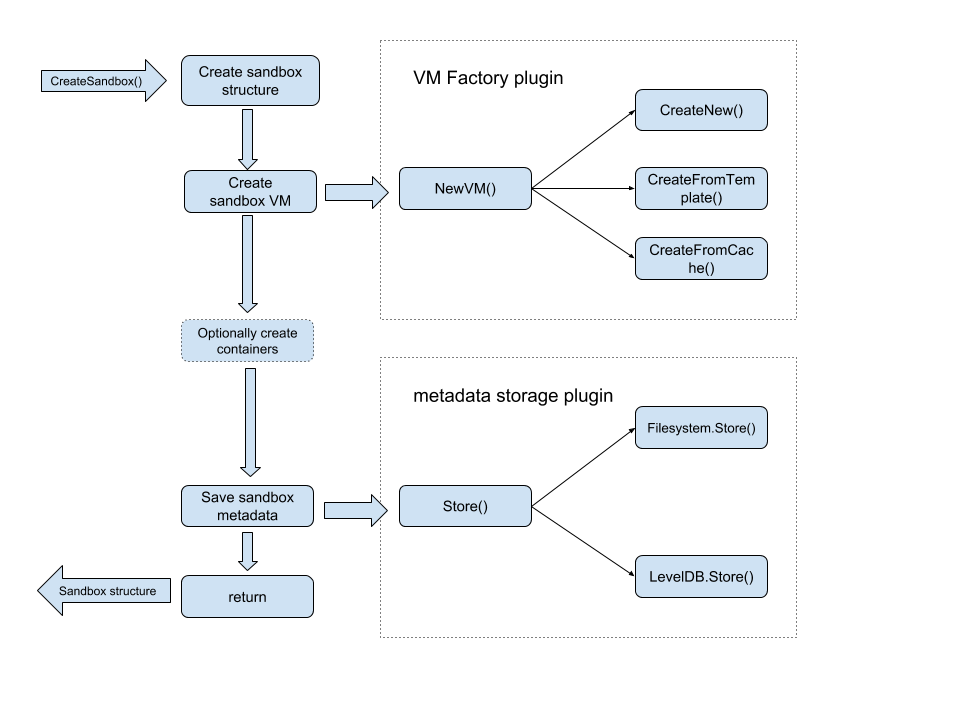
|
||||
|
||||
### Sandbox Connection Plugin Workflow
|
||||
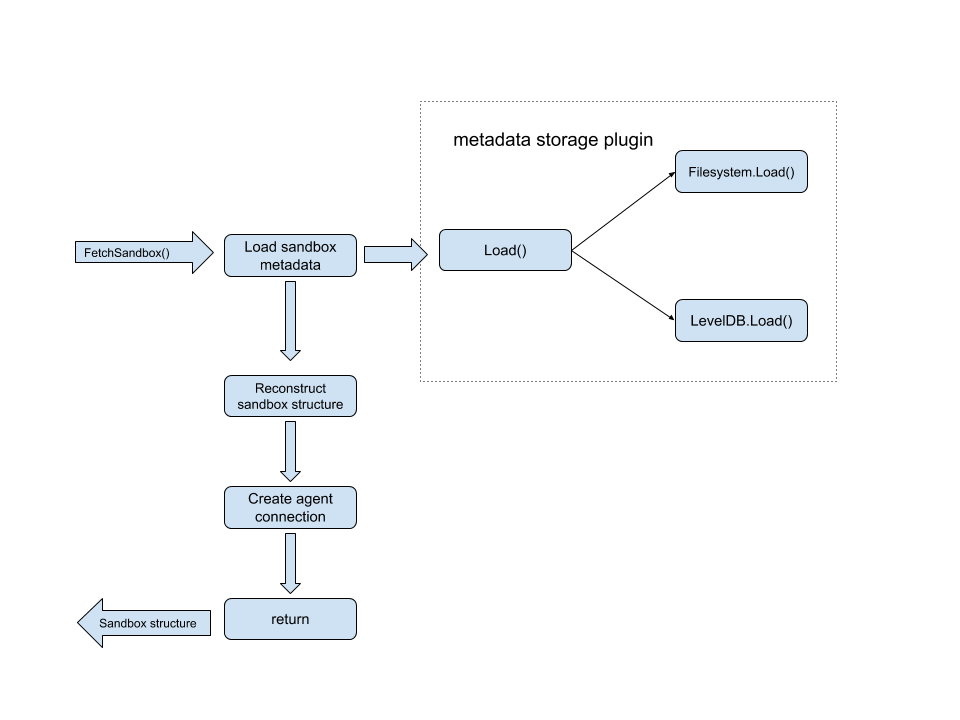
|
||||
@@ -1,95 +0,0 @@
|
||||
## Design requirements
|
||||
|
||||
The Kata Containers runtime **MUST** fulfill all of the following requirements:
|
||||
|
||||
### OCI compatibility
|
||||
The Kata Containers runtime **MUST** implement the [OCI runtime specification](https://github.com/opencontainers/runtime-spec) and support all
|
||||
the OCI runtime operations.
|
||||
|
||||
### [`runc`](https://github.com/opencontainers/runc) CLI compatibility
|
||||
In theory, being OCI compatible should be enough. In practice, the Kata Containers runtime
|
||||
should comply with the latest *stable* `runc` CLI. In particular, it **MUST** implement the
|
||||
following `runc` commands:
|
||||
|
||||
* `create`
|
||||
* `delete`
|
||||
* `exec`
|
||||
* `kill`
|
||||
* `list`
|
||||
* `pause`
|
||||
* `ps`
|
||||
* `start`
|
||||
* `state`
|
||||
* `version`
|
||||
|
||||
The Kata Containers runtime **MUST** implement the following command line options:
|
||||
* `--console-socket`
|
||||
* `--pid-file`
|
||||
|
||||
### [CRI](http://blog.kubernetes.io/2016/12/container-runtime-interface-cri-in-kubernetes.html) and [Kubernetes](https://kubernetes.io) support
|
||||
The Kata Containers project **MUST** provide two interfaces for CRI shims to manage hardware
|
||||
virtualization based Kubernetes pods and containers:
|
||||
- An OCI and `runc` compatible command line interface, as described in the previous section.
|
||||
This interface is used by implementations such as [`CRI-O`](http://cri-o.io) and [`cri-containerd`](https://github.com/containerd/cri-containerd), for example.
|
||||
- A hardware virtualization runtime library API for CRI shims to consume and provide a more
|
||||
CRI native implementation. The [`frakti`](https://github.com/kubernetes/frakti) CRI shim is an example of such a consumer.
|
||||
|
||||
### Multiple hardware architectures support
|
||||
The Kata Containers runtime **MUST NOT** be architecture-specific. It should be able to support
|
||||
multiple hardware architectures and provide a modular and flexible design for adding support
|
||||
for additional ones.
|
||||
|
||||
### Multiple hypervisor support
|
||||
The Kata Containers runtime **MUST NOT** be tied to any specific hardware virtualization technology,
|
||||
hypervisor, or virtual machine monitor implementation.
|
||||
It should support multiple hypervisors and provide a pluggable and flexible design to add support
|
||||
for additional ones.
|
||||
|
||||
#### Nesting
|
||||
The Kata Containers runtime **MUST** support nested virtualization environments.
|
||||
|
||||
### Networking
|
||||
|
||||
* The Kata Containers runtime **MUST** support CNI plugin.
|
||||
* The Kata Containers runtime **MUST** support both legacy and IPv6 networks.
|
||||
|
||||
### I/O
|
||||
|
||||
#### Devices direct assignment
|
||||
In order for containers to directly consume host hardware resources, the Kata Containers runtime
|
||||
**MUST** provide containers with secure pass through for generic devices such as GPUs, SRIOV,
|
||||
RDMA, QAT, by leveraging I/O virtualization technologies (IOMMU, interrupt remapping).
|
||||
|
||||
#### Acceleration
|
||||
The Kata Containers runtime **MUST** support accelerated and user-space-based I/O operations
|
||||
for networking (e.g. DPDK) as well as storage through `vhost-user` sockets.
|
||||
|
||||
#### Scalability
|
||||
The Kata Containers runtime **MUST** support scalable I/O through the SRIOV technology.
|
||||
|
||||
|
||||
### Virtualization overhead reduction
|
||||
A compelling aspect of containers is their minimal overhead compared to bare metal applications.
|
||||
A container runtime should keep the overhead to a minimum in order to provide the expected user
|
||||
experience.
|
||||
The Kata Containers runtime implementation **SHOULD** be optimized for:
|
||||
|
||||
* Minimal workload boot and shutdown times
|
||||
* Minimal workload memory footprint
|
||||
* Maximal networking throughput
|
||||
* Minimal networking latency
|
||||
|
||||
### Testing and debugging
|
||||
|
||||
#### Continuous Integration
|
||||
Each Kata Containers runtime pull request **MUST** pass at least the following set of container-related
|
||||
tests:
|
||||
|
||||
* Unit tests: runtime unit tests coverage >75%
|
||||
* Functional tests: the entire runtime CLI and APIs
|
||||
* Integration tests: Docker and Kubernetes
|
||||
|
||||
#### Debugging
|
||||
|
||||
The Kata Containers runtime implementation **MUST** use structured logging in order to namespace
|
||||
log messages to facilitate debugging.
|
||||
@@ -1,5 +0,0 @@
|
||||
# Design proposals
|
||||
|
||||
Kata Containers design proposal documents:
|
||||
|
||||
- [Kata Containers tracing](tracing-proposals.md)
|
||||
@@ -1,213 +0,0 @@
|
||||
# Kata Tracing proposals
|
||||
|
||||
## Overview
|
||||
|
||||
This document summarises a set of proposals triggered by the
|
||||
[tracing documentation PR][tracing-doc-pr].
|
||||
|
||||
## Required context
|
||||
|
||||
This section explains some terminology required to understand the proposals.
|
||||
Further details can be found in the
|
||||
[tracing documentation PR][tracing-doc-pr].
|
||||
|
||||
### Agent trace mode terminology
|
||||
|
||||
| Trace mode | Description | Use-case |
|
||||
|-|-|-|
|
||||
| Static | Trace agent from startup to shutdown | Entire lifespan |
|
||||
| Dynamic | Toggle tracing on/off as desired | On-demand "snapshot" |
|
||||
|
||||
### Agent trace type terminology
|
||||
|
||||
| Trace type | Description | Use-case |
|
||||
|-|-|-|
|
||||
| isolated | traces all relate to single component | Observing lifespan |
|
||||
| collated | traces "grouped" (runtime+agent) | Understanding component interaction |
|
||||
|
||||
### Container lifespan
|
||||
|
||||
| Lifespan | trace mode | trace type |
|
||||
|-|-|-|
|
||||
| short-lived | static | collated if possible, else isolated? |
|
||||
| long-running | dynamic | collated? (to see interactions) |
|
||||
|
||||
## Original plan for agent
|
||||
|
||||
- Implement all trace types and trace modes for agent.
|
||||
|
||||
- Why?
|
||||
- Maximum flexibility.
|
||||
|
||||
> **Counterargument:**
|
||||
>
|
||||
> Due to the intrusive nature of adding tracing, we have
|
||||
> learnt that landing small incremental changes is simpler and quicker!
|
||||
|
||||
- Compatibility with [Kata 1.x tracing][kata-1x-tracing].
|
||||
|
||||
> **Counterargument:**
|
||||
>
|
||||
> Agent tracing in Kata 1.x was extremely awkward to setup (to the extent
|
||||
> that it's unclear how many users actually used it!)
|
||||
>
|
||||
> This point, coupled with the new architecture for Kata 2.x, suggests
|
||||
> that we may not need to supply the same set of tracing features (in fact
|
||||
> they may not make sense)).
|
||||
|
||||
## Agent tracing proposals
|
||||
|
||||
### Agent tracing proposal 1: Don't implement dynamic trace mode
|
||||
|
||||
- All tracing will be static.
|
||||
|
||||
- Why?
|
||||
- Because dynamic tracing will always be "partial"
|
||||
|
||||
> In fact, not only would it be only a "snapshot" of activity, it may not
|
||||
> even be possible to create a complete "trace transaction". If this is
|
||||
> true, the trace output would be partial and would appear "unstructured".
|
||||
|
||||
### Agent tracing proposal 2: Simplify handling of trace type
|
||||
|
||||
- Agent tracing will be "isolated" by default.
|
||||
- Agent tracing will be "collated" if runtime tracing is also enabled.
|
||||
|
||||
- Why?
|
||||
- Offers a graceful fallback for agent tracing if runtime tracing disabled.
|
||||
- Simpler code!
|
||||
|
||||
## Questions to ask yourself (part 1)
|
||||
|
||||
- Are your containers long-running or short-lived?
|
||||
|
||||
- Would you ever need to turn on tracing "briefly"?
|
||||
- If "yes", is a "partial trace" useful or useless?
|
||||
|
||||
> Likely to be considered useless as it is a partial snapshot.
|
||||
> Alternative tracing methods may be more appropriate to dynamic
|
||||
> OpenTelemetry tracing.
|
||||
|
||||
## Questions to ask yourself (part 2)
|
||||
|
||||
- Are you happy to stop a container to enable tracing?
|
||||
If "no", dynamic tracing may be required.
|
||||
|
||||
- Would you ever want to trace the agent and the runtime "in isolation" at the
|
||||
same time?
|
||||
- If "yes", we need to fully implement `trace_mode=isolated`
|
||||
|
||||
> This seems unlikely though.
|
||||
|
||||
## Trace collection
|
||||
|
||||
The second set of proposals affect the way traces are collected.
|
||||
|
||||
### Motivation
|
||||
|
||||
Currently:
|
||||
|
||||
- The runtime sends trace spans to Jaeger directly.
|
||||
- The agent will send trace spans to the [`trace-forwarder`][trace-forwarder] component.
|
||||
- The trace forwarder will send trace spans to Jaeger.
|
||||
|
||||
Kata agent tracing overview:
|
||||
|
||||
```
|
||||
+-------------------------------------------+
|
||||
| Host |
|
||||
| |
|
||||
| +-----------+ |
|
||||
| | Trace | |
|
||||
| | Collector | |
|
||||
| +-----+-----+ |
|
||||
| ^ +--------------+ |
|
||||
| | spans | Kata VM | |
|
||||
| +-----+-----+ | | |
|
||||
| | Kata | spans | +-----+ | |
|
||||
| | Trace |<-----------------|Kata | | |
|
||||
| | Forwarder | VSOCK | |Agent| | |
|
||||
| +-----------+ Channel | +-----+ | |
|
||||
| +--------------+ |
|
||||
+-------------------------------------------+
|
||||
```
|
||||
|
||||
Currently:
|
||||
|
||||
- If agent tracing is enabled but the trace forwarder is not running,
|
||||
the agent will error.
|
||||
|
||||
- If the trace forwarder is started but Jaeger is not running,
|
||||
the trace forwarder will error.
|
||||
|
||||
### Goals
|
||||
|
||||
- The runtime and agent should:
|
||||
- Use the same trace collection implementation.
|
||||
- Use the most the common configuration items.
|
||||
|
||||
- Kata should should support more trace collection software or `SaaS`
|
||||
(for example `Zipkin`, `datadog`).
|
||||
|
||||
- Trace collection should not block normal runtime/agent operations
|
||||
(for example if `vsock-exporter`/Jaeger is not running, Kata Containers should work normally).
|
||||
|
||||
### Trace collection proposals
|
||||
|
||||
#### Trace collection proposal 1: Send all spans to the trace forwarder as a span proxy
|
||||
|
||||
Kata runtime/agent all send spans to trace forwarder, and the trace forwarder,
|
||||
acting as a tracing proxy, sends all spans to a tracing back-end, such as Jaeger or `datadog`.
|
||||
|
||||
**Pros:**
|
||||
|
||||
- Runtime/agent will be simple.
|
||||
- Could update trace collection target while Kata Containers are running.
|
||||
|
||||
**Cons:**
|
||||
|
||||
- Requires the trace forwarder component to be running (that is a pressure to operation).
|
||||
|
||||
#### Trace collection proposal 2: Send spans to collector directly from runtime/agent
|
||||
|
||||
Send spans to collector directly from runtime/agent, this proposal need
|
||||
network accessible to the collector.
|
||||
|
||||
**Pros:**
|
||||
|
||||
- No additional trace forwarder component needed.
|
||||
|
||||
**Cons:**
|
||||
|
||||
- Need more code/configuration to support all trace collectors.
|
||||
|
||||
## Future work
|
||||
|
||||
- We could add dynamic and fully isolated tracing at a later stage,
|
||||
if required.
|
||||
|
||||
## Further details
|
||||
|
||||
- See the new [GitHub project](https://github.com/orgs/kata-containers/projects/28).
|
||||
- [kata-containers-tracing-status](https://gist.github.com/jodh-intel/0ee54d41d2a803ba761e166136b42277) gist.
|
||||
- [tracing documentation PR][tracing-doc-pr].
|
||||
|
||||
## Summary
|
||||
|
||||
### Time line
|
||||
|
||||
- 2021-07-01: A summary of the discussion was
|
||||
[posted to the mail list](http://lists.katacontainers.io/pipermail/kata-dev/2021-July/001996.html).
|
||||
- 2021-06-22: These proposals were
|
||||
[discussed in the Kata Architecture Committee meeting](https://etherpad.opendev.org/p/Kata_Containers_2021_Architecture_Committee_Mtgs).
|
||||
- 2021-06-18: These proposals where
|
||||
[announced on the mailing list](http://lists.katacontainers.io/pipermail/kata-dev/2021-June/001980.html).
|
||||
|
||||
### Outcome
|
||||
|
||||
- Nobody opposed the agent proposals, so they are being implemented.
|
||||
- The trace collection proposals are still being considered.
|
||||
|
||||
[kata-1x-tracing]: https://github.com/kata-containers/agent/blob/master/TRACING.md
|
||||
[trace-forwarder]: /src/trace-forwarder
|
||||
[tracing-doc-pr]: https://github.com/kata-containers/kata-containers/pull/1937
|
||||
@@ -1,167 +0,0 @@
|
||||
# Virtual machine vCPU sizing in Kata Containers
|
||||
|
||||
## Default number of virtual CPUs
|
||||
|
||||
Before starting a container, the [runtime][6] reads the `default_vcpus` option
|
||||
from the [configuration file][7] to determine the number of virtual CPUs
|
||||
(vCPUs) needed to start the virtual machine. By default, `default_vcpus` is
|
||||
equal to 1 for fast boot time and a small memory footprint per virtual machine.
|
||||
Be aware that increasing this value negatively impacts the virtual machine's
|
||||
boot time and memory footprint.
|
||||
In general, we recommend that you do not edit this variable, unless you know
|
||||
what are you doing. If your container needs more than one vCPU, use
|
||||
[docker `--cpus`][1], [docker update][4], or [Kubernetes `cpu` limits][2] to
|
||||
assign more resources.
|
||||
|
||||
*Docker*
|
||||
|
||||
```sh
|
||||
$ docker run --name foo -ti --cpus 2 debian bash
|
||||
$ docker update --cpus 4 foo
|
||||
```
|
||||
|
||||
|
||||
*Kubernetes*
|
||||
|
||||
```yaml
|
||||
# ~/cpu-demo.yaml
|
||||
apiVersion: v1
|
||||
kind: Pod
|
||||
metadata:
|
||||
name: cpu-demo
|
||||
namespace: sandbox
|
||||
spec:
|
||||
containers:
|
||||
- name: cpu0
|
||||
image: vish/stress
|
||||
resources:
|
||||
limits:
|
||||
cpu: "3"
|
||||
args:
|
||||
- -cpus
|
||||
- "5"
|
||||
```
|
||||
|
||||
```sh
|
||||
$ sudo -E kubectl create -f ~/cpu-demo.yaml
|
||||
```
|
||||
|
||||
## Virtual CPUs and Kubernetes pods
|
||||
|
||||
A Kubernetes pod is a group of one or more containers, with shared storage and
|
||||
network, and a specification for how to run the containers [[specification][3]].
|
||||
In Kata Containers this group of containers, which is called a sandbox, runs inside
|
||||
the same virtual machine. If you do not specify a CPU constraint, the runtime does
|
||||
not add more vCPUs and the container is not placed inside a CPU cgroup.
|
||||
Instead, the container uses the number of vCPUs specified by `default_vcpus`
|
||||
and shares these resources with other containers in the same situation
|
||||
(without a CPU constraint).
|
||||
|
||||
## Container lifecycle
|
||||
|
||||
When you create a container with a CPU constraint, the runtime adds the
|
||||
number of vCPUs required by the container. Similarly, when the container terminates,
|
||||
the runtime removes these resources.
|
||||
|
||||
## Container without CPU constraint
|
||||
|
||||
A container without a CPU constraint uses the default number of vCPUs specified
|
||||
in the configuration file. In the case of Kubernetes pods, containers without a
|
||||
CPU constraint use and share between them the default number of vCPUs. For
|
||||
example, if `default_vcpus` is equal to 1 and you have 2 containers without CPU
|
||||
constraints with each container trying to consume 100% of vCPU, the resources
|
||||
divide in two parts, 50% of vCPU for each container because your virtual
|
||||
machine does not have enough resources to satisfy containers needs. If you want
|
||||
to give access to a greater or lesser portion of vCPUs to a specific container,
|
||||
use [`docker --cpu-shares`][1] or [Kubernetes `cpu` requests][2].
|
||||
|
||||
*Docker*
|
||||
|
||||
```sh
|
||||
$ docker run -ti --cpus-shares=512 debian bash
|
||||
```
|
||||
|
||||
*Kubernetes*
|
||||
|
||||
```yaml
|
||||
# ~/cpu-demo.yaml
|
||||
apiVersion: v1
|
||||
kind: Pod
|
||||
metadata:
|
||||
name: cpu-demo
|
||||
namespace: sandbox
|
||||
spec:
|
||||
containers:
|
||||
- name: cpu0
|
||||
image: vish/stress
|
||||
resources:
|
||||
requests:
|
||||
cpu: "0.7"
|
||||
args:
|
||||
- -cpus
|
||||
- "3"
|
||||
```
|
||||
|
||||
```sh
|
||||
$ sudo -E kubectl create -f ~/cpu-demo.yaml
|
||||
```
|
||||
|
||||
Before running containers without CPU constraint, consider that your containers
|
||||
are not running alone. Since your containers run inside a virtual machine other
|
||||
processes use the vCPUs as well (e.g. `systemd` and the Kata Containers
|
||||
[agent][5]). In general, we recommend setting `default_vcpus` equal to 1 to
|
||||
allow non-container processes to run on this vCPU and to specify a CPU
|
||||
constraint for each container. If your container is already running and needs
|
||||
more vCPUs, you can add more using [docker update][4].
|
||||
|
||||
## Container with CPU constraint
|
||||
|
||||
The runtime calculates the number of vCPUs required by a container with CPU
|
||||
constraints using the following formula: `vCPUs = ceiling( quota / period )`, where
|
||||
`quota` specifies the number of microseconds per CPU Period that the container is
|
||||
guaranteed CPU access and `period` specifies the CPU CFS scheduler period of time
|
||||
in microseconds. The result determines the number of vCPU to hot plug into the
|
||||
virtual machine. Once the vCPUs have been added, the [agent][5] places the
|
||||
container inside a CPU cgroup. This placement allows the container to use only
|
||||
its assigned resources.
|
||||
|
||||
## Do not waste resources
|
||||
|
||||
If you already know the number of vCPUs needed for each container and pod, or
|
||||
just want to run them with the same number of vCPUs, you can specify that
|
||||
number using the `default_vcpus` option in the configuration file, each virtual
|
||||
machine starts with that number of vCPUs. One limitation of this approach is
|
||||
that these vCPUs cannot be removed later and you might be wasting
|
||||
resources. For example, if you set `default_vcpus` to 8 and run only one
|
||||
container with a CPU constraint of 1 vCPUs, you might be wasting 7 vCPUs since
|
||||
the virtual machine starts with 8 vCPUs and 1 vCPUs is added and assigned
|
||||
to the container. Non-container processes might be able to use 8 vCPUs but they
|
||||
use a maximum 1 vCPU, hence 7 vCPUs might not be used.
|
||||
|
||||
|
||||
*Container without CPU constraint*
|
||||
|
||||
```sh
|
||||
$ docker run -ti debian bash -c "nproc; cat /sys/fs/cgroup/cpu,cpuacct/cpu.cfs_*"
|
||||
1 # number of vCPUs
|
||||
100000 # cfs period
|
||||
-1 # cfs quota
|
||||
```
|
||||
|
||||
*Container with CPU constraint*
|
||||
|
||||
```sh
|
||||
docker run --cpus 4 -ti debian bash -c "nproc; cat /sys/fs/cgroup/cpu,cpuacct/cpu.cfs_*"
|
||||
5 # number of vCPUs
|
||||
100000 # cfs period
|
||||
400000 # cfs quota
|
||||
```
|
||||
|
||||
|
||||
[1]: https://docs.docker.com/config/containers/resource_constraints/#cpu
|
||||
[2]: https://kubernetes.io/docs/tasks/configure-pod-container/assign-cpu-resource
|
||||
[3]: https://kubernetes.io/docs/concepts/workloads/pods/pod/
|
||||
[4]: https://docs.docker.com/engine/reference/commandline/update/
|
||||
[5]: ../../src/agent
|
||||
[6]: ../../src/runtime
|
||||
[7]: ../../src/runtime/README.md#configuration
|
||||
@@ -1,122 +0,0 @@
|
||||
# Virtualization in Kata Containers
|
||||
|
||||
Kata Containers, a second layer of isolation is created on top of those provided by traditional namespace-containers. The
|
||||
hardware virtualization interface is the basis of this additional layer. Kata will launch a lightweight virtual machine,
|
||||
and use the guest’s Linux kernel to create a container workload, or workloads in the case of multi-container pods. In Kubernetes
|
||||
and in the Kata implementation, the sandbox is carried out at the pod level. In Kata, this sandbox is created using a virtual machine.
|
||||
|
||||
This document describes how Kata Containers maps container technologies to virtual machines technologies, and how this is realized in
|
||||
the multiple hypervisors and virtual machine monitors that Kata supports.
|
||||
|
||||
## Mapping container concepts to virtual machine technologies
|
||||
|
||||
A typical deployment of Kata Containers will be in Kubernetes by way of a Container Runtime Interface (CRI) implementation. On every node,
|
||||
Kubelet will interact with a CRI implementer (such as containerd or CRI-O), which will in turn interface with Kata Containers (an OCI based runtime).
|
||||
|
||||
The CRI API, as defined at the [Kubernetes CRI-API repo](https://github.com/kubernetes/cri-api/), implies a few constructs being supported by the
|
||||
CRI implementation, and ultimately in Kata Containers. In order to support the full [API](https://github.com/kubernetes/cri-api/blob/a6f63f369f6d50e9d0886f2eda63d585fbd1ab6a/pkg/apis/runtime/v1alpha2/api.proto#L34-L110) with the CRI-implementer, Kata must provide the following constructs:
|
||||
|
||||

|
||||
|
||||
These constructs can then be further mapped to what devices are necessary for interfacing with the virtual machine:
|
||||
|
||||

|
||||
|
||||
Ultimately, these concepts map to specific para-virtualized devices or virtualization technologies.
|
||||
|
||||

|
||||
|
||||
Each hypervisor or VMM varies on how or if it handles each of these.
|
||||
|
||||
## Kata Containers Hypervisor and VMM support
|
||||
|
||||
Kata Containers [supports multiple hypervisors](../hypervisors.md).
|
||||
|
||||
Details of each solution and a summary are provided below.
|
||||
|
||||
### QEMU/KVM
|
||||
|
||||
Kata Containers with QEMU has complete compatibility with Kubernetes.
|
||||
|
||||
Depending on the host architecture, Kata Containers supports various machine types,
|
||||
for example `pc` and `q35` on x86 systems, `virt` on ARM systems and `pseries` on IBM Power systems. The default Kata Containers
|
||||
machine type is `pc`. The machine type and its [`Machine accelerators`](#machine-accelerators) can
|
||||
be changed by editing the runtime [`configuration`](./architecture.md/#configuration) file.
|
||||
|
||||
Devices and features used:
|
||||
- virtio VSOCK or virtio serial
|
||||
- virtio block or virtio SCSI
|
||||
- [virtio net](https://www.redhat.com/en/virtio-networking-series)
|
||||
- virtio fs or virtio 9p (recommend: virtio fs)
|
||||
- VFIO
|
||||
- hotplug
|
||||
- machine accelerators
|
||||
|
||||
Machine accelerators and hotplug are used in Kata Containers to manage resource constraints, improve boot time and reduce memory footprint. These are documented below.
|
||||
|
||||
#### Machine accelerators
|
||||
|
||||
Machine accelerators are architecture specific and can be used to improve the performance
|
||||
and enable specific features of the machine types. The following machine accelerators
|
||||
are used in Kata Containers:
|
||||
|
||||
- NVDIMM: This machine accelerator is x86 specific and only supported by `pc` and
|
||||
`q35` machine types. `nvdimm` is used to provide the root filesystem as a persistent
|
||||
memory device to the Virtual Machine.
|
||||
|
||||
#### Hotplug devices
|
||||
|
||||
The Kata Containers VM starts with a minimum amount of resources, allowing for faster boot time and a reduction in memory footprint. As the container launch progresses,
|
||||
devices are hotplugged to the VM. For example, when a CPU constraint is specified which includes additional CPUs, they can be hot added. Kata Containers has support
|
||||
for hot-adding the following devices:
|
||||
- Virtio block
|
||||
- Virtio SCSI
|
||||
- VFIO
|
||||
- CPU
|
||||
|
||||
### Firecracker/KVM
|
||||
|
||||
Firecracker, built on many rust crates that are within [rust-VMM](https://github.com/rust-vmm), has a very limited device model, providing a lighter
|
||||
footprint and attack surface, focusing on function-as-a-service like use cases. As a result, Kata Containers with Firecracker VMM supports a subset of the CRI API.
|
||||
Firecracker does not support file-system sharing, and as a result only block-based storage drivers are supported. Firecracker does not support device
|
||||
hotplug nor does it support VFIO. As a result, Kata Containers with Firecracker VMM does not support updating container resources after boot, nor
|
||||
does it support device passthrough.
|
||||
|
||||
Devices used:
|
||||
- virtio VSOCK
|
||||
- virtio block
|
||||
- virtio net
|
||||
|
||||
### Cloud Hypervisor/KVM
|
||||
|
||||
[Cloud Hypervisor](https://github.com/cloud-hypervisor/cloud-hypervisor), based
|
||||
on [rust-vmm](https://github.com/rust-vmm), is designed to have a
|
||||
lighter footprint and smaller attack surface for running modern cloud
|
||||
workloads. Kata Containers with Cloud
|
||||
Hypervisor provides mostly complete compatibility with Kubernetes
|
||||
comparable to the QEMU configuration. As of the 1.12 and 2.0.0 release
|
||||
of Kata Containers, the Cloud Hypervisor configuration supports both CPU
|
||||
and memory resize, device hotplug (disk and VFIO), file-system sharing through virtio-fs,
|
||||
block-based volumes, booting from VM images backed by pmem device, and
|
||||
fine-grained seccomp filters for each VMM threads (e.g. all virtio
|
||||
device worker threads). Please check [this GitHub Project](https://github.com/orgs/kata-containers/projects/21)
|
||||
for details of ongoing integration efforts.
|
||||
|
||||
Devices and features used:
|
||||
- virtio VSOCK or virtio serial
|
||||
- virtio block
|
||||
- virtio net
|
||||
- virtio fs
|
||||
- virtio pmem
|
||||
- VFIO
|
||||
- hotplug
|
||||
- seccomp filters
|
||||
- [HTTP OpenAPI](https://github.com/cloud-hypervisor/cloud-hypervisor/blob/master/vmm/src/api/openapi/cloud-hypervisor.yaml)
|
||||
|
||||
### Summary
|
||||
|
||||
| Solution | release introduced | brief summary |
|
||||
|-|-|-|
|
||||
| Cloud Hypervisor | 1.10 | upstream Cloud Hypervisor with rich feature support, e.g. hotplug, VFIO and FS sharing|
|
||||
| Firecracker | 1.5 | upstream Firecracker, rust-VMM based, no VFIO, no FS sharing, no memory/CPU hotplug |
|
||||
| QEMU | 1.0 | upstream QEMU, with support for hotplug and filesystem sharing |
|
||||
@@ -1,37 +0,0 @@
|
||||
# Howto Guides
|
||||
|
||||
## Kubernetes Integration
|
||||
|
||||
- [Run Kata containers with `crictl`](run-kata-with-crictl.md)
|
||||
- [Run Kata Containers with Kubernetes](run-kata-with-k8s.md)
|
||||
- [How to use Kata Containers and Containerd](containerd-kata.md)
|
||||
- [How to use Kata Containers and CRI (containerd plugin) with Kubernetes](how-to-use-k8s-with-cri-containerd-and-kata.md)
|
||||
- [Kata Containers and service mesh for Kubernetes](service-mesh.md)
|
||||
- [How to import Kata Containers logs into Fluentd](how-to-import-kata-logs-with-fluentd.md)
|
||||
|
||||
## Hypervisors Integration
|
||||
|
||||
Currently supported hypervisors with Kata Containers include:
|
||||
- `qemu`
|
||||
- `cloud-hypervisor`
|
||||
- `firecracker`
|
||||
- `ACRN`
|
||||
|
||||
While `qemu` and `cloud-hypervisor` work out of the box with installation of Kata,
|
||||
some additional configuration is needed in case of `firecracker` and `ACRN`.
|
||||
Refer to the following guides for additional configuration steps:
|
||||
- [Kata Containers with Firecracker](https://github.com/kata-containers/documentation/wiki/Initial-release-of-Kata-Containers-with-Firecracker-support)
|
||||
- [Kata Containers with ACRN Hypervisor](how-to-use-kata-containers-with-acrn.md)
|
||||
|
||||
## Advanced Topics
|
||||
|
||||
- [How to use Kata Containers with virtio-fs](how-to-use-virtio-fs-with-kata.md)
|
||||
- [Setting Sysctls with Kata](how-to-use-sysctls-with-kata.md)
|
||||
- [What Is VMCache and How To Enable It](what-is-vm-cache-and-how-do-I-use-it.md)
|
||||
- [What Is VM Templating and How To Enable It](what-is-vm-templating-and-how-do-I-use-it.md)
|
||||
- [Privileged Kata Containers](privileged.md)
|
||||
- [How to load kernel modules in Kata Containers](how-to-load-kernel-modules-with-kata.md)
|
||||
- [How to use Kata Containers with `virtio-mem`](how-to-use-virtio-mem-with-kata.md)
|
||||
- [How to set sandbox Kata Containers configurations with pod annotations](how-to-set-sandbox-config-kata.md)
|
||||
- [How to monitor Kata Containers in K8s](how-to-set-prometheus-in-k8s.md)
|
||||
- [How to use hotplug memory on arm64 in Kata Containers](how-to-hotplug-memory-arm64.md)
|
||||
@@ -1,353 +0,0 @@
|
||||
# How to use Kata Containers and Containerd
|
||||
|
||||
This document covers the installation and configuration of [containerd](https://containerd.io/)
|
||||
and [Kata Containers](https://katacontainers.io). The containerd provides not only the `ctr`
|
||||
command line tool, but also the [CRI](https://kubernetes.io/blog/2016/12/container-runtime-interface-cri-in-kubernetes/)
|
||||
interface for [Kubernetes](https://kubernetes.io) and other CRI clients.
|
||||
|
||||
This document is primarily written for Kata Containers v1.5.0-rc2 or above, and containerd v1.2.0 or above.
|
||||
Previous versions are addressed here, but we suggest users upgrade to the newer versions for better support.
|
||||
|
||||
## Concepts
|
||||
|
||||
### Kubernetes `RuntimeClass`
|
||||
|
||||
[`RuntimeClass`](https://kubernetes.io/docs/concepts/containers/runtime-class/) is a Kubernetes feature first
|
||||
introduced in Kubernetes 1.12 as alpha. It is the feature for selecting the container runtime configuration to
|
||||
use to run a pod’s containers. This feature is supported in `containerd` since [v1.2.0](https://github.com/containerd/containerd/releases/tag/v1.2.0).
|
||||
|
||||
Before the `RuntimeClass` was introduced, Kubernetes was not aware of the difference of runtimes on the node. `kubelet`
|
||||
creates Pod sandboxes and containers through CRI implementations, and treats all the Pods equally. However, there
|
||||
are requirements to run trusted Pods (i.e. Kubernetes plugin) in a native container like runc, and to run untrusted
|
||||
workloads with isolated sandboxes (i.e. Kata Containers).
|
||||
|
||||
As a result, the CRI implementations extended their semantics for the requirements:
|
||||
|
||||
- At the beginning, [Frakti](https://github.com/kubernetes/frakti) checks the network configuration of a Pod, and
|
||||
treat Pod with `host` network as trusted, while others are treated as untrusted.
|
||||
- The containerd introduced an annotation for untrusted Pods since [v1.0](https://github.com/containerd/cri/blob/v1.0.0-rc.0/docs/config.md):
|
||||
```yaml
|
||||
annotations:
|
||||
io.kubernetes.cri.untrusted-workload: "true"
|
||||
```
|
||||
- Similarly, CRI-O introduced the annotation `io.kubernetes.cri-o.TrustedSandbox` for untrusted Pods.
|
||||
|
||||
To eliminate the complexity of user configuration introduced by the non-standardized annotations and provide
|
||||
extensibility, `RuntimeClass` was introduced. This gives users the ability to affect the runtime behavior
|
||||
through `RuntimeClass` without the knowledge of the CRI daemons. We suggest that users with multiple runtimes
|
||||
use `RuntimeClass` instead of the deprecated annotations.
|
||||
|
||||
### Containerd Runtime V2 API: Shim V2 API
|
||||
|
||||
The [`containerd-shim-kata-v2` (short as `shimv2` in this documentation)](../../src/runtime/containerd-shim-v2)
|
||||
implements the [Containerd Runtime V2 (Shim API)](https://github.com/containerd/containerd/tree/master/runtime/v2) for Kata.
|
||||
With `shimv2`, Kubernetes can launch Pod and OCI-compatible containers with one shim per Pod. Prior to `shimv2`, `2N+1`
|
||||
shims (i.e. a `containerd-shim` and a `kata-shim` for each container and the Pod sandbox itself) and no standalone `kata-proxy`
|
||||
process were used, even with VSOCK not available.
|
||||
|
||||

|
||||
|
||||
The shim v2 is introduced in containerd [v1.2.0](https://github.com/containerd/containerd/releases/tag/v1.2.0) and Kata `shimv2`
|
||||
is implemented in Kata Containers v1.5.0.
|
||||
|
||||
## Install
|
||||
|
||||
### Install Kata Containers
|
||||
|
||||
Follow the instructions to [install Kata Containers](../install/README.md).
|
||||
|
||||
### Install containerd with CRI plugin
|
||||
|
||||
> **Note:** `cri` is a native plugin of containerd 1.1 and above. It is built into containerd and enabled by default.
|
||||
> You do not need to install `cri` if you have containerd 1.1 or above. Just remove the `cri` plugin from the list of
|
||||
> `disabled_plugins` in the containerd configuration file (`/etc/containerd/config.toml`).
|
||||
|
||||
Follow the instructions from the [CRI installation guide](http://github.com/containerd/cri/blob/master/docs/installation.md).
|
||||
|
||||
Then, check if `containerd` is now available:
|
||||
|
||||
```bash
|
||||
$ command -v containerd
|
||||
```
|
||||
|
||||
### Install CNI plugins
|
||||
|
||||
> **Note:** You do not need to install CNI plugins if you do not want to use containerd with Kubernetes.
|
||||
> If you have installed Kubernetes with `kubeadm`, you might have already installed the CNI plugins.
|
||||
|
||||
You can manually install CNI plugins as follows:
|
||||
|
||||
```bash
|
||||
$ go get github.com/containernetworking/plugins
|
||||
$ pushd $GOPATH/src/github.com/containernetworking/plugins
|
||||
$ ./build_linux.sh
|
||||
$ sudo mkdir /opt/cni
|
||||
$ sudo cp -r bin /opt/cni/
|
||||
$ popd
|
||||
```
|
||||
|
||||
### Install `cri-tools`
|
||||
|
||||
> **Note:** `cri-tools` is a set of tools for CRI used for development and testing. Users who only want
|
||||
> to use containerd with Kubernetes can skip the `cri-tools`.
|
||||
|
||||
You can install the `cri-tools` from source code:
|
||||
|
||||
```bash
|
||||
$ go get github.com/kubernetes-incubator/cri-tools
|
||||
$ pushd $GOPATH/src/github.com/kubernetes-incubator/cri-tools
|
||||
$ make
|
||||
$ sudo -E make install
|
||||
$ popd
|
||||
```
|
||||
|
||||
## Configuration
|
||||
|
||||
### Configure containerd to use Kata Containers
|
||||
|
||||
By default, the configuration of containerd is located at `/etc/containerd/config.toml`, and the
|
||||
`cri` plugins are placed in the following section:
|
||||
|
||||
```toml
|
||||
[plugins]
|
||||
[plugins.cri]
|
||||
[plugins.cri.containerd]
|
||||
[plugins.cri.containerd.default_runtime]
|
||||
#runtime_type = "io.containerd.runtime.v1.linux"
|
||||
|
||||
[plugins.cri.cni]
|
||||
# conf_dir is the directory in which the admin places a CNI conf.
|
||||
conf_dir = "/etc/cni/net.d"
|
||||
```
|
||||
|
||||
The following sections outline how to add Kata Containers to the configurations.
|
||||
|
||||
#### Kata Containers as a `RuntimeClass`
|
||||
|
||||
For
|
||||
- Kata Containers v1.5.0 or above (including `1.5.0-rc`)
|
||||
- Containerd v1.2.0 or above
|
||||
- Kubernetes v1.12.0 or above
|
||||
|
||||
The `RuntimeClass` is suggested.
|
||||
|
||||
The following configuration includes three runtime classes:
|
||||
- `plugins.cri.containerd.runtimes.runc`: the runc, and it is the default runtime.
|
||||
- `plugins.cri.containerd.runtimes.kata`: The function in containerd (reference [the document here](https://github.com/containerd/containerd/tree/master/runtime/v2#binary-naming))
|
||||
where the dot-connected string `io.containerd.kata.v2` is translated to `containerd-shim-kata-v2` (i.e. the
|
||||
binary name of the Kata implementation of [Containerd Runtime V2 (Shim API)](https://github.com/containerd/containerd/tree/master/runtime/v2)).
|
||||
- `plugins.cri.containerd.runtimes.katacli`: the `containerd-shim-runc-v1` calls `kata-runtime`, which is the legacy process.
|
||||
|
||||
```toml
|
||||
[plugins.cri.containerd]
|
||||
no_pivot = false
|
||||
[plugins.cri.containerd.runtimes]
|
||||
[plugins.cri.containerd.runtimes.runc]
|
||||
runtime_type = "io.containerd.runc.v1"
|
||||
[plugins.cri.containerd.runtimes.runc.options]
|
||||
NoPivotRoot = false
|
||||
NoNewKeyring = false
|
||||
ShimCgroup = ""
|
||||
IoUid = 0
|
||||
IoGid = 0
|
||||
BinaryName = "runc"
|
||||
Root = ""
|
||||
CriuPath = ""
|
||||
SystemdCgroup = false
|
||||
[plugins.cri.containerd.runtimes.kata]
|
||||
runtime_type = "io.containerd.kata.v2"
|
||||
[plugins.cri.containerd.runtimes.katacli]
|
||||
runtime_type = "io.containerd.runc.v1"
|
||||
[plugins.cri.containerd.runtimes.katacli.options]
|
||||
NoPivotRoot = false
|
||||
NoNewKeyring = false
|
||||
ShimCgroup = ""
|
||||
IoUid = 0
|
||||
IoGid = 0
|
||||
BinaryName = "/usr/bin/kata-runtime"
|
||||
Root = ""
|
||||
CriuPath = ""
|
||||
SystemdCgroup = false
|
||||
```
|
||||
|
||||
From Containerd v1.2.4 and Kata v1.6.0, there is a new runtime option supported, which allows you to specify a specific Kata configuration file as follows:
|
||||
|
||||
```toml
|
||||
[plugins.cri.containerd.runtimes.kata]
|
||||
runtime_type = "io.containerd.kata.v2"
|
||||
privileged_without_host_devices = true
|
||||
[plugins.cri.containerd.runtimes.kata.options]
|
||||
ConfigPath = "/etc/kata-containers/config.toml"
|
||||
```
|
||||
|
||||
`privileged_without_host_devices` tells containerd that a privileged Kata container should not have direct access to all host devices. If unset, containerd will pass all host devices to Kata container, which may cause security issues.
|
||||
|
||||
This `ConfigPath` option is optional. If you do not specify it, shimv2 first tries to get the configuration file from the environment variable `KATA_CONF_FILE`. If neither are set, shimv2 will use the default Kata configuration file paths (`/etc/kata-containers/configuration.toml` and `/usr/share/defaults/kata-containers/configuration.toml`).
|
||||
|
||||
If you use Containerd older than v1.2.4 or a version of Kata older than v1.6.0 and also want to specify a configuration file, you can use the following workaround, since the shimv2 accepts an environment variable, `KATA_CONF_FILE` for the configuration file path. Then, you can create a
|
||||
shell script with the following:
|
||||
|
||||
```bash
|
||||
#!/bin/bash
|
||||
KATA_CONF_FILE=/etc/kata-containers/firecracker.toml containerd-shim-kata-v2 $@
|
||||
```
|
||||
|
||||
Name it as `/usr/local/bin/containerd-shim-katafc-v2` and reference it in the configuration of containerd:
|
||||
|
||||
```toml
|
||||
[plugins.cri.containerd.runtimes.kata-firecracker]
|
||||
runtime_type = "io.containerd.katafc.v2"
|
||||
```
|
||||
|
||||
#### Kata Containers as the runtime for untrusted workload
|
||||
|
||||
For cases without `RuntimeClass` support, we can use the legacy annotation method to support using Kata Containers
|
||||
for an untrusted workload. With the following configuration, you can run trusted workloads with a runtime such as `runc`
|
||||
and then, run an untrusted workload with Kata Containers:
|
||||
|
||||
```toml
|
||||
[plugins.cri.containerd]
|
||||
# "plugins.cri.containerd.default_runtime" is the runtime to use in containerd.
|
||||
[plugins.cri.containerd.default_runtime]
|
||||
# runtime_type is the runtime type to use in containerd e.g. io.containerd.runtime.v1.linux
|
||||
runtime_type = "io.containerd.runtime.v1.linux"
|
||||
|
||||
# "plugins.cri.containerd.untrusted_workload_runtime" is a runtime to run untrusted workloads on it.
|
||||
[plugins.cri.containerd.untrusted_workload_runtime]
|
||||
# runtime_type is the runtime type to use in containerd e.g. io.containerd.runtime.v1.linux
|
||||
runtime_type = "io.containerd.kata.v2"
|
||||
```
|
||||
|
||||
For the earlier versions of Kata Containers and containerd that do not support Runtime V2 (Shim API), you can use the following alternative configuration:
|
||||
|
||||
```toml
|
||||
[plugins.cri.containerd]
|
||||
|
||||
# "plugins.cri.containerd.default_runtime" is the runtime to use in containerd.
|
||||
[plugins.cri.containerd.default_runtime]
|
||||
# runtime_type is the runtime type to use in containerd e.g. io.containerd.runtime.v1.linux
|
||||
runtime_type = "io.containerd.runtime.v1.linux"
|
||||
|
||||
# "plugins.cri.containerd.untrusted_workload_runtime" is a runtime to run untrusted workloads on it.
|
||||
[plugins.cri.containerd.untrusted_workload_runtime]
|
||||
# runtime_type is the runtime type to use in containerd e.g. io.containerd.runtime.v1.linux
|
||||
runtime_type = "io.containerd.runtime.v1.linux"
|
||||
|
||||
# runtime_engine is the name of the runtime engine used by containerd.
|
||||
runtime_engine = "/usr/bin/kata-runtime"
|
||||
```
|
||||
|
||||
You can find more information on the [Containerd config documentation](https://github.com/containerd/cri/blob/master/docs/config.md)
|
||||
|
||||
|
||||
#### Kata Containers as the default runtime
|
||||
|
||||
If you want to set Kata Containers as the only runtime in the deployment, you can simply configure as follows:
|
||||
|
||||
```toml
|
||||
[plugins.cri.containerd]
|
||||
[plugins.cri.containerd.default_runtime]
|
||||
runtime_type = "io.containerd.kata.v2"
|
||||
```
|
||||
|
||||
Alternatively, for the earlier versions of Kata Containers and containerd that do not support Runtime V2 (Shim API), you can use the following alternative configuration:
|
||||
|
||||
```toml
|
||||
[plugins.cri.containerd]
|
||||
[plugins.cri.containerd.default_runtime]
|
||||
runtime_type = "io.containerd.runtime.v1.linux"
|
||||
runtime_engine = "/usr/bin/kata-runtime"
|
||||
```
|
||||
|
||||
### Configuration for `cri-tools`
|
||||
|
||||
> **Note:** If you skipped the [Install `cri-tools`](#install-cri-tools) section, you can skip this section too.
|
||||
|
||||
First, add the CNI configuration in the containerd configuration.
|
||||
|
||||
The following is the configuration if you installed CNI as the *[Install CNI plugins](#install-cni-plugins)* section outlined.
|
||||
|
||||
Put the CNI configuration as `/etc/cni/net.d/10-mynet.conf`:
|
||||
|
||||
```json
|
||||
{
|
||||
"cniVersion": "0.2.0",
|
||||
"name": "mynet",
|
||||
"type": "bridge",
|
||||
"bridge": "cni0",
|
||||
"isGateway": true,
|
||||
"ipMasq": true,
|
||||
"ipam": {
|
||||
"type": "host-local",
|
||||
"subnet": "172.19.0.0/24",
|
||||
"routes": [
|
||||
{ "dst": "0.0.0.0/0" }
|
||||
]
|
||||
}
|
||||
}
|
||||
```
|
||||
|
||||
Next, reference the configuration directory through containerd `config.toml`:
|
||||
|
||||
```toml
|
||||
[plugins.cri.cni]
|
||||
# conf_dir is the directory in which the admin places a CNI conf.
|
||||
conf_dir = "/etc/cni/net.d"
|
||||
```
|
||||
|
||||
The configuration file of `crictl` command line tool in `cri-tools` locates at `/etc/crictl.yaml`:
|
||||
|
||||
```yaml
|
||||
runtime-endpoint: unix:///var/run/containerd/containerd.sock
|
||||
image-endpoint: unix:///var/run/containerd/containerd.sock
|
||||
timeout: 10
|
||||
debug: true
|
||||
```
|
||||
|
||||
## Run
|
||||
|
||||
### Launch containers with `ctr` command line
|
||||
|
||||
To run a container with Kata Containers through the containerd command line, you can run the following:
|
||||
|
||||
```bash
|
||||
$ sudo ctr image pull docker.io/library/busybox:latest
|
||||
$ sudo ctr run --runtime io.containerd.run.kata.v2 -t --rm docker.io/library/busybox:latest hello sh
|
||||
```
|
||||
|
||||
This launches a BusyBox container named `hello`, and it will be removed by `--rm` after it quits.
|
||||
|
||||
### Launch Pods with `crictl` command line
|
||||
|
||||
With the `crictl` command line of `cri-tools`, you can specify runtime class with `-r` or `--runtime` flag.
|
||||
Use the following to launch Pod with `kata` runtime class with the pod in [the example](https://github.com/kubernetes-sigs/cri-tools/tree/master/docs/examples)
|
||||
of `cri-tools`:
|
||||
|
||||
```bash
|
||||
$ sudo crictl runp -r kata podsandbox-config.yaml
|
||||
36e23521e8f89fabd9044924c9aeb34890c60e85e1748e8daca7e2e673f8653e
|
||||
```
|
||||
|
||||
You can add container to the launched Pod with the following:
|
||||
|
||||
```bash
|
||||
$ sudo crictl create 36e23521e8f89 container-config.yaml podsandbox-config.yaml
|
||||
1aab7585530e62c446734f12f6899f095ce53422dafcf5a80055ba11b95f2da7
|
||||
```
|
||||
|
||||
Now, start it with the following:
|
||||
|
||||
```bash
|
||||
$ sudo crictl start 1aab7585530e6
|
||||
1aab7585530e6
|
||||
```
|
||||
|
||||
In Kubernetes, you need to create a `RuntimeClass` resource and add the `RuntimeClass` field in the Pod Spec
|
||||
(see this [document](https://kubernetes.io/docs/concepts/containers/runtime-class/) for more information).
|
||||
|
||||
If `RuntimeClass` is not supported, you can use the following annotation in a Kubernetes pod to identify as an untrusted workload:
|
||||
|
||||
```yaml
|
||||
annotations:
|
||||
io.kubernetes.cri.untrusted-workload: "true"
|
||||
```
|
||||
@@ -1,19 +0,0 @@
|
||||
{
|
||||
"metadata": {
|
||||
"name": "busybox-container",
|
||||
"namespace": "test.kata"
|
||||
},
|
||||
"image": {
|
||||
"image": "docker.io/library/busybox:latest"
|
||||
},
|
||||
"command": [
|
||||
"sleep",
|
||||
"9999"
|
||||
],
|
||||
"args": [],
|
||||
"working_dir": "/",
|
||||
"log_path": "",
|
||||
"stdin": false,
|
||||
"stdin_once": false,
|
||||
"tty": false
|
||||
}
|
||||
@@ -1,20 +0,0 @@
|
||||
{
|
||||
"metadata": {
|
||||
"name": "busybox-pod",
|
||||
"uid": "busybox-pod",
|
||||
"namespace": "test.kata"
|
||||
},
|
||||
"hostname": "busybox_host",
|
||||
"log_directory": "",
|
||||
"dns_config": {
|
||||
},
|
||||
"port_mappings": [],
|
||||
"resources": {
|
||||
},
|
||||
"labels": {
|
||||
},
|
||||
"annotations": {
|
||||
},
|
||||
"linux": {
|
||||
}
|
||||
}
|
||||
@@ -1,39 +0,0 @@
|
||||
{
|
||||
"metadata": {
|
||||
"name": "redis-client",
|
||||
"namespace": "test.kata"
|
||||
},
|
||||
"image": {
|
||||
"image": "docker.io/library/redis:6.0.8-alpine"
|
||||
},
|
||||
"command": [
|
||||
"tail", "-f", "/dev/null"
|
||||
],
|
||||
"envs": [
|
||||
{
|
||||
"key": "PATH",
|
||||
"value": "/usr/local/sbin:/usr/local/bin:/usr/sbin:/usr/bin:/sbin:/bin"
|
||||
},
|
||||
{
|
||||
"key": "TERM",
|
||||
"value": "xterm"
|
||||
}
|
||||
],
|
||||
"labels": {
|
||||
"tier": "backend"
|
||||
},
|
||||
"annotations": {
|
||||
"pod": "redis-client-pod"
|
||||
},
|
||||
"log_path": "",
|
||||
"stdin": false,
|
||||
"stdin_once": false,
|
||||
"tty": false,
|
||||
"linux": {
|
||||
"resources": {
|
||||
"memory_limit_in_bytes": 524288000
|
||||
},
|
||||
"security_context": {
|
||||
}
|
||||
}
|
||||
}
|
||||
@@ -1,28 +0,0 @@
|
||||
{
|
||||
"metadata": {
|
||||
"name": "redis-client-pod",
|
||||
"uid": "test-redis-client-pod",
|
||||
"namespace": "test.kata"
|
||||
},
|
||||
"hostname": "redis-client",
|
||||
"log_directory": "",
|
||||
"dns_config": {
|
||||
"searches": [
|
||||
"8.8.8.8"
|
||||
]
|
||||
},
|
||||
"port_mappings": [],
|
||||
"resources": {
|
||||
"cpu": {
|
||||
"limits": 1,
|
||||
"requests": 1
|
||||
}
|
||||
},
|
||||
"labels": {
|
||||
"tier": "backend"
|
||||
},
|
||||
"annotations": {
|
||||
},
|
||||
"linux": {
|
||||
}
|
||||
}
|
||||
@@ -1,36 +0,0 @@
|
||||
{
|
||||
"metadata": {
|
||||
"name": "redis-server",
|
||||
"namespace": "test.kata"
|
||||
},
|
||||
"image": {
|
||||
"image": "docker.io/library/redis:6.0.8-alpine"
|
||||
},
|
||||
"envs": [
|
||||
{
|
||||
"key": "PATH",
|
||||
"value": "/usr/local/sbin:/usr/local/bin:/usr/sbin:/usr/bin:/sbin:/bin"
|
||||
},
|
||||
{
|
||||
"key": "TERM",
|
||||
"value": "xterm"
|
||||
}
|
||||
],
|
||||
"labels": {
|
||||
"tier": "backend"
|
||||
},
|
||||
"annotations": {
|
||||
"pod": "redis-server-pod"
|
||||
},
|
||||
"log_path": "",
|
||||
"stdin": false,
|
||||
"stdin_once": false,
|
||||
"tty": false,
|
||||
"linux": {
|
||||
"resources": {
|
||||
"memory_limit_in_bytes": 524288000
|
||||
},
|
||||
"security_context": {
|
||||
}
|
||||
}
|
||||
}
|
||||
@@ -1,28 +0,0 @@
|
||||
{
|
||||
"metadata": {
|
||||
"name": "redis-server-pod",
|
||||
"uid": "test-redis-server-pod",
|
||||
"namespace": "test.kata"
|
||||
},
|
||||
"hostname": "redis-server",
|
||||
"log_directory": "",
|
||||
"dns_config": {
|
||||
"searches": [
|
||||
"8.8.8.8"
|
||||
]
|
||||
},
|
||||
"port_mappings": [],
|
||||
"resources": {
|
||||
"cpu": {
|
||||
"limits": 1,
|
||||
"requests": 1
|
||||
}
|
||||
},
|
||||
"labels": {
|
||||
"tier": "backend"
|
||||
},
|
||||
"annotations": {
|
||||
},
|
||||
"linux": {
|
||||
}
|
||||
}
|
||||
@@ -1,43 +0,0 @@
|
||||
apiVersion: apps/v1
|
||||
kind: Deployment
|
||||
metadata:
|
||||
name: grafana
|
||||
namespace: prometheus
|
||||
labels:
|
||||
app: grafana
|
||||
spec:
|
||||
replicas: 1
|
||||
selector:
|
||||
matchLabels:
|
||||
app: grafana
|
||||
template:
|
||||
metadata:
|
||||
labels:
|
||||
app: grafana
|
||||
spec:
|
||||
containers:
|
||||
- image: grafana/grafana:7.0.5
|
||||
name: grafana
|
||||
ports:
|
||||
- containerPort: 3000
|
||||
name: http
|
||||
|
||||
---
|
||||
|
||||
apiVersion: v1
|
||||
kind: Service
|
||||
metadata:
|
||||
namespace: prometheus
|
||||
name: grafana
|
||||
labels:
|
||||
app: grafana
|
||||
spec:
|
||||
type: NodePort
|
||||
selector:
|
||||
app: grafana
|
||||
ports:
|
||||
- port: 3000
|
||||
targetPort: 3000
|
||||
name: http
|
||||
nodePort: 30000
|
||||
protocol: TCP
|
||||
@@ -1,55 +0,0 @@
|
||||
apiVersion: v1
|
||||
kind: Namespace
|
||||
metadata:
|
||||
name: kata-system
|
||||
|
||||
---
|
||||
|
||||
apiVersion: apps/v1
|
||||
kind: DaemonSet
|
||||
metadata:
|
||||
labels:
|
||||
app.kubernetes.io/name: kata-monitor
|
||||
name: kata-monitor
|
||||
namespace: kata-system
|
||||
spec:
|
||||
selector:
|
||||
matchLabels:
|
||||
app.kubernetes.io/name: kata-monitor
|
||||
template:
|
||||
metadata:
|
||||
labels:
|
||||
app.kubernetes.io/name: kata-monitor
|
||||
annotations:
|
||||
prometheus.io/scrape: "true"
|
||||
spec:
|
||||
hostNetwork: true
|
||||
containers:
|
||||
- name: kata-monitor
|
||||
image: quay.io/kata-containers/kata-monitor:2.0.0
|
||||
args:
|
||||
- -log-level=debug
|
||||
ports:
|
||||
- containerPort: 8090
|
||||
resources:
|
||||
limits:
|
||||
cpu: 200m
|
||||
memory: 300Mi
|
||||
requests:
|
||||
cpu: 200m
|
||||
memory: 300Mi
|
||||
volumeMounts:
|
||||
- name: containerdtask
|
||||
mountPath: /run/containerd/io.containerd.runtime.v2.task/
|
||||
readOnly: true
|
||||
- name: containerdsocket
|
||||
mountPath: /run/containerd/containerd.sock
|
||||
readOnly: true
|
||||
terminationGracePeriodSeconds: 30
|
||||
volumes:
|
||||
- name: containerdtask
|
||||
hostPath:
|
||||
path: /run/containerd/io.containerd.runtime.v2.task/
|
||||
- name: containerdsocket
|
||||
hostPath:
|
||||
path: /run/containerd/containerd.sock
|
||||
@@ -1,132 +0,0 @@
|
||||
apiVersion: v1
|
||||
kind: Namespace
|
||||
metadata:
|
||||
name: prometheus
|
||||
|
||||
---
|
||||
|
||||
apiVersion: rbac.authorization.k8s.io/v1beta1
|
||||
kind: ClusterRole
|
||||
metadata:
|
||||
name: prometheus
|
||||
rules:
|
||||
- apiGroups: [""]
|
||||
resources:
|
||||
- nodes
|
||||
- nodes/proxy
|
||||
- services
|
||||
- endpoints
|
||||
- pods
|
||||
verbs: ["get", "list", "watch"]
|
||||
- apiGroups:
|
||||
- extensions
|
||||
resources:
|
||||
- ingresses
|
||||
verbs: ["get", "list", "watch"]
|
||||
- nonResourceURLs: ["/metrics"]
|
||||
verbs: ["get"]
|
||||
|
||||
---
|
||||
|
||||
apiVersion: v1
|
||||
kind: ServiceAccount
|
||||
metadata:
|
||||
name: prometheus
|
||||
namespace: prometheus
|
||||
|
||||
---
|
||||
|
||||
apiVersion: rbac.authorization.k8s.io/v1beta1
|
||||
kind: ClusterRoleBinding
|
||||
metadata:
|
||||
name: prometheus
|
||||
roleRef:
|
||||
apiGroup: rbac.authorization.k8s.io
|
||||
kind: ClusterRole
|
||||
name: prometheus
|
||||
subjects:
|
||||
- kind: ServiceAccount
|
||||
name: prometheus
|
||||
namespace: prometheus
|
||||
|
||||
---
|
||||
|
||||
kind: Service
|
||||
apiVersion: v1
|
||||
metadata:
|
||||
name: prometheus
|
||||
namespace: prometheus
|
||||
labels:
|
||||
app: prometheus
|
||||
spec:
|
||||
type: NodePort
|
||||
selector:
|
||||
app: prometheus
|
||||
ports:
|
||||
- port: 9090
|
||||
targetPort: 9090
|
||||
name: http
|
||||
nodePort: 30909
|
||||
protocol: TCP
|
||||
|
||||
---
|
||||
|
||||
kind: Deployment
|
||||
apiVersion: apps/v1
|
||||
metadata:
|
||||
name: prometheus
|
||||
namespace: prometheus
|
||||
spec:
|
||||
replicas: 1
|
||||
selector:
|
||||
matchLabels:
|
||||
app: prometheus
|
||||
template:
|
||||
metadata:
|
||||
labels:
|
||||
app: prometheus
|
||||
spec:
|
||||
serviceAccountName: prometheus
|
||||
containers:
|
||||
- name: prometheus
|
||||
image: prom/prometheus:v2.7.1
|
||||
ports:
|
||||
- containerPort: 9090
|
||||
volumeMounts:
|
||||
- name: prometheus-config-volume
|
||||
mountPath: /etc/prometheus/prometheus.yml
|
||||
subPath: prometheus.yml
|
||||
volumes:
|
||||
- name: prometheus-config-volume
|
||||
configMap:
|
||||
name: prometheus-config
|
||||
restartPolicy: Always
|
||||
|
||||
---
|
||||
|
||||
kind: ConfigMap
|
||||
apiVersion: v1
|
||||
metadata:
|
||||
name: prometheus-config
|
||||
namespace: prometheus
|
||||
data:
|
||||
prometheus.yml: |
|
||||
# my global config
|
||||
global:
|
||||
scrape_interval: 15s # Set the scrape interval to every 15 seconds. Default is every 1 minute.
|
||||
evaluation_interval: 15s # Evaluate rules every 15 seconds. The default is every 1 minute.
|
||||
|
||||
scrape_configs:
|
||||
- job_name: 'kubernetes-pods'
|
||||
kubernetes_sd_configs:
|
||||
- role: pod
|
||||
namespaces:
|
||||
names:
|
||||
- kata-system
|
||||
|
||||
relabel_configs:
|
||||
# Example relabel to scrape only pods that have
|
||||
# "prometheus.io/scrape: true" annotation.
|
||||
- source_labels: [__meta_kubernetes_pod_annotation_prometheus_io_scrape]
|
||||
action: keep
|
||||
regex: true
|
||||
@@ -1,28 +0,0 @@
|
||||
# How to use memory hotplug feature in Kata Containers on arm64
|
||||
|
||||
## Introduction
|
||||
|
||||
Memory hotplug is a key feature for containers to allocate memory dynamically in deployment.
|
||||
As Kata Container bases on VM, this feature needs support both from VMM and guest kernel. Luckily, it has been fully supported for the current default version of QEMU and guest kernel used by Kata on arm64. For other VMMs, e.g, Cloud Hypervisor, the enablement work is on the road. Apart from VMM and guest kernel, memory hotplug also depends on ACPI which depends on firmware either. On x86, you can boot a VM using QEMU with ACPI enabled directly, because it boots up with firmware implicitly. For arm64, however, you need specify firmware explicitly. That is to say, if you are ready to run a normal Kata Container on arm64, what you need extra to do is to install the UEFI ROM before use the memory hotplug feature.
|
||||
|
||||
## Install UEFI ROM
|
||||
|
||||
We have offered a helper script for you to install the UEFI ROM. If you have installed Kata normally on your host, you just need to run the script as fellows:
|
||||
|
||||
```bash
|
||||
$ pushd $GOPATH/src/github.com/kata-containers/tests
|
||||
$ sudo .ci/aarch64/install_rom_aarch64.sh
|
||||
$ popd
|
||||
```
|
||||
|
||||
## Run for test
|
||||
|
||||
Let's test if the memory hotplug is ready for Kata after install the UEFI ROM. Make sure containerd is ready to run Kata before test.
|
||||
|
||||
```bash
|
||||
$ sudo ctr image pull docker.io/library/ubuntu:latest
|
||||
$ sudo ctr run --runtime io.containerd.run.kata.v2 -t --rm docker.io/library/ubuntu:latest hello sh -c "free -h"
|
||||
$ sudo ctr run --runtime io.containerd.run.kata.v2 -t --memory-limit 536870912 --rm docker.io/library/ubuntu:latest hello sh -c "free -h"
|
||||
```
|
||||
|
||||
Compare the results between the two tests. If the latter is 0.5G larger than the former, you have done what you want, and congratulation!
|
||||
@@ -1,447 +0,0 @@
|
||||
# Importing Kata Containers logs with Fluentd
|
||||
|
||||
# Introduction
|
||||
|
||||
This document describes how to import Kata Containers logs into [Fluentd](https://www.fluentd.org/),
|
||||
typically for importing into an
|
||||
Elastic/Fluentd/Kibana([EFK](https://github.com/kubernetes/kubernetes/tree/master/cluster/addons/fluentd-elasticsearch#running-efk-stack-in-production))
|
||||
or Elastic/Logstash/Kibana([ELK](https://www.elastic.co/elastic-stack)) stack.
|
||||
|
||||
The majority of this document focusses on CRI-O based (classic) Kata runtime. Much of that information
|
||||
also applies to the Kata `shimv2` runtime. Differences pertaining to Kata `shimv2` can be found in their
|
||||
[own section](#kata-shimv2).
|
||||
|
||||
> **Note:** This document does not cover any aspect of "log rotation". It is expected that any production
|
||||
> stack already has a method in place to control node log growth.
|
||||
|
||||
# Overview
|
||||
|
||||
Kata generates logs. The logs can come from numerous parts of the Kata stack (the runtime, proxy, shim
|
||||
and even the agent). By default the logs
|
||||
[go to the system journal](../../src/runtime/README.md#logging),
|
||||
but they can also be configured to be stored in files.
|
||||
|
||||
The logs default format is in [`logfmt` structured logging](https://brandur.org/logfmt), but can be switched to
|
||||
be JSON with a command line option.
|
||||
|
||||
Provided below are some examples of Kata log import and processing using
|
||||
[Fluentd](https://www.fluentd.org/).
|
||||
|
||||
## Test stack
|
||||
|
||||
Some of the testing we can perform locally, but other times we really need a live stack for testing.
|
||||
We will use a [`minikube`](https://github.com/kubernetes/minikube/) stack with EFK enabled and Kata
|
||||
installed to do our tests. Some details such as specific paths and versions of components may need
|
||||
to be adapted to your specific installation.
|
||||
|
||||
The [Kata minikube installation guide](../install/minikube-installation-guide.md) was used to install
|
||||
`minikube` with Kata Containers enabled.
|
||||
|
||||
The minikube EFK stack `addon` is then enabled:
|
||||
|
||||
```bash
|
||||
$ minikube addons enable efk
|
||||
```
|
||||
|
||||
> *Note*: Installing and booting EFK can take a little while - check progress with
|
||||
> `kubectl get pods -n=kube-system` and wait for all the pods to get to the `Running` state.
|
||||
|
||||
## Importing the logs
|
||||
|
||||
Kata offers us two choices to make when storing the logs:
|
||||
- Do we store them to the system log, or to separate files?
|
||||
- Do we store them in `logfmt` format, or `JSON`?
|
||||
|
||||
We will start by examining the Kata default setup (`logfmt` stored in the system log), and then look
|
||||
at other options.
|
||||
|
||||
## Direct import `logfmt` from `systemd`
|
||||
|
||||
Fluentd contains both a component that can read the `systemd` system journals, and a component
|
||||
that can parse `logfmt` entries. We will utilise these in two separate steps to evaluate how well
|
||||
the Kata logs import to the EFK stack.
|
||||
|
||||
### Configuring `minikube`
|
||||
|
||||
> **Note:** Setting up, configuration and deployment of `minikube` is not covered in exacting
|
||||
> detail in this guide. It is presumed the user has the abilities and their own Kubernetes/Fluentd
|
||||
> stack they are able to utilise in order to modify and test as necessary.
|
||||
|
||||
Minikube by default
|
||||
[configures](https://github.com/kubernetes/minikube/blob/master/deploy/iso/minikube-iso/board/coreos/minikube/rootfs-overlay/etc/systemd/journald.conf)
|
||||
the `systemd-journald` with the
|
||||
[`Storage=volatile`](https://www.freedesktop.org/software/systemd/man/journald.conf.html) option,
|
||||
which results in the journal being stored in `/run/log/journal`. Unfortunately, the Minikube EFK
|
||||
Fluentd install extracts most of its logs in `/var/log`, and therefore does not mount `/run/log`
|
||||
into the Fluentd pod by default. This prevents us from reading the system journal by default.
|
||||
|
||||
This can be worked around by patching the Minikube EFK `addon` YAML to mount `/run/log` into the
|
||||
Fluentd container:
|
||||
|
||||
```patch
|
||||
diff --git a/deploy/addons/efk/fluentd-es-rc.yaml.tmpl b/deploy/addons/efk/fluentd-es-rc.yaml.tmpl
|
||||
index 75e386984..83bea48b9 100644
|
||||
--- a/deploy/addons/efk/fluentd-es-rc.yaml.tmpl
|
||||
+++ b/deploy/addons/efk/fluentd-es-rc.yaml.tmpl
|
||||
@@ -44,6 +44,8 @@ spec:
|
||||
volumeMounts:
|
||||
- name: varlog
|
||||
mountPath: /var/log
|
||||
+ - name: runlog
|
||||
+ mountPath: /run/log
|
||||
- name: varlibdockercontainers
|
||||
mountPath: /var/lib/docker/containers
|
||||
readOnly: true
|
||||
@@ -57,6 +59,9 @@ spec:
|
||||
- name: varlog
|
||||
hostPath:
|
||||
path: /var/log
|
||||
+ - name: runlog
|
||||
+ hostPath:
|
||||
+ path: /run/log
|
||||
- name: varlibdockercontainers
|
||||
hostPath:
|
||||
path: /var/lib/docker/containers
|
||||
```
|
||||
|
||||
> **Note:** After making this change you will need to build your own `minikube` to encapsulate
|
||||
> and use this change, or fine another method to (re-)launch the Fluentd containers for the change
|
||||
> to take effect.
|
||||
|
||||
### Pull from `systemd`
|
||||
|
||||
We will start with testing Fluentd pulling the Kata logs directly from the system journal with the
|
||||
Fluentd [systemd plugin](https://github.com/fluent-plugin-systemd/fluent-plugin-systemd).
|
||||
|
||||
We modify the Fluentd config file with the following fragment. For reference, the Minikube
|
||||
YAML can be found
|
||||
[on GitHub](https://github.com/kubernetes/minikube/blob/master/deploy/addons/efk/fluentd-es-configmap.yaml.tmpl):
|
||||
|
||||
> **Note:** The below Fluentd config fragment is in the "older style" to match the Minikube version of
|
||||
> Fluentd. If using a more up to date version of Fluentd, you may need to update some parameters, such as
|
||||
> using `matches` rather than `filters` and placing `@` before `type`. Your Fluentd should warn you in its
|
||||
> logs if such updates are necessary.
|
||||
|
||||
```
|
||||
<source>
|
||||
type systemd
|
||||
tag kata-containers
|
||||
path /run/log/journal
|
||||
pos_file /run/log/journal/kata-journald.pos
|
||||
filters [{"SYSLOG_IDENTIFIER": "kata-runtime"}, {"SYSLOG_IDENTIFIER": "kata-shim"}]
|
||||
read_from_head true
|
||||
</source>
|
||||
```
|
||||
|
||||
We then apply the new YAML, and restart the Fluentd pod (by killing it, and letting the `ReplicationController`
|
||||
start a new instance, which will pick up the new `ConfigurationMap`):
|
||||
|
||||
```bash
|
||||
$ kubectl apply -f new-fluentd-cm.yaml
|
||||
$ kubectl delete pod -n=kube-system fluentd-es-XXXXX
|
||||
```
|
||||
|
||||
Now open the Kibana UI to the Minikube EFK `addon`, and launch a Kata QEMU based test pod in order to
|
||||
generate some Kata specific log entries:
|
||||
|
||||
```bash
|
||||
$ minikube addons open efk
|
||||
$ cd $GOPATH/src/github.com/kata-containers/kata-containers/tools/packaging/kata-deploy
|
||||
$ kubectl apply -f examples/nginx-deployment-qemu.yaml
|
||||
```
|
||||
|
||||
Looking at the Kibana UI, we can now see that some `kata-runtime` tagged records have appeared:
|
||||
|
||||

|
||||
|
||||
If we now filter on that tag, we can see just the Kata related entries
|
||||
|
||||

|
||||
|
||||
If we expand one of those entries, we can see we have imported useful information. You can then
|
||||
sub-filter on, for instance, the `SYSLOG_IDENTIFIER` to differentiate the Kata components, and
|
||||
on the `PRIORITY` to filter out critical issues etc.
|
||||
|
||||
Kata generates a significant amount of Kata specific information, which can be seen as
|
||||
[`logfmt`](https://github.com/kata-containers/tests/tree/main/cmd/log-parser#logfile-requirements).
|
||||
data contained in the `MESSAGE` field. Imported as-is, there is no easy way to filter on that data
|
||||
in Kibana:
|
||||
|
||||
.
|
||||
|
||||
We can however further sub-parse the Kata entries using the
|
||||
[Fluentd plugins](https://docs.fluentbit.io/manual/pipeline/parsers/logfmt) that will parse
|
||||
`logfmt` formatted data. We can utilise these to parse the sub-fields using a Fluentd filter
|
||||
section. At the same time, we will prefix the new fields with `kata_` to make it clear where
|
||||
they have come from:
|
||||
|
||||
```
|
||||
<filter kata-containers>
|
||||
@type parser
|
||||
key_name MESSAGE
|
||||
format logfmt
|
||||
reserve_data true
|
||||
inject_key_prefix kata_
|
||||
</filter>
|
||||
```
|
||||
|
||||
The Minikube Fluentd version does not come with the `logfmt` parser installed, so we will run a local
|
||||
test to check the parsing works. The resulting output from Fluentd is:
|
||||
|
||||
```
|
||||
2020-02-21 10:31:27.810781647 +0000 kata-containers:
|
||||
{"_BOOT_ID":"590edceeef5545a784ec8c6181a10400",
|
||||
"_MACHINE_ID":"3dd49df65a1b467bac8d51f2eaa17e92",
|
||||
"_HOSTNAME":"minikube",
|
||||
"PRIORITY":"6",
|
||||
"_UID":"0",
|
||||
"_GID":"0",
|
||||
"_SYSTEMD_SLICE":"system.slice",
|
||||
"_SELINUX_CONTEXT":"kernel",
|
||||
"_CAP_EFFECTIVE":"3fffffffff",
|
||||
"_TRANSPORT":"syslog",
|
||||
"_SYSTEMD_CGROUP":"/system.slice/crio.service",
|
||||
"_SYSTEMD_UNIT":"crio.service",
|
||||
"_SYSTEMD_INVOCATION_ID":"f2d99c784e6f406c87742f4bca16a4f6",
|
||||
"SYSLOG_IDENTIFIER":"kata-runtime",
|
||||
"_COMM":"kata-runtime",
|
||||
"_EXE":"/opt/kata/bin/kata-runtime",
|
||||
"SYSLOG_TIMESTAMP":"Feb 21 10:31:27 ",
|
||||
"_CMDLINE":"/opt/kata/bin/kata-runtime --config /opt/kata/share/defaults/kata-containers/configuration-qemu.toml --root /run/runc state 7cdd31660d8705facdadeb8598d2c0bd008e8142c54e3b3069abd392c8d58997",
|
||||
"SYSLOG_PID":"14314",
|
||||
"_PID":"14314",
|
||||
"MESSAGE":"time=\"2020-02-21T10:31:27.810781647Z\" level=info msg=\"release sandbox\" arch=amd64 command=state container=7cdd31660d8705facdadeb8598d2c0bd008e8142c54e3b3069abd392c8d58997 name=kata-runtime pid=14314 sandbox=1c3e77cad66aa2b6d8cc846f818370f79cb0104c0b840f67d0f502fd6562b68c source=virtcontainers subsystem=sandbox",
|
||||
"SYSLOG_RAW":"<6>Feb 21 10:31:27 kata-runtime[14314]: time=\"2020-02-21T10:31:27.810781647Z\" level=info msg=\"release sandbox\" arch=amd64 command=state container=7cdd31660d8705facdadeb8598d2c0bd008e8142c54e3b3069abd392c8d58997 name=kata-runtime pid=14314 sandbox=1c3e77cad66aa2b6d8cc846f818370f79cb0104c0b840f67d0f502fd6562b68c source=virtcontainers subsystem=sandbox\n",
|
||||
"_SOURCE_REALTIME_TIMESTAMP":"1582281087810805",
|
||||
"kata_level":"info",
|
||||
"kata_msg":"release sandbox",
|
||||
"kata_arch":"amd64",
|
||||
"kata_command":"state",
|
||||
"kata_container":"7cdd31660d8705facdadeb8598d2c0bd008e8142c54e3b3069abd392c8d58997",
|
||||
"kata_name":"kata-runtime",
|
||||
"kata_pid":14314,
|
||||
"kata_sandbox":"1c3e77cad66aa2b6d8cc846f818370f79cb0104c0b840f67d0f502fd6562b68c",
|
||||
"kata_source":"virtcontainers",
|
||||
"kata_subsystem":"sandbox"}
|
||||
```
|
||||
|
||||
Here we can see that the `MESSAGE` field has been parsed out and pre-pended into the `kata_*` fields,
|
||||
which contain usefully filterable fields such as `kata_level`, `kata_command` and `kata_subsystem` etc.
|
||||
|
||||
### Systemd Summary
|
||||
|
||||
We have managed to configure Fluentd to capture the Kata logs entries from the system
|
||||
journal, and further managed to then parse out the `logfmt` message into JSON to allow further analysis
|
||||
inside Elastic/Kibana.
|
||||
|
||||
## Directly importing JSON
|
||||
|
||||
The underlying basic data format used by Fluentd and Elastic is JSON. If we output JSON
|
||||
directly from Kata, that should make overall import and processing of the log entries more efficient.
|
||||
|
||||
There are potentially two things we can do with Kata here:
|
||||
|
||||
- Get Kata to [output its logs in `JSON` format](../../src/runtime/README.md#logging) rather
|
||||
than `logfmt`.
|
||||
- Get Kata to log directly into a file, rather than via the system journal. This would allow us to not need
|
||||
to parse the systemd format files, and capture the Kata log lines directly. It would also avoid Fluentd
|
||||
having to potentially parse or skip over many non-Kata related systemd journal that it is not at all
|
||||
interested in.
|
||||
|
||||
In theory we could get Kata to post its messages in JSON format to the systemd journal by adding the
|
||||
`--log-format=json` option to the Kata runtime, and then swapping the `logfmt` parser for the `json`
|
||||
parser, but we would still need to parse the systemd files. We will skip this setup in this document, and
|
||||
go directly to a full Kata specific JSON format logfile test.
|
||||
|
||||
### JSON in files
|
||||
|
||||
Kata runtime has the ability to generate JSON logs directly, rather than its default `logfmt` format. Passing
|
||||
the `--log-format=json` argument to the Kata runtime enables this. The easiest way to pass in this extra
|
||||
parameter from a [Kata deploy](https://github.com/kata-containers/kata-containers/tree/main/tools/packaging/kata-deploy) installation
|
||||
is to edit the `/opt/kata/bin/kata-qemu` shell script.
|
||||
|
||||
At the same time, we will add the `--log=/var/log/kata-runtime.log` argument to store the Kata logs in their
|
||||
own file (rather than into the system journal).
|
||||
|
||||
```bash
|
||||
#!/bin/bash
|
||||
/opt/kata/bin/kata-runtime --config "/opt/kata/share/defaults/kata-containers/configuration-qemu.toml" --log-format=json --log=/var/log/kata-runtime.log $@
|
||||
```
|
||||
|
||||
And then we'll add the Fluentd config section to parse that file. Note, we inform the parser that Kata is
|
||||
generating timestamps in `iso8601` format. Kata places these timestamps into a field called `time`, which
|
||||
is the default field the Fluentd parser looks for:
|
||||
|
||||
```
|
||||
<source>
|
||||
type tail
|
||||
tag kata-containers
|
||||
path /var/log/kata-runtime.log
|
||||
pos_file /var/log/kata-runtime.pos
|
||||
format json
|
||||
time_format %iso8601
|
||||
read_from_head true
|
||||
</source>
|
||||
```
|
||||
|
||||
This imports the `kata-runtime` logs, with the resulting records looking like:
|
||||
|
||||

|
||||
|
||||
Something to note here is that we seem to have gained an awful lot of fairly identical looking fields in the
|
||||
elastic database:
|
||||
|
||||

|
||||
|
||||
In reality, they are not all identical, but do come out of one of the Kata log entries - from the
|
||||
`kill` command. A JSON fragment showing an example is below:
|
||||
|
||||
```json
|
||||
{
|
||||
...
|
||||
"EndpointProperties": {
|
||||
"Iface": {
|
||||
"Index": 4,
|
||||
"MTU": 1460,
|
||||
"TxQLen": 0,
|
||||
"Name": "eth0",
|
||||
"HardwareAddr": "ClgKAQAL",
|
||||
"Flags": 19,
|
||||
"RawFlags": 69699,
|
||||
"ParentIndex": 15,
|
||||
"MasterIndex": 0,
|
||||
"Namespace": null,
|
||||
"Alias": "",
|
||||
"Statistics": {
|
||||
"RxPackets": 1,
|
||||
"TxPackets": 5,
|
||||
"RxBytes": 42,
|
||||
"TxBytes": 426,
|
||||
"RxErrors": 0,
|
||||
"TxErrors": 0,
|
||||
"RxDropped": 0,
|
||||
"TxDropped": 0,
|
||||
"Multicast": 0,
|
||||
"Collisions": 0,
|
||||
"RxLengthErrors": 0,
|
||||
"RxOverErrors": 0,
|
||||
"RxCrcErrors": 0,
|
||||
"RxFrameErrors": 0,
|
||||
"RxFifoErrors": 0,
|
||||
"RxMissedErrors": 0,
|
||||
"TxAbortedErrors": 0,
|
||||
"TxCarrierErrors": 0,
|
||||
"TxFifoErrors": 0,
|
||||
"TxHeartbeatErrors": 0,
|
||||
"TxWindowErrors": 0,
|
||||
"RxCompressed": 0,
|
||||
"TxCompressed": 0
|
||||
...
|
||||
```
|
||||
|
||||
If these new fields are not required, then a Fluentd
|
||||
[`record_transformer` filter](https://docs.fluentd.org/filter/record_transformer#remove_keys)
|
||||
could be used to delete them before they are injected into Elastic.
|
||||
|
||||
#### Prefixing all keys
|
||||
|
||||
It may be noted above that all the fields are imported with their base native name, such as
|
||||
`arch` and `level`. It may be better for data storage and processing if all the fields were
|
||||
identifiable as having come from Kata, and avoid namespace clashes with other imports.
|
||||
This can be achieved by prefixing all the keys with, say, `kata_`. It appears `fluend` cannot
|
||||
do this directly in the input or match phases, but can in the filter/parse phase (as was done
|
||||
when processing `logfmt` data for instance). To achieve this, we can first input the Kata
|
||||
JSON data as a single line, and then add the prefix using a JSON filter section:
|
||||
|
||||
```
|
||||
# Pull in as a single line...
|
||||
<source>
|
||||
@type tail
|
||||
path /var/log/kata-runtime.log
|
||||
pos_file /var/log/kata-runtime.pos
|
||||
read_from_head true
|
||||
tag kata-runtime
|
||||
<parse>
|
||||
@type none
|
||||
</parse>
|
||||
</source>
|
||||
|
||||
<filter kata-runtime>
|
||||
@type parser
|
||||
key_name message
|
||||
# drop the original single line `message` entry
|
||||
reserve_data false
|
||||
inject_key_prefix kata_
|
||||
<parse>
|
||||
@type json
|
||||
</parse>
|
||||
</filter>
|
||||
```
|
||||
|
||||
# Kata `shimv2`
|
||||
|
||||
When using the Kata `shimv2` runtime with `containerd`, as described in this
|
||||
[how-to guide](containerd-kata.md#containerd-runtime-v2-api-shim-v2-api), the Kata logs are routed
|
||||
differently, and some adjustments to the above methods will be necessary to filter them in Fluentd.
|
||||
|
||||
The Kata `shimv2` logs are different in two primary ways:
|
||||
|
||||
- The Kata logs are directed via `containerd`, and will be captured along with the `containerd` logs,
|
||||
such as on the containerd stdout or in the system journal.
|
||||
- In parallel, Kata `shimv2` places its logs into the system journal under the systemd name of `kata`.
|
||||
|
||||
Below is an example Fluentd configuration fragment showing one possible method of extracting and separating
|
||||
the `containerd` and Kata logs from the system journal by filtering on the Kata `SYSLOG_IDENTIFIER` field,
|
||||
using the [Fluentd v0.12 rewrite_tag_filter](https://docs.fluentd.org/v/0.12/output/rewrite_tag_filter):
|
||||
|
||||
```yaml
|
||||
<source>
|
||||
type systemd
|
||||
path /path/to/journal
|
||||
# capture the containerd logs
|
||||
filters [{ "_SYSTEMD_UNIT": "containerd.service" }]
|
||||
pos_file /tmp/systemd-containerd.pos
|
||||
read_from_head true
|
||||
# tag those temporarily, as we will filter them and rewrite the tags
|
||||
tag containerd_tmp_tag
|
||||
</source>
|
||||
|
||||
# filter out and split between kata entries and containerd entries
|
||||
<match containerd_tmp_tag>
|
||||
@type rewrite_tag_filter
|
||||
# Tag Kata entries
|
||||
<rule>
|
||||
key SYSLOG_IDENTIFIER
|
||||
pattern kata
|
||||
tag kata_tag
|
||||
</rule>
|
||||
# Anything that was not matched so far, tag as containerd
|
||||
<rule>
|
||||
key MESSAGE
|
||||
pattern /.+/
|
||||
tag containerd_tag
|
||||
</rule>
|
||||
</match>
|
||||
```
|
||||
|
||||
# Caveats
|
||||
|
||||
> **Warning:** You should be aware of the following caveats, which may disrupt or change what and how
|
||||
> you capture and process the Kata Containers logs.
|
||||
|
||||
The following caveats should be noted:
|
||||
|
||||
- There is a [known issue](https://github.com/kata-containers/runtime/issues/985) whereby enabling
|
||||
full debug in Kata, particularly enabling agent kernel log messages, can result in corrupt log lines
|
||||
being generated by Kata (due to overlapping multiple output streams).
|
||||
- Presently only the `kata-runtime` can generate JSON logs, and direct them to files. Other components
|
||||
such as the `proxy` and `shim` can only presently report to the system journal. Hopefully these
|
||||
components will be extended with extra functionality.
|
||||
|
||||
# Summary
|
||||
|
||||
We have shown how native Kata logs using the systemd journal and `logfmt` data can be import, and also
|
||||
how Kata can be instructed to generate JSON logs directly, and import those into Fluentd.
|
||||
|
||||
We have detailed a few known caveats, and leave it to the implementer to choose the best method for their
|
||||
system.
|
||||
@@ -1,109 +0,0 @@
|
||||
# Loading kernel modules
|
||||
|
||||
A new feature for loading kernel modules was introduced in Kata Containers 1.9.
|
||||
The list of kernel modules and their parameters can be provided using the
|
||||
configuration file or OCI annotations. The [Kata runtime][1] gives that
|
||||
information to the [Kata Agent][2] through gRPC when the sandbox is created.
|
||||
The [Kata Agent][2] will insert the kernel modules using `modprobe(8)`, hence
|
||||
modules dependencies are resolved automatically.
|
||||
|
||||
The sandbox will not be started when:
|
||||
|
||||
* A kernel module is specified and the `modprobe(8)` command is not installed in
|
||||
the guest or it fails loading the module.
|
||||
* The module is not available in the guest or it doesn't meet the guest kernel
|
||||
requirements, like architecture and version.
|
||||
|
||||
In the following sections are documented the different ways that exist for
|
||||
loading kernel modules in Kata Containers.
|
||||
|
||||
- [Using Kata Configuration file](#using-kata-configuration-file)
|
||||
- [Using annotations](#using-annotations)
|
||||
|
||||
# Using Kata Configuration file
|
||||
|
||||
```
|
||||
NOTE: Use this method, only if you need to pass the kernel modules to all
|
||||
containers. Please use annotations described below to set per pod annotations.
|
||||
```
|
||||
|
||||
The list of kernel modules and parameters can be set in the `kernel_modules`
|
||||
option as a coma separated list, where each entry in the list specifies a kernel
|
||||
module and its parameters. Each list element comprises one or more space separated
|
||||
fields. The first field specifies the module name and subsequent fields specify
|
||||
individual parameters for the module.
|
||||
|
||||
The following example specifies two modules to load: `e1000e` and `i915`. Two parameters
|
||||
are specified for the `e1000` module: `InterruptThrottleRate` (which takes an array
|
||||
of integer values) and `EEE` (which requires a single integer value).
|
||||
|
||||
```toml
|
||||
kernel_modules=["e1000e InterruptThrottleRate=3000,3000,3000 EEE=1", "i915"]
|
||||
```
|
||||
|
||||
Not all the container managers allow users provide custom annotations, hence
|
||||
this is the only way that Kata Containers provide for loading modules when
|
||||
custom annotations are not supported.
|
||||
|
||||
There are some limitations with this approach:
|
||||
|
||||
* Write access to the Kata configuration file is required.
|
||||
* The configuration file must be updated when a new container is created,
|
||||
otherwise the same list of modules is used, even if they are not needed in the
|
||||
container.
|
||||
|
||||
# Using annotations
|
||||
|
||||
As was mentioned above, not all containers need the same modules, therefore using
|
||||
the configuration file for specifying the list of kernel modules per [POD][3] can
|
||||
be a pain.
|
||||
Unlike the configuration file, [annotations](how-to-set-sandbox-config-kata.md)
|
||||
provide a way to specify custom configurations per POD.
|
||||
|
||||
The list of kernel modules and parameters can be set using the annotation
|
||||
`io.katacontainers.config.agent.kernel_modules` as a semicolon separated
|
||||
list, where the first word of each element is considered as the module name and
|
||||
the rest as its parameters.
|
||||
|
||||
In the following example two PODs are created, but the kernel modules `e1000e`
|
||||
and `i915` are inserted only in the POD `pod1`.
|
||||
|
||||
|
||||
```yaml
|
||||
apiVersion: v1
|
||||
kind: Pod
|
||||
metadata:
|
||||
name: pod1
|
||||
annotations:
|
||||
io.katacontainers.config.agent.kernel_modules: "e1000e EEE=1; i915"
|
||||
spec:
|
||||
runtimeClassName: kata
|
||||
containers:
|
||||
- name: c1
|
||||
image: busybox
|
||||
command:
|
||||
- sh
|
||||
stdin: true
|
||||
tty: true
|
||||
|
||||
---
|
||||
apiVersion: v1
|
||||
kind: Pod
|
||||
metadata:
|
||||
name: pod2
|
||||
spec:
|
||||
runtimeClassName: kata
|
||||
containers:
|
||||
- name: c2
|
||||
image: busybox
|
||||
command:
|
||||
- sh
|
||||
stdin: true
|
||||
tty: true
|
||||
```
|
||||
|
||||
> **Note**: To pass annotations to Kata containers, [CRI-O must be configured correctly](how-to-set-sandbox-config-kata.md#cri-o-configuration)
|
||||
|
||||
[1]: ../../src/runtime
|
||||
[2]: ../../src/agent
|
||||
[3]: https://kubernetes.io/docs/concepts/workloads/pods/pod/
|
||||
@@ -1,100 +0,0 @@
|
||||
# How to monitor Kata Containers in Kubernetes clusters
|
||||
|
||||
This document describes how to run `kata-monitor` in a Kubernetes cluster using Prometheus's service discovery to scrape metrics from `kata-agent`.
|
||||
|
||||
> **Warning**: This how-to is only for evaluation purpose, you **SHOULD NOT** running it in production using this configurations.
|
||||
|
||||
## Introduction
|
||||
|
||||
If you are running Kata containers in a Kubernetes cluster, the best way to run `kata-monitor` is using Kubernetes native `DaemonSet`, `kata-monitor` will run on desired Kubernetes nodes without other operations when new nodes joined the cluster.
|
||||
|
||||
Prometheus also support a Kubernetes service discovery that can find scrape targets dynamically without explicitly setting `kata-monitor`'s metric endpoints.
|
||||
|
||||
## Pre-requisites
|
||||
|
||||
You must have a running Kubernetes cluster first. If not, [install a Kubernetes cluster](https://kubernetes.io/docs/setup/) first.
|
||||
|
||||
Also you should ensure that `kubectl` working correctly.
|
||||
|
||||
> **Note**: More information about Kubernetes integrations:
|
||||
> - [Run Kata Containers with Kubernetes](run-kata-with-k8s.md)
|
||||
> - [How to use Kata Containers and Containerd](containerd-kata.md)
|
||||
> - [How to use Kata Containers and CRI (containerd plugin) with Kubernetes](how-to-use-k8s-with-cri-containerd-and-kata.md)
|
||||
|
||||
## Configure Prometheus
|
||||
|
||||
Start Prometheus by utilizing our sample manifest:
|
||||
|
||||
```
|
||||
$ kubectl apply -f https://raw.githubusercontent.com/kata-containers/kata-containers/main/docs/how-to/data/prometheus.yml
|
||||
```
|
||||
|
||||
This will create a new namespace, `prometheus`, and create the following resources:
|
||||
|
||||
* `ClusterRole`, `ServiceAccount`, `ClusterRoleBinding` to let Prometheus to access Kubernetes API server.
|
||||
* `ConfigMap` that contains minimum configurations to let Prometheus run Kubernetes service discovery.
|
||||
* `Deployment` that run Prometheus in `Pod`.
|
||||
* `Service` with `type` of `NodePort`(`30909` in this how to), that we can access Prometheus through `<hostIP>:30909`. In production environment, this `type` may be `LoadBalancer` or `Ingress` resource.
|
||||
|
||||
After the Prometheus server is running, run `curl -s http://hostIP:NodePort:30909/metrics`, if Prometheus is working correctly, you will get response like these:
|
||||
|
||||
```
|
||||
# HELP go_gc_duration_seconds A summary of the GC invocation durations.
|
||||
# TYPE go_gc_duration_seconds summary
|
||||
go_gc_duration_seconds{quantile="0"} 3.9403e-05
|
||||
go_gc_duration_seconds{quantile="0.25"} 0.000169907
|
||||
go_gc_duration_seconds{quantile="0.5"} 0.000207421
|
||||
go_gc_duration_seconds{quantile="0.75"} 0.000229911
|
||||
```
|
||||
|
||||
## Configure `kata-monitor`
|
||||
|
||||
`kata-monitor` can be started on the cluster as follows:
|
||||
|
||||
```
|
||||
$ kubectl apply -f https://raw.githubusercontent.com/kata-containers/kata-containers/main/docs/how-to/data/kata-monitor-daemonset.yml
|
||||
```
|
||||
|
||||
This will create a new namespace `kata-system` and a `daemonset` in it.
|
||||
|
||||
Once the `daemonset` is running, Prometheus should discover `kata-monitor` as a target. You can open `http://<hostIP>:30909/service-discovery` and find `kubernetes-pods` under the `Service Discovery` list
|
||||
|
||||
|
||||
## Setup Grafana
|
||||
|
||||
Run this command to run Grafana in Kubernetes:
|
||||
|
||||
```
|
||||
$ kubectl apply -f https://raw.githubusercontent.com/kata-containers/kata-containers/main/docs/how-to/data/grafana.yml
|
||||
```
|
||||
|
||||
This will create deployment and service for Grafana under namespace `prometheus`.
|
||||
|
||||
After the Grafana deployment is ready, you can open `http://hostIP:NodePort:30000/` to access Grafana server. For Grafana 7.0.5, the default user/password is `admin/admin`. You can modify the default account and adjust other security settings by editing the [Grafana configuration](https://grafana.com/docs/grafana/latest/installation/configuration/#security).
|
||||
|
||||
To use Grafana show data from Prometheus, you must create a Prometheus `datasource` and dashboard.
|
||||
|
||||
### Create `datasource`
|
||||
|
||||
Open `http://hostIP:NodePort:30000/datasources/new` in your browser, select Prometheus from time series databases list.
|
||||
|
||||
Normally you only need to set `URL` to `http://hostIP:NodePort:30909` to let it work, and leave the name as `Prometheus` as default.
|
||||
|
||||
### Import dashboard
|
||||
|
||||
A [sample dashboard](data/dashboard.json) for Kata Containers metrics is provided which can be imported to Grafana for evaluation.
|
||||
|
||||
You can import this dashboard using Grafana UI, or using `curl` command in console.
|
||||
|
||||
|
||||
```
|
||||
$ curl -XPOST -i localhost:3000/api/dashboards/import \
|
||||
-u admin:admin \
|
||||
-H "Content-Type: application/json" \
|
||||
-d "{\"dashboard\":$(curl -sL https://raw.githubusercontent.com/kata-containers/kata-containers/main/docs/how-to/data/dashboard.json )}"
|
||||
```
|
||||
|
||||
## References
|
||||
|
||||
- [Prometheus `kubernetes_sd_config`](https://prometheus.io/docs/prometheus/latest/configuration/configuration/#kubernetes_sd_config)
|
||||
|
||||
@@ -1,206 +0,0 @@
|
||||
# Per-Pod Kata Configurations
|
||||
|
||||
Kata Containers gives users freedom to customize at per-pod level, by setting
|
||||
a wide range of Kata specific annotations in the pod specification.
|
||||
|
||||
Some annotations may be [restricted](#restricted-annotations) by the
|
||||
configuration file for security reasons, notably annotations that could lead the
|
||||
runtime to execute programs on the host. Such annotations are marked with _(R)_ in
|
||||
the tables below.
|
||||
|
||||
# Kata Configuration Annotations
|
||||
There are several kinds of Kata configurations and they are listed below.
|
||||
|
||||
## Global Options
|
||||
| Key | Value Type | Comments |
|
||||
|-------| ----- | ----- |
|
||||
| `io.katacontainers.config_path` | string | Kata config file location that overrides the default config paths |
|
||||
| `io.katacontainers.pkg.oci.bundle_path` | string | OCI bundle path |
|
||||
| `io.katacontainers.pkg.oci.container_type`| string | OCI container type. Only accepts `pod_container` and `pod_sandbox` |
|
||||
|
||||
## Runtime Options
|
||||
| Key | Value Type | Comments |
|
||||
|-------| ----- | ----- |
|
||||
| `io.katacontainers.config.runtime.experimental` | `boolean` | determines if experimental features enabled |
|
||||
| `io.katacontainers.config.runtime.disable_guest_seccomp`| `boolean` | determines if `seccomp` should be applied inside guest |
|
||||
| `io.katacontainers.config.runtime.disable_new_netns` | `boolean` | determines if a new netns is created for the hypervisor process |
|
||||
| `io.katacontainers.config.runtime.internetworking_model` | string| determines how the VM should be connected to the container network interface. Valid values are `macvtap`, `tcfilter` and `none` |
|
||||
| `io.katacontainers.config.runtime.sandbox_cgroup_only`| `boolean` | determines if Kata processes are managed only in sandbox cgroup |
|
||||
| `io.katacontainers.config.runtime.enable_pprof` | `boolean` | enables Golang `pprof` for `containerd-shim-kata-v2` process |
|
||||
|
||||
## Agent Options
|
||||
| Key | Value Type | Comments |
|
||||
|-------| ----- | ----- |
|
||||
| `io.katacontainers.config.agent.enable_tracing` | `boolean` | enable tracing for the agent |
|
||||
| `io.katacontainers.config.agent.container_pipe_size` | uint32 | specify the size of the std(in/out) pipes created for containers |
|
||||
| `io.katacontainers.config.agent.kernel_modules` | string | the list of kernel modules and their parameters that will be loaded in the guest kernel. Semicolon separated list of kernel modules and their parameters. These modules will be loaded in the guest kernel using `modprobe`(8). E.g., `e1000e InterruptThrottleRate=3000,3000,3000 EEE=1; i915 enable_ppgtt=0` |
|
||||
| `io.katacontainers.config.agent.trace_mode` | string | the trace mode for the agent |
|
||||
| `io.katacontainers.config.agent.trace_type` | string | the trace type for the agent |
|
||||
|
||||
## Hypervisor Options
|
||||
| Key | Value Type | Comments |
|
||||
|-------| ----- | ----- |
|
||||
| `io.katacontainers.config.hypervisor.asset_hash_type` | string | the hash type used for assets verification, default is `sha512` |
|
||||
| `io.katacontainers.config.hypervisor.block_device_cache_direct` | `boolean` | Denotes whether use of `O_DIRECT` (bypass the host page cache) is enabled |
|
||||
| `io.katacontainers.config.hypervisor.block_device_cache_noflush` | `boolean` | Denotes whether flush requests for the device are ignored |
|
||||
| `io.katacontainers.config.hypervisor.block_device_cache_set` | `boolean` | cache-related options will be set to block devices or not |
|
||||
| `io.katacontainers.config.hypervisor.block_device_driver` | string | the driver to be used for block device, valid values are `virtio-blk`, `virtio-scsi`, `nvdimm`|
|
||||
| `io.katacontainers.config.hypervisor.cpu_features` | `string` | Comma-separated list of CPU features to pass to the CPU (QEMU) |
|
||||
| `io.katacontainers.config.hypervisor.ctlpath` (R) | `string` | Path to the `acrnctl` binary for the ACRN hypervisor |
|
||||
| `io.katacontainers.config.hypervisor.default_max_vcpus` | uint32| the maximum number of vCPUs allocated for the VM by the hypervisor |
|
||||
| `io.katacontainers.config.hypervisor.default_memory` | uint32| the memory assigned for a VM by the hypervisor in `MiB` |
|
||||
| `io.katacontainers.config.hypervisor.default_vcpus` | uint32| the default vCPUs assigned for a VM by the hypervisor |
|
||||
| `io.katacontainers.config.hypervisor.disable_block_device_use` | `boolean` | disallow a block device from being used |
|
||||
| `io.katacontainers.config.hypervisor.disable_image_nvdimm` | `boolean` | specify if a `nvdimm` device should be used as rootfs for the guest (QEMU) |
|
||||
| `io.katacontainers.config.hypervisor.disable_vhost_net` | `boolean` | specify if `vhost-net` is not available on the host |
|
||||
| `io.katacontainers.config.hypervisor.enable_hugepages` | `boolean` | if the memory should be `pre-allocated` from huge pages |
|
||||
| `io.katacontainers.config.hypervisor.enable_iommu_platform` | `boolean` | enable `iommu` on CCW devices (QEMU s390x) |
|
||||
| `io.katacontainers.config.hypervisor.enable_iommu` | `boolean` | enable `iommu` on Q35 (QEMU x86_64) |
|
||||
| `io.katacontainers.config.hypervisor.enable_iothreads` | `boolean`| enable IO to be processed in a separate thread. Supported currently for virtio-`scsi` driver |
|
||||
| `io.katacontainers.config.hypervisor.enable_mem_prealloc` | `boolean` | the memory space used for `nvdimm` device by the hypervisor |
|
||||
| `io.katacontainers.config.hypervisor.enable_swap` | `boolean` | enable swap of VM memory |
|
||||
| `io.katacontainers.config.hypervisor.enable_vhost_user_store` | `boolean` | enable vhost-user storage device (QEMU) |
|
||||
| `io.katacontainers.config.hypervisor.enable_virtio_mem` | `boolean` | enable virtio-mem (QEMU) |
|
||||
| `io.katacontainers.config.hypervisor.entropy_source` (R) | string| the path to a host source of entropy (`/dev/random`, `/dev/urandom` or real hardware RNG device) |
|
||||
| `io.katacontainers.config.hypervisor.file_mem_backend` (R) | string | file based memory backend root directory |
|
||||
| `io.katacontainers.config.hypervisor.firmware_hash` | string | container firmware SHA-512 hash value |
|
||||
| `io.katacontainers.config.hypervisor.firmware` | string | the guest firmware that will run the container VM |
|
||||
| `io.katacontainers.config.hypervisor.guest_hook_path` | string | the path within the VM that will be used for drop in hooks |
|
||||
| `io.katacontainers.config.hypervisor.hotplug_vfio_on_root_bus` | `boolean` | indicate if devices need to be hotplugged on the root bus instead of a bridge|
|
||||
| `io.katacontainers.config.hypervisor.hypervisor_hash` | string | container hypervisor binary SHA-512 hash value |
|
||||
| `io.katacontainers.config.hypervisor.image_hash` | string | container guest image SHA-512 hash value |
|
||||
| `io.katacontainers.config.hypervisor.image` | string | the guest image that will run in the container VM |
|
||||
| `io.katacontainers.config.hypervisor.initrd_hash` | string | container guest initrd SHA-512 hash value |
|
||||
| `io.katacontainers.config.hypervisor.initrd` | string | the guest initrd image that will run in the container VM |
|
||||
| `io.katacontainers.config.hypervisor.jailer_hash` | string | container jailer SHA-512 hash value |
|
||||
| `io.katacontainers.config.hypervisor.jailer_path` (R) | string | the jailer that will constrain the container VM |
|
||||
| `io.katacontainers.config.hypervisor.kernel_hash` | string | container kernel image SHA-512 hash value |
|
||||
| `io.katacontainers.config.hypervisor.kernel_params` | string | additional guest kernel parameters |
|
||||
| `io.katacontainers.config.hypervisor.kernel` | string | the kernel used to boot the container VM |
|
||||
| `io.katacontainers.config.hypervisor.machine_accelerators` | string | machine specific accelerators for the hypervisor |
|
||||
| `io.katacontainers.config.hypervisor.machine_type` | string | the type of machine being emulated by the hypervisor |
|
||||
| `io.katacontainers.config.hypervisor.memory_offset` | uint64| the memory space used for `nvdimm` device by the hypervisor |
|
||||
| `io.katacontainers.config.hypervisor.memory_slots` | uint32| the memory slots assigned to the VM by the hypervisor |
|
||||
| `io.katacontainers.config.hypervisor.msize_9p` | uint32 | the `msize` for 9p shares |
|
||||
| `io.katacontainers.config.hypervisor.path` | string | the hypervisor that will run the container VM |
|
||||
| `io.katacontainers.config.hypervisor.pcie_root_port` | specify the number of PCIe Root Port devices. The PCIe Root Port device is used to hot-plug a PCIe device (QEMU) |
|
||||
| `io.katacontainers.config.hypervisor.shared_fs` | string | the shared file system type, either `virtio-9p` or `virtio-fs` |
|
||||
| `io.katacontainers.config.hypervisor.use_vsock` | `boolean` | specify use of `vsock` for agent communication |
|
||||
| `io.katacontainers.config.hypervisor.vhost_user_store_path` (R) | `string` | specify the directory path where vhost-user devices related folders, sockets and device nodes should be (QEMU) |
|
||||
| `io.katacontainers.config.hypervisor.virtio_fs_cache_size` | uint32 | virtio-fs DAX cache size in `MiB` |
|
||||
| `io.katacontainers.config.hypervisor.virtio_fs_cache` | string | the cache mode for virtio-fs, valid values are `always`, `auto` and `none` |
|
||||
| `io.katacontainers.config.hypervisor.virtio_fs_daemon` | string | virtio-fs `vhost-user` daemon path |
|
||||
| `io.katacontainers.config.hypervisor.virtio_fs_extra_args` | string | extra options passed to `virtiofs` daemon |
|
||||
|
||||
# CRI-O Configuration
|
||||
|
||||
In case of CRI-O, all annotations specified in the pod spec are passed down to Kata.
|
||||
|
||||
# containerd Configuration
|
||||
|
||||
For containerd, annotations specified in the pod spec are passed down to Kata
|
||||
starting with version `1.3.0` of containerd. Additionally, extra configuration is
|
||||
needed for containerd, by providing a `pod_annotations` field in the containerd config
|
||||
file. The `pod_annotations` field is a list of annotations that can be passed down to
|
||||
Kata as OCI annotations. It supports golang match patterns. Since annotations supported
|
||||
by Kata follow the pattern `io.katacontainers.*`, the following configuration would work
|
||||
for passing annotations to Kata from containerd:
|
||||
|
||||
```
|
||||
$ cat /etc/containerd/config
|
||||
....
|
||||
|
||||
[plugins."io.containerd.grpc.v1.cri".containerd.runtimes.kata]
|
||||
runtime_type = "io.containerd.kata.v2"
|
||||
pod_annotations = ["io.katacontainers.*"]
|
||||
....
|
||||
|
||||
```
|
||||
|
||||
Additional documentation on the above configuration can be found in the
|
||||
[containerd docs](https://github.com/containerd/cri/blob/8d5a8355d07783ba2f8f451209f6bdcc7c412346/docs/config.md).
|
||||
|
||||
# Example - Using annotations
|
||||
|
||||
As mentioned above, not all containers need the same modules, therefore using
|
||||
the configuration file for specifying the list of kernel modules per POD can
|
||||
be a pain. Unlike the configuration file, annotations provide a way to specify
|
||||
custom configurations per POD.
|
||||
|
||||
The list of kernel modules and parameters can be set using the annotation
|
||||
`io.katacontainers.config.agent.kernel_modules` as a semicolon separated
|
||||
list, where the first word of each element is considered as the module name and
|
||||
the rest as its parameters.
|
||||
|
||||
Also users might want to enable guest `seccomp` to provide better isolation with a
|
||||
little performance sacrifice. The annotation
|
||||
`io.katacontainers.config.runtime.disable_guest_seccomp` can used for such purpose.
|
||||
|
||||
In the following example two PODs are created, but the kernel modules `e1000e`
|
||||
and `i915` are inserted only in the POD `pod1`. Also guest `seccomp` is only enabled
|
||||
in the POD `pod2`.
|
||||
|
||||
|
||||
```yaml
|
||||
apiVersion: v1
|
||||
kind: Pod
|
||||
metadata:
|
||||
name: pod1
|
||||
annotations:
|
||||
io.katacontainers.config.agent.kernel_modules: "e1000e EEE=1; i915"
|
||||
spec:
|
||||
runtimeClassName: kata
|
||||
containers:
|
||||
- name: c1
|
||||
image: busybox
|
||||
command:
|
||||
- sh
|
||||
stdin: true
|
||||
tty: true
|
||||
|
||||
---
|
||||
apiVersion: v1
|
||||
kind: Pod
|
||||
metadata:
|
||||
name: pod2
|
||||
annotations:
|
||||
io.katacontainers.config.runtime.disable_guest_seccomp: false
|
||||
spec:
|
||||
runtimeClassName: kata
|
||||
containers:
|
||||
- name: c2
|
||||
image: busybox
|
||||
command:
|
||||
- sh
|
||||
stdin: true
|
||||
tty: true
|
||||
```
|
||||
|
||||
# Restricted annotations
|
||||
|
||||
Some annotations are _restricted_, meaning that the configuration file specifies
|
||||
the acceptable values. Currently, only hypervisor annotations are restricted,
|
||||
for security reason, with the intent to control which binaries the Kata
|
||||
Containers runtime will launch on your behalf.
|
||||
|
||||
The configuration file validates the annotation _name_ as well as the annotation
|
||||
_value_.
|
||||
|
||||
The acceptable annotation names are defined by the `enable_annotations` entry in
|
||||
the configuration file.
|
||||
|
||||
For restricted annotations, an additional configuration entry provides a list of
|
||||
acceptable values. Since most restricted annotations are intended to control
|
||||
which binaries the runtime can execute, the valid value is generally provided by
|
||||
a shell pattern, as defined by `glob(3)`. The table below provides the name of
|
||||
the configuration entry:
|
||||
|
||||
| Key | Config file entry | Comments |
|
||||
|-------| ----- | ----- |
|
||||
| `ctlpath` | `valid_ctlpaths` | Valid paths for `acrnctl` binary |
|
||||
| `entropy_source` | `valid_entropy_sources` | Valid entropy sources, e.g. `/dev/random` |
|
||||
| `file_mem_backend` | `valid_file_mem_backends` | Valid locations for the file-based memory backend root directory |
|
||||
| `jailer_path` | `valid_jailer_paths`| Valid paths for the jailer constraining the container VM (Firecracker) |
|
||||
| `path` | `valid_hypervisor_paths` | Valid hypervisors to run the container VM |
|
||||
| `vhost_user_store_path` | `valid_vhost_user_store_paths` | Valid paths for vhost-user related files|
|
||||
| `virtio_fs_daemon` | `valid_virtio_fs_daemon_paths` | Valid paths for the `virtiofsd` daemon |
|
||||
@@ -1,209 +0,0 @@
|
||||
# How to use Kata Containers and CRI (containerd plugin) with Kubernetes
|
||||
|
||||
This document describes how to set up a single-machine Kubernetes (k8s) cluster.
|
||||
|
||||
The Kubernetes cluster will use the
|
||||
[CRI containerd plugin](https://github.com/containerd/cri) and
|
||||
[Kata Containers](https://katacontainers.io) to launch untrusted workloads.
|
||||
|
||||
## Requirements
|
||||
|
||||
- Kubernetes, Kubelet, `kubeadm`
|
||||
- containerd with `cri` plug-in
|
||||
- Kata Containers
|
||||
|
||||
> **Note:** For information about the supported versions of these components,
|
||||
> see the Kata Containers
|
||||
> [`versions.yaml`](../../versions.yaml)
|
||||
> file.
|
||||
|
||||
## Install and configure containerd
|
||||
|
||||
First, follow the [How to use Kata Containers and Containerd](containerd-kata.md) to install and configure containerd.
|
||||
Then, make sure the containerd works with the [examples in it](containerd-kata.md#run).
|
||||
|
||||
## Install and configure Kubernetes
|
||||
|
||||
### Install Kubernetes
|
||||
|
||||
- Follow the instructions for
|
||||
[`kubeadm` installation](https://kubernetes.io/docs/setup/independent/install-kubeadm/).
|
||||
|
||||
- Check `kubeadm` is now available
|
||||
|
||||
```bash
|
||||
$ command -v kubeadm
|
||||
```
|
||||
|
||||
### Configure Kubelet to use containerd
|
||||
|
||||
In order to allow Kubelet to use containerd (using the CRI interface), configure the service to point to the `containerd` socket.
|
||||
|
||||
- Configure Kubernetes to use `containerd`
|
||||
|
||||
```bash
|
||||
$ sudo mkdir -p /etc/systemd/system/kubelet.service.d/
|
||||
$ cat << EOF | sudo tee /etc/systemd/system/kubelet.service.d/0-containerd.conf
|
||||
[Service]
|
||||
Environment="KUBELET_EXTRA_ARGS=--container-runtime=remote --runtime-request-timeout=15m --container-runtime-endpoint=unix:///run/containerd/containerd.sock"
|
||||
EOF
|
||||
```
|
||||
|
||||
- Inform systemd about the new configuration
|
||||
|
||||
```bash
|
||||
$ sudo systemctl daemon-reload
|
||||
```
|
||||
|
||||
### Configure HTTP proxy - OPTIONAL
|
||||
|
||||
If you are behind a proxy, use the following script to configure your proxy for docker, Kubelet, and containerd:
|
||||
|
||||
```bash
|
||||
$ services="
|
||||
kubelet
|
||||
containerd
|
||||
docker
|
||||
"
|
||||
|
||||
$ for service in ${services}; do
|
||||
|
||||
service_dir="/etc/systemd/system/${service}.service.d/"
|
||||
sudo mkdir -p ${service_dir}
|
||||
|
||||
cat << EOT | sudo tee "${service_dir}/proxy.conf"
|
||||
[Service]
|
||||
Environment="HTTP_PROXY=${http_proxy}"
|
||||
Environment="HTTPS_PROXY=${https_proxy}"
|
||||
Environment="NO_PROXY=${no_proxy}"
|
||||
EOT
|
||||
done
|
||||
|
||||
$ sudo systemctl daemon-reload
|
||||
```
|
||||
|
||||
## Start Kubernetes
|
||||
|
||||
- Make sure `containerd` is up and running
|
||||
|
||||
```bash
|
||||
$ sudo systemctl restart containerd
|
||||
$ sudo systemctl status containerd
|
||||
```
|
||||
|
||||
- Prevent conflicts between `docker` iptables (packet filtering) rules and k8s pod communication
|
||||
|
||||
If Docker is installed on the node, it is necessary to modify the rule
|
||||
below. See https://github.com/kubernetes/kubernetes/issues/40182 for further
|
||||
details.
|
||||
|
||||
```bash
|
||||
$ sudo iptables -P FORWARD ACCEPT
|
||||
```
|
||||
|
||||
- Start cluster using `kubeadm`
|
||||
|
||||
```bash
|
||||
$ sudo kubeadm init --cri-socket /run/containerd/containerd.sock --pod-network-cidr=10.244.0.0/16
|
||||
$ export KUBECONFIG=/etc/kubernetes/admin.conf
|
||||
$ sudo -E kubectl get nodes
|
||||
$ sudo -E kubectl get pods
|
||||
```
|
||||
|
||||
## Configure Pod Network
|
||||
|
||||
A pod network plugin is needed to allow pods to communicate with each other.
|
||||
You can find more about CNI plugins from the [Creating a cluster with `kubeadm`](https://kubernetes.io/docs/setup/independent/create-cluster-kubeadm/#instructions) guide.
|
||||
|
||||
By default the CNI plugin binaries is installed under `/opt/cni/bin` (in package `kubernetes-cni`), you only need to create a configuration file for CNI plugin.
|
||||
|
||||
```bash
|
||||
$ sudo -E mkdir -p /etc/cni/net.d
|
||||
|
||||
$ sudo -E cat > /etc/cni/net.d/10-mynet.conf <<EOF
|
||||
{
|
||||
"cniVersion": "0.2.0",
|
||||
"name": "mynet",
|
||||
"type": "bridge",
|
||||
"bridge": "cni0",
|
||||
"isGateway": true,
|
||||
"ipMasq": true,
|
||||
"ipam": {
|
||||
"type": "host-local",
|
||||
"subnet": "172.19.0.0/24",
|
||||
"routes": [
|
||||
{ "dst": "0.0.0.0/0" }
|
||||
]
|
||||
}
|
||||
}
|
||||
EOF
|
||||
```
|
||||
|
||||
## Allow pods to run in the master node
|
||||
|
||||
By default, the cluster will not schedule pods in the master node. To enable master node scheduling:
|
||||
|
||||
```bash
|
||||
$ sudo -E kubectl taint nodes --all node-role.kubernetes.io/master-
|
||||
```
|
||||
|
||||
## Create runtime class for Kata Containers
|
||||
|
||||
By default, all pods are created with the default runtime configured in CRI containerd plugin.
|
||||
From Kubernetes v1.12, users can use [`RuntimeClass`](https://kubernetes.io/docs/concepts/containers/runtime-class/#runtime-class) to specify a different runtime for Pods.
|
||||
|
||||
```bash
|
||||
$ cat > runtime.yaml <<EOF
|
||||
apiVersion: node.k8s.io/v1beta1
|
||||
kind: RuntimeClass
|
||||
metadata:
|
||||
name: kata
|
||||
handler: kata
|
||||
EOF
|
||||
|
||||
$ sudo -E kubectl apply -f runtime.yaml
|
||||
```
|
||||
|
||||
## Run pod in Kata Containers
|
||||
|
||||
If a pod has the `runtimeClassName` set to `kata`, the CRI plugin runs the pod with the
|
||||
[Kata Containers runtime](../../src/runtime/README.md).
|
||||
|
||||
- Create an pod configuration that using Kata Containers runtime
|
||||
|
||||
```bash
|
||||
$ cat << EOT | tee nginx-kata.yaml
|
||||
apiVersion: v1
|
||||
kind: Pod
|
||||
metadata:
|
||||
name: nginx-kata
|
||||
spec:
|
||||
runtimeClassName: kata
|
||||
containers:
|
||||
- name: nginx
|
||||
image: nginx
|
||||
|
||||
EOT
|
||||
```
|
||||
|
||||
- Create the pod
|
||||
```bash
|
||||
$ sudo -E kubectl apply -f nginx-kata.yaml
|
||||
```
|
||||
|
||||
- Check pod is running
|
||||
|
||||
```bash
|
||||
$ sudo -E kubectl get pods
|
||||
```
|
||||
|
||||
- Check hypervisor is running
|
||||
```bash
|
||||
$ ps aux | grep qemu
|
||||
```
|
||||
|
||||
## Delete created pod
|
||||
|
||||
```bash
|
||||
$ sudo -E kubectl delete -f nginx-kata.yaml
|
||||
```
|
||||
@@ -1,125 +0,0 @@
|
||||
# Kata Containers with ACRN
|
||||
|
||||
This document provides an overview on how to run Kata containers with ACRN hypervisor and device model.
|
||||
|
||||
## Introduction
|
||||
|
||||
ACRN is a flexible, lightweight Type-1 reference hypervisor built with real-time and safety-criticality in mind. ACRN uses an open source platform making it optimized to streamline embedded development.
|
||||
|
||||
Some of the key features being:
|
||||
|
||||
- Small footprint - Approx. 25K lines of code (LOC).
|
||||
- Real Time - Low latency, faster boot time, improves overall responsiveness with hardware.
|
||||
- Adaptability - Multi-OS support for guest operating systems like Linux, Android, RTOSes.
|
||||
- Rich I/O mediators - Allows sharing of various I/O devices across VMs.
|
||||
- Optimized for a variety of IoT (Internet of Things) and embedded device solutions.
|
||||
|
||||
Please refer to ACRN [documentation](https://projectacrn.github.io/latest/index.html) for more details on ACRN hypervisor and device model.
|
||||
|
||||
## Pre-requisites
|
||||
|
||||
This document requires the presence of the ACRN hypervisor and Kata Containers on your system. Install using the instructions available through the following links:
|
||||
|
||||
- ACRN supported [Hardware](https://projectacrn.github.io/latest/hardware.html#supported-hardware).
|
||||
> **Note:** Please make sure to have a minimum of 4 logical processors (HT) or cores.
|
||||
- ACRN [software](https://projectacrn.github.io/latest/tutorials/run_kata_containers.html) setup.
|
||||
- For networking, ACRN supports either MACVTAP or TAP. If MACVTAP is not enabled in the Service OS, please follow the below steps to update the kernel:
|
||||
|
||||
```sh
|
||||
$ git clone https://github.com/projectacrn/acrn-kernel.git
|
||||
$ cd acrn-kernel
|
||||
$ cp kernel_config_sos .config
|
||||
$ sed -i "s/# CONFIG_MACVLAN is not set/CONFIG_MACVLAN=y/" .config
|
||||
$ sed -i '$ i CONFIG_MACVTAP=y' .config
|
||||
$ make clean && make olddefconfig && make && sudo make modules_install INSTALL_MOD_PATH=out/
|
||||
```
|
||||
Login into Service OS and update the kernel with MACVTAP support:
|
||||
|
||||
```sh
|
||||
$ sudo mount /dev/sda1 /mnt
|
||||
$ sudo scp -r <user name>@<host address>:<your workspace>/acrn-kernel/arch/x86/boot/bzImage /mnt/EFI/org.clearlinux/
|
||||
$ sudo scp -r <user name>@<host address>:<your workspace>/acrn-kernel/out/lib/modules/* /lib/modules/
|
||||
$ conf_file=$(sed -n '$ s/default //p' /mnt/loader/loader.conf).conf
|
||||
$ kernel_img=$(sed -n 2p /mnt/loader/entries/$conf_file | cut -d'/' -f4)
|
||||
$ sudo sed -i "s/$kernel_img/bzImage/g" /mnt/loader/entries/$conf_file
|
||||
$ sync && sudo umount /mnt && sudo reboot
|
||||
```
|
||||
- Kata Containers installation: Automated installation does not seem to be supported for Clear Linux, so please use [manual installation](../Developer-Guide.md) steps.
|
||||
|
||||
> **Note:** Create rootfs image and not initrd image.
|
||||
|
||||
In order to run Kata with ACRN, your container stack must provide block-based storage, such as device-mapper.
|
||||
|
||||
> **Note:** Currently, by design you can only launch one VM from Kata Containers using ACRN hypervisor (SDC scenario). Based on feedback from community we can increase number of VMs.
|
||||
|
||||
## Configure Docker
|
||||
|
||||
To configure Docker for device-mapper and Kata,
|
||||
|
||||
1. Stop Docker daemon if it is already running.
|
||||
|
||||
```bash
|
||||
$ sudo systemctl stop docker
|
||||
```
|
||||
|
||||
2. Set `/etc/docker/daemon.json` with the following contents.
|
||||
|
||||
```
|
||||
{
|
||||
"storage-driver": "devicemapper"
|
||||
}
|
||||
```
|
||||
|
||||
3. Restart docker.
|
||||
|
||||
```bash
|
||||
$ sudo systemctl daemon-reload
|
||||
$ sudo systemctl restart docker
|
||||
```
|
||||
|
||||
4. Configure [Docker](../Developer-Guide.md#update-the-docker-systemd-unit-file) to use `kata-runtime`.
|
||||
|
||||
## Configure Kata Containers with ACRN
|
||||
|
||||
To configure Kata Containers with ACRN, copy the generated `configuration-acrn.toml` file when building the `kata-runtime` to either `/etc/kata-containers/configuration.toml` or `/usr/share/defaults/kata-containers/configuration.toml`.
|
||||
|
||||
The following command shows full paths to the `configuration.toml` files that the runtime loads. It will use the first path that exists. (Please make sure the kernel and image paths are set correctly in the `configuration.toml` file)
|
||||
|
||||
```bash
|
||||
$ sudo kata-runtime --show-default-config-paths
|
||||
```
|
||||
|
||||
>**Warning:** Please offline CPUs using [this](offline_cpu.sh) script, else VM launches will fail.
|
||||
|
||||
```bash
|
||||
$ sudo ./offline_cpu.sh
|
||||
```
|
||||
|
||||
Start an ACRN based Kata Container,
|
||||
|
||||
```bash
|
||||
$ sudo docker run -ti --runtime=kata-runtime busybox sh
|
||||
```
|
||||
|
||||
You will see ACRN(`acrn-dm`) is now running on your system, as well as a `kata-shim`, `kata-proxy`. You should obtain an interactive shell prompt. Verify that all the Kata processes terminate once you exit the container.
|
||||
|
||||
```bash
|
||||
$ ps -ef | grep -E "kata|acrn"
|
||||
```
|
||||
|
||||
Validate ACRN hypervisor by using `kata-runtime kata-env`,
|
||||
|
||||
```sh
|
||||
$ kata-runtime kata-env | awk -v RS= '/\[Hypervisor\]/'
|
||||
[Hypervisor]
|
||||
MachineType = ""
|
||||
Version = "DM version is: 1.2-unstable-254577a6-dirty (daily tag:acrn-2019w27.4-140000p)
|
||||
Path = "/usr/bin/acrn-dm"
|
||||
BlockDeviceDriver = "virtio-blk"
|
||||
EntropySource = "/dev/urandom"
|
||||
Msize9p = 0
|
||||
MemorySlots = 10
|
||||
Debug = false
|
||||
UseVSock = false
|
||||
SharedFS = ""
|
||||
```
|
||||
@@ -1,122 +0,0 @@
|
||||
# Setting Sysctls with Kata
|
||||
|
||||
## Sysctls
|
||||
|
||||
In Linux, the sysctl interface allows an administrator to modify kernel
|
||||
parameters at runtime. Parameters are available via the `/proc/sys/` virtual
|
||||
process file system.
|
||||
|
||||
The parameters include the following subsystems among others:
|
||||
- `fs` (file systems)
|
||||
- `kernel` (kernel)
|
||||
- `net` (networking)
|
||||
- `vm` (virtual memory)
|
||||
|
||||
To get a complete list of kernel parameters, run:
|
||||
```
|
||||
$ sudo sysctl -a
|
||||
```
|
||||
|
||||
Kubernetes provide mechanisms for setting namespaced sysctls.
|
||||
Namespaced sysctls can be set per pod in the case of Kubernetes.
|
||||
The following sysctls are known to be namespaced and can be set with
|
||||
Kubernetes:
|
||||
|
||||
- `kernel.shm*`
|
||||
- `kernel.msg*`
|
||||
- `kernel.sem`
|
||||
- `fs.mqueue.*`
|
||||
- `net.*`
|
||||
|
||||
### Namespaced Sysctls:
|
||||
|
||||
Kata Containers supports setting namespaced sysctls with Kubernetes.
|
||||
All namespaced sysctls can be set in the same way as regular Linux based
|
||||
containers, the difference being, in the case of Kata they are set inside the guest.
|
||||
|
||||
#### Setting Namespaced Sysctls with Kubernetes:
|
||||
|
||||
Kubernetes considers certain sysctls as safe and others as unsafe. For detailed
|
||||
information about what sysctls are considered unsafe, please refer to the [Kubernetes sysctl docs](https://kubernetes.io/docs/tasks/administer-cluster/sysctl-cluster/).
|
||||
For using unsafe sysctls, the cluster admin would need to allow these as:
|
||||
|
||||
```
|
||||
$ kubelet --allowed-unsafe-sysctls 'kernel.msg*,net.ipv4.route.min_pmtu' ...
|
||||
```
|
||||
|
||||
or using the declarative approach as:
|
||||
|
||||
```
|
||||
$ cat kubeadm.yaml
|
||||
apiVersion: kubeadm.k8s.io/v1alpha3
|
||||
kind: InitConfiguration
|
||||
nodeRegistration:
|
||||
kubeletExtraArgs:
|
||||
allowed-unsafe-sysctls: "kernel.msg*,kernel.shm.*,net.*"
|
||||
...
|
||||
```
|
||||
|
||||
The above YAML can then be passed to `kubeadm init` as:
|
||||
```
|
||||
$ sudo -E kubeadm init --config=kubeadm.yaml
|
||||
```
|
||||
|
||||
Both safe and unsafe sysctls can be enabled in the same way in the Pod YAML:
|
||||
|
||||
```
|
||||
apiVersion: v1
|
||||
kind: Pod
|
||||
metadata:
|
||||
name: sysctl-example
|
||||
spec:
|
||||
securityContext:
|
||||
sysctls:
|
||||
- name: kernel.shm_rmid_forced
|
||||
value: "0"
|
||||
- name: net.ipv4.route.min_pmtu
|
||||
value: "1024"
|
||||
```
|
||||
|
||||
### Non-Namespaced Sysctls:
|
||||
|
||||
Kubernetes disallow sysctls without a namespace.
|
||||
The recommendation is to set them directly on the host or use a privileged
|
||||
container in the case of Kubernetes.
|
||||
|
||||
In the case of Kata, the approach of setting sysctls on the host does not
|
||||
work since the host sysctls have no effect on a Kata Container running
|
||||
inside a guest. Kata gives you the ability to set non-namespaced sysctls using a privileged container.
|
||||
This has the advantage that the non-namespaced sysctls are set inside the guest
|
||||
without having any effect on the `/proc/sys` values of any other pod or the
|
||||
host itself.
|
||||
|
||||
The recommended approach to do this would be to set the sysctl value in a
|
||||
privileged init container. In this way, the application containers do not need any elevated
|
||||
privileges.
|
||||
|
||||
```
|
||||
apiVersion: v1
|
||||
kind: Pod
|
||||
metadata:
|
||||
name: busybox-kata
|
||||
spec:
|
||||
runtimeClassName: kata-qemu
|
||||
securityContext:
|
||||
sysctls:
|
||||
- name: kernel.shm_rmid_forced
|
||||
value: "0"
|
||||
containers:
|
||||
- name: busybox-container
|
||||
securityContext:
|
||||
privileged: true
|
||||
image: debian
|
||||
command:
|
||||
- sleep
|
||||
- "3000"
|
||||
initContainers:
|
||||
- name: init-sys
|
||||
securityContext:
|
||||
privileged: true
|
||||
image: busybox
|
||||
command: ['sh', '-c', 'echo "64000" > /proc/sys/vm/max_map_count']
|
||||
```
|
||||
@@ -1,9 +0,0 @@
|
||||
# Kata Containers with virtio-fs
|
||||
|
||||
## Introduction
|
||||
|
||||
Container deployments utilize explicit or implicit file sharing between host filesystem and containers. From a trust perspective, avoiding a shared file-system between the trusted host and untrusted container is recommended. This is not always feasible. In Kata Containers, block-based volumes are preferred as they allow usage of either device pass through or `virtio-blk` for access within the virtual machine.
|
||||
|
||||
As of the 2.0 release of Kata Containers, [virtio-fs](https://virtio-fs.gitlab.io/) is the default filesystem sharing mechanism.
|
||||
|
||||
virtio-fs support works out of the box for `cloud-hypervisor` and `qemu`, when Kata Containers is deployed using `kata-deploy`. Learn more about `kata-deploy` and how to use `kata-deploy` in Kubernetes [here](https://github.com/kata-containers/kata-containers/tree/main/tools/packaging/kata-deploy#kubernetes-quick-start).
|
||||
@@ -1,68 +0,0 @@
|
||||
# Kata Containers with `virtio-mem`
|
||||
|
||||
## Introduction
|
||||
|
||||
The basic idea of `virtio-mem` is to provide a flexible, cross-architecture memory hot plug and hot unplug solution that avoids many limitations imposed by existing technologies, architectures, and interfaces.
|
||||
More details can be found in https://lkml.org/lkml/2019/12/12/681.
|
||||
|
||||
Kata Containers with `virtio-mem` supports memory resize.
|
||||
|
||||
## Requisites
|
||||
|
||||
Kata Containers just supports `virtio-mem` with QEMU.
|
||||
Install and setup Kata Containers as shown [here](../install/README.md).
|
||||
|
||||
### With x86_64
|
||||
The `virtio-mem` config of the x86_64 Kata Linux kernel is open.
|
||||
Enable `virtio-mem` as follows:
|
||||
```
|
||||
$ sudo sed -i -e 's/^#enable_virtio_mem.*$/enable_virtio_mem = true/g' /etc/kata-containers/configuration.toml
|
||||
```
|
||||
|
||||
### With other architectures
|
||||
The `virtio-mem` config of the others Kata Linux kernel is not open.
|
||||
You can open `virtio-mem` config as follows:
|
||||
```
|
||||
CONFIG_VIRTIO_MEM=y
|
||||
```
|
||||
Then you can build and install the guest kernel image as shown [here](../../tools/packaging/kernel/README.md#build-kata-containers-kernel).
|
||||
|
||||
## Run a Kata Container utilizing `virtio-mem`
|
||||
|
||||
Use following command to enable memory overcommitment of a Linux kernel. Because QEMU `virtio-mem` device need to allocate a lot of memory.
|
||||
```
|
||||
$ echo 1 | sudo tee /proc/sys/vm/overcommit_memory
|
||||
```
|
||||
|
||||
Use following command to start a Kata Container.
|
||||
```
|
||||
$ pod_yaml=pod.yaml
|
||||
$ container_yaml=container.yaml
|
||||
$ image="quay.io/prometheus/busybox:latest"
|
||||
$ cat << EOF > "${pod_yaml}"
|
||||
metadata:
|
||||
name: busybox-sandbox1
|
||||
EOF
|
||||
$ cat << EOF > "${container_yaml}"
|
||||
metadata:
|
||||
name: busybox-killed-vmm
|
||||
image:
|
||||
image: "$image"
|
||||
command:
|
||||
- top
|
||||
EOF
|
||||
$ sudo crictl pull $image
|
||||
$ podid=$(sudo crictl runp $pod_yaml)
|
||||
$ cid=$(sudo crictl create $podid $container_yaml $pod_yaml)
|
||||
$ sudo crictl start $cid
|
||||
```
|
||||
|
||||
Use the following command to set the container memory limit to 2g and the memory size of the VM to its default_memory + 2g.
|
||||
```
|
||||
$ sudo crictl update --memory $((2*1024*1024*1024)) $cid
|
||||
```
|
||||
|
||||
Use the following command to set the container memory limit to 1g and the memory size of the VM to its default_memory + 1g.
|
||||
```
|
||||
$ sudo crictl update --memory $((1*1024*1024*1024)) $cid
|
||||
```
|
||||

|
Before Width: | Height: | Size: 130 KiB |