81defc835f
t.Setenv is the modern standard Go testing utility (since Go 1.17) that automatically restores environment variables when the test completes. This replaces the custom testutil.WithEnvVar function which manually saved and restored env var state.

The testutil.go file is deleted as it only contained WithEnvVar. The testutil package remains for its other utilities like KubeconfigBuilder.
kubectx + kubens: Power tools for kubectl



/badge.svg)

This repository provides both kubectx and kubens tools.
Install →
What are kubectx and kubens?
kubectx is a tool to switch between contexts (clusters) on kubectl
faster.
kubens is a tool to switch between Kubernetes namespaces (and
configure them for kubectl) easily.
Here's a kubectx demo:

...and here's a kubens demo:

Examples
# switch to another cluster that's in kubeconfig
$ kubectx minikube
Switched to context "minikube".

# switch back to previous cluster
$ kubectx -
Switched to context "oregon".

# start an "isolated shell" that only has a single context
$ kubectx -s minikube

# rename context
$ kubectx dublin=gke_ahmetb_europe-west1-b_dublin
Context "gke_ahmetb_europe-west1-b_dublin" renamed to "dublin".

# change the active namespace on kubectl
$ kubens kube-system
Context "test" set.
Active namespace is "kube-system".

# go back to the previous namespace
$ kubens -
Context "test" set.
Active namespace is "default".

# change the active namespace even if it doesn't exist
$ kubens not-found-namespace --force
Context "test" set.
Active namespace is "not-found-namespace".
---
$ kubens not-found-namespace -f
Context "test" set.
Active namespace is "not-found-namespace".
If you have fzf installed, you can also
interactively select a context or cluster, or fuzzy-search by typing a few
characters. To learn more, read interactive mode →
Both kubectx and kubens support Tab completion on bash/zsh/fish
shells to help with long context names. You don't have to remember full context
names anymore.
Installation
| Package manager | Command |
|---|---|
| Homebrew (macOS & Linux) | brew install kubectx |
| MacPorts (macOS) | sudo port install kubectx |
| apt (Debian/Ubuntu) | sudo apt install kubectx |
| pacman (Arch Linux) | sudo pacman -S kubectx |
| Chocolatey (Windows) | choco install kubens kubectx |
| Scoop (Windows) | scoop bucket add main && scoop install main/kubens main/kubectx |
| winget (Windows) | winget install --id ahmetb.kubectx && winget install --id ahmetb.kubens |
| Krew (kubectl plugin) | kubectl krew install ctx && kubectl krew install ns |
Alternatively, download binaries from the Releases page → and add them to somewhere in your PATH.
Shell completion scripts
zsh (with antibody)
Add this line to your Plugins File (e.g.
~/.zsh_plugins.txt):
ahmetb/kubectx path:completion kind:fpath
Depending on your setup, you might or might not need to call compinit or
autoload -U compinit && compinit in your ~/.zshrc after you load the Plugins
file. If you use oh-my-zsh, load the
completions before you load oh-my-zsh because oh-my-zsh will call
compinit.
zsh (plain)
The completion scripts have to be in a path that belongs to $fpath. Either
link or copy them to an existing folder.
Example with oh-my-zsh:
mkdir -p ~/.oh-my-zsh/custom/completions
chmod -R 755 ~/.oh-my-zsh/custom/completions
ln -s /opt/kubectx/completion/_kubectx.zsh ~/.oh-my-zsh/custom/completions/_kubectx.zsh
ln -s /opt/kubectx/completion/_kubens.zsh ~/.oh-my-zsh/custom/completions/_kubens.zsh
echo "fpath=($ZSH/custom/completions $fpath)" >> ~/.zshrc
If completion doesn't work, add autoload -U compinit && compinit to your
.zshrc (similar to
zsh-completions).
If you are not using oh-my-zsh, you
could link to /usr/share/zsh/functions/Completion (might require sudo),
depending on the $fpath of your zsh installation.
In case of errors, calling compaudit might help.
bash
git clone https://github.com/ahmetb/kubectx.git ~/.kubectx
COMPDIR=$(pkg-config --variable=completionsdir bash-completion)
ln -sf ~/.kubectx/completion/kubens.bash $COMPDIR/kubens
ln -sf ~/.kubectx/completion/kubectx.bash $COMPDIR/kubectx
cat << EOF >> ~/.bashrc


#kubectx and kubens
export PATH=~/.kubectx:\$PATH
EOF
fish
mkdir -p ~/.config/fish/completions
ln -s /opt/kubectx/completion/kubectx.fish ~/.config/fish/completions/
ln -s /opt/kubectx/completion/kubens.fish ~/.config/fish/completions/
Note
Tip: Show context/namespace in your shell prompt with oh-my-posh or simply with kube-ps1.
Interactive mode
If you want kubectx and kubens commands to present you an interactive menu
with fuzzy searching, you just need to install
fzf in your $PATH.

Caveats:
- If you have
fzfinstalled, but want to opt out of using this feature, set the environment variableKUBECTX_IGNORE_FZF=1. - If you want to keep
fzfinteractive mode but need the default behavior of the command, you can do it by piping the output to another command (e.g.kubectx | cat).
Customizing colors
If you like to customize the colors indicating the current namespace or context,
set the environment variables KUBECTX_CURRENT_FGCOLOR and
KUBECTX_CURRENT_BGCOLOR (refer color codes
here):
export KUBECTX_CURRENT_FGCOLOR=$(tput setaf 6) # blue text
export KUBECTX_CURRENT_BGCOLOR=$(tput setab 7) # white background
Colors in the output can be disabled by setting the
NO_COLOR environment variable.
If you liked kubectx, you may like my
kubectl-aliases project, too. I
recommend pairing kubectx and kubens with fzf and
kube-ps1.
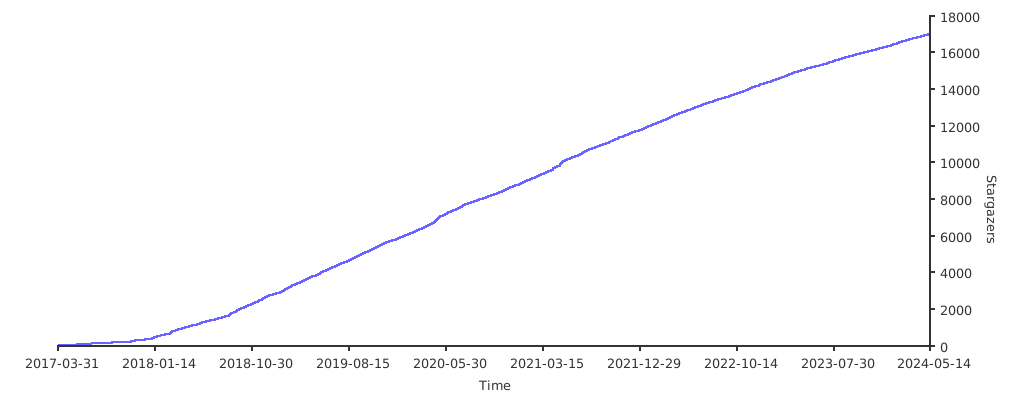
Stargazers over time