Compare commits
4 Commits
v0.0.237
...
harrison/m
| Author | SHA1 | Date | |
|---|---|---|---|

|
fb99d23b15 | ||
|
|
2f4a680c05 | ||

|
bb2cd74967 | ||

|
76b85d485d |
66
.github/CONTRIBUTING.md
vendored
@@ -95,14 +95,6 @@ To run formatting for this project:
|
||||
make format
|
||||
```
|
||||
|
||||
Additionally, you can run the formatter only on the files that have been modified in your current branch as compared to the master branch using the format_diff command:
|
||||
|
||||
```bash
|
||||
make format_diff
|
||||
```
|
||||
|
||||
This is especially useful when you have made changes to a subset of the project and want to ensure your changes are properly formatted without affecting the rest of the codebase.
|
||||
|
||||
### Linting
|
||||
|
||||
Linting for this project is done via a combination of [Black](https://black.readthedocs.io/en/stable/), [isort](https://pycqa.github.io/isort/), [flake8](https://flake8.pycqa.org/en/latest/), and [mypy](http://mypy-lang.org/).
|
||||
@@ -113,42 +105,8 @@ To run linting for this project:
|
||||
make lint
|
||||
```
|
||||
|
||||
In addition, you can run the linter only on the files that have been modified in your current branch as compared to the master branch using the lint_diff command:
|
||||
|
||||
```bash
|
||||
make lint_diff
|
||||
```
|
||||
|
||||
This can be very helpful when you've made changes to only certain parts of the project and want to ensure your changes meet the linting standards without having to check the entire codebase.
|
||||
|
||||
We recognize linting can be annoying - if you do not want to do it, please contact a project maintainer, and they can help you with it. We do not want this to be a blocker for good code getting contributed.
|
||||
|
||||
### Spellcheck
|
||||
|
||||
Spellchecking for this project is done via [codespell](https://github.com/codespell-project/codespell).
|
||||
Note that `codespell` finds common typos, so could have false-positive (correctly spelled but rarely used) and false-negatives (not finding misspelled) words.
|
||||
|
||||
To check spelling for this project:
|
||||
|
||||
```bash
|
||||
make spell_check
|
||||
```
|
||||
|
||||
To fix spelling in place:
|
||||
|
||||
```bash
|
||||
make spell_fix
|
||||
```
|
||||
|
||||
If codespell is incorrectly flagging a word, you can skip spellcheck for that word by adding it to the codespell config in the `pyproject.toml` file.
|
||||
|
||||
```python
|
||||
[tool.codespell]
|
||||
...
|
||||
# Add here:
|
||||
ignore-words-list = 'momento,collison,ned,foor,reworkd,parth,whats,aapply,mysogyny,unsecure'
|
||||
```
|
||||
|
||||
### Coverage
|
||||
|
||||
Code coverage (i.e. the amount of code that is covered by unit tests) helps identify areas of the code that are potentially more or less brittle.
|
||||
@@ -250,38 +208,30 @@ When you run `poetry install`, the `langchain` package is installed as editable
|
||||
|
||||
### Contribute Documentation
|
||||
|
||||
The docs directory contains Documentation and API Reference.
|
||||
Docs are largely autogenerated by [sphinx](https://www.sphinx-doc.org/en/master/) from the code.
|
||||
|
||||
Documentation is built using [Docusaurus 2](https://docusaurus.io/).
|
||||
|
||||
API Reference are largely autogenerated by [sphinx](https://www.sphinx-doc.org/en/master/) from the code.
|
||||
For that reason, we ask that you add good documentation to all classes and methods.
|
||||
|
||||
Similar to linting, we recognize documentation can be annoying. If you do not want to do it, please contact a project maintainer, and they can help you with it. We do not want this to be a blocker for good code getting contributed.
|
||||
|
||||
### Build Documentation Locally
|
||||
|
||||
In the following commands, the prefix `api_` indicates that those are operations for the API Reference.
|
||||
|
||||
Before building the documentation, it is always a good idea to clean the build directory:
|
||||
|
||||
```bash
|
||||
make docs_clean
|
||||
make api_docs_clean
|
||||
```
|
||||
|
||||
Next, you can build the documentation as outlined below:
|
||||
|
||||
```bash
|
||||
make docs_build
|
||||
make api_docs_build
|
||||
```
|
||||
|
||||
Finally, you can run the linkchecker to make sure all links are valid:
|
||||
Next, you can run the linkchecker to make sure all links are valid:
|
||||
|
||||
```bash
|
||||
make docs_linkcheck
|
||||
make api_docs_linkcheck
|
||||
```
|
||||
|
||||
Finally, you can build the documentation as outlined below:
|
||||
|
||||
```bash
|
||||
make docs_build
|
||||
```
|
||||
|
||||
## 🏭 Release Process
|
||||
|
||||
8
.github/PULL_REQUEST_TEMPLATE.md
vendored
@@ -7,18 +7,16 @@ Replace this comment with:
|
||||
- Tag maintainer: for a quicker response, tag the relevant maintainer (see below),
|
||||
- Twitter handle: we announce bigger features on Twitter. If your PR gets announced and you'd like a mention, we'll gladly shout you out!
|
||||
|
||||
Please make sure you're PR is passing linting and testing before submitting. Run `make format`, `make lint` and `make test` to check this locally.
|
||||
|
||||
If you're adding a new integration, please include:
|
||||
1. a test for the integration, preferably unit tests that do not rely on network access,
|
||||
2. an example notebook showing its use.
|
||||
|
||||
Maintainer responsibilities:
|
||||
- General / Misc / if you don't know who to tag: @baskaryan
|
||||
- General / Misc / if you don't know who to tag: @dev2049
|
||||
- DataLoaders / VectorStores / Retrievers: @rlancemartin, @eyurtsev
|
||||
- Models / Prompts: @hwchase17, @baskaryan
|
||||
- Models / Prompts: @hwchase17, @dev2049
|
||||
- Memory: @hwchase17
|
||||
- Agents / Tools / Toolkits: @hinthornw
|
||||
- Agents / Tools / Toolkits: @vowelparrot
|
||||
- Tracing / Callbacks: @agola11
|
||||
- Async: @agola11
|
||||
|
||||
|
||||
22
.github/workflows/codespell.yml
vendored
@@ -1,22 +0,0 @@
|
||||
---
|
||||
name: Codespell
|
||||
|
||||
on:
|
||||
push:
|
||||
branches: [master]
|
||||
pull_request:
|
||||
branches: [master]
|
||||
|
||||
permissions:
|
||||
contents: read
|
||||
|
||||
jobs:
|
||||
codespell:
|
||||
name: Check for spelling errors
|
||||
runs-on: ubuntu-latest
|
||||
|
||||
steps:
|
||||
- name: Checkout
|
||||
uses: actions/checkout@v3
|
||||
- name: Codespell
|
||||
uses: codespell-project/actions-codespell@v2
|
||||
5
.gitignore
vendored
@@ -161,12 +161,7 @@ docs/node_modules/
|
||||
docs/.docusaurus/
|
||||
docs/.cache-loader/
|
||||
docs/_dist
|
||||
docs/api_reference/api_reference.rst
|
||||
docs/api_reference/_build
|
||||
docs/api_reference/*/
|
||||
!docs/api_reference/_static/
|
||||
!docs/api_reference/templates/
|
||||
!docs/api_reference/themes/
|
||||
docs/docs_skeleton/build
|
||||
docs/docs_skeleton/node_modules
|
||||
docs/docs_skeleton/yarn.lock
|
||||
|
||||
@@ -9,9 +9,6 @@ build:
|
||||
os: ubuntu-22.04
|
||||
tools:
|
||||
python: "3.11"
|
||||
jobs:
|
||||
pre_build:
|
||||
- python docs/api_reference/create_api_rst.py
|
||||
|
||||
# Build documentation in the docs/ directory with Sphinx
|
||||
sphinx:
|
||||
|
||||
69
Makefile
@@ -1,47 +1,40 @@
|
||||
.PHONY: all clean docs_build docs_clean docs_linkcheck api_docs_build api_docs_clean api_docs_linkcheck format lint test tests test_watch integration_tests docker_tests help extended_tests
|
||||
.PHONY: all clean format lint test tests test_watch integration_tests docker_tests help extended_tests
|
||||
|
||||
# Default target executed when no arguments are given to make.
|
||||
all: help
|
||||
|
||||
######################
|
||||
# TESTING AND COVERAGE
|
||||
######################
|
||||
|
||||
# Run unit tests and generate a coverage report.
|
||||
coverage:
|
||||
poetry run pytest --cov \
|
||||
--cov-config=.coveragerc \
|
||||
--cov-report xml \
|
||||
--cov-report term-missing:skip-covered
|
||||
|
||||
######################
|
||||
# DOCUMENTATION
|
||||
######################
|
||||
|
||||
clean: docs_clean api_docs_clean
|
||||
clean: docs_clean
|
||||
|
||||
docs_compile:
|
||||
poetry run nbdoc_build --srcdir $(srcdir)
|
||||
|
||||
docs_build:
|
||||
docs/.local_build.sh
|
||||
cd docs && poetry run make html
|
||||
|
||||
docs_clean:
|
||||
rm -r docs/_dist
|
||||
cd docs && poetry run make clean
|
||||
|
||||
docs_linkcheck:
|
||||
poetry run linkchecker docs/_dist/docs_skeleton/ --ignore-url node_modules
|
||||
poetry run linkchecker docs/_build/html/index.html
|
||||
|
||||
api_docs_build:
|
||||
poetry run python docs/api_reference/create_api_rst.py
|
||||
cd docs/api_reference && poetry run make html
|
||||
format:
|
||||
poetry run black .
|
||||
poetry run ruff --select I --fix .
|
||||
|
||||
api_docs_clean:
|
||||
rm -f docs/api_reference/api_reference.rst
|
||||
cd docs/api_reference && poetry run make clean
|
||||
PYTHON_FILES=.
|
||||
lint: PYTHON_FILES=.
|
||||
lint_diff: PYTHON_FILES=$(shell git diff --name-only --diff-filter=d master | grep -E '\.py$$')
|
||||
|
||||
api_docs_linkcheck:
|
||||
poetry run linkchecker docs/api_reference/_build/html/index.html
|
||||
lint lint_diff:
|
||||
poetry run mypy $(PYTHON_FILES)
|
||||
poetry run black $(PYTHON_FILES) --check
|
||||
poetry run ruff .
|
||||
|
||||
# Define a variable for the test file path.
|
||||
TEST_FILE ?= tests/unit_tests/
|
||||
|
||||
test:
|
||||
@@ -63,34 +56,6 @@ docker_tests:
|
||||
docker build -t my-langchain-image:test .
|
||||
docker run --rm my-langchain-image:test
|
||||
|
||||
######################
|
||||
# LINTING AND FORMATTING
|
||||
######################
|
||||
|
||||
# Define a variable for Python and notebook files.
|
||||
PYTHON_FILES=.
|
||||
lint format: PYTHON_FILES=.
|
||||
lint_diff format_diff: PYTHON_FILES=$(shell git diff --name-only --diff-filter=d master | grep -E '\.py$$|\.ipynb$$')
|
||||
|
||||
lint lint_diff:
|
||||
poetry run mypy $(PYTHON_FILES)
|
||||
poetry run black $(PYTHON_FILES) --check
|
||||
poetry run ruff .
|
||||
|
||||
format format_diff:
|
||||
poetry run black $(PYTHON_FILES)
|
||||
poetry run ruff --select I --fix $(PYTHON_FILES)
|
||||
|
||||
spell_check:
|
||||
poetry run codespell --toml pyproject.toml
|
||||
|
||||
spell_fix:
|
||||
poetry run codespell --toml pyproject.toml -w
|
||||
|
||||
######################
|
||||
# HELP
|
||||
######################
|
||||
|
||||
help:
|
||||
@echo '----'
|
||||
@echo 'coverage - run unit tests and generate coverage report'
|
||||
|
||||
@@ -25,7 +25,7 @@ Please fill out [this form](https://forms.gle/57d8AmXBYp8PP8tZA) and we'll set u
|
||||
|
||||
`pip install langchain`
|
||||
or
|
||||
`pip install langsmith && conda install langchain -c conda-forge`
|
||||
`conda install langchain -c conda-forge`
|
||||
|
||||
## 🤔 What is this?
|
||||
|
||||
|
||||
@@ -1,15 +1,10 @@
|
||||
#!/usr/bin/env bash
|
||||
|
||||
set -o errexit
|
||||
set -o nounset
|
||||
set -o pipefail
|
||||
set -o xtrace
|
||||
|
||||
SCRIPT_DIR="$(cd "$(dirname "$0")"; pwd)"
|
||||
cd "${SCRIPT_DIR}"
|
||||
|
||||
mkdir -p _dist/docs_skeleton
|
||||
mkdir _dist
|
||||
cp -r {docs_skeleton,snippets} _dist
|
||||
mkdir -p _dist/docs_skeleton/static/api_reference
|
||||
cd api_reference
|
||||
poetry run make html
|
||||
cp -r _build/* ../_dist/docs_skeleton/static/api_reference
|
||||
cd ..
|
||||
cp -r extras/* _dist/docs_skeleton/docs
|
||||
cd _dist/docs_skeleton
|
||||
poetry run nbdoc_build
|
||||
|
||||
57
docs/api_reference/_static/js/mendablesearch.js
Normal file
@@ -0,0 +1,57 @@
|
||||
document.addEventListener('DOMContentLoaded', () => {
|
||||
// Load the external dependencies
|
||||
function loadScript(src, onLoadCallback) {
|
||||
const script = document.createElement('script');
|
||||
script.src = src;
|
||||
script.onload = onLoadCallback;
|
||||
document.head.appendChild(script);
|
||||
}
|
||||
|
||||
function createRootElement() {
|
||||
const rootElement = document.createElement('div');
|
||||
rootElement.id = 'my-component-root';
|
||||
document.body.appendChild(rootElement);
|
||||
return rootElement;
|
||||
}
|
||||
|
||||
|
||||
|
||||
function initializeMendable() {
|
||||
const rootElement = createRootElement();
|
||||
const { MendableFloatingButton } = Mendable;
|
||||
|
||||
|
||||
const iconSpan1 = React.createElement('span', {
|
||||
}, '🦜');
|
||||
|
||||
const iconSpan2 = React.createElement('span', {
|
||||
}, '🔗');
|
||||
|
||||
const icon = React.createElement('p', {
|
||||
style: { color: '#ffffff', fontSize: '22px',width: '48px', height: '48px', margin: '0px', padding: '0px', display: 'flex', alignItems: 'center', justifyContent: 'center', textAlign: 'center' },
|
||||
}, [iconSpan1, iconSpan2]);
|
||||
|
||||
const mendableFloatingButton = React.createElement(
|
||||
MendableFloatingButton,
|
||||
{
|
||||
style: { darkMode: false, accentColor: '#010810' },
|
||||
floatingButtonStyle: { color: '#ffffff', backgroundColor: '#010810' },
|
||||
anon_key: '82842b36-3ea6-49b2-9fb8-52cfc4bde6bf', // Mendable Search Public ANON key, ok to be public
|
||||
cmdShortcutKey:'j',
|
||||
messageSettings: {
|
||||
openSourcesInNewTab: false,
|
||||
prettySources: true // Prettify the sources displayed now
|
||||
},
|
||||
icon: icon,
|
||||
}
|
||||
);
|
||||
|
||||
ReactDOM.render(mendableFloatingButton, rootElement);
|
||||
}
|
||||
|
||||
loadScript('https://unpkg.com/react@17/umd/react.production.min.js', () => {
|
||||
loadScript('https://unpkg.com/react-dom@17/umd/react-dom.production.min.js', () => {
|
||||
loadScript('https://unpkg.com/@mendable/search@0.0.102/dist/umd/mendable.min.js', initializeMendable);
|
||||
});
|
||||
});
|
||||
});
|
||||
12
docs/api_reference/agents.rst
Normal file
@@ -0,0 +1,12 @@
|
||||
Agents
|
||||
==============
|
||||
|
||||
Reference guide for Agents and associated abstractions.
|
||||
|
||||
.. toctree::
|
||||
:maxdepth: 1
|
||||
:glob:
|
||||
|
||||
modules/agents
|
||||
modules/tools
|
||||
modules/agent_toolkits
|
||||
@@ -11,13 +11,12 @@
|
||||
# add these directories to sys.path here. If the directory is relative to the
|
||||
# documentation root, use os.path.abspath to make it absolute, like shown here.
|
||||
#
|
||||
import os
|
||||
import sys
|
||||
# import os
|
||||
# import sys
|
||||
# sys.path.insert(0, os.path.abspath('.'))
|
||||
|
||||
import toml
|
||||
|
||||
sys.path.insert(0, os.path.abspath("."))
|
||||
|
||||
with open("../../pyproject.toml") as f:
|
||||
data = toml.load(f)
|
||||
|
||||
@@ -46,9 +45,11 @@ extensions = [
|
||||
"sphinx.ext.napoleon",
|
||||
"sphinx.ext.viewcode",
|
||||
"sphinxcontrib.autodoc_pydantic",
|
||||
"myst_nb",
|
||||
"sphinx_copybutton",
|
||||
"sphinx_panels",
|
||||
"IPython.sphinxext.ipython_console_highlighting",
|
||||
"sphinx_tabs.tabs",
|
||||
]
|
||||
source_suffix = [".rst"]
|
||||
|
||||
@@ -58,22 +59,24 @@ autodoc_pydantic_config_members = False
|
||||
autodoc_pydantic_model_show_config_summary = False
|
||||
autodoc_pydantic_model_show_validator_members = False
|
||||
autodoc_pydantic_model_show_validator_summary = False
|
||||
autodoc_pydantic_model_show_field_summary = False
|
||||
autodoc_pydantic_model_members = False
|
||||
autodoc_pydantic_model_undoc_members = False
|
||||
autodoc_pydantic_model_hide_paramlist = False
|
||||
autodoc_pydantic_model_signature_prefix = "class"
|
||||
autodoc_pydantic_field_signature_prefix = "param"
|
||||
autodoc_member_order = "groupwise"
|
||||
autoclass_content = "both"
|
||||
autodoc_typehints_format = "short"
|
||||
|
||||
autodoc_pydantic_field_signature_prefix = "attribute"
|
||||
autodoc_pydantic_model_summary_list_order = "bysource"
|
||||
autodoc_member_order = "bysource"
|
||||
autodoc_default_options = {
|
||||
"members": True,
|
||||
"show-inheritance": True,
|
||||
"inherited-members": "BaseModel",
|
||||
"undoc-members": True,
|
||||
"special-members": "__call__",
|
||||
"undoc_members": True,
|
||||
"inherited_members": "BaseModel",
|
||||
}
|
||||
# autodoc_typehints = "description"
|
||||
autodoc_typehints = "description"
|
||||
|
||||
# Add any paths that contain templates here, relative to this directory.
|
||||
templates_path = ["templates"]
|
||||
templates_path = ["_templates"]
|
||||
|
||||
# List of patterns, relative to source directory, that match files and
|
||||
# directories to ignore when looking for source files.
|
||||
@@ -86,16 +89,14 @@ exclude_patterns = ["_build", "Thumbs.db", ".DS_Store"]
|
||||
# The theme to use for HTML and HTML Help pages. See the documentation for
|
||||
# a list of builtin themes.
|
||||
#
|
||||
html_theme = "scikit-learn-modern"
|
||||
html_theme_path = ["themes"]
|
||||
html_theme = "sphinx_rtd_theme"
|
||||
|
||||
# redirects dictionary maps from old links to new links
|
||||
html_additional_pages = {}
|
||||
redirects = {
|
||||
"index": "api_reference",
|
||||
html_theme_options = {
|
||||
"path_to_docs": "docs",
|
||||
"repository_url": "https://github.com/hwchase17/langchain",
|
||||
"use_repository_button": True,
|
||||
# "style_nav_header_background": "white"
|
||||
}
|
||||
for old_link in redirects:
|
||||
html_additional_pages[old_link] = "redirects.html"
|
||||
|
||||
html_context = {
|
||||
"display_github": True, # Integrate GitHub
|
||||
@@ -103,7 +104,6 @@ html_context = {
|
||||
"github_repo": "langchain", # Repo name
|
||||
"github_version": "master", # Version
|
||||
"conf_py_path": "/docs/api_reference", # Path in the checkout to the docs root
|
||||
"redirects": redirects,
|
||||
}
|
||||
|
||||
# Add any paths that contain custom static files (such as style sheets) here,
|
||||
@@ -116,9 +116,10 @@ html_static_path = ["_static"]
|
||||
html_css_files = [
|
||||
"css/custom.css",
|
||||
]
|
||||
html_use_index = False
|
||||
|
||||
html_js_files = [
|
||||
"js/mendablesearch.js",
|
||||
]
|
||||
|
||||
nb_execution_mode = "off"
|
||||
myst_enable_extensions = ["colon_fence"]
|
||||
|
||||
# generate autosummary even if no references
|
||||
autosummary_generate = True
|
||||
|
||||
@@ -1,96 +0,0 @@
|
||||
"""Script for auto-generating api_reference.rst"""
|
||||
import glob
|
||||
import re
|
||||
from pathlib import Path
|
||||
|
||||
ROOT_DIR = Path(__file__).parents[2].absolute()
|
||||
PKG_DIR = ROOT_DIR / "langchain"
|
||||
WRITE_FILE = Path(__file__).parent / "api_reference.rst"
|
||||
|
||||
|
||||
def load_members() -> dict:
|
||||
members: dict = {}
|
||||
for py in glob.glob(str(PKG_DIR) + "/**/*.py", recursive=True):
|
||||
module = py[len(str(PKG_DIR)) + 1 :].replace(".py", "").replace("/", ".")
|
||||
top_level = module.split(".")[0]
|
||||
if top_level not in members:
|
||||
members[top_level] = {"classes": [], "functions": []}
|
||||
with open(py, "r") as f:
|
||||
for line in f.readlines():
|
||||
cls = re.findall(r"^class ([^_].*)\(", line)
|
||||
members[top_level]["classes"].extend([module + "." + c for c in cls])
|
||||
func = re.findall(r"^def ([^_].*)\(", line)
|
||||
afunc = re.findall(r"^async def ([^_].*)\(", line)
|
||||
func_strings = [module + "." + f for f in func + afunc]
|
||||
members[top_level]["functions"].extend(func_strings)
|
||||
return members
|
||||
|
||||
|
||||
def construct_doc(members: dict) -> str:
|
||||
full_doc = """\
|
||||
.. _api_reference:
|
||||
|
||||
=============
|
||||
API Reference
|
||||
=============
|
||||
|
||||
"""
|
||||
for module, _members in sorted(members.items(), key=lambda kv: kv[0]):
|
||||
classes = _members["classes"]
|
||||
functions = _members["functions"]
|
||||
if not (classes or functions):
|
||||
continue
|
||||
|
||||
module_title = module.replace("_", " ").title()
|
||||
if module_title == "Llms":
|
||||
module_title = "LLMs"
|
||||
section = f":mod:`langchain.{module}`: {module_title}"
|
||||
full_doc += f"""\
|
||||
{section}
|
||||
{'=' * (len(section) + 1)}
|
||||
|
||||
.. automodule:: langchain.{module}
|
||||
:no-members:
|
||||
:no-inherited-members:
|
||||
|
||||
"""
|
||||
|
||||
if classes:
|
||||
cstring = "\n ".join(sorted(classes))
|
||||
full_doc += f"""\
|
||||
Classes
|
||||
--------------
|
||||
.. currentmodule:: langchain
|
||||
|
||||
.. autosummary::
|
||||
:toctree: {module}
|
||||
:template: class.rst
|
||||
|
||||
{cstring}
|
||||
|
||||
"""
|
||||
if functions:
|
||||
fstring = "\n ".join(sorted(functions))
|
||||
full_doc += f"""\
|
||||
Functions
|
||||
--------------
|
||||
.. currentmodule:: langchain
|
||||
|
||||
.. autosummary::
|
||||
:toctree: {module}
|
||||
|
||||
{fstring}
|
||||
|
||||
"""
|
||||
return full_doc
|
||||
|
||||
|
||||
def main() -> None:
|
||||
members = load_members()
|
||||
full_doc = construct_doc(members)
|
||||
with open(WRITE_FILE, "w") as f:
|
||||
f.write(full_doc)
|
||||
|
||||
|
||||
if __name__ == "__main__":
|
||||
main()
|
||||
13
docs/api_reference/data_connection.rst
Normal file
@@ -0,0 +1,13 @@
|
||||
Data connection
|
||||
==============
|
||||
LangChain has a number of modules that help you load, structure, store, and retrieve documents.
|
||||
|
||||
.. toctree::
|
||||
:maxdepth: 1
|
||||
:glob:
|
||||
|
||||
modules/document_loaders
|
||||
modules/document_transformers
|
||||
modules/embeddings
|
||||
modules/vectorstores
|
||||
modules/retrievers
|
||||
@@ -1,8 +1,29 @@
|
||||
=============
|
||||
LangChain API
|
||||
=============
|
||||
API Reference
|
||||
==========================
|
||||
|
||||
| Full documentation on all methods, classes, and APIs in the LangChain Python package.
|
||||
|
||||
.. toctree::
|
||||
:maxdepth: 2
|
||||
:maxdepth: 1
|
||||
:caption: Abstractions
|
||||
|
||||
api_reference.rst
|
||||
./modules/base_classes.rst
|
||||
|
||||
|
||||
.. toctree::
|
||||
:maxdepth: 1
|
||||
:caption: Core
|
||||
|
||||
./model_io.rst
|
||||
./data_connection.rst
|
||||
./modules/chains.rst
|
||||
./agents.rst
|
||||
./modules/memory.rst
|
||||
./modules/callbacks.rst
|
||||
|
||||
.. toctree::
|
||||
:maxdepth: 1
|
||||
:caption: Additional
|
||||
|
||||
./modules/utilities.rst
|
||||
./modules/experimental.rst
|
||||
|
||||
12
docs/api_reference/model_io.rst
Normal file
@@ -0,0 +1,12 @@
|
||||
Model I/O
|
||||
==============
|
||||
|
||||
LangChain provides interfaces and integrations for working with language models.
|
||||
|
||||
.. toctree::
|
||||
:maxdepth: 1
|
||||
:glob:
|
||||
|
||||
./prompts.rst
|
||||
./models.rst
|
||||
./modules/output_parsers.rst
|
||||
11
docs/api_reference/models.rst
Normal file
@@ -0,0 +1,11 @@
|
||||
Models
|
||||
==============
|
||||
|
||||
LangChain provides interfaces and integrations for a number of different types of models.
|
||||
|
||||
.. toctree::
|
||||
:maxdepth: 1
|
||||
:glob:
|
||||
|
||||
modules/llms
|
||||
modules/chat_models
|
||||
7
docs/api_reference/modules/agent_toolkits.rst
Normal file
@@ -0,0 +1,7 @@
|
||||
Agent Toolkits
|
||||
===============================
|
||||
|
||||
.. automodule:: langchain.agents.agent_toolkits
|
||||
:members:
|
||||
:undoc-members:
|
||||
|
||||
7
docs/api_reference/modules/agents.rst
Normal file
@@ -0,0 +1,7 @@
|
||||
Agents
|
||||
===============================
|
||||
|
||||
.. automodule:: langchain.agents
|
||||
:members:
|
||||
:undoc-members:
|
||||
|
||||
5
docs/api_reference/modules/base_classes.rst
Normal file
@@ -0,0 +1,5 @@
|
||||
Base classes
|
||||
========================
|
||||
|
||||
.. automodule:: langchain.schema
|
||||
:inherited-members:
|
||||
7
docs/api_reference/modules/callbacks.rst
Normal file
@@ -0,0 +1,7 @@
|
||||
Callbacks
|
||||
=======================
|
||||
|
||||
.. automodule:: langchain.callbacks
|
||||
:members:
|
||||
:undoc-members:
|
||||
|
||||
8
docs/api_reference/modules/chains.rst
Normal file
@@ -0,0 +1,8 @@
|
||||
Chains
|
||||
=======================
|
||||
|
||||
.. automodule:: langchain.chains
|
||||
:members:
|
||||
:undoc-members:
|
||||
:inherited-members: BaseModel
|
||||
|
||||
7
docs/api_reference/modules/chat_models.rst
Normal file
@@ -0,0 +1,7 @@
|
||||
Chat Models
|
||||
===============================
|
||||
|
||||
.. automodule:: langchain.chat_models
|
||||
:members:
|
||||
:undoc-members:
|
||||
|
||||
7
docs/api_reference/modules/document_loaders.rst
Normal file
@@ -0,0 +1,7 @@
|
||||
Document Loaders
|
||||
===============================
|
||||
|
||||
.. automodule:: langchain.document_loaders
|
||||
:members:
|
||||
:undoc-members:
|
||||
|
||||
13
docs/api_reference/modules/document_transformers.rst
Normal file
@@ -0,0 +1,13 @@
|
||||
Document Transformers
|
||||
===============================
|
||||
|
||||
.. automodule:: langchain.document_transformers
|
||||
:members:
|
||||
:undoc-members:
|
||||
|
||||
Text Splitters
|
||||
------------------------------
|
||||
|
||||
.. automodule:: langchain.text_splitter
|
||||
:members:
|
||||
:undoc-members:
|
||||
5
docs/api_reference/modules/embeddings.rst
Normal file
@@ -0,0 +1,5 @@
|
||||
Embeddings
|
||||
===========================
|
||||
|
||||
.. automodule:: langchain.embeddings
|
||||
:members:
|
||||
@@ -1,9 +0,0 @@
|
||||
Evaluation
|
||||
=======================
|
||||
|
||||
LangChain has a number of convenient evaluation chains you can use off the shelf to grade your models' oupputs.
|
||||
|
||||
.. automodule:: langchain.evaluation
|
||||
:members:
|
||||
:undoc-members:
|
||||
:inherited-members:
|
||||
5
docs/api_reference/modules/example_selector.rst
Normal file
@@ -0,0 +1,5 @@
|
||||
Example Selector
|
||||
=========================================
|
||||
|
||||
.. automodule:: langchain.prompts.example_selector
|
||||
:members:
|
||||
28
docs/api_reference/modules/experimental.rst
Normal file
@@ -0,0 +1,28 @@
|
||||
====================
|
||||
Experimental
|
||||
====================
|
||||
|
||||
This module contains experimental modules and reproductions of existing work using LangChain primitives.
|
||||
|
||||
Autonomous agents
|
||||
------------------
|
||||
|
||||
Here, we document the BabyAGI and AutoGPT classes from the langchain.experimental module.
|
||||
|
||||
.. autoclass:: langchain.experimental.BabyAGI
|
||||
:members:
|
||||
|
||||
.. autoclass:: langchain.experimental.AutoGPT
|
||||
:members:
|
||||
|
||||
|
||||
Generative agents
|
||||
------------------
|
||||
|
||||
Here, we document the GenerativeAgent and GenerativeAgentMemory classes from the langchain.experimental module.
|
||||
|
||||
.. autoclass:: langchain.experimental.GenerativeAgent
|
||||
:members:
|
||||
|
||||
.. autoclass:: langchain.experimental.GenerativeAgentMemory
|
||||
:members:
|
||||
7
docs/api_reference/modules/llms.rst
Normal file
@@ -0,0 +1,7 @@
|
||||
LLMs
|
||||
=======================
|
||||
|
||||
.. automodule:: langchain.llms
|
||||
:members:
|
||||
:inherited-members:
|
||||
:special-members: __call__
|
||||
7
docs/api_reference/modules/memory.rst
Normal file
@@ -0,0 +1,7 @@
|
||||
Memory
|
||||
===============================
|
||||
|
||||
.. automodule:: langchain.memory
|
||||
:members:
|
||||
:undoc-members:
|
||||
|
||||
7
docs/api_reference/modules/output_parsers.rst
Normal file
@@ -0,0 +1,7 @@
|
||||
Output Parsers
|
||||
===============================
|
||||
|
||||
.. automodule:: langchain.output_parsers
|
||||
:members:
|
||||
:undoc-members:
|
||||
|
||||
6
docs/api_reference/modules/prompts.rst
Normal file
@@ -0,0 +1,6 @@
|
||||
Prompt Templates
|
||||
========================
|
||||
|
||||
.. automodule:: langchain.prompts
|
||||
:members:
|
||||
:undoc-members:
|
||||
14
docs/api_reference/modules/retrievers.rst
Normal file
@@ -0,0 +1,14 @@
|
||||
Retrievers
|
||||
===============================
|
||||
|
||||
.. automodule:: langchain.retrievers
|
||||
:members:
|
||||
:undoc-members:
|
||||
|
||||
Document compressors
|
||||
-------------------------------
|
||||
|
||||
.. automodule:: langchain.retrievers.document_compressors
|
||||
:members:
|
||||
:undoc-members:
|
||||
|
||||
7
docs/api_reference/modules/tools.rst
Normal file
@@ -0,0 +1,7 @@
|
||||
Tools
|
||||
===============================
|
||||
|
||||
.. automodule:: langchain.tools
|
||||
:members:
|
||||
:undoc-members:
|
||||
|
||||
7
docs/api_reference/modules/utilities.rst
Normal file
@@ -0,0 +1,7 @@
|
||||
Utilities
|
||||
===============================
|
||||
|
||||
.. automodule:: langchain.utilities
|
||||
:members:
|
||||
:undoc-members:
|
||||
|
||||
6
docs/api_reference/modules/vectorstores.rst
Normal file
@@ -0,0 +1,6 @@
|
||||
Vector Stores
|
||||
=============================
|
||||
|
||||
.. automodule:: langchain.vectorstores
|
||||
:members:
|
||||
:undoc-members:
|
||||
11
docs/api_reference/prompts.rst
Normal file
@@ -0,0 +1,11 @@
|
||||
Prompts
|
||||
==============
|
||||
|
||||
The reference guides here all relate to objects for working with Prompts.
|
||||
|
||||
.. toctree::
|
||||
:maxdepth: 1
|
||||
:glob:
|
||||
|
||||
modules/prompts
|
||||
modules/example_selector
|
||||
@@ -1,27 +0,0 @@
|
||||
Copyright (c) 2007-2023 The scikit-learn developers.
|
||||
All rights reserved.
|
||||
|
||||
Redistribution and use in source and binary forms, with or without
|
||||
modification, are permitted provided that the following conditions are met:
|
||||
|
||||
* Redistributions of source code must retain the above copyright notice, this
|
||||
list of conditions and the following disclaimer.
|
||||
|
||||
* Redistributions in binary form must reproduce the above copyright notice,
|
||||
this list of conditions and the following disclaimer in the documentation
|
||||
and/or other materials provided with the distribution.
|
||||
|
||||
* Neither the name of the copyright holder nor the names of its
|
||||
contributors may be used to endorse or promote products derived from
|
||||
this software without specific prior written permission.
|
||||
|
||||
THIS SOFTWARE IS PROVIDED BY THE COPYRIGHT HOLDERS AND CONTRIBUTORS "AS IS"
|
||||
AND ANY EXPRESS OR IMPLIED WARRANTIES, INCLUDING, BUT NOT LIMITED TO, THE
|
||||
IMPLIED WARRANTIES OF MERCHANTABILITY AND FITNESS FOR A PARTICULAR PURPOSE ARE
|
||||
DISCLAIMED. IN NO EVENT SHALL THE COPYRIGHT HOLDER OR CONTRIBUTORS BE LIABLE
|
||||
FOR ANY DIRECT, INDIRECT, INCIDENTAL, SPECIAL, EXEMPLARY, OR CONSEQUENTIAL
|
||||
DAMAGES (INCLUDING, BUT NOT LIMITED TO, PROCUREMENT OF SUBSTITUTE GOODS OR
|
||||
SERVICES; LOSS OF USE, DATA, OR PROFITS; OR BUSINESS INTERRUPTION) HOWEVER
|
||||
CAUSED AND ON ANY THEORY OF LIABILITY, WHETHER IN CONTRACT, STRICT LIABILITY,
|
||||
OR TORT (INCLUDING NEGLIGENCE OR OTHERWISE) ARISING IN ANY WAY OUT OF THE USE
|
||||
OF THIS SOFTWARE, EVEN IF ADVISED OF THE POSSIBILITY OF SUCH DAMAGE.
|
||||
@@ -1,28 +0,0 @@
|
||||
:mod:`{{module}}`.{{objname}}
|
||||
{{ underline }}==============
|
||||
|
||||
.. currentmodule:: {{ module }}
|
||||
|
||||
.. autoclass:: {{ objname }}
|
||||
|
||||
{% block methods %}
|
||||
{% if methods %}
|
||||
.. rubric:: {{ _('Methods') }}
|
||||
|
||||
.. autosummary::
|
||||
{% for item in methods %}
|
||||
~{{ name }}.{{ item }}
|
||||
{%- endfor %}
|
||||
{% endif %}
|
||||
{% endblock %}
|
||||
|
||||
{% block attributes %}
|
||||
{% if attributes %}
|
||||
.. rubric:: {{ _('Attributes') }}
|
||||
|
||||
.. autosummary::
|
||||
{% for item in attributes %}
|
||||
~{{ name }}.{{ item }}
|
||||
{%- endfor %}
|
||||
{% endif %}
|
||||
{% endblock %}
|
||||
@@ -1,15 +0,0 @@
|
||||
{% set redirect = pathto(redirects[pagename]) %}
|
||||
<!DOCTYPE html>
|
||||
<html>
|
||||
<head>
|
||||
<meta charset="utf-8">
|
||||
<meta name="viewport" content="width=device-width, initial-scale=1.0">
|
||||
<meta http-equiv="Refresh" content="0; url={{ redirect }}" />
|
||||
<meta name="Description" content="scikit-learn: machine learning in Python">
|
||||
<link rel="canonical" href="{{ redirect }}" />
|
||||
<title>scikit-learn: machine learning in Python</title>
|
||||
</head>
|
||||
<body>
|
||||
<p>You will be automatically redirected to the <a href="{{ redirect }}">new location of this page</a>.</p>
|
||||
</body>
|
||||
</html>
|
||||
@@ -1,27 +0,0 @@
|
||||
Copyright (c) 2007-2023 The scikit-learn developers.
|
||||
All rights reserved.
|
||||
|
||||
Redistribution and use in source and binary forms, with or without
|
||||
modification, are permitted provided that the following conditions are met:
|
||||
|
||||
* Redistributions of source code must retain the above copyright notice, this
|
||||
list of conditions and the following disclaimer.
|
||||
|
||||
* Redistributions in binary form must reproduce the above copyright notice,
|
||||
this list of conditions and the following disclaimer in the documentation
|
||||
and/or other materials provided with the distribution.
|
||||
|
||||
* Neither the name of the copyright holder nor the names of its
|
||||
contributors may be used to endorse or promote products derived from
|
||||
this software without specific prior written permission.
|
||||
|
||||
THIS SOFTWARE IS PROVIDED BY THE COPYRIGHT HOLDERS AND CONTRIBUTORS "AS IS"
|
||||
AND ANY EXPRESS OR IMPLIED WARRANTIES, INCLUDING, BUT NOT LIMITED TO, THE
|
||||
IMPLIED WARRANTIES OF MERCHANTABILITY AND FITNESS FOR A PARTICULAR PURPOSE ARE
|
||||
DISCLAIMED. IN NO EVENT SHALL THE COPYRIGHT HOLDER OR CONTRIBUTORS BE LIABLE
|
||||
FOR ANY DIRECT, INDIRECT, INCIDENTAL, SPECIAL, EXEMPLARY, OR CONSEQUENTIAL
|
||||
DAMAGES (INCLUDING, BUT NOT LIMITED TO, PROCUREMENT OF SUBSTITUTE GOODS OR
|
||||
SERVICES; LOSS OF USE, DATA, OR PROFITS; OR BUSINESS INTERRUPTION) HOWEVER
|
||||
CAUSED AND ON ANY THEORY OF LIABILITY, WHETHER IN CONTRACT, STRICT LIABILITY,
|
||||
OR TORT (INCLUDING NEGLIGENCE OR OTHERWISE) ARISING IN ANY WAY OUT OF THE USE
|
||||
OF THIS SOFTWARE, EVEN IF ADVISED OF THE POSSIBILITY OF SUCH DAMAGE.
|
||||
@@ -1,67 +0,0 @@
|
||||
<script>
|
||||
$(document).ready(function() {
|
||||
/* Add a [>>>] button on the top-right corner of code samples to hide
|
||||
* the >>> and ... prompts and the output and thus make the code
|
||||
* copyable. */
|
||||
var div = $('.highlight-python .highlight,' +
|
||||
'.highlight-python3 .highlight,' +
|
||||
'.highlight-pycon .highlight,' +
|
||||
'.highlight-default .highlight')
|
||||
var pre = div.find('pre');
|
||||
|
||||
// get the styles from the current theme
|
||||
pre.parent().parent().css('position', 'relative');
|
||||
var hide_text = 'Hide prompts and outputs';
|
||||
var show_text = 'Show prompts and outputs';
|
||||
|
||||
// create and add the button to all the code blocks that contain >>>
|
||||
div.each(function(index) {
|
||||
var jthis = $(this);
|
||||
if (jthis.find('.gp').length > 0) {
|
||||
var button = $('<span class="copybutton">>>></span>');
|
||||
button.attr('title', hide_text);
|
||||
button.data('hidden', 'false');
|
||||
jthis.prepend(button);
|
||||
}
|
||||
// tracebacks (.gt) contain bare text elements that need to be
|
||||
// wrapped in a span to work with .nextUntil() (see later)
|
||||
jthis.find('pre:has(.gt)').contents().filter(function() {
|
||||
return ((this.nodeType == 3) && (this.data.trim().length > 0));
|
||||
}).wrap('<span>');
|
||||
});
|
||||
|
||||
// define the behavior of the button when it's clicked
|
||||
$('.copybutton').click(function(e){
|
||||
e.preventDefault();
|
||||
var button = $(this);
|
||||
if (button.data('hidden') === 'false') {
|
||||
// hide the code output
|
||||
button.parent().find('.go, .gp, .gt').hide();
|
||||
button.next('pre').find('.gt').nextUntil('.gp, .go').css('visibility', 'hidden');
|
||||
button.css('text-decoration', 'line-through');
|
||||
button.attr('title', show_text);
|
||||
button.data('hidden', 'true');
|
||||
} else {
|
||||
// show the code output
|
||||
button.parent().find('.go, .gp, .gt').show();
|
||||
button.next('pre').find('.gt').nextUntil('.gp, .go').css('visibility', 'visible');
|
||||
button.css('text-decoration', 'none');
|
||||
button.attr('title', hide_text);
|
||||
button.data('hidden', 'false');
|
||||
}
|
||||
});
|
||||
|
||||
/*** Add permalink buttons next to glossary terms ***/
|
||||
$('dl.glossary > dt[id]').append(function() {
|
||||
return ('<a class="headerlink" href="#' +
|
||||
this.getAttribute('id') +
|
||||
'" title="Permalink to this term">¶</a>');
|
||||
});
|
||||
});
|
||||
|
||||
</script>
|
||||
{%- if pagename != 'index' and pagename != 'documentation' %}
|
||||
{% if theme_mathjax_path %}
|
||||
<script id="MathJax-script" async src="{{ theme_mathjax_path }}"></script>
|
||||
{% endif %}
|
||||
{%- endif %}
|
||||
@@ -1,142 +0,0 @@
|
||||
{# TEMPLATE VAR SETTINGS #}
|
||||
{%- set url_root = pathto('', 1) %}
|
||||
{%- if url_root == '#' %}{% set url_root = '' %}{% endif %}
|
||||
{%- if not embedded and docstitle %}
|
||||
{%- set titlesuffix = " — "|safe + docstitle|e %}
|
||||
{%- else %}
|
||||
{%- set titlesuffix = "" %}
|
||||
{%- endif %}
|
||||
{%- set lang_attr = 'en' %}
|
||||
|
||||
<!DOCTYPE html>
|
||||
<!--[if IE 8]><html class="no-js lt-ie9" lang="{{ lang_attr }}" > <![endif]-->
|
||||
<!--[if gt IE 8]><!--> <html class="no-js" lang="{{ lang_attr }}" > <!--<![endif]-->
|
||||
<head>
|
||||
<meta charset="utf-8">
|
||||
{{ metatags }}
|
||||
<meta name="viewport" content="width=device-width, initial-scale=1.0">
|
||||
|
||||
{% block htmltitle %}
|
||||
<title>{{ title|striptags|e }}{{ titlesuffix }}</title>
|
||||
{% endblock %}
|
||||
<link rel="canonical" href="http://scikit-learn.org/stable/{{pagename}}.html" />
|
||||
|
||||
{% if favicon_url %}
|
||||
<link rel="shortcut icon" href="{{ favicon_url|e }}"/>
|
||||
{% endif %}
|
||||
|
||||
<link rel="stylesheet" href="{{ pathto('_static/css/vendor/bootstrap.min.css', 1) }}" type="text/css" />
|
||||
{%- for css in css_files %}
|
||||
{%- if css|attr("rel") %}
|
||||
<link rel="{{ css.rel }}" href="{{ pathto(css.filename, 1) }}" type="text/css"{% if css.title is not none %} title="{{ css.title }}"{% endif %} />
|
||||
{%- else %}
|
||||
<link rel="stylesheet" href="{{ pathto(css, 1) }}" type="text/css" />
|
||||
{%- endif %}
|
||||
{%- endfor %}
|
||||
<link rel="stylesheet" href="{{ pathto('_static/' + style, 1) }}" type="text/css" />
|
||||
<script id="documentation_options" data-url_root="{{ pathto('', 1) }}" src="{{ pathto('_static/documentation_options.js', 1) }}"></script>
|
||||
<script src="{{ pathto('_static/jquery.js', 1) }}"></script>
|
||||
{%- block extrahead %} {% endblock %}
|
||||
</head>
|
||||
<body>
|
||||
{% include "nav.html" %}
|
||||
{%- block content %}
|
||||
<div class="d-flex" id="sk-doc-wrapper">
|
||||
<input type="checkbox" name="sk-toggle-checkbox" id="sk-toggle-checkbox">
|
||||
<label id="sk-sidemenu-toggle" class="sk-btn-toggle-toc btn sk-btn-primary" for="sk-toggle-checkbox">Toggle Menu</label>
|
||||
<div id="sk-sidebar-wrapper" class="border-right">
|
||||
<div class="sk-sidebar-toc-wrapper">
|
||||
<div class="btn-group w-100 mb-2" role="group" aria-label="rellinks">
|
||||
{%- if prev %}
|
||||
<a href="{{ prev.link|e }}" role="button" class="btn sk-btn-rellink py-1" sk-rellink-tooltip="{{ prev.title|striptags }}">Prev</a>
|
||||
{%- else %}
|
||||
<a href="#" role="button" class="btn sk-btn-rellink py-1 disabled"">Prev</a>
|
||||
{%- endif %}
|
||||
{%- if parents -%}
|
||||
<a href="{{ parents[-1].link|e }}" role="button" class="btn sk-btn-rellink py-1" sk-rellink-tooltip="{{ parents[-1].title|striptags }}">Up</a>
|
||||
{%- else %}
|
||||
<a href="#" role="button" class="btn sk-btn-rellink disabled py-1">Up</a>
|
||||
{%- endif %}
|
||||
{%- if next %}
|
||||
<a href="{{ next.link|e }}" role="button" class="btn sk-btn-rellink py-1" sk-rellink-tooltip="{{ next.title|striptags }}">Next</a>
|
||||
{%- else %}
|
||||
<a href="#" role="button" class="btn sk-btn-rellink py-1 disabled"">Next</a>
|
||||
{%- endif %}
|
||||
</div>
|
||||
{%- if pagename != "install" %}
|
||||
<div class="alert alert-warning p-1 mb-2" role="alert">
|
||||
<p class="text-center mb-0">
|
||||
<strong>LangChain {{ release }}</strong><br/>
|
||||
</p>
|
||||
</div>
|
||||
{%- endif %}
|
||||
{%- if meta and meta['parenttoc']|tobool %}
|
||||
<div class="sk-sidebar-toc">
|
||||
{% set nav = get_nav_object(maxdepth=3, collapse=True, numbered=True) %}
|
||||
<ul>
|
||||
{% for main_nav_item in nav %}
|
||||
{% if main_nav_item.active %}
|
||||
<li>
|
||||
<a href="{{ main_nav_item.url }}" class="sk-toc-active">{{ main_nav_item.title }}</a>
|
||||
</li>
|
||||
<ul>
|
||||
{% for nav_item in main_nav_item.children %}
|
||||
<li>
|
||||
<a href="{{ nav_item.url }}" class="{% if nav_item.active %}sk-toc-active{% endif %}">{{ nav_item.title }}</a>
|
||||
{% if nav_item.children %}
|
||||
<ul>
|
||||
{% for inner_child in nav_item.children %}
|
||||
<li class="sk-toctree-l3">
|
||||
<a href="{{ inner_child.url }}">{{ inner_child.title }}</a>
|
||||
</li>
|
||||
{% endfor %}
|
||||
</ul>
|
||||
{% endif %}
|
||||
</li>
|
||||
{% endfor %}
|
||||
</ul>
|
||||
{% endif %}
|
||||
{% endfor %}
|
||||
</ul>
|
||||
</div>
|
||||
{%- elif meta and meta['globalsidebartoc']|tobool %}
|
||||
<div class="sk-sidebar-toc sk-sidebar-global-toc">
|
||||
{{ toctree(maxdepth=2, titles_only=True) }}
|
||||
</div>
|
||||
{%- else %}
|
||||
<div class="sk-sidebar-toc">
|
||||
{{ toc }}
|
||||
</div>
|
||||
{%- endif %}
|
||||
</div>
|
||||
</div>
|
||||
<div id="sk-page-content-wrapper">
|
||||
<div class="sk-page-content container-fluid body px-md-3" role="main">
|
||||
{% block body %}{% endblock %}
|
||||
</div>
|
||||
<div class="container">
|
||||
<footer class="sk-content-footer">
|
||||
{%- if pagename != 'index' %}
|
||||
{%- if show_copyright %}
|
||||
{%- if hasdoc('copyright') %}
|
||||
{% trans path=pathto('copyright'), copyright=copyright|e %}© {{ copyright }}.{% endtrans %}
|
||||
{%- else %}
|
||||
{% trans copyright=copyright|e %}© {{ copyright }}.{% endtrans %}
|
||||
{%- endif %}
|
||||
{%- endif %}
|
||||
{%- if last_updated %}
|
||||
{% trans last_updated=last_updated|e %}Last updated on {{ last_updated }}.{% endtrans %}
|
||||
{%- endif %}
|
||||
{%- if show_source and has_source and sourcename %}
|
||||
<a href="{{ pathto('_sources/' + sourcename, true)|e }}" rel="nofollow">{{ _('Show this page source') }}</a>
|
||||
{%- endif %}
|
||||
{%- endif %}
|
||||
</footer>
|
||||
</div>
|
||||
</div>
|
||||
</div>
|
||||
{%- endblock %}
|
||||
<script src="{{ pathto('_static/js/vendor/bootstrap.min.js', 1) }}"></script>
|
||||
{% include "javascript.html" %}
|
||||
</body>
|
||||
</html>
|
||||
@@ -1,69 +0,0 @@
|
||||
{%- if pagename != 'index' and pagename != 'documentation' %}
|
||||
{%- set nav_bar_class = "sk-docs-navbar" %}
|
||||
{%- set top_container_cls = "sk-docs-container" %}
|
||||
{%- else %}
|
||||
{%- set nav_bar_class = "sk-landing-navbar" %}
|
||||
{%- set top_container_cls = "sk-landing-container" %}
|
||||
{%- endif %}
|
||||
|
||||
{% if theme_link_to_live_contributing_page|tobool %}
|
||||
{# Link to development page for live builds #}
|
||||
{%- set development_link = "https://scikit-learn.org/dev/developers/index.html" %}
|
||||
{# Open on a new development page in new window/tab for live builds #}
|
||||
{%- set development_attrs = 'target="_blank" rel="noopener noreferrer"' %}
|
||||
{%- else %}
|
||||
{%- set development_link = pathto('developers/index') %}
|
||||
{%- set development_attrs = '' %}
|
||||
{%- endif %}
|
||||
|
||||
|
||||
<nav id="navbar" class="{{ nav_bar_class }} navbar navbar-expand-md navbar-light bg-light py-0">
|
||||
<div class="container-fluid {{ top_container_cls }} px-0">
|
||||
{%- if logo_url %}
|
||||
<a class="navbar-brand py-0" href="{{ pathto('index') }}">
|
||||
<img
|
||||
class="sk-brand-img"
|
||||
src="{{ logo_url|e }}"
|
||||
alt="logo"/>
|
||||
</a>
|
||||
{%- endif %}
|
||||
<button
|
||||
id="sk-navbar-toggler"
|
||||
class="navbar-toggler"
|
||||
type="button"
|
||||
data-toggle="collapse"
|
||||
data-target="#navbarSupportedContent"
|
||||
aria-controls="navbarSupportedContent"
|
||||
aria-expanded="false"
|
||||
aria-label="Toggle navigation"
|
||||
>
|
||||
<span class="navbar-toggler-icon"></span>
|
||||
</button>
|
||||
|
||||
<div class="sk-navbar-collapse collapse navbar-collapse" id="navbarSupportedContent">
|
||||
<ul class="navbar-nav mr-auto">
|
||||
<li class="nav-item">
|
||||
<a class="sk-nav-link nav-link" href="{{ pathto('api_reference') }}">API</a>
|
||||
</li>
|
||||
<li class="nav-item">
|
||||
<a class="sk-nav-link nav-link" target="_blank" rel="noopener noreferrer" href="https://python.langchain.com/">Python Docs</a>
|
||||
</li>
|
||||
{%- for title, link, link_attrs in drop_down_navigation %}
|
||||
<li class="nav-item">
|
||||
<a class="sk-nav-link nav-link nav-more-item-mobile-items" href="{{ link }}" {{ link_attrs }}>{{ title }}</a>
|
||||
</li>
|
||||
{%- endfor %}
|
||||
</ul>
|
||||
{%- if pagename != "search"%}
|
||||
<div id="searchbox" role="search">
|
||||
<div class="searchformwrapper">
|
||||
<form class="search" action="{{ pathto('search') }}" method="get">
|
||||
<input class="sk-search-text-input" type="text" name="q" aria-labelledby="searchlabel" />
|
||||
<input class="sk-search-text-btn" type="submit" value="{{ _('Go') }}" />
|
||||
</form>
|
||||
</div>
|
||||
</div>
|
||||
{%- endif %}
|
||||
</div>
|
||||
</div>
|
||||
</nav>
|
||||
@@ -1,16 +0,0 @@
|
||||
{%- extends "basic/search.html" %}
|
||||
{% block extrahead %}
|
||||
<script type="text/javascript" src="{{ pathto('_static/underscore.js', 1) }}"></script>
|
||||
<script type="text/javascript" src="{{ pathto('searchindex.js', 1) }}" defer></script>
|
||||
<script type="text/javascript" src="{{ pathto('_static/doctools.js', 1) }}"></script>
|
||||
<script type="text/javascript" src="{{ pathto('_static/language_data.js', 1) }}"></script>
|
||||
<script type="text/javascript" src="{{ pathto('_static/searchtools.js', 1) }}"></script>
|
||||
<!-- <script type="text/javascript" src="{{ pathto('_static/sphinx_highlight.js', 1) }}"></script> -->
|
||||
<script type="text/javascript">
|
||||
$(document).ready(function() {
|
||||
if (!Search.out) {
|
||||
Search.init();
|
||||
}
|
||||
});
|
||||
</script>
|
||||
{% endblock %}
|
||||
@@ -1,8 +0,0 @@
|
||||
[theme]
|
||||
inherit = basic
|
||||
pygments_style = default
|
||||
stylesheet = css/theme.css
|
||||
|
||||
[options]
|
||||
link_to_live_contributing_page = false
|
||||
mathjax_path =
|
||||

|
Before Width: | Height: | Size: 157 KiB After Width: | Height: | Size: 157 KiB |
@@ -3,8 +3,6 @@ sidebar_position: 0
|
||||
---
|
||||
# Integrations
|
||||
|
||||
Visit the [Integrations Hub](https://integrations.langchain.com) to further explore, upvote and request integrations across key LangChain components.
|
||||
|
||||
import DocCardList from "@theme/DocCardList";
|
||||
|
||||
<DocCardList />
|
||||
|
||||
@@ -47,7 +47,7 @@ import ChatModel from "@snippets/get_started/quickstart/chat_model.mdx"
|
||||
|
||||
## Prompt templates
|
||||
|
||||
Most LLM applications do not pass user input directly into an LLM. Usually they will add the user input to a larger piece of text, called a prompt template, that provides additional context on the specific task at hand.
|
||||
Most LLM applications do not pass user input directly into to an LLM. Usually they will add the user input to a larger piece of text, called a prompt template, that provides additional context on the specific task at hand.
|
||||
|
||||
In the previous example, the text we passed to the model contained instructions to generate a company name. For our application, it'd be great if the user only had to provide the description of a company/product, without having to worry about giving the model instructions.
|
||||
|
||||
@@ -138,7 +138,7 @@ The chains and agents we've looked at so far have been stateless, but for many a
|
||||
|
||||
The Memory module gives you a way to maintain application state. The base Memory interface is simple: it lets you update state given the latest run inputs and outputs and it lets you modify (or contextualize) the next input using the stored state.
|
||||
|
||||
There are a number of built-in memory systems. The simplest of these is a buffer memory which just prepends the last few inputs/outputs to the current input - we will use this in the example below.
|
||||
There are a number of built-in memory systems. The simplest of these are is a buffer memory which just prepends the last few inputs/outputs to the current input - we will use this in the example below.
|
||||
|
||||
import MemoryLLM from "@snippets/get_started/quickstart/memory_llms.mdx"
|
||||
import MemoryChatModel from "@snippets/get_started/quickstart/memory_chat_models.mdx"
|
||||
@@ -155,4 +155,4 @@ You can use Memory with chains and agents initialized with chat models. The main
|
||||
<MemoryChatModel/>
|
||||
|
||||
</TabItem>
|
||||
</Tabs>
|
||||
</Tabs>
|
||||
@@ -1,12 +0,0 @@
|
||||
# LangSmith
|
||||
|
||||
import DocCardList from "@theme/DocCardList";
|
||||
|
||||
LangSmith helps you trace and evaluate your language model applications and intelligent agents to help you
|
||||
move from prototype to production.
|
||||
|
||||
Check out the [interactive walkthrough](walkthrough) below to get started.
|
||||
|
||||
For more information, please refer to the [LangSmith documentation](https://docs.smith.langchain.com/)
|
||||
|
||||
<DocCardList />
|
||||
@@ -2,8 +2,6 @@
|
||||
|
||||
>[JSON (JavaScript Object Notation)](https://en.wikipedia.org/wiki/JSON) is an open standard file format and data interchange format that uses human-readable text to store and transmit data objects consisting of attribute–value pairs and arrays (or other serializable values).
|
||||
|
||||
>[JSON Lines](https://jsonlines.org/) is a file format where each line is a valid JSON value.
|
||||
|
||||
import Example from "@snippets/modules/data_connection/document_loaders/how_to/json.mdx"
|
||||
|
||||
<Example/>
|
||||
|
||||
@@ -24,7 +24,7 @@ That means there are two different axes along which you can customize your text
|
||||
1. How the text is split
|
||||
2. How the chunk size is measured
|
||||
|
||||
### Get started with text splitters
|
||||
## Get started with text splitters
|
||||
|
||||
import GetStarted from "@snippets/modules/data_connection/document_transformers/get_started.mdx"
|
||||
|
||||
|
||||
@@ -1,2 +1 @@
|
||||
label: 'Text splitters'
|
||||
position: 0
|
||||
|
||||
@@ -8,7 +8,7 @@ Many LLM applications require user-specific data that is not part of the model's
|
||||
building blocks to load, transform, store and query your data via:
|
||||
|
||||
- [Document loaders](/docs/modules/data_connection/document_loaders/): Load documents from many different sources
|
||||
- [Document transformers](/docs/modules/data_connection/document_transformers/): Split documents, convert documents into Q&A format, drop redundant documents, and more
|
||||
- [Document transformers](/docs/modules/data_connection/document_transformers/): Split documents, drop redundant documents, and more
|
||||
- [Text embedding models](/docs/modules/data_connection/text_embedding/): Take unstructured text and turn it into a list of floating point numbers
|
||||
- [Vector stores](/docs/modules/data_connection/vectorstores/): Store and search over embedded data
|
||||
- [Retrievers](/docs/modules/data_connection/retrievers/): Query your data
|
||||
|
||||
@@ -8,20 +8,10 @@ vectors, and then at query time to embed the unstructured query and retrieve the
|
||||
'most similar' to the embedded query. A vector store takes care of storing embedded data and performing vector search
|
||||
for you.
|
||||
|
||||

|
||||
|
||||
## Get started
|
||||
|
||||
This walkthrough showcases basic functionality related to VectorStores. A key part of working with vector stores is creating the vector to put in them, which is usually created via embeddings. Therefore, it is recommended that you familiarize yourself with the [text embedding model](/docs/modules/data_connection/text_embedding/) interfaces before diving into this.
|
||||
This walkthrough showcases basic functionality related to VectorStores. A key part of working with vector stores is creating the vector to put in them, which is usually created via embeddings. Therefore, it is recommended that you familiarize yourself with the [text embedding model](/docs/modules/model_io/models/embeddings.html) interfaces before diving into this.
|
||||
|
||||
import GetStarted from "@snippets/modules/data_connection/vectorstores/get_started.mdx"
|
||||
|
||||
<GetStarted/>
|
||||
|
||||
## Asynchronous operations
|
||||
|
||||
Vector stores are usually run as a separate service that requires some IO operations, and therefore they might be called asynchronously. That gives performance benefits as you don't waste time waiting for responses from external services. That might also be important if you work with an asynchronous framework, such as [FastAPI](https://fastapi.tiangolo.com/).
|
||||
|
||||
import AsyncVectorStore from "@snippets/modules/data_connection/vectorstores/async.mdx"
|
||||
|
||||
<AsyncVectorStore/>
|
||||
@@ -1,8 +0,0 @@
|
||||
---
|
||||
sidebar_position: 3
|
||||
---
|
||||
# Comparison Evaluators
|
||||
|
||||
import DocCardList from "@theme/DocCardList";
|
||||
|
||||
<DocCardList />
|
||||
@@ -1,12 +0,0 @@
|
||||
---
|
||||
sidebar_position: 5
|
||||
---
|
||||
# Examples
|
||||
|
||||
🚧 _Docs under construction_ 🚧
|
||||
|
||||
Below are some examples for inspecting and checking different chains.
|
||||
|
||||
import DocCardList from "@theme/DocCardList";
|
||||
|
||||
<DocCardList />
|
||||
@@ -1,28 +0,0 @@
|
||||
---
|
||||
sidebar_position: 6
|
||||
---
|
||||
|
||||
import DocCardList from "@theme/DocCardList";
|
||||
|
||||
# Evaluation
|
||||
|
||||
Language models can be unpredictable. This makes it challenging to ship reliable applications to production, where repeatable, useful outcomes across diverse inputs are a minimum requirement. Tests help demonstrate each component in an LLM application can produce the required or expected functionality. These tests also safeguard against regressions while you improve interconnected pieces of an integrated system. However, measuring the quality of generated text can be challenging. It can be hard to agree on the right set of metrics for your application, and it can be difficult to translate those into better performance. Furthermore, it's common to lack sufficient evaluation data adequately test the range of inputs and expected outputs for each component when you're just getting started. The LangChain community is building open source tools and guides to help address these challenges.
|
||||
|
||||
LangChain exposes different types of evaluators for common types of evaluation. Each type has off-the-shelf implementations you can use to get started, as well as an
|
||||
extensible API so you can create your own or contribute improvements for everyone to use. The following sections have example notebooks for you to get started.
|
||||
|
||||
- [String Evaluators](/docs/modules/evaluation/string/): Evaluate the predicted string for a given input, usually against a reference string
|
||||
- [Trajectory Evaluators](/docs/modules/evaluation/trajectory/): Evaluate the whole trajectory of agent actions
|
||||
- [Comparison Evaluators](/docs/modules/evaluation/comparison/): Compare predictions from two runs on a common input
|
||||
|
||||
|
||||
This section also provides some additional examples of how you could use these evaluators for different scenarios or apply to different chain implementations in the LangChain library. Some examples include:
|
||||
|
||||
- [Preference Scoring Chain Outputs](/docs/modules/evaluation/examples/comparisons): An example using a comparison evaluator on different models or prompts to select statistically significant differences in aggregate preference scores
|
||||
|
||||
|
||||
## Reference Docs
|
||||
|
||||
For detailed information of the available evaluators, including how to instantiate, configure, and customize them. Check out the [reference documentation](https://api.python.langchain.com/en/latest/api_reference.html#module-langchain.evaluation) directly.
|
||||
|
||||
<DocCardList />
|
||||
@@ -1,8 +0,0 @@
|
||||
---
|
||||
sidebar_position: 2
|
||||
---
|
||||
# String Evaluators
|
||||
|
||||
import DocCardList from "@theme/DocCardList";
|
||||
|
||||
<DocCardList />
|
||||
@@ -1,8 +0,0 @@
|
||||
---
|
||||
sidebar_position: 4
|
||||
---
|
||||
# Trajectory Evaluators
|
||||
|
||||
import DocCardList from "@theme/DocCardList";
|
||||
|
||||
<DocCardList />
|
||||
@@ -17,6 +17,4 @@ Let chains choose which tools to use given high-level directives
|
||||
#### [Memory](/docs/modules/memory/)
|
||||
Persist application state between runs of a chain
|
||||
#### [Callbacks](/docs/modules/callbacks/)
|
||||
Log and stream intermediate steps of any chain
|
||||
#### [Evaluation](/docs/modules/evaluation/)
|
||||
Evaluate the performance of a chain.
|
||||
Log and stream intermediate steps of any chain
|
||||
@@ -7,10 +7,7 @@ const { ProvidePlugin } = require("webpack");
|
||||
const path = require("path");
|
||||
|
||||
const examplesPath = path.resolve(__dirname, "..", "examples", "src");
|
||||
const snippetsPath = path.resolve(__dirname, "..", "snippets");
|
||||
|
||||
const baseLightCodeBlockTheme = require("prism-react-renderer/themes/vsLight");
|
||||
const baseDarkCodeBlockTheme = require("prism-react-renderer/themes/vsDark");
|
||||
const snippetsPath = path.resolve(__dirname, "..", "snippets")
|
||||
|
||||
/** @type {import('@docusaurus/types').Config} */
|
||||
const config = {
|
||||
@@ -87,6 +84,7 @@ const config = {
|
||||
({
|
||||
docs: {
|
||||
sidebarPath: require.resolve("./sidebars.js"),
|
||||
editUrl: "https://github.com/hwchase17/langchain/edit/master/docs/",
|
||||
remarkPlugins: [
|
||||
[require("@docusaurus/remark-plugin-npm2yarn"), { sync: true }],
|
||||
],
|
||||
@@ -129,30 +127,13 @@ const config = {
|
||||
},
|
||||
},
|
||||
prism: {
|
||||
theme: {
|
||||
...baseLightCodeBlockTheme,
|
||||
plain: {
|
||||
...baseLightCodeBlockTheme.plain,
|
||||
backgroundColor: "#F5F5F5",
|
||||
},
|
||||
},
|
||||
darkTheme: {
|
||||
...baseDarkCodeBlockTheme,
|
||||
plain: {
|
||||
...baseDarkCodeBlockTheme.plain,
|
||||
backgroundColor: "#222222",
|
||||
},
|
||||
},
|
||||
theme: require("prism-react-renderer/themes/vsLight"),
|
||||
darkTheme: require("prism-react-renderer/themes/vsDark"),
|
||||
},
|
||||
image: "img/parrot-chainlink-icon.png",
|
||||
navbar: {
|
||||
title: "🦜️🔗 LangChain",
|
||||
items: [
|
||||
{
|
||||
to: "https://smith.langchain.com",
|
||||
label: "LangSmith",
|
||||
position: "right",
|
||||
},
|
||||
{
|
||||
to: "https://js.langchain.com/docs",
|
||||
label: "JS/TS Docs",
|
||||
|
||||
15215
docs/docs_skeleton/package-lock.json
generated
@@ -23,7 +23,7 @@
|
||||
"@docusaurus/preset-classic": "2.4.0",
|
||||
"@docusaurus/remark-plugin-npm2yarn": "^2.4.0",
|
||||
"@mdx-js/react": "^1.6.22",
|
||||
"@mendable/search": "^0.0.125",
|
||||
"@mendable/search": "^0.0.102",
|
||||
"clsx": "^1.2.1",
|
||||
"json-loader": "^0.5.7",
|
||||
"process": "^0.11.10",
|
||||
|
||||
@@ -22,7 +22,6 @@ export default function SearchBarWrapper() {
|
||||
placeholder="Search..."
|
||||
dialogPlaceholder="How do I use a LLM Chain?"
|
||||
messageSettings={{ openSourcesInNewTab: false, prettySources: true }}
|
||||
isPinnable
|
||||
showSimpleSearch
|
||||
/>
|
||||
</div>
|
||||
|
||||

|
Before Width: | Height: | Size: 116 KiB |

|
Before Width: | Height: | Size: 237 KiB |

|
Before Width: | Height: | Size: 173 KiB |

|
Before Width: | Height: | Size: 164 KiB |

|
Before Width: | Height: | Size: 118 KiB |

|
Before Width: | Height: | Size: 858 KiB |
@@ -138,11 +138,7 @@
|
||||
},
|
||||
{
|
||||
"source": "/en/latest/integrations/databerry.html",
|
||||
"destination": "/docs/ecosystem/integrations/chaindesk"
|
||||
},
|
||||
{
|
||||
"source": "/docs/ecosystem/integrations/databerry",
|
||||
"destination": "/docs/ecosystem/integrations/chaindesk"
|
||||
"destination": "/docs/ecosystem/integrations/databerry"
|
||||
},
|
||||
{
|
||||
"source": "/en/latest/integrations/databricks/databricks.html",
|
||||
@@ -1300,10 +1296,6 @@
|
||||
"source": "/en/latest/modules/indexes/text_splitters/examples/markdown_header_metadata.html",
|
||||
"destination": "/docs/modules/data_connection/document_transformers/text_splitters/markdown_header_metadata"
|
||||
},
|
||||
{
|
||||
"source": "/en/latest/modules/indexes/text_splitters.html",
|
||||
"destination": "/docs/modules/data_connection/document_transformers/"
|
||||
},
|
||||
{
|
||||
"source": "/en/latest/modules/indexes/retrievers/examples/chroma_self_query.html",
|
||||
"destination": "/docs/modules/data_connection/retrievers/how_to/self_query/chroma_self_query"
|
||||
@@ -1338,11 +1330,7 @@
|
||||
},
|
||||
{
|
||||
"source": "/en/latest/modules/indexes/retrievers/examples/databerry.html",
|
||||
"destination": "/docs/modules/data_connection/retrievers/integrations/chaindesk"
|
||||
},
|
||||
{
|
||||
"source": "/docs/modules/data_connection/retrievers/integrations/databerry",
|
||||
"destination": "/docs/modules/data_connection/retrievers/integrations/chaindesk"
|
||||
"destination": "/docs/modules/data_connection/retrievers/integrations/databerry"
|
||||
},
|
||||
{
|
||||
"source": "/en/latest/modules/indexes/retrievers/examples/elastic_search_bm25.html",
|
||||
@@ -1876,14 +1864,6 @@
|
||||
"source": "/en/latest/modules/models/llms/integrations/writer.html",
|
||||
"destination": "/docs/modules/model_io/models/llms/integrations/writer"
|
||||
},
|
||||
{
|
||||
"source": "/en/latest/modules/prompts/output_parsers.html",
|
||||
"destination": "/docs/modules/model_io/output_parsers/"
|
||||
},
|
||||
{
|
||||
"source": "/docs/modules/prompts/output_parsers.html",
|
||||
"destination": "/docs/modules/model_io/output_parsers/"
|
||||
},
|
||||
{
|
||||
"source": "/en/latest/modules/prompts/output_parsers/examples/datetime.html",
|
||||
"destination": "/docs/modules/model_io/output_parsers/datetime"
|
||||
@@ -2096,10 +2076,6 @@
|
||||
"source": "/en/latest/modules/indexes/retrievers/examples/:path*",
|
||||
"destination": "/docs/modules/data_connection/retrievers/integrations:path*"
|
||||
},
|
||||
{
|
||||
"source": "/en/latest/modules/indexes/vectorstores/examples/:path*",
|
||||
"destination": "/docs/modules/data_connection/vectorstores/integrations/:path*"
|
||||
},
|
||||
{
|
||||
"source": "/en/latest/modules/indexes/:path*",
|
||||
"destination": "/docs/modules/data_connection/:path*"
|
||||
@@ -2137,4 +2113,4 @@
|
||||
"destination": "/docs/:path*"
|
||||
}
|
||||
]
|
||||
}
|
||||
}
|
||||
@@ -1,124 +0,0 @@
|
||||
# Tutorials
|
||||
|
||||
|
||||
⛓ icon marks a new addition [last update 2023-07-05]
|
||||
|
||||
---------------------
|
||||
|
||||
### DeepLearning.AI courses
|
||||
by [Harrison Chase](https://github.com/hwchase17) and [Andrew Ng](https://en.wikipedia.org/wiki/Andrew_Ng)
|
||||
- [LangChain for LLM Application Development](https://learn.deeplearning.ai/langchain)
|
||||
- ⛓ [LangChain Chat with Your Data](https://learn.deeplearning.ai/langchain-chat-with-your-data)
|
||||
|
||||
### Handbook
|
||||
[LangChain AI Handbook](https://www.pinecone.io/learn/langchain/) By **James Briggs** and **Francisco Ingham**
|
||||
|
||||
### Short Tutorials
|
||||
[LangChain Crash Course - Build apps with language models](https://youtu.be/LbT1yp6quS8) by [Patrick Loeber](https://www.youtube.com/@patloeber)
|
||||
|
||||
[LangChain Crash Course: Build an AutoGPT app in 25 minutes](https://youtu.be/MlK6SIjcjE8) by [Nicholas Renotte](https://www.youtube.com/@NicholasRenotte)
|
||||
|
||||
[LangChain Explained in 13 Minutes | QuickStart Tutorial for Beginners](https://youtu.be/aywZrzNaKjs) by [Rabbitmetrics](https://www.youtube.com/@rabbitmetrics)
|
||||
|
||||
|
||||
## Tutorials
|
||||
|
||||
### [LangChain for Gen AI and LLMs](https://www.youtube.com/playlist?list=PLIUOU7oqGTLieV9uTIFMm6_4PXg-hlN6F) by [James Briggs](https://www.youtube.com/@jamesbriggs)
|
||||
- #1 [Getting Started with `GPT-3` vs. Open Source LLMs](https://youtu.be/nE2skSRWTTs)
|
||||
- #2 [Prompt Templates for `GPT 3.5` and other LLMs](https://youtu.be/RflBcK0oDH0)
|
||||
- #3 [LLM Chains using `GPT 3.5` and other LLMs](https://youtu.be/S8j9Tk0lZHU)
|
||||
- [LangChain Data Loaders, Tokenizers, Chunking, and Datasets - Data Prep 101](https://youtu.be/eqOfr4AGLk8)
|
||||
- #4 [Chatbot Memory for `Chat-GPT`, `Davinci` + other LLMs](https://youtu.be/X05uK0TZozM)
|
||||
- #5 [Chat with OpenAI in LangChain](https://youtu.be/CnAgB3A5OlU)
|
||||
- #6 [Fixing LLM Hallucinations with Retrieval Augmentation in LangChain](https://youtu.be/kvdVduIJsc8)
|
||||
- #7 [LangChain Agents Deep Dive with `GPT 3.5`](https://youtu.be/jSP-gSEyVeI)
|
||||
- #8 [Create Custom Tools for Chatbots in LangChain](https://youtu.be/q-HNphrWsDE)
|
||||
- #9 [Build Conversational Agents with Vector DBs](https://youtu.be/H6bCqqw9xyI)
|
||||
- [Using NEW `MPT-7B` in Hugging Face and LangChain](https://youtu.be/DXpk9K7DgMo)
|
||||
- ⛓ [`MPT-30B` Chatbot with LangChain](https://youtu.be/pnem-EhT6VI)
|
||||
|
||||
|
||||
### [LangChain 101](https://www.youtube.com/playlist?list=PLqZXAkvF1bPNQER9mLmDbntNfSpzdDIU5) by [Greg Kamradt (Data Indy)](https://www.youtube.com/@DataIndependent)
|
||||
- [What Is LangChain? - LangChain + `ChatGPT` Overview](https://youtu.be/_v_fgW2SkkQ)
|
||||
- [Quickstart Guide](https://youtu.be/kYRB-vJFy38)
|
||||
- [Beginner Guide To 7 Essential Concepts](https://youtu.be/2xxziIWmaSA)
|
||||
- [Beginner Guide To 9 Use Cases](https://youtu.be/vGP4pQdCocw)
|
||||
- [Agents Overview + Google Searches](https://youtu.be/Jq9Sf68ozk0)
|
||||
- [`OpenAI` + `Wolfram Alpha`](https://youtu.be/UijbzCIJ99g)
|
||||
- [Ask Questions On Your Custom (or Private) Files](https://youtu.be/EnT-ZTrcPrg)
|
||||
- [Connect `Google Drive Files` To `OpenAI`](https://youtu.be/IqqHqDcXLww)
|
||||
- [`YouTube Transcripts` + `OpenAI`](https://youtu.be/pNcQ5XXMgH4)
|
||||
- [Question A 300 Page Book (w/ `OpenAI` + `Pinecone`)](https://youtu.be/h0DHDp1FbmQ)
|
||||
- [Workaround `OpenAI's` Token Limit With Chain Types](https://youtu.be/f9_BWhCI4Zo)
|
||||
- [Build Your Own OpenAI + LangChain Web App in 23 Minutes](https://youtu.be/U_eV8wfMkXU)
|
||||
- [Working With The New `ChatGPT API`](https://youtu.be/e9P7FLi5Zy8)
|
||||
- [OpenAI + LangChain Wrote Me 100 Custom Sales Emails](https://youtu.be/y1pyAQM-3Bo)
|
||||
- [Structured Output From `OpenAI` (Clean Dirty Data)](https://youtu.be/KwAXfey-xQk)
|
||||
- [Connect `OpenAI` To +5,000 Tools (LangChain + `Zapier`)](https://youtu.be/7tNm0yiDigU)
|
||||
- [Use LLMs To Extract Data From Text (Expert Mode)](https://youtu.be/xZzvwR9jdPA)
|
||||
- [Extract Insights From Interview Transcripts Using LLMs](https://youtu.be/shkMOHwJ4SM)
|
||||
- [5 Levels Of LLM Summarizing: Novice to Expert](https://youtu.be/qaPMdcCqtWk)
|
||||
- [Control Tone & Writing Style Of Your LLM Output](https://youtu.be/miBG-a3FuhU)
|
||||
- [Build Your Own `AI Twitter Bot` Using LLMs](https://youtu.be/yLWLDjT01q8)
|
||||
- [ChatGPT made my interview questions for me (`Streamlit` + LangChain)](https://youtu.be/zvoAMx0WKkw)
|
||||
- [Function Calling via ChatGPT API - First Look With LangChain](https://youtu.be/0-zlUy7VUjg)
|
||||
- ⛓ [Extract Topics From Video/Audio With LLMs (Topic Modeling w/ LangChain)](https://youtu.be/pEkxRQFNAs4)
|
||||
|
||||
|
||||
### [LangChain How to and guides](https://www.youtube.com/playlist?list=PL8motc6AQftk1Bs42EW45kwYbyJ4jOdiZ) by [Sam Witteveen](https://www.youtube.com/@samwitteveenai)
|
||||
- [LangChain Basics - LLMs & PromptTemplates with Colab](https://youtu.be/J_0qvRt4LNk)
|
||||
- [LangChain Basics - Tools and Chains](https://youtu.be/hI2BY7yl_Ac)
|
||||
- [`ChatGPT API` Announcement & Code Walkthrough with LangChain](https://youtu.be/phHqvLHCwH4)
|
||||
- [Conversations with Memory (explanation & code walkthrough)](https://youtu.be/X550Zbz_ROE)
|
||||
- [Chat with `Flan20B`](https://youtu.be/VW5LBavIfY4)
|
||||
- [Using `Hugging Face Models` locally (code walkthrough)](https://youtu.be/Kn7SX2Mx_Jk)
|
||||
- [`PAL` : Program-aided Language Models with LangChain code](https://youtu.be/dy7-LvDu-3s)
|
||||
- [Building a Summarization System with LangChain and `GPT-3` - Part 1](https://youtu.be/LNq_2s_H01Y)
|
||||
- [Building a Summarization System with LangChain and `GPT-3` - Part 2](https://youtu.be/d-yeHDLgKHw)
|
||||
- [Microsoft's `Visual ChatGPT` using LangChain](https://youtu.be/7YEiEyfPF5U)
|
||||
- [LangChain Agents - Joining Tools and Chains with Decisions](https://youtu.be/ziu87EXZVUE)
|
||||
- [Comparing LLMs with LangChain](https://youtu.be/rFNG0MIEuW0)
|
||||
- [Using `Constitutional AI` in LangChain](https://youtu.be/uoVqNFDwpX4)
|
||||
- [Talking to `Alpaca` with LangChain - Creating an Alpaca Chatbot](https://youtu.be/v6sF8Ed3nTE)
|
||||
- [Talk to your `CSV` & `Excel` with LangChain](https://youtu.be/xQ3mZhw69bc)
|
||||
- [`BabyAGI`: Discover the Power of Task-Driven Autonomous Agents!](https://youtu.be/QBcDLSE2ERA)
|
||||
- [Improve your `BabyAGI` with LangChain](https://youtu.be/DRgPyOXZ-oE)
|
||||
- [Master `PDF` Chat with LangChain - Your essential guide to queries on documents](https://youtu.be/ZzgUqFtxgXI)
|
||||
- [Using LangChain with `DuckDuckGO` `Wikipedia` & `PythonREPL` Tools](https://youtu.be/KerHlb8nuVc)
|
||||
- [Building Custom Tools and Agents with LangChain (gpt-3.5-turbo)](https://youtu.be/biS8G8x8DdA)
|
||||
- [LangChain Retrieval QA Over Multiple Files with `ChromaDB`](https://youtu.be/3yPBVii7Ct0)
|
||||
- [LangChain Retrieval QA with Instructor Embeddings & `ChromaDB` for PDFs](https://youtu.be/cFCGUjc33aU)
|
||||
- [LangChain + Retrieval Local LLMs for Retrieval QA - No OpenAI!!!](https://youtu.be/9ISVjh8mdlA)
|
||||
- [`Camel` + LangChain for Synthetic Data & Market Research](https://youtu.be/GldMMK6-_-g)
|
||||
- [Information Extraction with LangChain & `Kor`](https://youtu.be/SW1ZdqH0rRQ)
|
||||
- [Converting a LangChain App from OpenAI to OpenSource](https://youtu.be/KUDn7bVyIfc)
|
||||
- [Using LangChain `Output Parsers` to get what you want out of LLMs](https://youtu.be/UVn2NroKQCw)
|
||||
- [Building a LangChain Custom Medical Agent with Memory](https://youtu.be/6UFtRwWnHws)
|
||||
- [Understanding `ReACT` with LangChain](https://youtu.be/Eug2clsLtFs)
|
||||
- [`OpenAI Functions` + LangChain : Building a Multi Tool Agent](https://youtu.be/4KXK6c6TVXQ)
|
||||
- [What can you do with 16K tokens in LangChain?](https://youtu.be/z2aCZBAtWXs)
|
||||
- [Tagging and Extraction - Classification using `OpenAI Functions`](https://youtu.be/a8hMgIcUEnE)
|
||||
- ⛓ [HOW to Make Conversational Form with LangChain](https://youtu.be/IT93On2LB5k)
|
||||
|
||||
|
||||
### [LangChain](https://www.youtube.com/playlist?list=PLVEEucA9MYhOu89CX8H3MBZqayTbcCTMr) by [Prompt Engineering](https://www.youtube.com/@engineerprompt)
|
||||
- [LangChain Crash Course — All You Need to Know to Build Powerful Apps with LLMs](https://youtu.be/5-fc4Tlgmro)
|
||||
- [Working with MULTIPLE `PDF` Files in LangChain: `ChatGPT` for your Data](https://youtu.be/s5LhRdh5fu4)
|
||||
- [`ChatGPT` for YOUR OWN `PDF` files with LangChain](https://youtu.be/TLf90ipMzfE)
|
||||
- [Talk to YOUR DATA without OpenAI APIs: LangChain](https://youtu.be/wrD-fZvT6UI)
|
||||
- [Langchain: PDF Chat App (GUI) | ChatGPT for Your PDF FILES](https://youtu.be/RIWbalZ7sTo)
|
||||
- [LangFlow: Build Chatbots without Writing Code](https://youtu.be/KJ-ux3hre4s)
|
||||
- [LangChain: Giving Memory to LLMs](https://youtu.be/dxO6pzlgJiY)
|
||||
- [BEST OPEN Alternative to `OPENAI's EMBEDDINGs` for Retrieval QA: LangChain](https://youtu.be/ogEalPMUCSY)
|
||||
|
||||
|
||||
### LangChain by [Chat with data](https://www.youtube.com/@chatwithdata)
|
||||
- [LangChain Beginner's Tutorial for `Typescript`/`Javascript`](https://youtu.be/bH722QgRlhQ)
|
||||
- [`GPT-4` Tutorial: How to Chat With Multiple `PDF` Files (~1000 pages of Tesla's 10-K Annual Reports)](https://youtu.be/Ix9WIZpArm0)
|
||||
- [`GPT-4` & LangChain Tutorial: How to Chat With A 56-Page `PDF` Document (w/`Pinecone`)](https://youtu.be/ih9PBGVVOO4)
|
||||
- [LangChain & Supabase Tutorial: How to Build a ChatGPT Chatbot For Your Website](https://youtu.be/R2FMzcsmQY8)
|
||||
- [LangChain Agents: Build Personal Assistants For Your Data (Q&A with Harrison Chase and Mayo Oshin)](https://youtu.be/gVkF8cwfBLI)
|
||||
|
||||
|
||||
---------------------
|
||||
⛓ icon marks a new addition [last update 2023-07-05]
|
||||
@@ -1,6 +1,6 @@
|
||||
# YouTube videos
|
||||
# YouTube tutorials
|
||||
|
||||
⛓ icon marks a new addition [last update 2023-06-20]
|
||||
This is a collection of `LangChain` videos on `YouTube`.
|
||||
|
||||
### [Official LangChain YouTube channel](https://www.youtube.com/@LangChain)
|
||||
|
||||
@@ -9,6 +9,7 @@
|
||||
- [LangChain and Weaviate with Harrison Chase and Bob van Luijt - Weaviate Podcast #36](https://youtu.be/lhby7Ql7hbk) by [Weaviate • Vector Database](https://www.youtube.com/@Weaviate)
|
||||
- [LangChain Demo + Q&A with Harrison Chase](https://youtu.be/zaYTXQFR0_s?t=788) by [Full Stack Deep Learning](https://www.youtube.com/@FullStackDeepLearning)
|
||||
- [LangChain Agents: Build Personal Assistants For Your Data (Q&A with Harrison Chase and Mayo Oshin)](https://youtu.be/gVkF8cwfBLI) by [Chat with data](https://www.youtube.com/@chatwithdata)
|
||||
- ⛓️ [LangChain "Agents in Production" Webinar](https://youtu.be/k8GNCCs16F4) by [LangChain](https://www.youtube.com/@LangChain)
|
||||
|
||||
## Videos (sorted by views)
|
||||
|
||||
@@ -30,9 +31,6 @@
|
||||
- [`Weaviate` + LangChain for LLM apps presented by Erika Cardenas](https://youtu.be/7AGj4Td5Lgw) by [`Weaviate` • Vector Database](https://www.youtube.com/@Weaviate)
|
||||
- [Langchain Overview — How to Use Langchain & `ChatGPT`](https://youtu.be/oYVYIq0lOtI) by [Python In Office](https://www.youtube.com/@pythoninoffice6568)
|
||||
- [Langchain Overview - How to Use Langchain & `ChatGPT`](https://youtu.be/oYVYIq0lOtI) by [Python In Office](https://www.youtube.com/@pythoninoffice6568)
|
||||
- [LangChain Tutorials](https://www.youtube.com/watch?v=FuqdVNB_8c0&list=PL9V0lbeJ69brU-ojMpU1Y7Ic58Tap0Cw6) by [Edrick](https://www.youtube.com/@edrickdch):
|
||||
- [LangChain, Chroma DB, OpenAI Beginner Guide | ChatGPT with your PDF](https://youtu.be/FuqdVNB_8c0)
|
||||
- [LangChain 101: The Complete Beginner's Guide](https://youtu.be/P3MAbZ2eMUI)
|
||||
- [Custom langchain Agent & Tools with memory. Turn any `Python function` into langchain tool with Gpt 3](https://youtu.be/NIG8lXk0ULg) by [echohive](https://www.youtube.com/@echohive)
|
||||
- [LangChain: Run Language Models Locally - `Hugging Face Models`](https://youtu.be/Xxxuw4_iCzw) by [Prompt Engineering](https://www.youtube.com/@engineerprompt)
|
||||
- [`ChatGPT` with any `YouTube` video using langchain and `chromadb`](https://youtu.be/TQZfB2bzVwU) by [echohive](https://www.youtube.com/@echohive)
|
||||
@@ -48,68 +46,154 @@
|
||||
- [Langchain + `Zapier` Agent](https://youtu.be/yribLAb-pxA) by [Merk](https://www.youtube.com/@merksworld)
|
||||
- [Connecting the Internet with `ChatGPT` (LLMs) using Langchain And Answers Your Questions](https://youtu.be/9Y0TBC63yZg) by [Kamalraj M M](https://www.youtube.com/@insightbuilder)
|
||||
- [Build More Powerful LLM Applications for Business’s with LangChain (Beginners Guide)](https://youtu.be/sp3-WLKEcBg) by[ No Code Blackbox](https://www.youtube.com/@nocodeblackbox)
|
||||
- [LangFlow LLM Agent Demo for 🦜🔗LangChain](https://youtu.be/zJxDHaWt-6o) by [Cobus Greyling](https://www.youtube.com/@CobusGreylingZA)
|
||||
- [Chatbot Factory: Streamline Python Chatbot Creation with LLMs and Langchain](https://youtu.be/eYer3uzrcuM) by [Finxter](https://www.youtube.com/@CobusGreylingZA)
|
||||
- [LangChain Tutorial - ChatGPT mit eigenen Daten](https://youtu.be/0XDLyY90E2c) by [Coding Crashkurse](https://www.youtube.com/@codingcrashkurse6429)
|
||||
- [Chat with a `CSV` | LangChain Agents Tutorial (Beginners)](https://youtu.be/tjeti5vXWOU) by [GoDataProf](https://www.youtube.com/@godataprof)
|
||||
- [Introdução ao Langchain - #Cortes - Live DataHackers](https://youtu.be/fw8y5VRei5Y) by [Prof. João Gabriel Lima](https://www.youtube.com/@profjoaogabriellima)
|
||||
- [LangChain: Level up `ChatGPT` !? | LangChain Tutorial Part 1](https://youtu.be/vxUGx8aZpDE) by [Code Affinity](https://www.youtube.com/@codeaffinitydev)
|
||||
- [KI schreibt krasses Youtube Skript 😲😳 | LangChain Tutorial Deutsch](https://youtu.be/QpTiXyK1jus) by [SimpleKI](https://www.youtube.com/@simpleki)
|
||||
- [Chat with Audio: Langchain, `Chroma DB`, OpenAI, and `Assembly AI`](https://youtu.be/Kjy7cx1r75g) by [AI Anytime](https://www.youtube.com/@AIAnytime)
|
||||
- [QA over documents with Auto vector index selection with Langchain router chains](https://youtu.be/9G05qybShv8) by [echohive](https://www.youtube.com/@echohive)
|
||||
- [Build your own custom LLM application with `Bubble.io` & Langchain (No Code & Beginner friendly)](https://youtu.be/O7NhQGu1m6c) by [No Code Blackbox](https://www.youtube.com/@nocodeblackbox)
|
||||
- [Simple App to Question Your Docs: Leveraging `Streamlit`, `Hugging Face Spaces`, LangChain, and `Claude`!](https://youtu.be/X4YbNECRr7o) by [Chris Alexiuk](https://www.youtube.com/@chrisalexiuk)
|
||||
- [LANGCHAIN AI- `ConstitutionalChainAI` + Databutton AI ASSISTANT Web App](https://youtu.be/5zIU6_rdJCU) by [Avra](https://www.youtube.com/@Avra_b)
|
||||
- [LANGCHAIN AI AUTONOMOUS AGENT WEB APP - 👶 `BABY AGI` 🤖 with EMAIL AUTOMATION using `DATABUTTON`](https://youtu.be/cvAwOGfeHgw) by [Avra](https://www.youtube.com/@Avra_b)
|
||||
- [The Future of Data Analysis: Using A.I. Models in Data Analysis (LangChain)](https://youtu.be/v_LIcVyg5dk) by [Absent Data](https://www.youtube.com/@absentdata)
|
||||
- [Memory in LangChain | Deep dive (python)](https://youtu.be/70lqvTFh_Yg) by [Eden Marco](https://www.youtube.com/@EdenMarco)
|
||||
- [9 LangChain UseCases | Beginner's Guide | 2023](https://youtu.be/zS8_qosHNMw) by [Data Science Basics](https://www.youtube.com/@datasciencebasics)
|
||||
- [Use Large Language Models in Jupyter Notebook | LangChain | Agents & Indexes](https://youtu.be/JSe11L1a_QQ) by [Abhinaw Tiwari](https://www.youtube.com/@AbhinawTiwariAT)
|
||||
- [How to Talk to Your Langchain Agent | `11 Labs` + `Whisper`](https://youtu.be/N4k459Zw2PU) by [VRSEN](https://www.youtube.com/@vrsen)
|
||||
- [LangChain Deep Dive: 5 FUN AI App Ideas To Build Quickly and Easily](https://youtu.be/mPYEPzLkeks) by [James NoCode](https://www.youtube.com/@jamesnocode)
|
||||
- [BEST OPEN Alternative to OPENAI's EMBEDDINGs for Retrieval QA: LangChain](https://youtu.be/ogEalPMUCSY) by [Prompt Engineering](https://www.youtube.com/@engineerprompt)
|
||||
- [LangChain 101: Models](https://youtu.be/T6c_XsyaNSQ) by [Mckay Wrigley](https://www.youtube.com/@realmckaywrigley)
|
||||
- [LangChain with JavaScript Tutorial #1 | Setup & Using LLMs](https://youtu.be/W3AoeMrg27o) by [Leon van Zyl](https://www.youtube.com/@leonvanzyl)
|
||||
- [LangChain Overview & Tutorial for Beginners: Build Powerful AI Apps Quickly & Easily (ZERO CODE)](https://youtu.be/iI84yym473Q) by [James NoCode](https://www.youtube.com/@jamesnocode)
|
||||
- [LangChain In Action: Real-World Use Case With Step-by-Step Tutorial](https://youtu.be/UO699Szp82M) by [Rabbitmetrics](https://www.youtube.com/@rabbitmetrics)
|
||||
- [Summarizing and Querying Multiple Papers with LangChain](https://youtu.be/p_MQRWH5Y6k) by [Automata Learning Lab](https://www.youtube.com/@automatalearninglab)
|
||||
- [Using Langchain (and `Replit`) through `Tana`, ask `Google`/`Wikipedia`/`Wolfram Alpha` to fill out a table](https://youtu.be/Webau9lEzoI) by [Stian Håklev](https://www.youtube.com/@StianHaklev)
|
||||
- [Langchain PDF App (GUI) | Create a ChatGPT For Your `PDF` in Python](https://youtu.be/wUAUdEw5oxM) by [Alejandro AO - Software & Ai](https://www.youtube.com/@alejandro_ao)
|
||||
- [Auto-GPT with LangChain 🔥 | Create Your Own Personal AI Assistant](https://youtu.be/imDfPmMKEjM) by [Data Science Basics](https://www.youtube.com/@datasciencebasics)
|
||||
- [Create Your OWN Slack AI Assistant with Python & LangChain](https://youtu.be/3jFXRNn2Bu8) by [Dave Ebbelaar](https://www.youtube.com/@daveebbelaar)
|
||||
- [How to Create LOCAL Chatbots with GPT4All and LangChain [Full Guide]](https://youtu.be/4p1Fojur8Zw) by [Liam Ottley](https://www.youtube.com/@LiamOttley)
|
||||
- [Build a `Multilingual PDF` Search App with LangChain, `Cohere` and `Bubble`](https://youtu.be/hOrtuumOrv8) by [Menlo Park Lab](https://www.youtube.com/@menloparklab)
|
||||
- [Building a LangChain Agent (code-free!) Using `Bubble` and `Flowise`](https://youtu.be/jDJIIVWTZDE) by [Menlo Park Lab](https://www.youtube.com/@menloparklab)
|
||||
- [Build a LangChain-based Semantic PDF Search App with No-Code Tools Bubble and Flowise](https://youtu.be/s33v5cIeqA4) by [Menlo Park Lab](https://www.youtube.com/@menloparklab)
|
||||
- [LangChain Memory Tutorial | Building a ChatGPT Clone in Python](https://youtu.be/Cwq91cj2Pnc) by [Alejandro AO - Software & Ai](https://www.youtube.com/@alejandro_ao)
|
||||
- [ChatGPT For Your DATA | Chat with Multiple Documents Using LangChain](https://youtu.be/TeDgIDqQmzs) by [Data Science Basics](https://www.youtube.com/@datasciencebasics)
|
||||
- [`Llama Index`: Chat with Documentation using URL Loader](https://youtu.be/XJRoDEctAwA) by [Merk](https://www.youtube.com/@merksworld)
|
||||
- [Using OpenAI, LangChain, and `Gradio` to Build Custom GenAI Applications](https://youtu.be/1MsmqMg3yUc) by [David Hundley](https://www.youtube.com/@dkhundley)
|
||||
- [LangChain, Chroma DB, OpenAI Beginner Guide | ChatGPT with your PDF](https://youtu.be/FuqdVNB_8c0)
|
||||
- ⛓ [Build AI chatbot with custom knowledge base using OpenAI API and GPT Index](https://youtu.be/vDZAZuaXf48) by [Irina Nik](https://www.youtube.com/@irina_nik)
|
||||
- ⛓ [Build Your Own Auto-GPT Apps with LangChain (Python Tutorial)](https://youtu.be/NYSWn1ipbgg) by [Dave Ebbelaar](https://www.youtube.com/@daveebbelaar)
|
||||
- ⛓ [Chat with Multiple `PDFs` | LangChain App Tutorial in Python (Free LLMs and Embeddings)](https://youtu.be/dXxQ0LR-3Hg) by [Alejandro AO - Software & Ai](https://www.youtube.com/@alejandro_ao)
|
||||
- ⛓ [Chat with a `CSV` | `LangChain Agents` Tutorial (Beginners)](https://youtu.be/tjeti5vXWOU) by [Alejandro AO - Software & Ai](https://www.youtube.com/@alejandro_ao)
|
||||
- ⛓ [Create Your Own ChatGPT with `PDF` Data in 5 Minutes (LangChain Tutorial)](https://youtu.be/au2WVVGUvc8) by [Liam Ottley](https://www.youtube.com/@LiamOttley)
|
||||
- ⛓ [Using ChatGPT with YOUR OWN Data. This is magical. (LangChain OpenAI API)](https://youtu.be/9AXP7tCI9PI) by [TechLead](https://www.youtube.com/@TechLead)
|
||||
- ⛓ [Build a Custom Chatbot with OpenAI: `GPT-Index` & LangChain | Step-by-Step Tutorial](https://youtu.be/FIDv6nc4CgU) by [Fabrikod](https://www.youtube.com/@fabrikod)
|
||||
- ⛓ [`Flowise` is an open source no-code UI visual tool to build 🦜🔗LangChain applications](https://youtu.be/CovAPtQPU0k) by [Cobus Greyling](https://www.youtube.com/@CobusGreylingZA)
|
||||
- ⛓ [LangChain & GPT 4 For Data Analysis: The `Pandas` Dataframe Agent](https://youtu.be/rFQ5Kmkd4jc) by [Rabbitmetrics](https://www.youtube.com/@rabbitmetrics)
|
||||
- ⛓ [`GirlfriendGPT` - AI girlfriend with LangChain](https://youtu.be/LiN3D1QZGQw) by [Toolfinder AI](https://www.youtube.com/@toolfinderai)
|
||||
- ⛓ [`PrivateGPT`: Chat to your FILES OFFLINE and FREE [Installation and Tutorial]](https://youtu.be/G7iLllmx4qc) by [Prompt Engineering](https://www.youtube.com/@engineerprompt)
|
||||
- ⛓ [How to build with Langchain 10x easier | ⛓️ LangFlow & `Flowise`](https://youtu.be/Ya1oGL7ZTvU) by [AI Jason](https://www.youtube.com/@AIJasonZ)
|
||||
- ⛓ [Getting Started With LangChain In 20 Minutes- Build Celebrity Search Application](https://youtu.be/_FpT1cwcSLg) by [Krish Naik](https://www.youtube.com/@krishnaik06)
|
||||
- ⛓️ [LangFlow LLM Agent Demo for 🦜🔗LangChain](https://youtu.be/zJxDHaWt-6o) by [Cobus Greyling](https://www.youtube.com/@CobusGreylingZA)
|
||||
- ⛓️ [Chatbot Factory: Streamline Python Chatbot Creation with LLMs and Langchain](https://youtu.be/eYer3uzrcuM) by [Finxter](https://www.youtube.com/@CobusGreylingZA)
|
||||
- ⛓️ [LangChain Tutorial - ChatGPT mit eigenen Daten](https://youtu.be/0XDLyY90E2c) by [Coding Crashkurse](https://www.youtube.com/@codingcrashkurse6429)
|
||||
- ⛓️ [Chat with a `CSV` | LangChain Agents Tutorial (Beginners)](https://youtu.be/tjeti5vXWOU) by [GoDataProf](https://www.youtube.com/@godataprof)
|
||||
- ⛓️ [Introdução ao Langchain - #Cortes - Live DataHackers](https://youtu.be/fw8y5VRei5Y) by [Prof. João Gabriel Lima](https://www.youtube.com/@profjoaogabriellima)
|
||||
- ⛓️ [LangChain: Level up `ChatGPT` !? | LangChain Tutorial Part 1](https://youtu.be/vxUGx8aZpDE) by [Code Affinity](https://www.youtube.com/@codeaffinitydev)
|
||||
- ⛓️ [KI schreibt krasses Youtube Skript 😲😳 | LangChain Tutorial Deutsch](https://youtu.be/QpTiXyK1jus) by [SimpleKI](https://www.youtube.com/@simpleki)
|
||||
- ⛓️ [Chat with Audio: Langchain, `Chroma DB`, OpenAI, and `Assembly AI`](https://youtu.be/Kjy7cx1r75g) by [AI Anytime](https://www.youtube.com/@AIAnytime)
|
||||
- ⛓️ [QA over documents with Auto vector index selection with Langchain router chains](https://youtu.be/9G05qybShv8) by [echohive](https://www.youtube.com/@echohive)
|
||||
- ⛓️ [Build your own custom LLM application with `Bubble.io` & Langchain (No Code & Beginner friendly)](https://youtu.be/O7NhQGu1m6c) by [No Code Blackbox](https://www.youtube.com/@nocodeblackbox)
|
||||
- ⛓️ [Simple App to Question Your Docs: Leveraging `Streamlit`, `Hugging Face Spaces`, LangChain, and `Claude`!](https://youtu.be/X4YbNECRr7o) by [Chris Alexiuk](https://www.youtube.com/@chrisalexiuk)
|
||||
- ⛓️ [LANGCHAIN AI- `ConstitutionalChainAI` + Databutton AI ASSISTANT Web App](https://youtu.be/5zIU6_rdJCU) by [Avra](https://www.youtube.com/@Avra_b)
|
||||
- ⛓️ [LANGCHAIN AI AUTONOMOUS AGENT WEB APP - 👶 `BABY AGI` 🤖 with EMAIL AUTOMATION using `DATABUTTON`](https://youtu.be/cvAwOGfeHgw) by [Avra](https://www.youtube.com/@Avra_b)
|
||||
- ⛓️ [The Future of Data Analysis: Using A.I. Models in Data Analysis (LangChain)](https://youtu.be/v_LIcVyg5dk) by [Absent Data](https://www.youtube.com/@absentdata)
|
||||
- ⛓️ [Memory in LangChain | Deep dive (python)](https://youtu.be/70lqvTFh_Yg) by [Eden Marco](https://www.youtube.com/@EdenMarco)
|
||||
- ⛓️ [9 LangChain UseCases | Beginner's Guide | 2023](https://youtu.be/zS8_qosHNMw) by [Data Science Basics](https://www.youtube.com/@datasciencebasics)
|
||||
- ⛓️ [Use Large Language Models in Jupyter Notebook | LangChain | Agents & Indexes](https://youtu.be/JSe11L1a_QQ) by [Abhinaw Tiwari](https://www.youtube.com/@AbhinawTiwariAT)
|
||||
- ⛓️ [How to Talk to Your Langchain Agent | `11 Labs` + `Whisper`](https://youtu.be/N4k459Zw2PU) by [VRSEN](https://www.youtube.com/@vrsen)
|
||||
- ⛓️ [LangChain Deep Dive: 5 FUN AI App Ideas To Build Quickly and Easily](https://youtu.be/mPYEPzLkeks) by [James NoCode](https://www.youtube.com/@jamesnocode)
|
||||
- ⛓️ [BEST OPEN Alternative to OPENAI's EMBEDDINGs for Retrieval QA: LangChain](https://youtu.be/ogEalPMUCSY) by [Prompt Engineering](https://www.youtube.com/@engineerprompt)
|
||||
- ⛓️ [LangChain 101: Models](https://youtu.be/T6c_XsyaNSQ) by [Mckay Wrigley](https://www.youtube.com/@realmckaywrigley)
|
||||
- ⛓️ [LangChain with JavaScript Tutorial #1 | Setup & Using LLMs](https://youtu.be/W3AoeMrg27o) by [Leon van Zyl](https://www.youtube.com/@leonvanzyl)
|
||||
- ⛓️ [LangChain Overview & Tutorial for Beginners: Build Powerful AI Apps Quickly & Easily (ZERO CODE)](https://youtu.be/iI84yym473Q) by [James NoCode](https://www.youtube.com/@jamesnocode)
|
||||
- ⛓️ [LangChain In Action: Real-World Use Case With Step-by-Step Tutorial](https://youtu.be/UO699Szp82M) by [Rabbitmetrics](https://www.youtube.com/@rabbitmetrics)
|
||||
- ⛓️ [Summarizing and Querying Multiple Papers with LangChain](https://youtu.be/p_MQRWH5Y6k) by [Automata Learning Lab](https://www.youtube.com/@automatalearninglab)
|
||||
- ⛓️ [Using Langchain (and `Replit`) through `Tana`, ask `Google`/`Wikipedia`/`Wolfram Alpha` to fill out a table](https://youtu.be/Webau9lEzoI) by [Stian Håklev](https://www.youtube.com/@StianHaklev)
|
||||
- ⛓️ [Langchain PDF App (GUI) | Create a ChatGPT For Your `PDF` in Python](https://youtu.be/wUAUdEw5oxM) by [Alejandro AO - Software & Ai](https://www.youtube.com/@alejandro_ao)
|
||||
- ⛓️ [Auto-GPT with LangChain 🔥 | Create Your Own Personal AI Assistant](https://youtu.be/imDfPmMKEjM) by [Data Science Basics](https://www.youtube.com/@datasciencebasics)
|
||||
- ⛓️ [Create Your OWN Slack AI Assistant with Python & LangChain](https://youtu.be/3jFXRNn2Bu8) by [Dave Ebbelaar](https://www.youtube.com/@daveebbelaar)
|
||||
- ⛓️ [How to Create LOCAL Chatbots with GPT4All and LangChain [Full Guide]](https://youtu.be/4p1Fojur8Zw) by [Liam Ottley](https://www.youtube.com/@LiamOttley)
|
||||
- ⛓️ [Build a `Multilingual PDF` Search App with LangChain, `Cohere` and `Bubble`](https://youtu.be/hOrtuumOrv8) by [Menlo Park Lab](https://www.youtube.com/@menloparklab)
|
||||
- ⛓️ [Building a LangChain Agent (code-free!) Using `Bubble` and `Flowise`](https://youtu.be/jDJIIVWTZDE) by [Menlo Park Lab](https://www.youtube.com/@menloparklab)
|
||||
- ⛓️ [Build a LangChain-based Semantic PDF Search App with No-Code Tools Bubble and Flowise](https://youtu.be/s33v5cIeqA4) by [Menlo Park Lab](https://www.youtube.com/@menloparklab)
|
||||
- ⛓️ [LangChain Memory Tutorial | Building a ChatGPT Clone in Python](https://youtu.be/Cwq91cj2Pnc) by [Alejandro AO - Software & Ai](https://www.youtube.com/@alejandro_ao)
|
||||
- ⛓️ [ChatGPT For Your DATA | Chat with Multiple Documents Using LangChain](https://youtu.be/TeDgIDqQmzs) by [Data Science Basics](https://www.youtube.com/@datasciencebasics)
|
||||
- ⛓️ [`Llama Index`: Chat with Documentation using URL Loader](https://youtu.be/XJRoDEctAwA) by [Merk](https://www.youtube.com/@merksworld)
|
||||
- ⛓️ [Using OpenAI, LangChain, and `Gradio` to Build Custom GenAI Applications](https://youtu.be/1MsmqMg3yUc) by [David Hundley](https://www.youtube.com/@dkhundley)
|
||||
- ⛓️ [LangChain, Chroma DB, OpenAI Beginner Guide | ChatGPT with your PDF](https://youtu.be/FuqdVNB_8c0)
|
||||
- [LangChain Crash Course: Build an AutoGPT app in 25 minutes](https://youtu.be/MlK6SIjcjE8) by [Nicholas Renotte](https://www.youtube.com/@NicholasRenotte)
|
||||
- [LangChain Crash Course - Build apps with language models](https://youtu.be/LbT1yp6quS8) by [Patrick Loeber](https://www.youtube.com/@patloeber)
|
||||
- [LangChain Explained in 13 Minutes | QuickStart Tutorial for Beginners](https://youtu.be/aywZrzNaKjs) by [Rabbitmetrics](https://www.youtube.com/@rabbitmetrics)
|
||||
|
||||
|
||||
## Tutorial Series
|
||||
|
||||
### [Prompt Engineering and LangChain](https://www.youtube.com/watch?v=muXbPpG_ys4&list=PLEJK-H61Xlwzm5FYLDdKt_6yibO33zoMW) by [Venelin Valkov](https://www.youtube.com/@venelin_valkov)
|
||||
|
||||
⛓ icon marks a new addition [last update 2023-05-15]
|
||||
|
||||
### DeepLearning.AI course
|
||||
⛓[LangChain for LLM Application Development](https://learn.deeplearning.ai/langchain) by Harrison Chase presented by [Andrew Ng](https://en.wikipedia.org/wiki/Andrew_Ng)
|
||||
|
||||
### Handbook
|
||||
[LangChain AI Handbook](https://www.pinecone.io/learn/langchain/) By **James Briggs** and **Francisco Ingham**
|
||||
|
||||
### Tutorials
|
||||
[LangChain Tutorials](https://www.youtube.com/watch?v=FuqdVNB_8c0&list=PL9V0lbeJ69brU-ojMpU1Y7Ic58Tap0Cw6) by [Edrick](https://www.youtube.com/@edrickdch):
|
||||
- ⛓ [LangChain, Chroma DB, OpenAI Beginner Guide | ChatGPT with your PDF](https://youtu.be/FuqdVNB_8c0)
|
||||
- ⛓ [LangChain 101: The Complete Beginner's Guide](https://youtu.be/P3MAbZ2eMUI)
|
||||
|
||||
[LangChain Crash Course: Build an AutoGPT app in 25 minutes](https://youtu.be/MlK6SIjcjE8) by [Nicholas Renotte](https://www.youtube.com/@NicholasRenotte)
|
||||
|
||||
|
||||
[LangChain Crash Course - Build apps with language models](https://youtu.be/LbT1yp6quS8) by [Patrick Loeber](https://www.youtube.com/@patloeber)
|
||||
|
||||
|
||||
[LangChain Explained in 13 Minutes | QuickStart Tutorial for Beginners](https://youtu.be/aywZrzNaKjs) by [Rabbitmetrics](https://www.youtube.com/@rabbitmetrics)
|
||||
|
||||
|
||||
### [LangChain for Gen AI and LLMs](https://www.youtube.com/playlist?list=PLIUOU7oqGTLieV9uTIFMm6_4PXg-hlN6F) by [James Briggs](https://www.youtube.com/@jamesbriggs):
|
||||
- #1 [Getting Started with `GPT-3` vs. Open Source LLMs](https://youtu.be/nE2skSRWTTs)
|
||||
- #2 [Prompt Templates for `GPT 3.5` and other LLMs](https://youtu.be/RflBcK0oDH0)
|
||||
- #3 [LLM Chains using `GPT 3.5` and other LLMs](https://youtu.be/S8j9Tk0lZHU)
|
||||
- #4 [Chatbot Memory for `Chat-GPT`, `Davinci` + other LLMs](https://youtu.be/X05uK0TZozM)
|
||||
- #5 [Chat with OpenAI in LangChain](https://youtu.be/CnAgB3A5OlU)
|
||||
- ⛓ #6 [Fixing LLM Hallucinations with Retrieval Augmentation in LangChain](https://youtu.be/kvdVduIJsc8)
|
||||
- ⛓ #7 [LangChain Agents Deep Dive with GPT 3.5](https://youtu.be/jSP-gSEyVeI)
|
||||
- ⛓ #8 [Create Custom Tools for Chatbots in LangChain](https://youtu.be/q-HNphrWsDE)
|
||||
- ⛓ #9 [Build Conversational Agents with Vector DBs](https://youtu.be/H6bCqqw9xyI)
|
||||
|
||||
|
||||
### [LangChain 101](https://www.youtube.com/playlist?list=PLqZXAkvF1bPNQER9mLmDbntNfSpzdDIU5) by [Data Independent](https://www.youtube.com/@DataIndependent):
|
||||
- [What Is LangChain? - LangChain + `ChatGPT` Overview](https://youtu.be/_v_fgW2SkkQ)
|
||||
- [Quickstart Guide](https://youtu.be/kYRB-vJFy38)
|
||||
- [Beginner Guide To 7 Essential Concepts](https://youtu.be/2xxziIWmaSA)
|
||||
- [`OpenAI` + `Wolfram Alpha`](https://youtu.be/UijbzCIJ99g)
|
||||
- [Ask Questions On Your Custom (or Private) Files](https://youtu.be/EnT-ZTrcPrg)
|
||||
- [Connect `Google Drive Files` To `OpenAI`](https://youtu.be/IqqHqDcXLww)
|
||||
- [`YouTube Transcripts` + `OpenAI`](https://youtu.be/pNcQ5XXMgH4)
|
||||
- [Question A 300 Page Book (w/ `OpenAI` + `Pinecone`)](https://youtu.be/h0DHDp1FbmQ)
|
||||
- [Workaround `OpenAI's` Token Limit With Chain Types](https://youtu.be/f9_BWhCI4Zo)
|
||||
- [Build Your Own OpenAI + LangChain Web App in 23 Minutes](https://youtu.be/U_eV8wfMkXU)
|
||||
- [Working With The New `ChatGPT API`](https://youtu.be/e9P7FLi5Zy8)
|
||||
- [OpenAI + LangChain Wrote Me 100 Custom Sales Emails](https://youtu.be/y1pyAQM-3Bo)
|
||||
- [Structured Output From `OpenAI` (Clean Dirty Data)](https://youtu.be/KwAXfey-xQk)
|
||||
- [Connect `OpenAI` To +5,000 Tools (LangChain + `Zapier`)](https://youtu.be/7tNm0yiDigU)
|
||||
- [Use LLMs To Extract Data From Text (Expert Mode)](https://youtu.be/xZzvwR9jdPA)
|
||||
- ⛓ [Extract Insights From Interview Transcripts Using LLMs](https://youtu.be/shkMOHwJ4SM)
|
||||
- ⛓ [5 Levels Of LLM Summarizing: Novice to Expert](https://youtu.be/qaPMdcCqtWk)
|
||||
|
||||
|
||||
### [LangChain How to and guides](https://www.youtube.com/playlist?list=PL8motc6AQftk1Bs42EW45kwYbyJ4jOdiZ) by [Sam Witteveen](https://www.youtube.com/@samwitteveenai):
|
||||
- [LangChain Basics - LLMs & PromptTemplates with Colab](https://youtu.be/J_0qvRt4LNk)
|
||||
- [LangChain Basics - Tools and Chains](https://youtu.be/hI2BY7yl_Ac)
|
||||
- [`ChatGPT API` Announcement & Code Walkthrough with LangChain](https://youtu.be/phHqvLHCwH4)
|
||||
- [Conversations with Memory (explanation & code walkthrough)](https://youtu.be/X550Zbz_ROE)
|
||||
- [Chat with `Flan20B`](https://youtu.be/VW5LBavIfY4)
|
||||
- [Using `Hugging Face Models` locally (code walkthrough)](https://youtu.be/Kn7SX2Mx_Jk)
|
||||
- [`PAL` : Program-aided Language Models with LangChain code](https://youtu.be/dy7-LvDu-3s)
|
||||
- [Building a Summarization System with LangChain and `GPT-3` - Part 1](https://youtu.be/LNq_2s_H01Y)
|
||||
- [Building a Summarization System with LangChain and `GPT-3` - Part 2](https://youtu.be/d-yeHDLgKHw)
|
||||
- [Microsoft's `Visual ChatGPT` using LangChain](https://youtu.be/7YEiEyfPF5U)
|
||||
- [LangChain Agents - Joining Tools and Chains with Decisions](https://youtu.be/ziu87EXZVUE)
|
||||
- [Comparing LLMs with LangChain](https://youtu.be/rFNG0MIEuW0)
|
||||
- [Using `Constitutional AI` in LangChain](https://youtu.be/uoVqNFDwpX4)
|
||||
- [Talking to `Alpaca` with LangChain - Creating an Alpaca Chatbot](https://youtu.be/v6sF8Ed3nTE)
|
||||
- [Talk to your `CSV` & `Excel` with LangChain](https://youtu.be/xQ3mZhw69bc)
|
||||
- [`BabyAGI`: Discover the Power of Task-Driven Autonomous Agents!](https://youtu.be/QBcDLSE2ERA)
|
||||
- [Improve your `BabyAGI` with LangChain](https://youtu.be/DRgPyOXZ-oE)
|
||||
- ⛓ [Master `PDF` Chat with LangChain - Your essential guide to queries on documents](https://youtu.be/ZzgUqFtxgXI)
|
||||
- ⛓ [Using LangChain with `DuckDuckGO` `Wikipedia` & `PythonREPL` Tools](https://youtu.be/KerHlb8nuVc)
|
||||
- ⛓ [Building Custom Tools and Agents with LangChain (gpt-3.5-turbo)](https://youtu.be/biS8G8x8DdA)
|
||||
- ⛓ [LangChain Retrieval QA Over Multiple Files with `ChromaDB`](https://youtu.be/3yPBVii7Ct0)
|
||||
- ⛓ [LangChain Retrieval QA with Instructor Embeddings & `ChromaDB` for PDFs](https://youtu.be/cFCGUjc33aU)
|
||||
- ⛓ [LangChain + Retrieval Local LLMs for Retrieval QA - No OpenAI!!!](https://youtu.be/9ISVjh8mdlA)
|
||||
|
||||
|
||||
### [LangChain](https://www.youtube.com/playlist?list=PLVEEucA9MYhOu89CX8H3MBZqayTbcCTMr) by [Prompt Engineering](https://www.youtube.com/@engineerprompt):
|
||||
- [LangChain Crash Course — All You Need to Know to Build Powerful Apps with LLMs](https://youtu.be/5-fc4Tlgmro)
|
||||
- [Working with MULTIPLE `PDF` Files in LangChain: `ChatGPT` for your Data](https://youtu.be/s5LhRdh5fu4)
|
||||
- [`ChatGPT` for YOUR OWN `PDF` files with LangChain](https://youtu.be/TLf90ipMzfE)
|
||||
- [Talk to YOUR DATA without OpenAI APIs: LangChain](https://youtu.be/wrD-fZvT6UI)
|
||||
- ⛓️ [CHATGPT For WEBSITES: Custom ChatBOT](https://youtu.be/RBnuhhmD21U)
|
||||
|
||||
|
||||
### LangChain by [Chat with data](https://www.youtube.com/@chatwithdata)
|
||||
- [LangChain Beginner's Tutorial for `Typescript`/`Javascript`](https://youtu.be/bH722QgRlhQ)
|
||||
- [`GPT-4` Tutorial: How to Chat With Multiple `PDF` Files (~1000 pages of Tesla's 10-K Annual Reports)](https://youtu.be/Ix9WIZpArm0)
|
||||
- [`GPT-4` & LangChain Tutorial: How to Chat With A 56-Page `PDF` Document (w/`Pinecone`)](https://youtu.be/ih9PBGVVOO4)
|
||||
- ⛓ [LangChain & Supabase Tutorial: How to Build a ChatGPT Chatbot For Your Website](https://youtu.be/R2FMzcsmQY8)
|
||||
|
||||
|
||||
### [Get SH\*T Done with Prompt Engineering and LangChain](https://www.youtube.com/watch?v=muXbPpG_ys4&list=PLEJK-H61Xlwzm5FYLDdKt_6yibO33zoMW) by [Venelin Valkov](https://www.youtube.com/@venelin_valkov)
|
||||
- [Getting Started with LangChain: Load Custom Data, Run OpenAI Models, Embeddings and `ChatGPT`](https://www.youtube.com/watch?v=muXbPpG_ys4)
|
||||
- [Loaders, Indexes & Vectorstores in LangChain: Question Answering on `PDF` files with `ChatGPT`](https://www.youtube.com/watch?v=FQnvfR8Dmr0)
|
||||
- [LangChain Models: `ChatGPT`, `Flan Alpaca`, `OpenAI Embeddings`, Prompt Templates & Streaming](https://www.youtube.com/watch?v=zy6LiK5F5-s)
|
||||
- [LangChain Chains: Use `ChatGPT` to Build Conversational Agents, Summaries and Q&A on Text With LLMs](https://www.youtube.com/watch?v=h1tJZQPcimM)
|
||||
- [Analyze Custom CSV Data with `GPT-4` using Langchain](https://www.youtube.com/watch?v=Ew3sGdX8at4)
|
||||
- [Build ChatGPT Chatbots with LangChain Memory: Understanding and Implementing Memory in Conversations](https://youtu.be/CyuUlf54wTs)
|
||||
|
||||
- ⛓ [Build ChatGPT Chatbots with LangChain Memory: Understanding and Implementing Memory in Conversations](https://youtu.be/CyuUlf54wTs)
|
||||
|
||||
---------------------
|
||||
⛓ icon marks a new addition [last update 2023-06-20]
|
||||
⛓ icon marks a new addition [last update 2023-05-15]
|
||||
|
||||
@@ -2,261 +2,188 @@
|
||||
|
||||
Dependents stats for `hwchase17/langchain`
|
||||
|
||||
[](https://github.com/hwchase17/langchain/network/dependents)
|
||||
[&message=244&color=informational&logo=slickpic)](https://github.com/hwchase17/langchain/network/dependents)
|
||||
[&message=9697&color=informational&logo=slickpic)](https://github.com/hwchase17/langchain/network/dependents)
|
||||
[&message=19827&color=informational&logo=slickpic)](https://github.com/hwchase17/langchain/network/dependents)
|
||||
[](https://github.com/hwchase17/langchain/network/dependents)
|
||||
[&message=172&color=informational&logo=slickpic)](https://github.com/hwchase17/langchain/network/dependents)
|
||||
[&message=4980&color=informational&logo=slickpic)](https://github.com/hwchase17/langchain/network/dependents)
|
||||
[&message=17239&color=informational&logo=slickpic)](https://github.com/hwchase17/langchain/network/dependents)
|
||||
|
||||
|
||||
[update: 2023-07-07; only dependent repositories with Stars > 100]
|
||||
[update: 2023-05-17; only dependent repositories with Stars > 100]
|
||||
|
||||
|
||||
| Repository | Stars |
|
||||
| :-------- | -----: |
|
||||
|[openai/openai-cookbook](https://github.com/openai/openai-cookbook) | 41047 |
|
||||
|[LAION-AI/Open-Assistant](https://github.com/LAION-AI/Open-Assistant) | 33983 |
|
||||
|[microsoft/TaskMatrix](https://github.com/microsoft/TaskMatrix) | 33375 |
|
||||
|[imartinez/privateGPT](https://github.com/imartinez/privateGPT) | 31114 |
|
||||
|[hpcaitech/ColossalAI](https://github.com/hpcaitech/ColossalAI) | 30369 |
|
||||
|[reworkd/AgentGPT](https://github.com/reworkd/AgentGPT) | 24116 |
|
||||
|[OpenBB-finance/OpenBBTerminal](https://github.com/OpenBB-finance/OpenBBTerminal) | 22565 |
|
||||
|[openai/chatgpt-retrieval-plugin](https://github.com/openai/chatgpt-retrieval-plugin) | 18375 |
|
||||
|[jerryjliu/llama_index](https://github.com/jerryjliu/llama_index) | 17723 |
|
||||
|[mindsdb/mindsdb](https://github.com/mindsdb/mindsdb) | 16958 |
|
||||
|[mlflow/mlflow](https://github.com/mlflow/mlflow) | 14632 |
|
||||
|[GaiZhenbiao/ChuanhuChatGPT](https://github.com/GaiZhenbiao/ChuanhuChatGPT) | 11273 |
|
||||
|[openai/evals](https://github.com/openai/evals) | 10745 |
|
||||
|[databrickslabs/dolly](https://github.com/databrickslabs/dolly) | 10298 |
|
||||
|[imClumsyPanda/langchain-ChatGLM](https://github.com/imClumsyPanda/langchain-ChatGLM) | 9838 |
|
||||
|[logspace-ai/langflow](https://github.com/logspace-ai/langflow) | 9247 |
|
||||
|[AIGC-Audio/AudioGPT](https://github.com/AIGC-Audio/AudioGPT) | 8768 |
|
||||
|[PromtEngineer/localGPT](https://github.com/PromtEngineer/localGPT) | 8651 |
|
||||
|[StanGirard/quivr](https://github.com/StanGirard/quivr) | 8119 |
|
||||
|[go-skynet/LocalAI](https://github.com/go-skynet/LocalAI) | 7418 |
|
||||
|[gventuri/pandas-ai](https://github.com/gventuri/pandas-ai) | 7301 |
|
||||
|[PipedreamHQ/pipedream](https://github.com/PipedreamHQ/pipedream) | 6636 |
|
||||
|[arc53/DocsGPT](https://github.com/arc53/DocsGPT) | 5849 |
|
||||
|[e2b-dev/e2b](https://github.com/e2b-dev/e2b) | 5129 |
|
||||
|[langgenius/dify](https://github.com/langgenius/dify) | 4804 |
|
||||
|[serge-chat/serge](https://github.com/serge-chat/serge) | 4448 |
|
||||
|[csunny/DB-GPT](https://github.com/csunny/DB-GPT) | 4350 |
|
||||
|[wenda-LLM/wenda](https://github.com/wenda-LLM/wenda) | 4268 |
|
||||
|[zauberzeug/nicegui](https://github.com/zauberzeug/nicegui) | 4244 |
|
||||
|[intitni/CopilotForXcode](https://github.com/intitni/CopilotForXcode) | 4232 |
|
||||
|[GreyDGL/PentestGPT](https://github.com/GreyDGL/PentestGPT) | 4154 |
|
||||
|[madawei2699/myGPTReader](https://github.com/madawei2699/myGPTReader) | 4080 |
|
||||
|[zilliztech/GPTCache](https://github.com/zilliztech/GPTCache) | 3949 |
|
||||
|[gkamradt/langchain-tutorials](https://github.com/gkamradt/langchain-tutorials) | 3920 |
|
||||
|[bentoml/OpenLLM](https://github.com/bentoml/OpenLLM) | 3481 |
|
||||
|[MineDojo/Voyager](https://github.com/MineDojo/Voyager) | 3453 |
|
||||
|[mmabrouk/chatgpt-wrapper](https://github.com/mmabrouk/chatgpt-wrapper) | 3355 |
|
||||
|[postgresml/postgresml](https://github.com/postgresml/postgresml) | 3328 |
|
||||
|[marqo-ai/marqo](https://github.com/marqo-ai/marqo) | 3100 |
|
||||
|[kyegomez/tree-of-thoughts](https://github.com/kyegomez/tree-of-thoughts) | 3049 |
|
||||
|[PrefectHQ/marvin](https://github.com/PrefectHQ/marvin) | 2844 |
|
||||
|[project-baize/baize-chatbot](https://github.com/project-baize/baize-chatbot) | 2833 |
|
||||
|[h2oai/h2ogpt](https://github.com/h2oai/h2ogpt) | 2809 |
|
||||
|[hwchase17/chat-langchain](https://github.com/hwchase17/chat-langchain) | 2809 |
|
||||
|[whitead/paper-qa](https://github.com/whitead/paper-qa) | 2664 |
|
||||
|[Azure-Samples/azure-search-openai-demo](https://github.com/Azure-Samples/azure-search-openai-demo) | 2650 |
|
||||
|[OpenGVLab/InternGPT](https://github.com/OpenGVLab/InternGPT) | 2525 |
|
||||
|[GerevAI/gerev](https://github.com/GerevAI/gerev) | 2372 |
|
||||
|[ParisNeo/lollms-webui](https://github.com/ParisNeo/lollms-webui) | 2287 |
|
||||
|[OpenBMB/BMTools](https://github.com/OpenBMB/BMTools) | 2265 |
|
||||
|[SamurAIGPT/privateGPT](https://github.com/SamurAIGPT/privateGPT) | 2084 |
|
||||
|[Chainlit/chainlit](https://github.com/Chainlit/chainlit) | 1912 |
|
||||
|[Farama-Foundation/PettingZoo](https://github.com/Farama-Foundation/PettingZoo) | 1869 |
|
||||
|[OpenGVLab/Ask-Anything](https://github.com/OpenGVLab/Ask-Anything) | 1864 |
|
||||
|[IntelligenzaArtificiale/Free-Auto-GPT](https://github.com/IntelligenzaArtificiale/Free-Auto-GPT) | 1849 |
|
||||
|[Unstructured-IO/unstructured](https://github.com/Unstructured-IO/unstructured) | 1766 |
|
||||
|[yanqiangmiffy/Chinese-LangChain](https://github.com/yanqiangmiffy/Chinese-LangChain) | 1745 |
|
||||
|[NVIDIA/NeMo-Guardrails](https://github.com/NVIDIA/NeMo-Guardrails) | 1732 |
|
||||
|[hwchase17/notion-qa](https://github.com/hwchase17/notion-qa) | 1716 |
|
||||
|[paulpierre/RasaGPT](https://github.com/paulpierre/RasaGPT) | 1619 |
|
||||
|[pinterest/querybook](https://github.com/pinterest/querybook) | 1468 |
|
||||
|[vocodedev/vocode-python](https://github.com/vocodedev/vocode-python) | 1446 |
|
||||
|[thomas-yanxin/LangChain-ChatGLM-Webui](https://github.com/thomas-yanxin/LangChain-ChatGLM-Webui) | 1430 |
|
||||
|[Mintplex-Labs/anything-llm](https://github.com/Mintplex-Labs/anything-llm) | 1419 |
|
||||
|[Kav-K/GPTDiscord](https://github.com/Kav-K/GPTDiscord) | 1416 |
|
||||
|[lunasec-io/lunasec](https://github.com/lunasec-io/lunasec) | 1327 |
|
||||
|[psychic-api/psychic](https://github.com/psychic-api/psychic) | 1307 |
|
||||
|[jina-ai/thinkgpt](https://github.com/jina-ai/thinkgpt) | 1242 |
|
||||
|[agiresearch/OpenAGI](https://github.com/agiresearch/OpenAGI) | 1239 |
|
||||
|[ttengwang/Caption-Anything](https://github.com/ttengwang/Caption-Anything) | 1203 |
|
||||
|[jina-ai/dev-gpt](https://github.com/jina-ai/dev-gpt) | 1179 |
|
||||
|[keephq/keep](https://github.com/keephq/keep) | 1169 |
|
||||
|[greshake/llm-security](https://github.com/greshake/llm-security) | 1156 |
|
||||
|[richardyc/Chrome-GPT](https://github.com/richardyc/Chrome-GPT) | 1090 |
|
||||
|[jina-ai/langchain-serve](https://github.com/jina-ai/langchain-serve) | 1088 |
|
||||
|[mmz-001/knowledge_gpt](https://github.com/mmz-001/knowledge_gpt) | 1074 |
|
||||
|[juncongmoo/chatllama](https://github.com/juncongmoo/chatllama) | 1057 |
|
||||
|[noahshinn024/reflexion](https://github.com/noahshinn024/reflexion) | 1045 |
|
||||
|[visual-openllm/visual-openllm](https://github.com/visual-openllm/visual-openllm) | 1036 |
|
||||
|[101dotxyz/GPTeam](https://github.com/101dotxyz/GPTeam) | 999 |
|
||||
|[poe-platform/api-bot-tutorial](https://github.com/poe-platform/api-bot-tutorial) | 989 |
|
||||
|[irgolic/AutoPR](https://github.com/irgolic/AutoPR) | 974 |
|
||||
|[homanp/superagent](https://github.com/homanp/superagent) | 970 |
|
||||
|[microsoft/X-Decoder](https://github.com/microsoft/X-Decoder) | 941 |
|
||||
|[peterw/Chat-with-Github-Repo](https://github.com/peterw/Chat-with-Github-Repo) | 896 |
|
||||
|[SamurAIGPT/Camel-AutoGPT](https://github.com/SamurAIGPT/Camel-AutoGPT) | 856 |
|
||||
|[cirediatpl/FigmaChain](https://github.com/cirediatpl/FigmaChain) | 840 |
|
||||
|[chatarena/chatarena](https://github.com/chatarena/chatarena) | 829 |
|
||||
|[rlancemartin/auto-evaluator](https://github.com/rlancemartin/auto-evaluator) | 816 |
|
||||
|[seanpixel/Teenage-AGI](https://github.com/seanpixel/Teenage-AGI) | 816 |
|
||||
|[hashintel/hash](https://github.com/hashintel/hash) | 806 |
|
||||
|[corca-ai/EVAL](https://github.com/corca-ai/EVAL) | 790 |
|
||||
|[eyurtsev/kor](https://github.com/eyurtsev/kor) | 752 |
|
||||
|[cheshire-cat-ai/core](https://github.com/cheshire-cat-ai/core) | 713 |
|
||||
|[e-johnstonn/BriefGPT](https://github.com/e-johnstonn/BriefGPT) | 686 |
|
||||
|[run-llama/llama-lab](https://github.com/run-llama/llama-lab) | 685 |
|
||||
|[refuel-ai/autolabel](https://github.com/refuel-ai/autolabel) | 673 |
|
||||
|[griptape-ai/griptape](https://github.com/griptape-ai/griptape) | 617 |
|
||||
|[billxbf/ReWOO](https://github.com/billxbf/ReWOO) | 616 |
|
||||
|[Anil-matcha/ChatPDF](https://github.com/Anil-matcha/ChatPDF) | 609 |
|
||||
|[NimbleBoxAI/ChainFury](https://github.com/NimbleBoxAI/ChainFury) | 592 |
|
||||
|[getmetal/motorhead](https://github.com/getmetal/motorhead) | 581 |
|
||||
|[ajndkr/lanarky](https://github.com/ajndkr/lanarky) | 574 |
|
||||
|[namuan/dr-doc-search](https://github.com/namuan/dr-doc-search) | 572 |
|
||||
|[kreneskyp/ix](https://github.com/kreneskyp/ix) | 564 |
|
||||
|[akshata29/chatpdf](https://github.com/akshata29/chatpdf) | 540 |
|
||||
|[hwchase17/chat-your-data](https://github.com/hwchase17/chat-your-data) | 540 |
|
||||
|[whyiyhw/chatgpt-wechat](https://github.com/whyiyhw/chatgpt-wechat) | 537 |
|
||||
|[khoj-ai/khoj](https://github.com/khoj-ai/khoj) | 531 |
|
||||
|[SamurAIGPT/ChatGPT-Developer-Plugins](https://github.com/SamurAIGPT/ChatGPT-Developer-Plugins) | 528 |
|
||||
|[microsoft/PodcastCopilot](https://github.com/microsoft/PodcastCopilot) | 526 |
|
||||
|[ruoccofabrizio/azure-open-ai-embeddings-qna](https://github.com/ruoccofabrizio/azure-open-ai-embeddings-qna) | 515 |
|
||||
|[alexanderatallah/window.ai](https://github.com/alexanderatallah/window.ai) | 494 |
|
||||
|[StevenGrove/GPT4Tools](https://github.com/StevenGrove/GPT4Tools) | 483 |
|
||||
|[jina-ai/agentchain](https://github.com/jina-ai/agentchain) | 472 |
|
||||
|[mckaywrigley/repo-chat](https://github.com/mckaywrigley/repo-chat) | 465 |
|
||||
|[yeagerai/yeagerai-agent](https://github.com/yeagerai/yeagerai-agent) | 464 |
|
||||
|[langchain-ai/langchain-aiplugin](https://github.com/langchain-ai/langchain-aiplugin) | 464 |
|
||||
|[mpaepper/content-chatbot](https://github.com/mpaepper/content-chatbot) | 455 |
|
||||
|[michaelthwan/searchGPT](https://github.com/michaelthwan/searchGPT) | 455 |
|
||||
|[freddyaboulton/gradio-tools](https://github.com/freddyaboulton/gradio-tools) | 450 |
|
||||
|[amosjyng/langchain-visualizer](https://github.com/amosjyng/langchain-visualizer) | 446 |
|
||||
|[msoedov/langcorn](https://github.com/msoedov/langcorn) | 445 |
|
||||
|[plastic-labs/tutor-gpt](https://github.com/plastic-labs/tutor-gpt) | 426 |
|
||||
|[poe-platform/poe-protocol](https://github.com/poe-platform/poe-protocol) | 426 |
|
||||
|[jonra1993/fastapi-alembic-sqlmodel-async](https://github.com/jonra1993/fastapi-alembic-sqlmodel-async) | 418 |
|
||||
|[langchain-ai/auto-evaluator](https://github.com/langchain-ai/auto-evaluator) | 416 |
|
||||
|[steamship-core/steamship-langchain](https://github.com/steamship-core/steamship-langchain) | 401 |
|
||||
|[xuwenhao/geektime-ai-course](https://github.com/xuwenhao/geektime-ai-course) | 400 |
|
||||
|[continuum-llms/chatgpt-memory](https://github.com/continuum-llms/chatgpt-memory) | 386 |
|
||||
|[mtenenholtz/chat-twitter](https://github.com/mtenenholtz/chat-twitter) | 382 |
|
||||
|[explosion/spacy-llm](https://github.com/explosion/spacy-llm) | 368 |
|
||||
|[showlab/VLog](https://github.com/showlab/VLog) | 363 |
|
||||
|[yvann-hub/Robby-chatbot](https://github.com/yvann-hub/Robby-chatbot) | 363 |
|
||||
|[daodao97/chatdoc](https://github.com/daodao97/chatdoc) | 361 |
|
||||
|[opentensor/bittensor](https://github.com/opentensor/bittensor) | 360 |
|
||||
|[alejandro-ao/langchain-ask-pdf](https://github.com/alejandro-ao/langchain-ask-pdf) | 355 |
|
||||
|[logan-markewich/llama_index_starter_pack](https://github.com/logan-markewich/llama_index_starter_pack) | 351 |
|
||||
|[jupyterlab/jupyter-ai](https://github.com/jupyterlab/jupyter-ai) | 348 |
|
||||
|[alejandro-ao/ask-multiple-pdfs](https://github.com/alejandro-ao/ask-multiple-pdfs) | 321 |
|
||||
|[andylokandy/gpt-4-search](https://github.com/andylokandy/gpt-4-search) | 314 |
|
||||
|[mosaicml/examples](https://github.com/mosaicml/examples) | 313 |
|
||||
|[personoids/personoids-lite](https://github.com/personoids/personoids-lite) | 306 |
|
||||
|[itamargol/openai](https://github.com/itamargol/openai) | 304 |
|
||||
|[Anil-matcha/Website-to-Chatbot](https://github.com/Anil-matcha/Website-to-Chatbot) | 299 |
|
||||
|[momegas/megabots](https://github.com/momegas/megabots) | 299 |
|
||||
|[BlackHC/llm-strategy](https://github.com/BlackHC/llm-strategy) | 289 |
|
||||
|[daveebbelaar/langchain-experiments](https://github.com/daveebbelaar/langchain-experiments) | 283 |
|
||||
|[wandb/weave](https://github.com/wandb/weave) | 279 |
|
||||
|[Cheems-Seminar/grounded-segment-any-parts](https://github.com/Cheems-Seminar/grounded-segment-any-parts) | 273 |
|
||||
|[jerlendds/osintbuddy](https://github.com/jerlendds/osintbuddy) | 271 |
|
||||
|[OpenBMB/AgentVerse](https://github.com/OpenBMB/AgentVerse) | 270 |
|
||||
|[MagnivOrg/prompt-layer-library](https://github.com/MagnivOrg/prompt-layer-library) | 269 |
|
||||
|[sullivan-sean/chat-langchainjs](https://github.com/sullivan-sean/chat-langchainjs) | 259 |
|
||||
|[Azure-Samples/openai](https://github.com/Azure-Samples/openai) | 252 |
|
||||
|[bborn/howdoi.ai](https://github.com/bborn/howdoi.ai) | 248 |
|
||||
|[hnawaz007/pythondataanalysis](https://github.com/hnawaz007/pythondataanalysis) | 247 |
|
||||
|[conceptofmind/toolformer](https://github.com/conceptofmind/toolformer) | 243 |
|
||||
|[truera/trulens](https://github.com/truera/trulens) | 239 |
|
||||
|[ur-whitelab/exmol](https://github.com/ur-whitelab/exmol) | 238 |
|
||||
|[intel/intel-extension-for-transformers](https://github.com/intel/intel-extension-for-transformers) | 237 |
|
||||
|[monarch-initiative/ontogpt](https://github.com/monarch-initiative/ontogpt) | 236 |
|
||||
|[wandb/edu](https://github.com/wandb/edu) | 231 |
|
||||
|[recalign/RecAlign](https://github.com/recalign/RecAlign) | 229 |
|
||||
|[alvarosevilla95/autolang](https://github.com/alvarosevilla95/autolang) | 223 |
|
||||
|[kaleido-lab/dolphin](https://github.com/kaleido-lab/dolphin) | 221 |
|
||||
|[JohnSnowLabs/nlptest](https://github.com/JohnSnowLabs/nlptest) | 220 |
|
||||
|[paolorechia/learn-langchain](https://github.com/paolorechia/learn-langchain) | 219 |
|
||||
|[Safiullah-Rahu/CSV-AI](https://github.com/Safiullah-Rahu/CSV-AI) | 215 |
|
||||
|[Haste171/langchain-chatbot](https://github.com/Haste171/langchain-chatbot) | 215 |
|
||||
|[steamship-packages/langchain-agent-production-starter](https://github.com/steamship-packages/langchain-agent-production-starter) | 214 |
|
||||
|[airobotlab/KoChatGPT](https://github.com/airobotlab/KoChatGPT) | 213 |
|
||||
|[filip-michalsky/SalesGPT](https://github.com/filip-michalsky/SalesGPT) | 211 |
|
||||
|[marella/chatdocs](https://github.com/marella/chatdocs) | 207 |
|
||||
|[su77ungr/CASALIOY](https://github.com/su77ungr/CASALIOY) | 200 |
|
||||
|[shaman-ai/agent-actors](https://github.com/shaman-ai/agent-actors) | 195 |
|
||||
|[plchld/InsightFlow](https://github.com/plchld/InsightFlow) | 189 |
|
||||
|[jbrukh/gpt-jargon](https://github.com/jbrukh/gpt-jargon) | 186 |
|
||||
|[hwchase17/langchain-streamlit-template](https://github.com/hwchase17/langchain-streamlit-template) | 185 |
|
||||
|[huchenxucs/ChatDB](https://github.com/huchenxucs/ChatDB) | 179 |
|
||||
|[benthecoder/ClassGPT](https://github.com/benthecoder/ClassGPT) | 178 |
|
||||
|[hwchase17/chroma-langchain](https://github.com/hwchase17/chroma-langchain) | 178 |
|
||||
|[radi-cho/datasetGPT](https://github.com/radi-cho/datasetGPT) | 177 |
|
||||
|[jiran214/GPT-vup](https://github.com/jiran214/GPT-vup) | 176 |
|
||||
|[rsaryev/talk-codebase](https://github.com/rsaryev/talk-codebase) | 174 |
|
||||
|[edreisMD/plugnplai](https://github.com/edreisMD/plugnplai) | 174 |
|
||||
|[gia-guar/JARVIS-ChatGPT](https://github.com/gia-guar/JARVIS-ChatGPT) | 172 |
|
||||
|[hardbyte/qabot](https://github.com/hardbyte/qabot) | 171 |
|
||||
|[shamspias/customizable-gpt-chatbot](https://github.com/shamspias/customizable-gpt-chatbot) | 165 |
|
||||
|[gustavz/DataChad](https://github.com/gustavz/DataChad) | 164 |
|
||||
|[yasyf/compress-gpt](https://github.com/yasyf/compress-gpt) | 163 |
|
||||
|[SamPink/dev-gpt](https://github.com/SamPink/dev-gpt) | 161 |
|
||||
|[yuanjie-ai/ChatLLM](https://github.com/yuanjie-ai/ChatLLM) | 161 |
|
||||
|[pablomarin/GPT-Azure-Search-Engine](https://github.com/pablomarin/GPT-Azure-Search-Engine) | 160 |
|
||||
|[jondurbin/airoboros](https://github.com/jondurbin/airoboros) | 157 |
|
||||
|[fengyuli-dev/multimedia-gpt](https://github.com/fengyuli-dev/multimedia-gpt) | 157 |
|
||||
|[PradipNichite/Youtube-Tutorials](https://github.com/PradipNichite/Youtube-Tutorials) | 156 |
|
||||
|[nicknochnack/LangchainDocuments](https://github.com/nicknochnack/LangchainDocuments) | 155 |
|
||||
|[ethanyanjiali/minChatGPT](https://github.com/ethanyanjiali/minChatGPT) | 155 |
|
||||
|[ccurme/yolopandas](https://github.com/ccurme/yolopandas) | 154 |
|
||||
|[chakkaradeep/pyCodeAGI](https://github.com/chakkaradeep/pyCodeAGI) | 153 |
|
||||
|[preset-io/promptimize](https://github.com/preset-io/promptimize) | 150 |
|
||||
|[onlyphantom/llm-python](https://github.com/onlyphantom/llm-python) | 148 |
|
||||
|[Azure-Samples/azure-search-power-skills](https://github.com/Azure-Samples/azure-search-power-skills) | 146 |
|
||||
|[realminchoi/babyagi-ui](https://github.com/realminchoi/babyagi-ui) | 144 |
|
||||
|[microsoft/azure-openai-in-a-day-workshop](https://github.com/microsoft/azure-openai-in-a-day-workshop) | 144 |
|
||||
|[jmpaz/promptlib](https://github.com/jmpaz/promptlib) | 143 |
|
||||
|[shauryr/S2QA](https://github.com/shauryr/S2QA) | 142 |
|
||||
|[handrew/browserpilot](https://github.com/handrew/browserpilot) | 141 |
|
||||
|[Jaseci-Labs/jaseci](https://github.com/Jaseci-Labs/jaseci) | 140 |
|
||||
|[Klingefjord/chatgpt-telegram](https://github.com/Klingefjord/chatgpt-telegram) | 140 |
|
||||
|[WongSaang/chatgpt-ui-server](https://github.com/WongSaang/chatgpt-ui-server) | 139 |
|
||||
|[ibiscp/LLM-IMDB](https://github.com/ibiscp/LLM-IMDB) | 139 |
|
||||
|[menloparklab/langchain-cohere-qdrant-doc-retrieval](https://github.com/menloparklab/langchain-cohere-qdrant-doc-retrieval) | 138 |
|
||||
|[hirokidaichi/wanna](https://github.com/hirokidaichi/wanna) | 137 |
|
||||
|[steamship-core/vercel-examples](https://github.com/steamship-core/vercel-examples) | 137 |
|
||||
|[deeppavlov/dream](https://github.com/deeppavlov/dream) | 136 |
|
||||
|[miaoshouai/miaoshouai-assistant](https://github.com/miaoshouai/miaoshouai-assistant) | 135 |
|
||||
|[sugarforever/LangChain-Tutorials](https://github.com/sugarforever/LangChain-Tutorials) | 135 |
|
||||
|[yasyf/summ](https://github.com/yasyf/summ) | 135 |
|
||||
|[peterw/StoryStorm](https://github.com/peterw/StoryStorm) | 134 |
|
||||
|[vaibkumr/prompt-optimizer](https://github.com/vaibkumr/prompt-optimizer) | 132 |
|
||||
|[ju-bezdek/langchain-decorators](https://github.com/ju-bezdek/langchain-decorators) | 130 |
|
||||
|[homanp/vercel-langchain](https://github.com/homanp/vercel-langchain) | 128 |
|
||||
|[Teahouse-Studios/akari-bot](https://github.com/Teahouse-Studios/akari-bot) | 127 |
|
||||
|[petehunt/langchain-github-bot](https://github.com/petehunt/langchain-github-bot) | 125 |
|
||||
|[eunomia-bpf/GPTtrace](https://github.com/eunomia-bpf/GPTtrace) | 122 |
|
||||
|[fixie-ai/fixie-examples](https://github.com/fixie-ai/fixie-examples) | 122 |
|
||||
|[Aggregate-Intellect/practical-llms](https://github.com/Aggregate-Intellect/practical-llms) | 120 |
|
||||
|[davila7/file-gpt](https://github.com/davila7/file-gpt) | 120 |
|
||||
|[Azure-Samples/azure-search-openai-demo-csharp](https://github.com/Azure-Samples/azure-search-openai-demo-csharp) | 119 |
|
||||
|[prof-frink-lab/slangchain](https://github.com/prof-frink-lab/slangchain) | 117 |
|
||||
|[aurelio-labs/arxiv-bot](https://github.com/aurelio-labs/arxiv-bot) | 117 |
|
||||
|[zenml-io/zenml-projects](https://github.com/zenml-io/zenml-projects) | 116 |
|
||||
|[flurb18/AgentOoba](https://github.com/flurb18/AgentOoba) | 114 |
|
||||
|[kaarthik108/snowChat](https://github.com/kaarthik108/snowChat) | 112 |
|
||||
|[RedisVentures/redis-openai-qna](https://github.com/RedisVentures/redis-openai-qna) | 111 |
|
||||
|[solana-labs/chatgpt-plugin](https://github.com/solana-labs/chatgpt-plugin) | 111 |
|
||||
|[kulltc/chatgpt-sql](https://github.com/kulltc/chatgpt-sql) | 109 |
|
||||
|[summarizepaper/summarizepaper](https://github.com/summarizepaper/summarizepaper) | 109 |
|
||||
|[Azure-Samples/miyagi](https://github.com/Azure-Samples/miyagi) | 106 |
|
||||
|[ssheng/BentoChain](https://github.com/ssheng/BentoChain) | 106 |
|
||||
|[voxel51/voxelgpt](https://github.com/voxel51/voxelgpt) | 105 |
|
||||
|[mallahyari/drqa](https://github.com/mallahyari/drqa) | 103 |
|
||||
|[openai/openai-cookbook](https://github.com/openai/openai-cookbook) | 35401 |
|
||||
|[LAION-AI/Open-Assistant](https://github.com/LAION-AI/Open-Assistant) | 32861 |
|
||||
|[microsoft/TaskMatrix](https://github.com/microsoft/TaskMatrix) | 32766 |
|
||||
|[hpcaitech/ColossalAI](https://github.com/hpcaitech/ColossalAI) | 29560 |
|
||||
|[reworkd/AgentGPT](https://github.com/reworkd/AgentGPT) | 22315 |
|
||||
|[imartinez/privateGPT](https://github.com/imartinez/privateGPT) | 17474 |
|
||||
|[openai/chatgpt-retrieval-plugin](https://github.com/openai/chatgpt-retrieval-plugin) | 16923 |
|
||||
|[mindsdb/mindsdb](https://github.com/mindsdb/mindsdb) | 16112 |
|
||||
|[jerryjliu/llama_index](https://github.com/jerryjliu/llama_index) | 15407 |
|
||||
|[mlflow/mlflow](https://github.com/mlflow/mlflow) | 14345 |
|
||||
|[GaiZhenbiao/ChuanhuChatGPT](https://github.com/GaiZhenbiao/ChuanhuChatGPT) | 10372 |
|
||||
|[databrickslabs/dolly](https://github.com/databrickslabs/dolly) | 9919 |
|
||||
|[AIGC-Audio/AudioGPT](https://github.com/AIGC-Audio/AudioGPT) | 8177 |
|
||||
|[logspace-ai/langflow](https://github.com/logspace-ai/langflow) | 6807 |
|
||||
|[imClumsyPanda/langchain-ChatGLM](https://github.com/imClumsyPanda/langchain-ChatGLM) | 6087 |
|
||||
|[arc53/DocsGPT](https://github.com/arc53/DocsGPT) | 5292 |
|
||||
|[e2b-dev/e2b](https://github.com/e2b-dev/e2b) | 4622 |
|
||||
|[nsarrazin/serge](https://github.com/nsarrazin/serge) | 4076 |
|
||||
|[madawei2699/myGPTReader](https://github.com/madawei2699/myGPTReader) | 3952 |
|
||||
|[zauberzeug/nicegui](https://github.com/zauberzeug/nicegui) | 3952 |
|
||||
|[go-skynet/LocalAI](https://github.com/go-skynet/LocalAI) | 3762 |
|
||||
|[GreyDGL/PentestGPT](https://github.com/GreyDGL/PentestGPT) | 3388 |
|
||||
|[mmabrouk/chatgpt-wrapper](https://github.com/mmabrouk/chatgpt-wrapper) | 3243 |
|
||||
|[zilliztech/GPTCache](https://github.com/zilliztech/GPTCache) | 3189 |
|
||||
|[wenda-LLM/wenda](https://github.com/wenda-LLM/wenda) | 3050 |
|
||||
|[marqo-ai/marqo](https://github.com/marqo-ai/marqo) | 2930 |
|
||||
|[gkamradt/langchain-tutorials](https://github.com/gkamradt/langchain-tutorials) | 2710 |
|
||||
|[PrefectHQ/marvin](https://github.com/PrefectHQ/marvin) | 2545 |
|
||||
|[project-baize/baize-chatbot](https://github.com/project-baize/baize-chatbot) | 2479 |
|
||||
|[whitead/paper-qa](https://github.com/whitead/paper-qa) | 2399 |
|
||||
|[langgenius/dify](https://github.com/langgenius/dify) | 2344 |
|
||||
|[GerevAI/gerev](https://github.com/GerevAI/gerev) | 2283 |
|
||||
|[hwchase17/chat-langchain](https://github.com/hwchase17/chat-langchain) | 2266 |
|
||||
|[guangzhengli/ChatFiles](https://github.com/guangzhengli/ChatFiles) | 1903 |
|
||||
|[Azure-Samples/azure-search-openai-demo](https://github.com/Azure-Samples/azure-search-openai-demo) | 1884 |
|
||||
|[OpenBMB/BMTools](https://github.com/OpenBMB/BMTools) | 1860 |
|
||||
|[Farama-Foundation/PettingZoo](https://github.com/Farama-Foundation/PettingZoo) | 1813 |
|
||||
|[OpenGVLab/Ask-Anything](https://github.com/OpenGVLab/Ask-Anything) | 1571 |
|
||||
|[IntelligenzaArtificiale/Free-Auto-GPT](https://github.com/IntelligenzaArtificiale/Free-Auto-GPT) | 1480 |
|
||||
|[hwchase17/notion-qa](https://github.com/hwchase17/notion-qa) | 1464 |
|
||||
|[NVIDIA/NeMo-Guardrails](https://github.com/NVIDIA/NeMo-Guardrails) | 1419 |
|
||||
|[Unstructured-IO/unstructured](https://github.com/Unstructured-IO/unstructured) | 1410 |
|
||||
|[Kav-K/GPTDiscord](https://github.com/Kav-K/GPTDiscord) | 1363 |
|
||||
|[paulpierre/RasaGPT](https://github.com/paulpierre/RasaGPT) | 1344 |
|
||||
|[StanGirard/quivr](https://github.com/StanGirard/quivr) | 1330 |
|
||||
|[lunasec-io/lunasec](https://github.com/lunasec-io/lunasec) | 1318 |
|
||||
|[vocodedev/vocode-python](https://github.com/vocodedev/vocode-python) | 1286 |
|
||||
|[agiresearch/OpenAGI](https://github.com/agiresearch/OpenAGI) | 1156 |
|
||||
|[h2oai/h2ogpt](https://github.com/h2oai/h2ogpt) | 1141 |
|
||||
|[jina-ai/thinkgpt](https://github.com/jina-ai/thinkgpt) | 1106 |
|
||||
|[yanqiangmiffy/Chinese-LangChain](https://github.com/yanqiangmiffy/Chinese-LangChain) | 1072 |
|
||||
|[ttengwang/Caption-Anything](https://github.com/ttengwang/Caption-Anything) | 1064 |
|
||||
|[jina-ai/dev-gpt](https://github.com/jina-ai/dev-gpt) | 1057 |
|
||||
|[juncongmoo/chatllama](https://github.com/juncongmoo/chatllama) | 1003 |
|
||||
|[greshake/llm-security](https://github.com/greshake/llm-security) | 1002 |
|
||||
|[visual-openllm/visual-openllm](https://github.com/visual-openllm/visual-openllm) | 957 |
|
||||
|[richardyc/Chrome-GPT](https://github.com/richardyc/Chrome-GPT) | 918 |
|
||||
|[irgolic/AutoPR](https://github.com/irgolic/AutoPR) | 886 |
|
||||
|[mmz-001/knowledge_gpt](https://github.com/mmz-001/knowledge_gpt) | 867 |
|
||||
|[thomas-yanxin/LangChain-ChatGLM-Webui](https://github.com/thomas-yanxin/LangChain-ChatGLM-Webui) | 850 |
|
||||
|[microsoft/X-Decoder](https://github.com/microsoft/X-Decoder) | 837 |
|
||||
|[peterw/Chat-with-Github-Repo](https://github.com/peterw/Chat-with-Github-Repo) | 826 |
|
||||
|[cirediatpl/FigmaChain](https://github.com/cirediatpl/FigmaChain) | 782 |
|
||||
|[hashintel/hash](https://github.com/hashintel/hash) | 778 |
|
||||
|[seanpixel/Teenage-AGI](https://github.com/seanpixel/Teenage-AGI) | 773 |
|
||||
|[jina-ai/langchain-serve](https://github.com/jina-ai/langchain-serve) | 738 |
|
||||
|[corca-ai/EVAL](https://github.com/corca-ai/EVAL) | 737 |
|
||||
|[ai-sidekick/sidekick](https://github.com/ai-sidekick/sidekick) | 717 |
|
||||
|[rlancemartin/auto-evaluator](https://github.com/rlancemartin/auto-evaluator) | 703 |
|
||||
|[poe-platform/api-bot-tutorial](https://github.com/poe-platform/api-bot-tutorial) | 689 |
|
||||
|[SamurAIGPT/Camel-AutoGPT](https://github.com/SamurAIGPT/Camel-AutoGPT) | 666 |
|
||||
|[eyurtsev/kor](https://github.com/eyurtsev/kor) | 608 |
|
||||
|[run-llama/llama-lab](https://github.com/run-llama/llama-lab) | 559 |
|
||||
|[namuan/dr-doc-search](https://github.com/namuan/dr-doc-search) | 544 |
|
||||
|[pieroit/cheshire-cat](https://github.com/pieroit/cheshire-cat) | 520 |
|
||||
|[griptape-ai/griptape](https://github.com/griptape-ai/griptape) | 514 |
|
||||
|[getmetal/motorhead](https://github.com/getmetal/motorhead) | 481 |
|
||||
|[hwchase17/chat-your-data](https://github.com/hwchase17/chat-your-data) | 462 |
|
||||
|[langchain-ai/langchain-aiplugin](https://github.com/langchain-ai/langchain-aiplugin) | 452 |
|
||||
|[jina-ai/agentchain](https://github.com/jina-ai/agentchain) | 439 |
|
||||
|[SamurAIGPT/ChatGPT-Developer-Plugins](https://github.com/SamurAIGPT/ChatGPT-Developer-Plugins) | 437 |
|
||||
|[alexanderatallah/window.ai](https://github.com/alexanderatallah/window.ai) | 433 |
|
||||
|[michaelthwan/searchGPT](https://github.com/michaelthwan/searchGPT) | 427 |
|
||||
|[mpaepper/content-chatbot](https://github.com/mpaepper/content-chatbot) | 425 |
|
||||
|[mckaywrigley/repo-chat](https://github.com/mckaywrigley/repo-chat) | 422 |
|
||||
|[whyiyhw/chatgpt-wechat](https://github.com/whyiyhw/chatgpt-wechat) | 421 |
|
||||
|[freddyaboulton/gradio-tools](https://github.com/freddyaboulton/gradio-tools) | 407 |
|
||||
|[jonra1993/fastapi-alembic-sqlmodel-async](https://github.com/jonra1993/fastapi-alembic-sqlmodel-async) | 395 |
|
||||
|[yeagerai/yeagerai-agent](https://github.com/yeagerai/yeagerai-agent) | 383 |
|
||||
|[akshata29/chatpdf](https://github.com/akshata29/chatpdf) | 374 |
|
||||
|[OpenGVLab/InternGPT](https://github.com/OpenGVLab/InternGPT) | 368 |
|
||||
|[ruoccofabrizio/azure-open-ai-embeddings-qna](https://github.com/ruoccofabrizio/azure-open-ai-embeddings-qna) | 358 |
|
||||
|[101dotxyz/GPTeam](https://github.com/101dotxyz/GPTeam) | 357 |
|
||||
|[mtenenholtz/chat-twitter](https://github.com/mtenenholtz/chat-twitter) | 354 |
|
||||
|[amosjyng/langchain-visualizer](https://github.com/amosjyng/langchain-visualizer) | 343 |
|
||||
|[msoedov/langcorn](https://github.com/msoedov/langcorn) | 334 |
|
||||
|[showlab/VLog](https://github.com/showlab/VLog) | 330 |
|
||||
|[continuum-llms/chatgpt-memory](https://github.com/continuum-llms/chatgpt-memory) | 324 |
|
||||
|[steamship-core/steamship-langchain](https://github.com/steamship-core/steamship-langchain) | 323 |
|
||||
|[daodao97/chatdoc](https://github.com/daodao97/chatdoc) | 320 |
|
||||
|[xuwenhao/geektime-ai-course](https://github.com/xuwenhao/geektime-ai-course) | 308 |
|
||||
|[StevenGrove/GPT4Tools](https://github.com/StevenGrove/GPT4Tools) | 301 |
|
||||
|[logan-markewich/llama_index_starter_pack](https://github.com/logan-markewich/llama_index_starter_pack) | 300 |
|
||||
|[andylokandy/gpt-4-search](https://github.com/andylokandy/gpt-4-search) | 299 |
|
||||
|[Anil-matcha/ChatPDF](https://github.com/Anil-matcha/ChatPDF) | 287 |
|
||||
|[itamargol/openai](https://github.com/itamargol/openai) | 273 |
|
||||
|[BlackHC/llm-strategy](https://github.com/BlackHC/llm-strategy) | 267 |
|
||||
|[momegas/megabots](https://github.com/momegas/megabots) | 259 |
|
||||
|[bborn/howdoi.ai](https://github.com/bborn/howdoi.ai) | 238 |
|
||||
|[Cheems-Seminar/grounded-segment-any-parts](https://github.com/Cheems-Seminar/grounded-segment-any-parts) | 232 |
|
||||
|[ur-whitelab/exmol](https://github.com/ur-whitelab/exmol) | 227 |
|
||||
|[sullivan-sean/chat-langchainjs](https://github.com/sullivan-sean/chat-langchainjs) | 227 |
|
||||
|[explosion/spacy-llm](https://github.com/explosion/spacy-llm) | 226 |
|
||||
|[recalign/RecAlign](https://github.com/recalign/RecAlign) | 218 |
|
||||
|[jupyterlab/jupyter-ai](https://github.com/jupyterlab/jupyter-ai) | 218 |
|
||||
|[alvarosevilla95/autolang](https://github.com/alvarosevilla95/autolang) | 215 |
|
||||
|[conceptofmind/toolformer](https://github.com/conceptofmind/toolformer) | 213 |
|
||||
|[MagnivOrg/prompt-layer-library](https://github.com/MagnivOrg/prompt-layer-library) | 209 |
|
||||
|[JohnSnowLabs/nlptest](https://github.com/JohnSnowLabs/nlptest) | 208 |
|
||||
|[airobotlab/KoChatGPT](https://github.com/airobotlab/KoChatGPT) | 197 |
|
||||
|[langchain-ai/auto-evaluator](https://github.com/langchain-ai/auto-evaluator) | 195 |
|
||||
|[yvann-hub/Robby-chatbot](https://github.com/yvann-hub/Robby-chatbot) | 195 |
|
||||
|[alejandro-ao/langchain-ask-pdf](https://github.com/alejandro-ao/langchain-ask-pdf) | 192 |
|
||||
|[daveebbelaar/langchain-experiments](https://github.com/daveebbelaar/langchain-experiments) | 189 |
|
||||
|[NimbleBoxAI/ChainFury](https://github.com/NimbleBoxAI/ChainFury) | 187 |
|
||||
|[kaleido-lab/dolphin](https://github.com/kaleido-lab/dolphin) | 184 |
|
||||
|[Anil-matcha/Website-to-Chatbot](https://github.com/Anil-matcha/Website-to-Chatbot) | 183 |
|
||||
|[plchld/InsightFlow](https://github.com/plchld/InsightFlow) | 180 |
|
||||
|[OpenBMB/AgentVerse](https://github.com/OpenBMB/AgentVerse) | 166 |
|
||||
|[benthecoder/ClassGPT](https://github.com/benthecoder/ClassGPT) | 166 |
|
||||
|[jbrukh/gpt-jargon](https://github.com/jbrukh/gpt-jargon) | 161 |
|
||||
|[hardbyte/qabot](https://github.com/hardbyte/qabot) | 160 |
|
||||
|[shaman-ai/agent-actors](https://github.com/shaman-ai/agent-actors) | 153 |
|
||||
|[radi-cho/datasetGPT](https://github.com/radi-cho/datasetGPT) | 153 |
|
||||
|[poe-platform/poe-protocol](https://github.com/poe-platform/poe-protocol) | 152 |
|
||||
|[paolorechia/learn-langchain](https://github.com/paolorechia/learn-langchain) | 149 |
|
||||
|[ajndkr/lanarky](https://github.com/ajndkr/lanarky) | 149 |
|
||||
|[fengyuli-dev/multimedia-gpt](https://github.com/fengyuli-dev/multimedia-gpt) | 147 |
|
||||
|[yasyf/compress-gpt](https://github.com/yasyf/compress-gpt) | 144 |
|
||||
|[homanp/superagent](https://github.com/homanp/superagent) | 143 |
|
||||
|[realminchoi/babyagi-ui](https://github.com/realminchoi/babyagi-ui) | 141 |
|
||||
|[ethanyanjiali/minChatGPT](https://github.com/ethanyanjiali/minChatGPT) | 141 |
|
||||
|[ccurme/yolopandas](https://github.com/ccurme/yolopandas) | 139 |
|
||||
|[hwchase17/langchain-streamlit-template](https://github.com/hwchase17/langchain-streamlit-template) | 138 |
|
||||
|[Jaseci-Labs/jaseci](https://github.com/Jaseci-Labs/jaseci) | 136 |
|
||||
|[hirokidaichi/wanna](https://github.com/hirokidaichi/wanna) | 135 |
|
||||
|[Haste171/langchain-chatbot](https://github.com/Haste171/langchain-chatbot) | 134 |
|
||||
|[jmpaz/promptlib](https://github.com/jmpaz/promptlib) | 130 |
|
||||
|[Klingefjord/chatgpt-telegram](https://github.com/Klingefjord/chatgpt-telegram) | 130 |
|
||||
|[filip-michalsky/SalesGPT](https://github.com/filip-michalsky/SalesGPT) | 128 |
|
||||
|[handrew/browserpilot](https://github.com/handrew/browserpilot) | 128 |
|
||||
|[shauryr/S2QA](https://github.com/shauryr/S2QA) | 127 |
|
||||
|[steamship-core/vercel-examples](https://github.com/steamship-core/vercel-examples) | 127 |
|
||||
|[yasyf/summ](https://github.com/yasyf/summ) | 127 |
|
||||
|[gia-guar/JARVIS-ChatGPT](https://github.com/gia-guar/JARVIS-ChatGPT) | 126 |
|
||||
|[jerlendds/osintbuddy](https://github.com/jerlendds/osintbuddy) | 125 |
|
||||
|[ibiscp/LLM-IMDB](https://github.com/ibiscp/LLM-IMDB) | 124 |
|
||||
|[Teahouse-Studios/akari-bot](https://github.com/Teahouse-Studios/akari-bot) | 124 |
|
||||
|[hwchase17/chroma-langchain](https://github.com/hwchase17/chroma-langchain) | 124 |
|
||||
|[menloparklab/langchain-cohere-qdrant-doc-retrieval](https://github.com/menloparklab/langchain-cohere-qdrant-doc-retrieval) | 123 |
|
||||
|[peterw/StoryStorm](https://github.com/peterw/StoryStorm) | 123 |
|
||||
|[chakkaradeep/pyCodeAGI](https://github.com/chakkaradeep/pyCodeAGI) | 123 |
|
||||
|[petehunt/langchain-github-bot](https://github.com/petehunt/langchain-github-bot) | 115 |
|
||||
|[su77ungr/CASALIOY](https://github.com/su77ungr/CASALIOY) | 113 |
|
||||
|[eunomia-bpf/GPTtrace](https://github.com/eunomia-bpf/GPTtrace) | 113 |
|
||||
|[zenml-io/zenml-projects](https://github.com/zenml-io/zenml-projects) | 112 |
|
||||
|[pablomarin/GPT-Azure-Search-Engine](https://github.com/pablomarin/GPT-Azure-Search-Engine) | 111 |
|
||||
|[shamspias/customizable-gpt-chatbot](https://github.com/shamspias/customizable-gpt-chatbot) | 109 |
|
||||
|[WongSaang/chatgpt-ui-server](https://github.com/WongSaang/chatgpt-ui-server) | 108 |
|
||||
|[davila7/file-gpt](https://github.com/davila7/file-gpt) | 104 |
|
||||
|[enhancedocs/enhancedocs](https://github.com/enhancedocs/enhancedocs) | 102 |
|
||||
|[aurelio-labs/arxiv-bot](https://github.com/aurelio-labs/arxiv-bot) | 101 |
|
||||
|
||||
|
||||
|
||||
|
||||
@@ -1,28 +0,0 @@
|
||||
# Airtable
|
||||
|
||||
>[Airtable](https://en.wikipedia.org/wiki/Airtable) is a cloud collaboration service.
|
||||
`Airtable` is a spreadsheet-database hybrid, with the features of a database but applied to a spreadsheet.
|
||||
> The fields in an Airtable table are similar to cells in a spreadsheet, but have types such as 'checkbox',
|
||||
> 'phone number', and 'drop-down list', and can reference file attachments like images.
|
||||
|
||||
>Users can create a database, set up column types, add records, link tables to one another, collaborate, sort records
|
||||
> and publish views to external websites.
|
||||
|
||||
## Installation and Setup
|
||||
|
||||
```bash
|
||||
pip install pyairtable
|
||||
```
|
||||
|
||||
* Get your [API key](https://support.airtable.com/docs/creating-and-using-api-keys-and-access-tokens).
|
||||
* Get the [ID of your base](https://airtable.com/developers/web/api/introduction).
|
||||
* Get the [table ID from the table url](https://www.highviewapps.com/kb/where-can-i-find-the-airtable-base-id-and-table-id/#:~:text=Both%20the%20Airtable%20Base%20ID,URL%20that%20begins%20with%20tbl).
|
||||
|
||||
## Document Loader
|
||||
|
||||
|
||||
```python
|
||||
from langchain.document_loaders import AirtableLoader
|
||||
```
|
||||
|
||||
See an [example](/docs/modules/data_connection/document_loaders/integrations/airtable.html).
|
||||
@@ -1,199 +0,0 @@
|
||||
{
|
||||
"cells": [
|
||||
{
|
||||
"cell_type": "markdown",
|
||||
"metadata": {},
|
||||
"source": [
|
||||
"# Arthur"
|
||||
]
|
||||
},
|
||||
{
|
||||
"cell_type": "markdown",
|
||||
"metadata": {},
|
||||
"source": [
|
||||
"[Arthur](https://arthur.ai) is a model monitoring and observability platform.\n",
|
||||
"\n",
|
||||
"The following guide shows how to run a registered chat LLM with the Arthur callback handler to automatically log model inferences to Arthur.\n",
|
||||
"\n",
|
||||
"If you do not have a model currently onboarded to Arthur, visit our [onboarding guide for generative text models](https://docs.arthur.ai/user-guide/walkthroughs/model-onboarding/generative_text_onboarding.html). For more information about how to use the Arthur SDK, visit our [docs](https://docs.arthur.ai/)."
|
||||
]
|
||||
},
|
||||
{
|
||||
"cell_type": "code",
|
||||
"execution_count": 2,
|
||||
"metadata": {
|
||||
"id": "y8ku6X96sebl"
|
||||
},
|
||||
"outputs": [],
|
||||
"source": [
|
||||
"from langchain.callbacks import ArthurCallbackHandler\n",
|
||||
"from langchain.callbacks.streaming_stdout import StreamingStdOutCallbackHandler\n",
|
||||
"from langchain.chat_models import ChatOpenAI\n",
|
||||
"from langchain.schema import HumanMessage"
|
||||
]
|
||||
},
|
||||
{
|
||||
"cell_type": "markdown",
|
||||
"metadata": {},
|
||||
"source": [
|
||||
"Place Arthur credentials here"
|
||||
]
|
||||
},
|
||||
{
|
||||
"cell_type": "code",
|
||||
"execution_count": 3,
|
||||
"metadata": {
|
||||
"id": "Me3prhqjsoqz"
|
||||
},
|
||||
"outputs": [],
|
||||
"source": [
|
||||
"arthur_url = \"https://app.arthur.ai\"\n",
|
||||
"arthur_login = \"your-arthur-login-username-here\"\n",
|
||||
"arthur_model_id = \"your-arthur-model-id-here\""
|
||||
]
|
||||
},
|
||||
{
|
||||
"cell_type": "markdown",
|
||||
"metadata": {},
|
||||
"source": [
|
||||
"Create Langchain LLM with Arthur callback handler"
|
||||
]
|
||||
},
|
||||
{
|
||||
"cell_type": "code",
|
||||
"execution_count": 4,
|
||||
"metadata": {
|
||||
"id": "9Hq9snQasynA"
|
||||
},
|
||||
"outputs": [],
|
||||
"source": [
|
||||
"def make_langchain_chat_llm(chat_model=):\n",
|
||||
" return ChatOpenAI(\n",
|
||||
" streaming=True,\n",
|
||||
" temperature=0.1,\n",
|
||||
" callbacks=[\n",
|
||||
" StreamingStdOutCallbackHandler(),\n",
|
||||
" ArthurCallbackHandler.from_credentials(\n",
|
||||
" arthur_model_id, \n",
|
||||
" arthur_url=arthur_url, \n",
|
||||
" arthur_login=arthur_login)\n",
|
||||
" ])"
|
||||
]
|
||||
},
|
||||
{
|
||||
"cell_type": "code",
|
||||
"execution_count": 10,
|
||||
"metadata": {},
|
||||
"outputs": [
|
||||
{
|
||||
"name": "stdout",
|
||||
"output_type": "stream",
|
||||
"text": [
|
||||
"Please enter password for admin: ········\n"
|
||||
]
|
||||
}
|
||||
],
|
||||
"source": [
|
||||
"chatgpt = make_langchain_chat_llm()"
|
||||
]
|
||||
},
|
||||
{
|
||||
"cell_type": "markdown",
|
||||
"metadata": {
|
||||
"id": "aXRyj50Ls8eP"
|
||||
},
|
||||
"source": [
|
||||
"Running the chat LLM with this `run` function will save the chat history in an ongoing list so that the conversation can reference earlier messages and log each response to the Arthur platform. You can view the history of this model's inferences on your [model dashboard page](https://app.arthur.ai/).\n",
|
||||
"\n",
|
||||
"Enter `q` to quit the run loop"
|
||||
]
|
||||
},
|
||||
{
|
||||
"cell_type": "code",
|
||||
"execution_count": 13,
|
||||
"metadata": {
|
||||
"id": "4taWSbN-s31Y"
|
||||
},
|
||||
"outputs": [],
|
||||
"source": [
|
||||
"def run(llm):\n",
|
||||
" history = []\n",
|
||||
" while True:\n",
|
||||
" user_input = input(\"\\n>>> input >>>\\n>>>: \")\n",
|
||||
" if user_input == \"q\":\n",
|
||||
" break\n",
|
||||
" history.append(HumanMessage(content=user_input))\n",
|
||||
" history.append(llm(history))"
|
||||
]
|
||||
},
|
||||
{
|
||||
"cell_type": "code",
|
||||
"execution_count": 17,
|
||||
"metadata": {
|
||||
"id": "MEx8nWJps-EG"
|
||||
},
|
||||
"outputs": [
|
||||
{
|
||||
"name": "stdout",
|
||||
"output_type": "stream",
|
||||
"text": [
|
||||
"\n",
|
||||
">>> input >>>\n",
|
||||
">>>: What is a callback handler?\n",
|
||||
"A callback handler, also known as a callback function or callback method, is a piece of code that is executed in response to a specific event or condition. It is commonly used in programming languages that support event-driven or asynchronous programming paradigms.\n",
|
||||
"\n",
|
||||
"The purpose of a callback handler is to provide a way for developers to define custom behavior that should be executed when a certain event occurs. Instead of waiting for a result or blocking the execution, the program registers a callback function and continues with other tasks. When the event is triggered, the callback function is invoked, allowing the program to respond accordingly.\n",
|
||||
"\n",
|
||||
"Callback handlers are commonly used in various scenarios, such as handling user input, responding to network requests, processing asynchronous operations, and implementing event-driven architectures. They provide a flexible and modular way to handle events and decouple different components of a system.\n",
|
||||
">>> input >>>\n",
|
||||
">>>: What do I need to do to get the full benefits of this\n",
|
||||
"To get the full benefits of using a callback handler, you should consider the following:\n",
|
||||
"\n",
|
||||
"1. Understand the event or condition: Identify the specific event or condition that you want to respond to with a callback handler. This could be user input, network requests, or any other asynchronous operation.\n",
|
||||
"\n",
|
||||
"2. Define the callback function: Create a function that will be executed when the event or condition occurs. This function should contain the desired behavior or actions you want to take in response to the event.\n",
|
||||
"\n",
|
||||
"3. Register the callback function: Depending on the programming language or framework you are using, you may need to register or attach the callback function to the appropriate event or condition. This ensures that the callback function is invoked when the event occurs.\n",
|
||||
"\n",
|
||||
"4. Handle the callback: Implement the necessary logic within the callback function to handle the event or condition. This could involve updating the user interface, processing data, making further requests, or triggering other actions.\n",
|
||||
"\n",
|
||||
"5. Consider error handling: It's important to handle any potential errors or exceptions that may occur within the callback function. This ensures that your program can gracefully handle unexpected situations and prevent crashes or undesired behavior.\n",
|
||||
"\n",
|
||||
"6. Maintain code readability and modularity: As your codebase grows, it's crucial to keep your callback handlers organized and maintainable. Consider using design patterns or architectural principles to structure your code in a modular and scalable way.\n",
|
||||
"\n",
|
||||
"By following these steps, you can leverage the benefits of callback handlers, such as asynchronous and event-driven programming, improved responsiveness, and modular code design.\n",
|
||||
">>> input >>>\n",
|
||||
">>>: q\n"
|
||||
]
|
||||
}
|
||||
],
|
||||
"source": [
|
||||
"run(chatgpt)"
|
||||
]
|
||||
}
|
||||
],
|
||||
"metadata": {
|
||||
"colab": {
|
||||
"provenance": []
|
||||
},
|
||||
"kernelspec": {
|
||||
"display_name": "Python 3 (ipykernel)",
|
||||
"language": "python",
|
||||
"name": "python3"
|
||||
},
|
||||
"language_info": {
|
||||
"codemirror_mode": {
|
||||
"name": "ipython",
|
||||
"version": 3
|
||||
},
|
||||
"file_extension": ".py",
|
||||
"mimetype": "text/x-python",
|
||||
"name": "python",
|
||||
"nbconvert_exporter": "python",
|
||||
"pygments_lexer": "ipython3",
|
||||
"version": "3.10.11"
|
||||
}
|
||||
},
|
||||
"nbformat": 4,
|
||||
"nbformat_minor": 1
|
||||
}
|
||||
@@ -22,7 +22,7 @@ import os
|
||||
os.environ["OPENAI_API_TYPE"] = "azure"
|
||||
os.environ["OPENAI_API_BASE"] = "https://<your-endpoint.openai.azure.com/"
|
||||
os.environ["OPENAI_API_KEY"] = "your AzureOpenAI key"
|
||||
os.environ["OPENAI_API_VERSION"] = "2023-05-15"
|
||||
os.environ["OPENAI_API_VERSION"] = "2023-03-15-preview"
|
||||
```
|
||||
|
||||
## LLM
|
||||
|
||||
@@ -1,36 +0,0 @@
|
||||
# Brave Search
|
||||
|
||||
|
||||
>[Brave Search](https://en.wikipedia.org/wiki/Brave_Search) is a search engine developed by Brave Software.
|
||||
> - `Brave Search` uses its own web index. As of May 2022, it covered over 10 billion pages and was used to serve 92%
|
||||
> of search results without relying on any third-parties, with the remainder being retrieved
|
||||
> server-side from the Bing API or (on an opt-in basis) client-side from Google. According
|
||||
> to Brave, the index was kept "intentionally smaller than that of Google or Bing" in order to
|
||||
> help avoid spam and other low-quality content, with the disadvantage that "Brave Search is
|
||||
> not yet as good as Google in recovering long-tail queries."
|
||||
>- `Brave Search Premium`: As of April 2023 Brave Search is an ad-free website, but it will
|
||||
> eventually switch to a new model that will include ads and premium users will get an ad-free experience.
|
||||
> User data including IP addresses won't be collected from its users by default. A premium account
|
||||
> will be required for opt-in data-collection.
|
||||
|
||||
|
||||
## Installation and Setup
|
||||
|
||||
To get access to the Brave Search API, you need to [create an account and get an API key](https://api.search.brave.com/app/dashboard).
|
||||
|
||||
|
||||
## Document Loader
|
||||
|
||||
See a [usage example](/docs/modules/data_connection/document_loaders/integrations/brave_search.html).
|
||||
|
||||
```python
|
||||
from langchain.document_loaders import BraveSearchLoader
|
||||
```
|
||||
|
||||
## Tool
|
||||
|
||||
See a [usage example](/docs/modules/agents/tools/integrations/brave_search.html).
|
||||
|
||||
```python
|
||||
from langchain.tools import BraveSearch
|
||||
```
|
||||
@@ -1,31 +1,19 @@
|
||||
# Cassandra
|
||||
|
||||
>[Apache Cassandra®](https://cassandra.apache.org/) is a free and open-source, distributed, wide-column
|
||||
>[Cassandra](https://en.wikipedia.org/wiki/Apache_Cassandra) is a free and open-source, distributed, wide-column
|
||||
> store, NoSQL database management system designed to handle large amounts of data across many commodity servers,
|
||||
> providing high availability with no single point of failure. Cassandra offers support for clusters spanning
|
||||
> providing high availability with no single point of failure. `Cassandra` offers support for clusters spanning
|
||||
> multiple datacenters, with asynchronous masterless replication allowing low latency operations for all clients.
|
||||
> Cassandra was designed to implement a combination of _Amazon's Dynamo_ distributed storage and replication
|
||||
> techniques combined with _Google's Bigtable_ data and storage engine model.
|
||||
> `Cassandra` was designed to implement a combination of `Amazon's Dynamo` distributed storage and replication
|
||||
> techniques combined with `Google's Bigtable` data and storage engine model.
|
||||
|
||||
## Installation and Setup
|
||||
|
||||
```bash
|
||||
pip install cassandra-driver
|
||||
pip install cassio
|
||||
pip install cassandra-drive
|
||||
```
|
||||
|
||||
|
||||
|
||||
## Vector Store
|
||||
|
||||
See a [usage example](/docs/modules/data_connection/vectorstores/integrations/cassandra.html).
|
||||
|
||||
```python
|
||||
from langchain.memory import CassandraChatMessageHistory
|
||||
```
|
||||
|
||||
|
||||
|
||||
## Memory
|
||||
|
||||
See a [usage example](/docs/modules/memory/integrations/cassandra_chat_message_history.html).
|
||||
|
||||
@@ -1,52 +0,0 @@
|
||||
# Clarifai
|
||||
|
||||
>[Clarifai](https://clarifai.com) is one of first deep learning platforms having been founded in 2013. Clarifai provides an AI platform with the full AI lifecycle for data exploration, data labeling, model training, evaluation and inference around images, video, text and audio data. In the LangChain ecosystem, as far as we're aware, Clarifai is the only provider that supports LLMs, embeddings and a vector store in one production scale platform, making it an excellent choice to operationalize your LangChain implementations.
|
||||
|
||||
## Installation and Setup
|
||||
- Install the Python SDK:
|
||||
```bash
|
||||
pip install clarifai
|
||||
```
|
||||
[Sign-up](https://clarifai.com/signup) for a Clarifai account, then get a personal access token to access the Clarifai API from your [security settings](https://clarifai.com/settings/security) and set it as an environment variable (`CLARIFAI_PAT`).
|
||||
|
||||
|
||||
## Models
|
||||
|
||||
Clarifai provides 1,000s of AI models for many different use cases. You can [explore them here](https://clarifai.com/explore) to find the one most suited for your use case. These models include those created by other providers such as OpenAI, Anthropic, Cohere, AI21, etc. as well as state of the art from open source such as Falcon, InstructorXL, etc. so that you build the best in AI into your products. You'll find these organized by the creator's user_id and into projects we call applications denoted by their app_id. Those IDs will be needed in additional to the model_id and optionally the version_id, so make note of all these IDs once you found the best model for your use case!
|
||||
|
||||
Also note that given there are many models for images, video, text and audio understanding, you can build some interested AI agents that utilize the variety of AI models as experts to understand those data types.
|
||||
|
||||
### LLMs
|
||||
|
||||
To find the selection of LLMs in the Clarifai platform you can select the text to text model type [here](https://clarifai.com/explore/models?filterData=%5B%7B%22field%22%3A%22model_type_id%22%2C%22value%22%3A%5B%22text-to-text%22%5D%7D%5D&page=1&perPage=24).
|
||||
|
||||
```python
|
||||
from langchain.llms import Clarifai
|
||||
llm = Clarifai(pat=CLARIFAI_PAT, user_id=USER_ID, app_id=APP_ID, model_id=MODEL_ID)
|
||||
```
|
||||
|
||||
For more details, the docs on the Clarifai LLM wrapper provide a [detailed walkthrough](/docs/modules/model_io/models/llms/integrations/clarifai.html).
|
||||
|
||||
|
||||
### Text Embedding Models
|
||||
|
||||
To find the selection of text embeddings models in the Clarifai platform you can select the text to embedding model type [here](https://clarifai.com/explore/models?page=1&perPage=24&filterData=%5B%7B%22field%22%3A%22model_type_id%22%2C%22value%22%3A%5B%22text-embedder%22%5D%7D%5D).
|
||||
|
||||
There is a Clarifai Embedding model in LangChain, which you can access with:
|
||||
```python
|
||||
from langchain.embeddings import ClarifaiEmbeddings
|
||||
embeddings = ClarifaiEmbeddings(pat=CLARIFAI_PAT, user_id=USER_ID, app_id=APP_ID, model_id=MODEL_ID)
|
||||
```
|
||||
For more details, the docs on the Clarifai Embeddings wrapper provide a [detailed walthrough](/docs/modules/data_connection/text_embedding/integrations/clarifai.html).
|
||||
|
||||
## Vectorstore
|
||||
|
||||
Clarifai's vector DB was launched in 2016 and has been optimized to support live search queries. With workflows in the Clarifai platform, you data is automatically indexed by am embedding model and optionally other models as well to index that information in the DB for search. You can query the DB not only via the vectors but also filter by metadata matches, other AI predicted concepts, and even do geo-coordinate search. Simply create an application, select the appropriate base workflow for your type of data, and upload it (through the API as [documented here](https://docs.clarifai.com/api-guide/data/create-get-update-delete) or the UIs at clarifai.com).
|
||||
|
||||
You an also add data directly from LangChain as well, and the auto-indexing will take place for you. You'll notice this is a little different than other vectorstores where you need to provde an embedding model in their constructor and have LangChain coordinate getting the embeddings from text and writing those to the index. Not only is it more convenient, but it's much more scalable to use Clarifai's distributed cloud to do all the index in the background.
|
||||
|
||||
```python
|
||||
from langchain.vectorstores import Clarifai
|
||||
clarifai_vector_db = Clarifai.from_texts(user_id=USER_ID, app_id=APP_ID, texts=texts, pat=CLARIFAI_PAT, number_of_docs=NUMBER_OF_DOCS, metadatas = metadatas)
|
||||
```
|
||||
For more details, the docs on the Clarifai vector store provide a [detailed walthrough](/docs/modules/data_connection/text_embedding/integrations/clarifai.html).
|
||||
@@ -1,110 +0,0 @@
|
||||
# CnosDB
|
||||
> [CnosDB](https://github.com/cnosdb/cnosdb) is an open source distributed time series database with high performance, high compression rate and high ease of use.
|
||||
|
||||
## Installation and Setup
|
||||
|
||||
```python
|
||||
pip install cnos-connector
|
||||
```
|
||||
|
||||
## Connecting to CnosDB
|
||||
You can connect to CnosDB using the `SQLDatabase.from_cnosdb()` method.
|
||||
### Syntax
|
||||
```python
|
||||
def SQLDatabase.from_cnosdb(url: str = "127.0.0.1:8902",
|
||||
user: str = "root",
|
||||
password: str = "",
|
||||
tenant: str = "cnosdb",
|
||||
database: str = "public")
|
||||
```
|
||||
Args:
|
||||
1. url (str): The HTTP connection host name and port number of the CnosDB
|
||||
service, excluding "http://" or "https://", with a default value
|
||||
of "127.0.0.1:8902".
|
||||
2. user (str): The username used to connect to the CnosDB service, with a
|
||||
default value of "root".
|
||||
3. password (str): The password of the user connecting to the CnosDB service,
|
||||
with a default value of "".
|
||||
4. tenant (str): The name of the tenant used to connect to the CnosDB service,
|
||||
with a default value of "cnosdb".
|
||||
5. database (str): The name of the database in the CnosDB tenant.
|
||||
## Examples
|
||||
```python
|
||||
# Connecting to CnosDB with SQLDatabase Wrapper
|
||||
from langchain import SQLDatabase
|
||||
|
||||
db = SQLDatabase.from_cnosdb()
|
||||
```
|
||||
```python
|
||||
# Creating a OpenAI Chat LLM Wrapper
|
||||
from langchain.chat_models import ChatOpenAI
|
||||
|
||||
llm = ChatOpenAI(temperature=0, model_name="gpt-3.5-turbo")
|
||||
```
|
||||
|
||||
### SQL Database Chain
|
||||
This example demonstrates the use of the SQL Chain for answering a question over a CnosDB.
|
||||
```python
|
||||
from langchain import SQLDatabaseChain
|
||||
|
||||
db_chain = SQLDatabaseChain.from_llm(llm, db, verbose=True)
|
||||
|
||||
db_chain.run(
|
||||
"What is the average temperature of air at station XiaoMaiDao between October 19, 2022 and Occtober 20, 2022?"
|
||||
)
|
||||
```
|
||||
```shell
|
||||
> Entering new chain...
|
||||
What is the average temperature of air at station XiaoMaiDao between October 19, 2022 and Occtober 20, 2022?
|
||||
SQLQuery:SELECT AVG(temperature) FROM air WHERE station = 'XiaoMaiDao' AND time >= '2022-10-19' AND time < '2022-10-20'
|
||||
SQLResult: [(68.0,)]
|
||||
Answer:The average temperature of air at station XiaoMaiDao between October 19, 2022 and October 20, 2022 is 68.0.
|
||||
> Finished chain.
|
||||
```
|
||||
### SQL Database Agent
|
||||
This example demonstrates the use of the SQL Database Agent for answering questions over a CnosDB.
|
||||
```python
|
||||
from langchain.agents import create_sql_agent
|
||||
from langchain.agents.agent_toolkits import SQLDatabaseToolkit
|
||||
|
||||
toolkit = SQLDatabaseToolkit(db=db, llm=llm)
|
||||
agent = create_sql_agent(llm=llm, toolkit=toolkit, verbose=True)
|
||||
```
|
||||
```python
|
||||
agent.run(
|
||||
"What is the average temperature of air at station XiaoMaiDao between October 19, 2022 and Occtober 20, 2022?"
|
||||
)
|
||||
```
|
||||
```shell
|
||||
> Entering new chain...
|
||||
Action: sql_db_list_tables
|
||||
Action Input: ""
|
||||
Observation: air
|
||||
Thought:The "air" table seems relevant to the question. I should query the schema of the "air" table to see what columns are available.
|
||||
Action: sql_db_schema
|
||||
Action Input: "air"
|
||||
Observation:
|
||||
CREATE TABLE air (
|
||||
pressure FLOAT,
|
||||
station STRING,
|
||||
temperature FLOAT,
|
||||
time TIMESTAMP,
|
||||
visibility FLOAT
|
||||
)
|
||||
|
||||
/*
|
||||
3 rows from air table:
|
||||
pressure station temperature time visibility
|
||||
75.0 XiaoMaiDao 67.0 2022-10-19T03:40:00 54.0
|
||||
77.0 XiaoMaiDao 69.0 2022-10-19T04:40:00 56.0
|
||||
76.0 XiaoMaiDao 68.0 2022-10-19T05:40:00 55.0
|
||||
*/
|
||||
Thought:The "temperature" column in the "air" table is relevant to the question. I can query the average temperature between the specified dates.
|
||||
Action: sql_db_query
|
||||
Action Input: "SELECT AVG(temperature) FROM air WHERE station = 'XiaoMaiDao' AND time >= '2022-10-19' AND time <= '2022-10-20'"
|
||||
Observation: [(68.0,)]
|
||||
Thought:The average temperature of air at station XiaoMaiDao between October 19, 2022 and October 20, 2022 is 68.0.
|
||||
Final Answer: 68.0
|
||||
|
||||
> Finished chain.
|
||||
```
|
||||
@@ -1,17 +1,17 @@
|
||||
# Chaindesk
|
||||
# Databerry
|
||||
|
||||
>[Chaindesk](https://chaindesk.ai) is an [open source](https://github.com/gmpetrov/databerry) document retrieval platform that helps to connect your personal data with Large Language Models.
|
||||
>[Databerry](https://databerry.ai) is an [open source](https://github.com/gmpetrov/databerry) document retrieval platform that helps to connect your personal data with Large Language Models.
|
||||
|
||||
|
||||
## Installation and Setup
|
||||
|
||||
We need to sign up for Chaindesk, create a datastore, add some data and get your datastore api endpoint url.
|
||||
We need the [API Key](https://docs.chaindesk.ai/api-reference/authentication).
|
||||
We need to sign up for Databerry, create a datastore, add some data and get your datastore api endpoint url.
|
||||
We need the [API Key](https://docs.databerry.ai/api-reference/authentication).
|
||||
|
||||
## Retriever
|
||||
|
||||
See a [usage example](/docs/modules/data_connection/retrievers/integrations/chaindesk.html).
|
||||
See a [usage example](/docs/modules/data_connection/retrievers/integrations/databerry.html).
|
||||
|
||||
```python
|
||||
from langchain.retrievers import ChaindeskRetriever
|
||||
from langchain.retrievers import DataberryRetriever
|
||||
```
|
||||
@@ -6,28 +6,22 @@ The [Databricks](https://www.databricks.com/) Lakehouse Platform unifies data, a
|
||||
Databricks embraces the LangChain ecosystem in various ways:
|
||||
|
||||
1. Databricks connector for the SQLDatabase Chain: SQLDatabase.from_databricks() provides an easy way to query your data on Databricks through LangChain
|
||||
2. Databricks MLflow integrates with LangChain: Tracking and serving LangChain applications with fewer steps
|
||||
3. Databricks MLflow AI Gateway
|
||||
4. Databricks as an LLM provider: Deploy your fine-tuned LLMs on Databricks via serving endpoints or cluster driver proxy apps, and query it as langchain.llms.Databricks
|
||||
5. Databricks Dolly: Databricks open-sourced Dolly which allows for commercial use, and can be accessed through the Hugging Face Hub
|
||||
2. Databricks-managed MLflow integrates with LangChain: Tracking and serving LangChain applications with fewer steps
|
||||
3. Databricks as an LLM provider: Deploy your fine-tuned LLMs on Databricks via serving endpoints or cluster driver proxy apps, and query it as langchain.llms.Databricks
|
||||
4. Databricks Dolly: Databricks open-sourced Dolly which allows for commercial use, and can be accessed through the Hugging Face Hub
|
||||
|
||||
Databricks connector for the SQLDatabase Chain
|
||||
----------------------------------------------
|
||||
You can connect to [Databricks runtimes](https://docs.databricks.com/runtime/index.html) and [Databricks SQL](https://www.databricks.com/product/databricks-sql) using the SQLDatabase wrapper of LangChain. See the notebook [Connect to Databricks](/docs/ecosystem/integrations/databricks/databricks.html) for details.
|
||||
|
||||
Databricks MLflow integrates with LangChain
|
||||
-------------------------------------------
|
||||
Databricks-managed MLflow integrates with LangChain
|
||||
---------------------------------------------------
|
||||
|
||||
MLflow is an open source platform to manage the ML lifecycle, including experimentation, reproducibility, deployment, and a central model registry. See the notebook [MLflow Callback Handler](/docs/ecosystem/integrations/mlflow_tracking.ipynb) for details about MLflow's integration with LangChain.
|
||||
|
||||
Databricks provides a fully managed and hosted version of MLflow integrated with enterprise security features, high availability, and other Databricks workspace features such as experiment and run management and notebook revision capture. MLflow on Databricks offers an integrated experience for tracking and securing machine learning model training runs and running machine learning projects. See [MLflow guide](https://docs.databricks.com/mlflow/index.html) for more details.
|
||||
|
||||
Databricks MLflow makes it more convenient to develop LangChain applications on Databricks. For MLflow tracking, you don't need to set the tracking uri. For MLflow Model Serving, you can save LangChain Chains in the MLflow langchain flavor, and then register and serve the Chain with a few clicks on Databricks, with credentials securely managed by MLflow Model Serving.
|
||||
|
||||
Databricks MLflow AI Gateway
|
||||
----------------------------
|
||||
|
||||
See [MLflow AI Gateway](/docs/ecosystem/integrations/mlflow_ai_gateway).
|
||||
Databricks-managed MLflow makes it more convenient to develop LangChain applications on Databricks. For MLflow tracking, you don't need to set the tracking uri. For MLflow Model Serving, you can save LangChain Chains in the MLflow langchain flavor, and then register and serve the Chain with a few clicks on Databricks, with credentials securely managed by MLflow Model Serving.
|
||||
|
||||
Databricks as an LLM provider
|
||||
-----------------------------
|
||||
|
||||
@@ -1,19 +0,0 @@
|
||||
# Datadog Logs
|
||||
|
||||
>[Datadog](https://www.datadoghq.com/) is a monitoring and analytics platform for cloud-scale applications.
|
||||
|
||||
## Installation and Setup
|
||||
|
||||
```bash
|
||||
pip install datadog_api_client
|
||||
```
|
||||
|
||||
We must initialize the loader with the Datadog API key and APP key, and we need to set up the query to extract the desired logs.
|
||||
|
||||
## Document Loader
|
||||
|
||||
See a [usage example](/docs/modules/data_connection/document_loaders/integrations/datadog_logs.html).
|
||||
|
||||
```python
|
||||
from langchain.document_loaders import DatadogLogsLoader
|
||||
```
|
||||
@@ -1,51 +0,0 @@
|
||||
# DataForSEO
|
||||
|
||||
This page provides instructions on how to use the DataForSEO search APIs within LangChain.
|
||||
|
||||
## Installation and Setup
|
||||
|
||||
- Get a DataForSEO API Access login and password, and set them as environment variables (`DATAFORSEO_LOGIN` and `DATAFORSEO_PASSWORD` respectively). You can find it in your dashboard.
|
||||
|
||||
## Wrappers
|
||||
|
||||
### Utility
|
||||
|
||||
The DataForSEO utility wraps the API. To import this utility, use:
|
||||
|
||||
```python
|
||||
from langchain.utilities import DataForSeoAPIWrapper
|
||||
```
|
||||
|
||||
For a detailed walkthrough of this wrapper, see [this notebook](/docs/modules/agents/tools/integrations/dataforseo.ipynb).
|
||||
|
||||
### Tool
|
||||
|
||||
You can also load this wrapper as a Tool to use with an Agent:
|
||||
|
||||
```python
|
||||
from langchain.agents import load_tools
|
||||
tools = load_tools(["dataforseo-api-search"])
|
||||
```
|
||||
|
||||
## Example usage
|
||||
|
||||
```python
|
||||
dataforseo = DataForSeoAPIWrapper(api_login="your_login", api_password="your_password")
|
||||
result = dataforseo.run("Bill Gates")
|
||||
print(result)
|
||||
```
|
||||
|
||||
## Environment Variables
|
||||
|
||||
You can store your DataForSEO API Access login and password as environment variables. The wrapper will automatically check for these environment variables if no values are provided:
|
||||
|
||||
```python
|
||||
import os
|
||||
|
||||
os.environ["DATAFORSEO_LOGIN"] = "your_login"
|
||||
os.environ["DATAFORSEO_PASSWORD"] = "your_password"
|
||||
|
||||
dataforseo = DataForSeoAPIWrapper()
|
||||
result = dataforseo.run("weather in Los Angeles")
|
||||
print(result)
|
||||
```
|
||||
@@ -1,153 +0,0 @@
|
||||
# Flyte
|
||||
|
||||
> [Flyte](https://github.com/flyteorg/flyte) is an open-source orchestrator that facilitates building production-grade data and ML pipelines.
|
||||
> It is built for scalability and reproducibility, leveraging Kubernetes as its underlying platform.
|
||||
|
||||
The purpose of this notebook is to demonstrate the integration of a `FlyteCallback` into your Flyte task, enabling you to effectively monitor and track your LangChain experiments.
|
||||
|
||||
## Installation & Setup
|
||||
|
||||
- Install the Flytekit library by running the command `pip install flytekit`.
|
||||
- Install the Flytekit-Envd plugin by running the command `pip install flytekitplugins-envd`.
|
||||
- Install LangChain by running the command `pip install langchain`.
|
||||
- Install [Docker](https://docs.docker.com/engine/install/) on your system.
|
||||
|
||||
## Flyte Tasks
|
||||
|
||||
A Flyte [task](https://docs.flyte.org/projects/cookbook/en/latest/auto/core/flyte_basics/task.html) serves as the foundational building block of Flyte.
|
||||
To execute LangChain experiments, you need to write Flyte tasks that define the specific steps and operations involved.
|
||||
|
||||
NOTE: The [getting started guide](https://docs.flyte.org/projects/cookbook/en/latest/index.html) offers detailed, step-by-step instructions on installing Flyte locally and running your initial Flyte pipeline.
|
||||
|
||||
First, import the necessary dependencies to support your LangChain experiments.
|
||||
|
||||
```python
|
||||
import os
|
||||
|
||||
from flytekit import ImageSpec, task
|
||||
from langchain.agents import AgentType, initialize_agent, load_tools
|
||||
from langchain.callbacks import FlyteCallbackHandler
|
||||
from langchain.chains import LLMChain
|
||||
from langchain.chat_models import ChatOpenAI
|
||||
from langchain.prompts import PromptTemplate
|
||||
from langchain.schema import HumanMessage
|
||||
```
|
||||
|
||||
Set up the necessary environment variables to utilize the OpenAI API and Serp API:
|
||||
|
||||
```python
|
||||
# Set OpenAI API key
|
||||
os.environ["OPENAI_API_KEY"] = "<your_openai_api_key>"
|
||||
|
||||
# Set Serp API key
|
||||
os.environ["SERPAPI_API_KEY"] = "<your_serp_api_key>"
|
||||
```
|
||||
|
||||
Replace `<your_openai_api_key>` and `<your_serp_api_key>` with your respective API keys obtained from OpenAI and Serp API.
|
||||
|
||||
To guarantee reproducibility of your pipelines, Flyte tasks are containerized.
|
||||
Each Flyte task must be associated with an image, which can either be shared across the entire Flyte [workflow](https://docs.flyte.org/projects/cookbook/en/latest/auto/core/flyte_basics/basic_workflow.html) or provided separately for each task.
|
||||
|
||||
To streamline the process of supplying the required dependencies for each Flyte task, you can initialize an [`ImageSpec`](https://docs.flyte.org/projects/cookbook/en/latest/auto/core/image_spec/image_spec.html) object.
|
||||
This approach automatically triggers a Docker build, alleviating the need for users to manually create a Docker image.
|
||||
|
||||
```python
|
||||
custom_image = ImageSpec(
|
||||
name="langchain-flyte",
|
||||
packages=[
|
||||
"langchain",
|
||||
"openai",
|
||||
"spacy",
|
||||
"https://github.com/explosion/spacy-models/releases/download/en_core_web_sm-3.5.0/en_core_web_sm-3.5.0.tar.gz",
|
||||
"textstat",
|
||||
"google-search-results",
|
||||
],
|
||||
registry="<your-registry>",
|
||||
)
|
||||
```
|
||||
|
||||
You have the flexibility to push the Docker image to a registry of your preference.
|
||||
[Docker Hub](https://hub.docker.com/) or [GitHub Container Registry (GHCR)](https://docs.github.com/en/packages/working-with-a-github-packages-registry/working-with-the-container-registry) is a convenient option to begin with.
|
||||
|
||||
Once you have selected a registry, you can proceed to create Flyte tasks that log the LangChain metrics to Flyte Deck.
|
||||
|
||||
The following examples demonstrate tasks related to OpenAI LLM, chains and agent with tools:
|
||||
|
||||
### LLM
|
||||
|
||||
```python
|
||||
@task(disable_deck=False, container_image=custom_image)
|
||||
def langchain_llm() -> str:
|
||||
llm = ChatOpenAI(
|
||||
model_name="gpt-3.5-turbo",
|
||||
temperature=0.2,
|
||||
callbacks=[FlyteCallbackHandler()],
|
||||
)
|
||||
return llm([HumanMessage(content="Tell me a joke")]).content
|
||||
```
|
||||
|
||||
### Chain
|
||||
|
||||
```python
|
||||
@task(disable_deck=False, container_image=custom_image)
|
||||
def langchain_chain() -> list[dict[str, str]]:
|
||||
template = """You are a playwright. Given the title of play, it is your job to write a synopsis for that title.
|
||||
Title: {title}
|
||||
Playwright: This is a synopsis for the above play:"""
|
||||
llm = ChatOpenAI(
|
||||
model_name="gpt-3.5-turbo",
|
||||
temperature=0,
|
||||
callbacks=[FlyteCallbackHandler()],
|
||||
)
|
||||
prompt_template = PromptTemplate(input_variables=["title"], template=template)
|
||||
synopsis_chain = LLMChain(
|
||||
llm=llm, prompt=prompt_template, callbacks=[FlyteCallbackHandler()]
|
||||
)
|
||||
test_prompts = [
|
||||
{
|
||||
"title": "documentary about good video games that push the boundary of game design"
|
||||
},
|
||||
]
|
||||
return synopsis_chain.apply(test_prompts)
|
||||
```
|
||||
|
||||
### Agent
|
||||
|
||||
```python
|
||||
@task(disable_deck=False, container_image=custom_image)
|
||||
def langchain_agent() -> str:
|
||||
llm = OpenAI(
|
||||
model_name="gpt-3.5-turbo",
|
||||
temperature=0,
|
||||
callbacks=[FlyteCallbackHandler()],
|
||||
)
|
||||
tools = load_tools(
|
||||
["serpapi", "llm-math"], llm=llm, callbacks=[FlyteCallbackHandler()]
|
||||
)
|
||||
agent = initialize_agent(
|
||||
tools,
|
||||
llm,
|
||||
agent=AgentType.ZERO_SHOT_REACT_DESCRIPTION,
|
||||
callbacks=[FlyteCallbackHandler()],
|
||||
verbose=True,
|
||||
)
|
||||
return agent.run(
|
||||
"Who is Leonardo DiCaprio's girlfriend? Could you calculate her current age and raise it to the power of 0.43?"
|
||||
)
|
||||
```
|
||||
|
||||
These tasks serve as a starting point for running your LangChain experiments within Flyte.
|
||||
|
||||
## Execute the Flyte Tasks on Kubernetes
|
||||
|
||||
To execute the Flyte tasks on the configured Flyte backend, use the following command:
|
||||
|
||||
```bash
|
||||
pyflyte run --image <your-image> langchain_flyte.py langchain_llm
|
||||
```
|
||||
|
||||
This command will initiate the execution of the `langchain_llm` task on the Flyte backend. You can trigger the remaining two tasks in a similar manner.
|
||||
|
||||
The metrics will be displayed on the Flyte UI as follows:
|
||||
|
||||
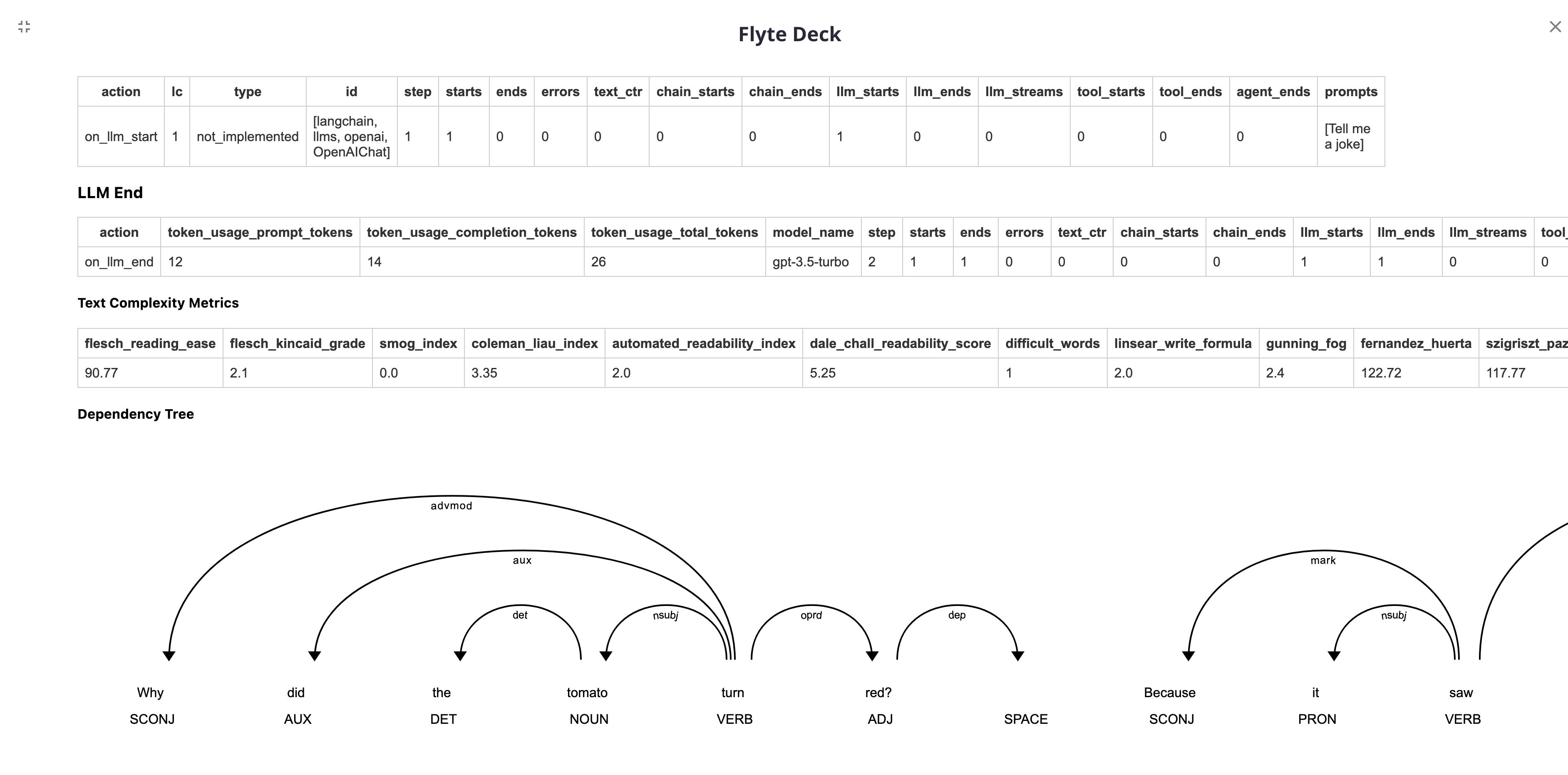
|
||||
@@ -1,44 +0,0 @@
|
||||
# Grobid
|
||||
|
||||
This page covers how to use the Grobid to parse articles for LangChain.
|
||||
It is separated into two parts: installation and running the server
|
||||
|
||||
## Installation and Setup
|
||||
#Ensure You have Java installed
|
||||
!apt-get install -y openjdk-11-jdk -q
|
||||
!update-alternatives --set java /usr/lib/jvm/java-11-openjdk-amd64/bin/java
|
||||
|
||||
#Clone and install the Grobid Repo
|
||||
import os
|
||||
!git clone https://github.com/kermitt2/grobid.git
|
||||
os.environ["JAVA_HOME"] = "/usr/lib/jvm/java-11-openjdk-amd64"
|
||||
os.chdir('grobid')
|
||||
!./gradlew clean install
|
||||
|
||||
#Run the server,
|
||||
get_ipython().system_raw('nohup ./gradlew run > grobid.log 2>&1 &')
|
||||
|
||||
You can now use the GrobidParser to produce documents
|
||||
```python
|
||||
from langchain.document_loaders.parsers import GrobidParser
|
||||
from langchain.document_loaders.generic import GenericLoader
|
||||
|
||||
#Produce chunks from article paragraphs
|
||||
loader = GenericLoader.from_filesystem(
|
||||
"/Users/31treehaus/Desktop/Papers/",
|
||||
glob="*",
|
||||
suffixes=[".pdf"],
|
||||
parser= GrobidParser(segment_sentences=False)
|
||||
)
|
||||
docs = loader.load()
|
||||
|
||||
#Produce chunks from article sentences
|
||||
loader = GenericLoader.from_filesystem(
|
||||
"/Users/31treehaus/Desktop/Papers/",
|
||||
glob="*",
|
||||
suffixes=[".pdf"],
|
||||
parser= GrobidParser(segment_sentences=True)
|
||||
)
|
||||
docs = loader.load()
|
||||
```
|
||||
Chunk metadata will include bboxes although these are a bit funky to parse, see https://grobid.readthedocs.io/en/latest/Coordinates-in-PDF/
|
||||
@@ -16,59 +16,3 @@ There exists a Jina Embeddings wrapper, which you can access with
|
||||
from langchain.embeddings import JinaEmbeddings
|
||||
```
|
||||
For a more detailed walkthrough of this, see [this notebook](/docs/modules/data_connection/text_embedding/integrations/jina.html)
|
||||
|
||||
## Deployment
|
||||
|
||||
[Langchain-serve](https://github.com/jina-ai/langchain-serve), powered by Jina, helps take LangChain apps to production with easy to use REST/WebSocket APIs and Slack bots.
|
||||
|
||||
### Usage
|
||||
|
||||
Install the package from PyPI.
|
||||
|
||||
```bash
|
||||
pip install langchain-serve
|
||||
```
|
||||
|
||||
Wrap your LangChain app with the `@serving` decorator.
|
||||
|
||||
```python
|
||||
# app.py
|
||||
from lcserve import serving
|
||||
|
||||
@serving
|
||||
def ask(input: str) -> str:
|
||||
from langchain import LLMChain, OpenAI
|
||||
from langchain.agents import AgentExecutor, ZeroShotAgent
|
||||
|
||||
tools = [...] # list of tools
|
||||
prompt = ZeroShotAgent.create_prompt(
|
||||
tools, input_variables=["input", "agent_scratchpad"],
|
||||
)
|
||||
llm_chain = LLMChain(llm=OpenAI(temperature=0), prompt=prompt)
|
||||
agent = ZeroShotAgent(
|
||||
llm_chain=llm_chain, allowed_tools=[tool.name for tool in tools]
|
||||
)
|
||||
agent_executor = AgentExecutor.from_agent_and_tools(
|
||||
agent=agent,
|
||||
tools=tools,
|
||||
verbose=True,
|
||||
)
|
||||
return agent_executor.run(input)
|
||||
```
|
||||
|
||||
Deploy on Jina AI Cloud with `lc-serve deploy jcloud app`. Once deployed, we can send a POST request to the API endpoint to get a response.
|
||||
|
||||
```bash
|
||||
curl -X 'POST' 'https://<your-app>.wolf.jina.ai/ask' \
|
||||
-d '{
|
||||
"input": "Your Quesion here?",
|
||||
"envs": {
|
||||
"OPENAI_API_KEY": "sk-***"
|
||||
}
|
||||
}'
|
||||
```
|
||||
|
||||
You can also self-host the app on your infrastructure with Docker-compose or Kubernetes. See [here](https://github.com/jina-ai/langchain-serve#-self-host-llm-apps-with-docker-compose-or-kubernetes) for more details.
|
||||
|
||||
|
||||
Langchain-serve also allows to deploy the apps with WebSocket APIs and Slack Bots both on [Jina AI Cloud](https://cloud.jina.ai/) or self-hosted infrastructure.
|
||||
|
||||
@@ -10,7 +10,7 @@ For Feedback, Issues, Contributions - please raise an issue here:
|
||||
Main principles and benefits:
|
||||
|
||||
- more `pythonic` way of writing code
|
||||
- write multiline prompts that won't break your code flow with indentation
|
||||
- write multiline prompts that wont break your code flow with indentation
|
||||
- making use of IDE in-built support for **hinting**, **type checking** and **popup with docs** to quickly peek in the function to see the prompt, parameters it consumes etc.
|
||||
- leverage all the power of 🦜🔗 LangChain ecosystem
|
||||
- adding support for **optional parameters**
|
||||
@@ -31,7 +31,7 @@ def write_me_short_post(topic:str, platform:str="twitter", audience:str = "devel
|
||||
"""
|
||||
return
|
||||
|
||||
# run it naturally
|
||||
# run it naturaly
|
||||
write_me_short_post(topic="starwars")
|
||||
# or
|
||||
write_me_short_post(topic="starwars", platform="redit")
|
||||
@@ -122,7 +122,7 @@ await write_me_short_post(topic="old movies")
|
||||
|
||||
# Simplified streaming
|
||||
|
||||
If we want to leverage streaming:
|
||||
If we wan't to leverage streaming:
|
||||
- we need to define prompt as async function
|
||||
- turn on the streaming on the decorator, or we can define PromptType with streaming on
|
||||
- capture the stream using StreamingContext
|
||||
@@ -149,7 +149,7 @@ async def write_me_short_post(topic:str, platform:str="twitter", audience:str =
|
||||
|
||||
|
||||
|
||||
# just an arbitrary function to demonstrate the streaming... will be some websockets code in the real world
|
||||
# just an arbitrary function to demonstrate the streaming... wil be some websockets code in the real world
|
||||
tokens=[]
|
||||
def capture_stream_func(new_token:str):
|
||||
tokens.append(new_token)
|
||||
@@ -250,7 +250,7 @@ the roles here are model native roles (assistant, user, system for chatGPT)
|
||||
|
||||
# Optional sections
|
||||
- you can define a whole sections of your prompt that should be optional
|
||||
- if any input in the section is missing, the whole section won't be rendered
|
||||
- if any input in the section is missing, the whole section wont be rendered
|
||||
|
||||
the syntax for this is as follows:
|
||||
|
||||
@@ -273,7 +273,7 @@ def prompt_with_optional_partials():
|
||||
# Output parsers
|
||||
|
||||
- llm_prompt decorator natively tries to detect the best output parser based on the output type. (if not set, it returns the raw string)
|
||||
- list, dict and pydantic outputs are also supported natively (automatically)
|
||||
- list, dict and pydantic outputs are also supported natively (automaticaly)
|
||||
|
||||
``` python
|
||||
# this code example is complete and should run as it is
|
||||
|
||||
@@ -28,4 +28,4 @@ To import this vectorstore:
|
||||
from langchain.vectorstores import Marqo
|
||||
```
|
||||
|
||||
For a more detailed walkthrough of the Marqo wrapper and some of its unique features, see [this notebook](/docs/modules/data_connection/vectorstores/integrations/marqo.html)
|
||||
For a more detailed walkthrough of the Marqo wrapper and some of its unique features, see [this notebook](../modules/indexes/vectorstores/examples/marqo.ipynb)
|
||||
|
||||
@@ -1,116 +0,0 @@
|
||||
# MLflow AI Gateway
|
||||
|
||||
The MLflow AI Gateway service is a powerful tool designed to streamline the usage and management of various large language model (LLM) providers, such as OpenAI and Anthropic, within an organization. It offers a high-level interface that simplifies the interaction with these services by providing a unified endpoint to handle specific LLM related requests. See [the MLflow AI Gateway documentation](https://mlflow.org/docs/latest/gateway/index.html) for more details.
|
||||
|
||||
## Installation and Setup
|
||||
|
||||
Install `mlflow` with MLflow AI Gateway dependencies:
|
||||
|
||||
```sh
|
||||
pip install 'mlflow[gateway]'
|
||||
```
|
||||
|
||||
Set the OpenAI API key as an environment variable:
|
||||
|
||||
```sh
|
||||
export OPENAI_API_KEY=...
|
||||
```
|
||||
|
||||
Create a configuration file:
|
||||
|
||||
```yaml
|
||||
routes:
|
||||
- name: completions
|
||||
type: llm/v1/completions
|
||||
model:
|
||||
provider: openai
|
||||
name: text-davinci-003
|
||||
config:
|
||||
openai_api_key: $OPENAI_API_KEY
|
||||
|
||||
- name: embeddings
|
||||
type: llm/v1/embeddings
|
||||
model:
|
||||
provider: openai
|
||||
name: text-embedding-ada-002
|
||||
config:
|
||||
openai_api_key: $OPENAI_API_KEY
|
||||
```
|
||||
|
||||
Start the Gateway server:
|
||||
|
||||
```sh
|
||||
mlflow gateway start --config-path /path/to/config.yaml
|
||||
```
|
||||
|
||||
## Completions Example
|
||||
|
||||
```python
|
||||
import mlflow
|
||||
from langchain import LLMChain, PromptTemplate
|
||||
from langchain.llms import MlflowAIGateway
|
||||
|
||||
gateway = MlflowAIGateway(
|
||||
gateway_uri="http://127.0.0.1:5000",
|
||||
route="completions",
|
||||
params={
|
||||
"temperature": 0.0,
|
||||
"top_p": 0.1,
|
||||
},
|
||||
)
|
||||
|
||||
llm_chain = LLMChain(
|
||||
llm=gateway,
|
||||
prompt=PromptTemplate(
|
||||
input_variables=["adjective"],
|
||||
template="Tell me a {adjective} joke",
|
||||
),
|
||||
)
|
||||
result = llm_chain.run(adjective="funny")
|
||||
print(result)
|
||||
|
||||
with mlflow.start_run():
|
||||
model_info = mlflow.langchain.log_model(chain, "model")
|
||||
|
||||
model = mlflow.pyfunc.load_model(model_info.model_uri)
|
||||
print(model.predict([{"adjective": "funny"}]))
|
||||
```
|
||||
|
||||
## Embeddings Example
|
||||
|
||||
```python
|
||||
from langchain.embeddings import MlflowAIGatewayEmbeddings
|
||||
|
||||
embeddings = MlflowAIGatewayEmbeddings(
|
||||
gateway_uri="http://127.0.0.1:5000",
|
||||
route="embeddings",
|
||||
)
|
||||
|
||||
print(embeddings.embed_query("hello"))
|
||||
print(embeddings.embed_documents(["hello"]))
|
||||
```
|
||||
|
||||
## Databricks MLflow AI Gateway
|
||||
|
||||
Databricks MLflow AI Gateway is in private preview.
|
||||
Please contact a Databricks representative to enroll in the preview.
|
||||
|
||||
```python
|
||||
from langchain import LLMChain, PromptTemplate
|
||||
from langchain.llms import MlflowAIGateway
|
||||
|
||||
gateway = MlflowAIGateway(
|
||||
gateway_uri="databricks",
|
||||
route="completions",
|
||||
)
|
||||
|
||||
llm_chain = LLMChain(
|
||||
llm=gateway,
|
||||
prompt=PromptTemplate(
|
||||
input_variables=["adjective"],
|
||||
template="Tell me a {adjective} joke",
|
||||
),
|
||||
)
|
||||
result = llm_chain.run(adjective="funny")
|
||||
print(result)
|
||||
```
|
||||
@@ -18,7 +18,7 @@ We also deliver with live demo on huggingface! Please checkout our [huggingface
|
||||
## Installation and Setup
|
||||
- Install the Python SDK with `pip install clickhouse-connect`
|
||||
|
||||
### Setting up environments
|
||||
### Setting up envrionments
|
||||
|
||||
There are two ways to set up parameters for myscale index.
|
||||
|
||||
|
||||
@@ -8,36 +8,6 @@ It is broken into two parts: installation and setup, and then references to spec
|
||||
|
||||
## Wrappers
|
||||
|
||||
All wrappers needing a redis url connection string to connect to the database support either a stand alone Redis server
|
||||
or a High-Availability setup with Replication and Redis Sentinels.
|
||||
|
||||
### Redis Standalone connection url
|
||||
For standalone Redis server the official redis connection url formats can be used as describe in the python redis modules
|
||||
"from_url()" method [Redis.from_url](https://redis-py.readthedocs.io/en/stable/connections.html#redis.Redis.from_url)
|
||||
|
||||
Example: `redis_url = "redis://:secret-pass@localhost:6379/0"`
|
||||
|
||||
### Redis Sentinel connection url
|
||||
|
||||
For [Redis sentinel setups](https://redis.io/docs/management/sentinel/) the connection scheme is "redis+sentinel".
|
||||
This is an un-offical extensions to the official IANA registered protocol schemes as long as there is no connection url
|
||||
for Sentinels available.
|
||||
|
||||
Example: `redis_url = "redis+sentinel://:secret-pass@sentinel-host:26379/mymaster/0"`
|
||||
|
||||
The format is `redis+sentinel://[[username]:[password]]@[host-or-ip]:[port]/[service-name]/[db-number]`
|
||||
with the default values of "service-name = mymaster" and "db-number = 0" if not set explicit.
|
||||
The service-name is the redis server monitoring group name as configured within the Sentinel.
|
||||
|
||||
The current url format limits the connection string to one sentinel host only (no list can be given) and
|
||||
booth Redis server and sentinel must have the same password set (if used).
|
||||
|
||||
### Redis Cluster connection url
|
||||
|
||||
Redis cluster is not supported right now for all methods requiring a "redis_url" parameter.
|
||||
The only way to use a Redis Cluster is with LangChain classes accepting a preconfigured Redis client like `RedisCache`
|
||||
(example below).
|
||||
|
||||
### Cache
|
||||
|
||||
The Cache wrapper allows for [Redis](https://redis.io) to be used as a remote, low-latency, in-memory cache for LLM prompts and responses.
|
||||
|
||||
@@ -17,10 +17,3 @@ See a [usage example](/docs/modules/data_connection/vectorstores/integrations/ro
|
||||
```python
|
||||
from langchain.vectorstores import RocksetDB
|
||||
```
|
||||
|
||||
## Document Loader
|
||||
|
||||
See a [usage example](docs/modules/data_connection/document_loaders/integrations/rockset).
|
||||
```python
|
||||
from langchain.document_loaders import RocksetLoader
|
||||
```
|
||||
@@ -1,56 +0,0 @@
|
||||
# TruLens
|
||||
|
||||
This page covers how to use [TruLens](https://trulens.org) to evaluate and track LLM apps built on langchain.
|
||||
|
||||
## What is TruLens?
|
||||
|
||||
TruLens is an [opensource](https://github.com/truera/trulens) package that provides instrumentation and evaluation tools for large language model (LLM) based applications.
|
||||
|
||||
## Quick start
|
||||
|
||||
Once you've created your LLM chain, you can use TruLens for evaluation and tracking. TruLens has a number of [out-of-the-box Feedback Functions](https://www.trulens.org/trulens_eval/feedback_functions/), and is also an extensible framework for LLM evaluation.
|
||||
|
||||
```python
|
||||
# create a feedback function
|
||||
|
||||
from trulens_eval.feedback import Feedback, Huggingface, OpenAI
|
||||
# Initialize HuggingFace-based feedback function collection class:
|
||||
hugs = Huggingface()
|
||||
openai = OpenAI()
|
||||
|
||||
# Define a language match feedback function using HuggingFace.
|
||||
lang_match = Feedback(hugs.language_match).on_input_output()
|
||||
# By default this will check language match on the main app input and main app
|
||||
# output.
|
||||
|
||||
# Question/answer relevance between overall question and answer.
|
||||
qa_relevance = Feedback(openai.relevance).on_input_output()
|
||||
# By default this will evaluate feedback on main app input and main app output.
|
||||
|
||||
# Toxicity of input
|
||||
toxicity = Feedback(openai.toxicity).on_input()
|
||||
|
||||
```
|
||||
|
||||
After you've set up Feedback Function(s) for evaluating your LLM, you can wrap your application with TruChain to get detailed tracing, logging and evaluation of your LLM app.
|
||||
|
||||
```python
|
||||
# wrap your chain with TruChain
|
||||
truchain = TruChain(
|
||||
chain,
|
||||
app_id='Chain1_ChatApplication',
|
||||
feedbacks=[lang_match, qa_relevance, toxicity]
|
||||
)
|
||||
# Note: any `feedbacks` specified here will be evaluated and logged whenever the chain is used.
|
||||
truchain("que hora es?")
|
||||
```
|
||||
|
||||
Now you can explore your LLM-based application!
|
||||
|
||||
Doing so will help you understand how your LLM application is performing at a glance. As you iterate new versions of your LLM application, you can compare their performance across all of the different quality metrics you've set up. You'll also be able to view evaluations at a record level, and explore the chain metadata for each record.
|
||||
|
||||
```python
|
||||
tru.run_dashboard() # open a Streamlit app to explore
|
||||
```
|
||||
|
||||
For more information on TruLens, visit [trulens.org](https://www.trulens.org/)
|
||||